1. Вовед
This user manual provides comprehensive instructions for the installation, operation, and maintenance of your Weiser SmartCode Keypad Electronic Deadbolt. This advanced keyless entry system offers enhanced security and convenience for your home.
The SmartCode deadbolt features a sleek design, a backlit keypad for visibility, and the ability to store up to 50 user codes. It operates on 4 AA batteries and includes SmartKey re-key technology for added security and flexibility.
2. Информации за безбедност
Please read and understand all instructions before installing and using this product. Keep this manual for future reference.
- Do not attempt to disassemble or modify the lock. This may cause damage to the product and void the warranty.
- Use only the specified battery type (4 AA alkaline batteries). Do not mix old and new batteries or different types of batteries.
- Ensure proper polarity when inserting batteries.
- Keep all keys and user codes in a secure location.
- Avoid exposing the lock to extreme temperatures or direct moisture.
- Regularly check the lock's functionality and battery level.
3. Содржина на пакетот
Проверете дали сите компоненти се присутни пред да започнете со инсталацијата:

Image: Complete package contents of the Weiser SmartCode Keypad Electronic Deadbolt.
- Electronic Deadbolt (Exterior Keypad Assembly)
- Electronic Deadbolt (Interior Battery Unit)
- Бравата
- Ударна плоча
- Плоча за монтирање
- Инсталациски хардвер (шрафови)
- 2 Клучеви
- Алатка SmartKey
- Прирачник за инсталација (овој документ)
Note: 4 AA batteries are required and not included in the package.
4. Поставување и инсталација
The Weiser SmartCode deadbolt is designed for easy installation. For a seamless setup experience, it is highly recommended to use the free BILT app, which provides step-by-step interactive 3D instructions with voice and video guidance.
4.1 Компатибилност на врати
This lock is designed to fit standard doors 1-3/8" to 1-3/4" (35 mm - 44 mm) thick with an adjustable backset (2-3/8" or 2-3/4"). It is ideal for most exterior and interior residential doors.
4.2 Чекори за инсталација (надview)
- Подгответе ја вратата: Ensure your door is properly drilled and aligned for a deadbolt installation.
- Инсталирајте го бравата: Insert the latch into the door edge, ensuring the correct backset is selected.
- Инсталирајте го надворешниот склоп: Place the exterior keypad assembly onto the door, feeding the cable through the cross bore.
- Инсталирајте ја монтажната плоча: Secure the mounting plate to the door using the provided screws, ensuring the cable passes through the plate.
- Connect the Cable and Install Interior Assembly: Connect the cable from the exterior assembly to the interior battery unit. Mount the interior unit to the mounting plate.
- Инсталирајте батерии: Insert 4 AA alkaline batteries into the interior unit, observing polarity.
- Извршете го процесот на отворање на вратата: This crucial step teaches the lock the orientation of your door. Follow the specific instructions in the full manual or BILT app.
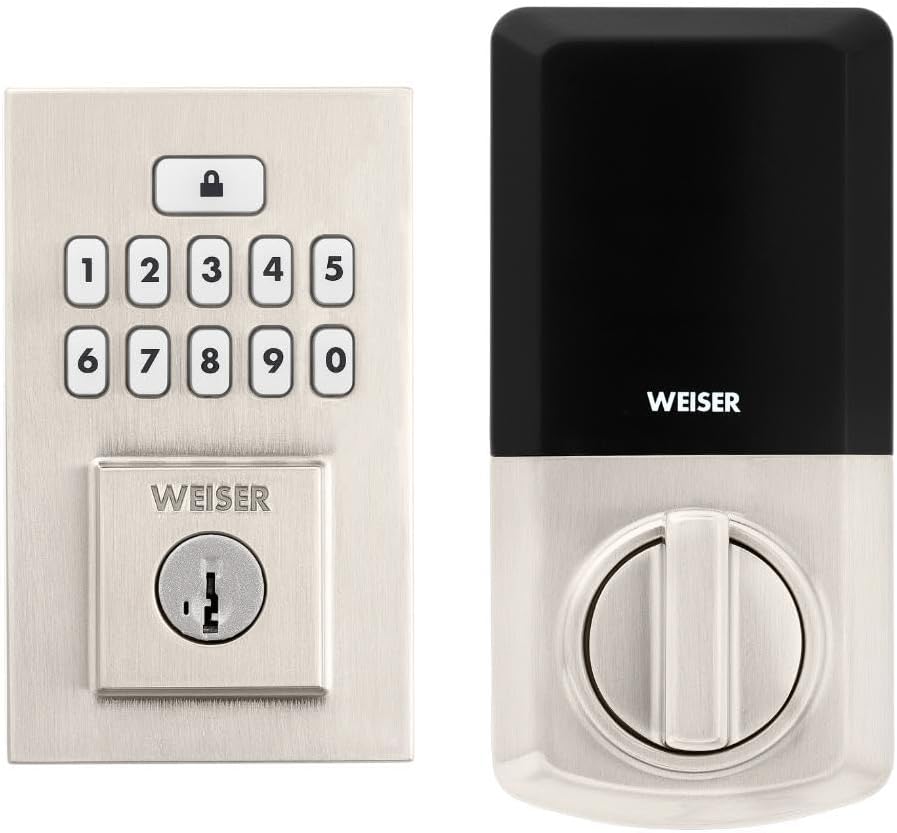
Image: Assembled Weiser SmartCode Keypad Electronic Deadbolt, showing both exterior and interior components.

Image: Close-up of the exterior keypad, featuring the backlit numeric buttons and keyhole.
5. Упатства за работа
5.1 Заклучување на вратата
- Заклучување со еден допир: Press the Lock button (top button with padlock icon) on the keypad. The deadbolt will extend.
- Функција за автоматско заклучување: If enabled, the deadbolt will automatically extend after a set period (e.g., 30 seconds) once unlocked.
5.2 Отклучување на вратата
- Користење на кориснички код: Enter your personalized 4-8 digit user code on the keypad. The deadbolt will retract.
- Користење на клучот: Вметнете го физичкиот клуч во клучалката и свртете го за да го отклучите.
5.3 Програмирање на кориснички кодови
The lock supports up to 50 user codes and 1 master code. Refer to the detailed programming instructions in the full manual for adding, deleting, or modifying codes.
- Главен код: The master code is used to add and delete user codes. It does not unlock the door.
- Кориснички кодови: These codes are used to unlock the door.


Image: Icons illustrating user management, programming, and auto-lock features.
5.4 SmartKey Re-key Technology
The SmartKey re-key technology allows you to re-key your lock in seconds, maintaining key control and protecting against lost, stolen, or unauthorized keys without removing the lock from your door. Use the provided SmartKey tool and follow the instructions carefully.

Image: SmartKey Security feature, demonstrating how to re-key the lock.
6. Одржување
6.1 Замена на батеријата
The lock operates on 4 AA alkaline batteries. When the batteries are low, the lock will provide an audible and/or visual low battery warning. Replace all four batteries simultaneously to ensure optimal performance.
- Отстранете го капакот на батеријата на внатрешната единица.
- Отстранете ги старите батерии и фрлете ги правилно.
- Вметнете нови AA алкални батерии, внимавајќи на правилниот поларитет (+/-).
- Заменете го капакот на батеријата.
Note: Battery life can vary based on usage frequency and environmental conditions. If the auto-lock feature is frequently used, battery life may be shorter.
6.2 Чистење
Исчистете ја бравата со мека, дamp крпа. Избегнувајте употреба на абразивни средства за чистење, растворувачи или хемиски спрејови, бидејќи тие можат да ја оштетат завршната обработка и електронските компоненти.
7 Смена на проблеми
| Проблем | Можна причина | Решение |
|---|---|---|
| Lock does not respond or keypad is not lit. | Починати батерии. | Заменете ги сите четири AA батерии. |
| Lock beeps 3 times during programming or code entry. | Incorrect code, programming error, or lock not handed correctly. | Verify the code. Re-attempt programming steps carefully. Perform the door handing process again. If issues persist, reset the unit to factory settings (refer to full manual). |
| Deadbolt extends when door is open (Auto-lock issue). | The lock does not have a sensor to detect if the door is open or closed. Auto-lock activates after the set time regardless of door position. | This is normal operation. Ensure the door is closed before the auto-lock time expires, or disable the auto-lock feature if it causes inconvenience. |
| Keypad is difficult to see at night. | Backlight not active. | The keypad is backlit and stays lit for 30 seconds after inactivity. Ensure there is enough battery power. |
| Lock is not operating smoothly. | Misalignment of door or strike plate, or internal mechanism issue. | Check door and frame alignment. Ensure the strike plate is correctly installed. If the issue persists, contact customer support. |
8. Спецификации
| Карактеристика | Детал |
|---|---|
| Број на модел | 9 GED92600-003 |
| Димензии на производот | 6.99 x 2.86 x 13.97 cm (2.75 x 1.13 x 5.5 инчи) |
| Тежина на ставката | 454 g (1 lb) |
| Боја | Сатен никел |
| Стил | Современа |
| Заврши | Брусен |
| Материјал | Метал |
| Тип на заклучување | Deadbolt, Electronic |
| Тастатура | 10-Button, Backlit |
| Кориснички кодови | Up to 50 user codes, 1 master code |
| Извор на енергија | 4 AA батерии (не се вклучени) |
| Компатибилност на дебелината на вратата | 1-3/8" to 1-3/4" (35 mm - 44 mm) |
| Заден дел | Прилагодлив 2-3/8" или 2-3/4" |
| Посебни карактеристики | Weather Resistant, Anti-Bump, Auto-Lock, One-Touch Lock, Back-Lit Keypad, SmartKey Security |
| ANSI степен | Одделение 2 |
| Земја на потекло | Кина |
9. Гаранција и поддршка
9.1 Информации за гаранцијата
The Weiser SmartCode Keypad Electronic Deadbolt comes with a 1 година гаранција од датумот на купување. Оваа гаранција ги покрива дефектите во материјалот и изработката при нормална употреба. Ве молиме зачувајте го доказот за купување за гаранциски барања.
For full warranty details and limitations, please refer to the official Weiser webсајт или контактирајте со поддршката за корисници.
9.2 Поддршка за корисници
For technical assistance, troubleshooting, or warranty inquiries, please contact Weiser customer support:
- Поддршка преку Интернет: Visit the official Weiser website for FAQs, video tutorials, and contact forms.
- Телефонска поддршка: Refer to the contact information provided on the Weiser packaging or website for phone support hours.
- Апликација BILT: Utilize the BILT app for interactive 3D installation and programming guidance.
When contacting support, please have your product model number (9GED92600-003) and purchase date available.


