1. Вовед
This manual provides essential information for the proper assembly, operation, and maintenance of your Whadda WMMI211 Air Quality Monitor. Please read these instructions carefully before using the device to ensure safe and efficient performance. The WMMI211 is designed to measure various environmental parameters including equivalent CO2 (eCO2), total volatile organic compounds (TVOC), barometric pressure, temperature, and humidity.
2. Информации за безбедност
- Држете го уредот подалеку од вода и средини со висока влажност.
- Не го изложувајте уредот на екстремни температури или директна сончева светлина подолг временски период.
- Избегнувајте паѓање или изложување на уредот на силни удари.
- Не обидувајте се да го отворите или модифицирате уредот. За сите сервиси обратете се на квалификуван персонал.
- Use only the specified power adapter or USB cable for power supply.
3. Содржина на пакетот
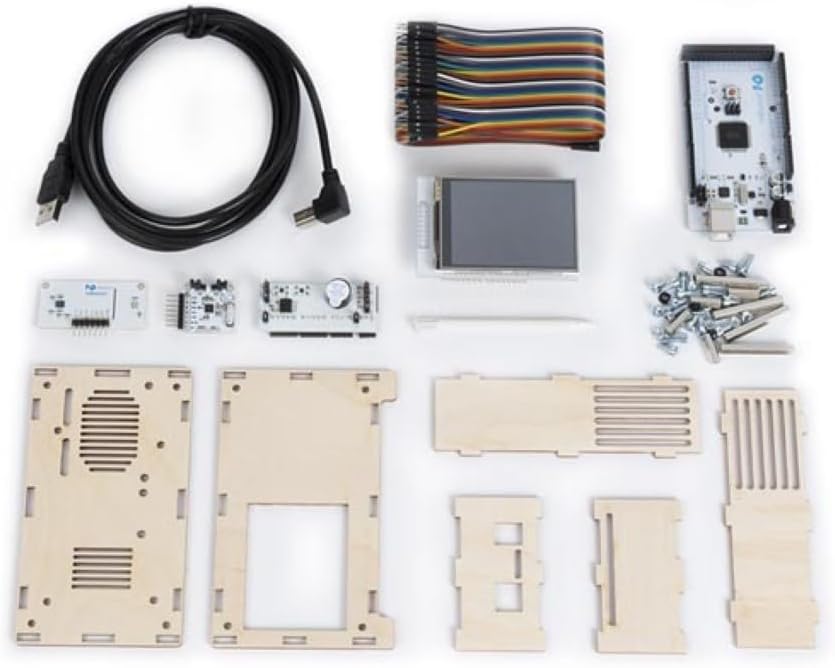
Проверете дали сите компоненти наведени подолу се присутни во вашето пакување:
- Main circuit board with display
- Environmental sensor module
- Wooden enclosure panels
- USB кабел за напојување
- Connecting wires/ribbon cable
- Screws and nuts for assembly
- Small screwdriver (if included)

Слика 3.1: All components of the Whadda WMMI211 Air Quality Monitor kit, including circuit boards, display, wooden panels, cables, and fasteners.
4. Поставување и склопување
The Whadda WMMI211 is provided as a kit requiring assembly. Follow these steps carefully:
- Подгответе компоненти: Unpack all components and identify each part as per the package contents list.
- Составете го куќиштето: Carefully interlock the wooden panels to form the main enclosure. Ensure the display opening is correctly oriented.
- Mount Main Board: Secure the main circuit board into the designated slots or standoffs within the enclosure using the provided screws and nuts.
- Поврзување на дисплеј: Connect the display module to the main circuit board using the ribbon cable. Ensure the connection is firm and correctly oriented.
- Install Sensor Module: Connect the environmental sensor module to the main board using the appropriate connecting wires. Position the sensor module in its designated area, often with ventilation slots.
- Безбедни панели: Once all internal components are connected, secure the remaining wooden panels, ensuring all screws are tightened gently to avoid damaging the wood.
- Поврзување за напојување: Connect the USB power cable to the device's USB port and then to a suitable USB power source (e.g., a computer USB port or a 5V USB power adapter).
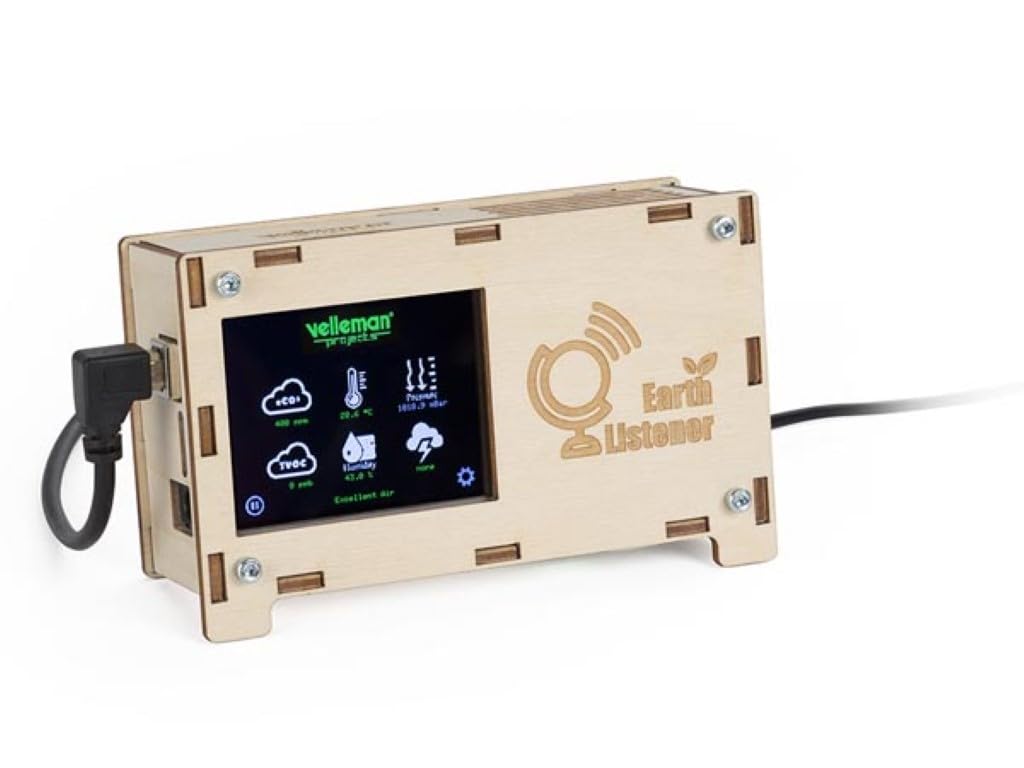
Слика 4.1: Предна страна view of the fully assembled Whadda WMMI211 Air Quality Monitor, showing the display and USB power connection.

Слика 4.2: Страна view of the assembled Whadda WMMI211, highlighting the wooden enclosure and fasteners.
Слика 4.3: Дното view of the assembled Whadda WMMI211, showing ventilation slots for sensor operation.
5. Упатства за работа
Once assembled and powered, the Whadda WMMI211 will automatically begin to display environmental readings.
- Вклучување: Connect the USB cable to a power source. The device will power on automatically and the display will illuminate.
- Првично загревање: Allow the device approximately 5-10 minutes for the sensors to stabilize and provide accurate readings.
- Читање на екранот: The display shows various parameters with corresponding icons:
- eCO2: Equivalent Carbon Dioxide levels (in ppm).
- TVOC: Total Volatile Organic Compounds (in ppb).
- Температура: Ambient temperature (in °C or °F).
- Влажност: Relative humidity (in %).
- Притисок: Barometric pressure (in hPa or mbar).
- Navigation/Settings: If buttons are present (as indicated by a gear icon on the display), they typically allow you to cycle through display modes, adjust brightness, or access calibration options. Refer to the on-screen prompts for specific functions.
- Исклучено: Disconnect the USB power cable to turn off the device.
6. Одржување
- Чистење: Gently wipe the device's exterior with a soft, dry cloth. Do not use liquid cleaners or abrasive materials. Ensure no dust or debris obstructs the sensor ventilation slots.
- Складирање: Кога не е во употреба, чувајте го уредот на ладно и суво место, подалеку од директна сончева светлина и екстремни температури.
- Калибрација на сензорот: The sensors are typically factory-calibrated. If you suspect inaccurate readings, consult the manufacturer's support for potential recalibration procedures.
7 Смена на проблеми
| Проблем | Можна причина | Решение |
|---|---|---|
| Уредот не се вклучува. | Нема напојување или има дефектна врска. | Check USB cable connection and power source. Try a different USB port or adapter. |
| Екранот е празен или прикажува грешки. | Loose display cable or software issue. | Ensure display ribbon cable is securely connected. Power cycle the device. |
| Readings appear inaccurate. | Sensor warm-up period not complete, or environmental interference. | Allow 5-10 minutes for sensor stabilization. Ensure device is not near strong air currents, heat sources, or chemical fumes. |
| Уредот не реагира. | Привремен софтверски дефект. | Disconnect power for 10 seconds, then reconnect to perform a hard reset. |
8. Спецификации
- Број на модел: WMMI211
- Производител: Вада
- Димензии на производот: 17.78 x 12.7 x 6.35 cm
- Тежина на ставката: 425.24 г (15 унци)
- Посебни карактеристики: Measures eCO2, TVOC, Barometric Pressure, Temperature, Humidity
- Напојување: USB 5V (via USB cable)
9. Гаранција и поддршка
For warranty information, technical support, or service inquiries, please refer to the official Whadda webлокација или контактирајте го вашиот продавач. Чувајте ја сметката како доказ за купување.


