Производот завршиview
Thank you for choosing Pulsar Bluetooth In-Ear Earphones. This manual provides essential information for setting up, operating, and maintaining your earphones to ensure optimal performance and longevity.
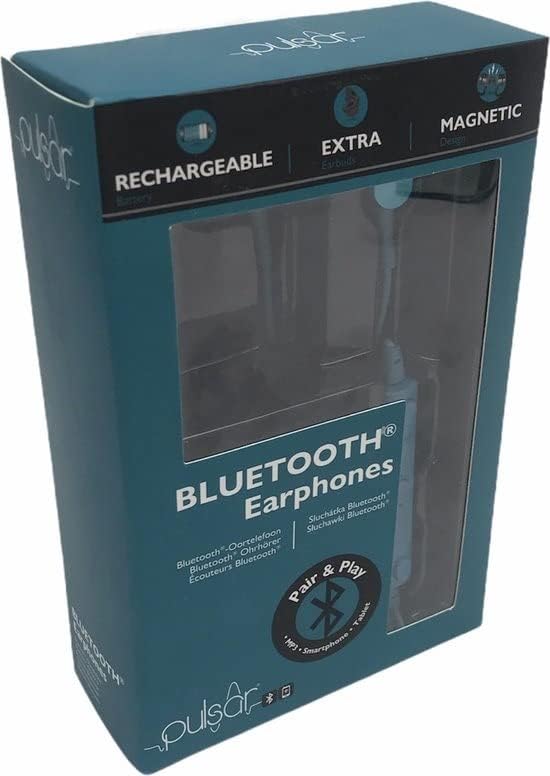
Image showing the retail packaging of the Pulsar Bluetooth Earphones, highlighting features like 'Rechargeable', 'Extra Earbuds', and 'Magnetic Design'.
Карактеристики на производот
- Bluetooth верзија: 5.0
- Безжичен опсег: 10 метри
- Големина на возачот: 10 мм
- Импеданса: 32 Ом
- Чувствителност: 105 dB
- Фреквентен одзив: 20 Hz - 20 kHz
- Integrated rechargeable USB charging cable (Included)
- Extra earbuds for comfortable fit
Поставување
Полнење на батеријата
The earphone is equipped with a 3.7 V 55 mAh Li-po battery. It is recommended to fully charge the battery before first use. This process takes approximately 2 hours.
- Connect the micro USB end of the USB charging cable to the 5V, 0.5A DC charging port on the earphone.
- Connect the other end of the USB charging cable to a compatible USB port (e.g., computer, wall adapter).
- During charging, the LED indicator light will illuminate црвено.
- Once the battery is fully charged, the LED indicator light will turn сина боја.
- Gently disconnect both ends of the USB charging cable and store the cable safely for future use.

Одблиску view of the Pulsar Bluetooth Earphones in green, showcasing the in-ear design and the connecting cable.
Оперативни
Bluetooth Pairing with a Compatible Device
Follow these steps to pair your Pulsar earphones with a Bluetooth-enabled device:
- Once the earphone is powered on, the LED indicator light will quickly flash сина боја и портокалова. This indicates that the earphone is ready to be paired with a compatible Bluetooth device.
- На вашиот уред со Bluetooth (на пр., паметен телефон, таблет), пребарајте достапни Bluetooth уреди.
- Изберете "EE2927" from the list of found devices to connect and link.
Забелешка: After a successful connection, you can control the audio playback and volume either directly from the earphone's controls or through the relevant controls on your Bluetooth-compatible device.
Одржување
Правилното одржување гарантира долготрајност и перформанси на вашите слушалки.
- Чистење: Use a soft, dry cloth to wipe the earphones. Do not use abrasive cleaners or immerse them in water.
- Складирање: When not in use, store the earphones in a cool, dry place, away from direct sunlight and extreme temperatures.
- Грижа за кабел: Avoid sharp bends or excessive pulling on the charging cable to prevent damage.
- Отпорност на вода: Овие слушалки се не водоотпорен. Avoid exposure to liquids.
Решавање проблеми
If you encounter issues with your Pulsar earphones, refer to the following common problems and solutions:
- Earphones will not power on:
- Ensure the battery is fully charged. Connect the earphones to a power source and allow them to charge for at least 30 minutes before attempting to power on again.
- Не може да се спари со Bluetooth уред:
- Ensure the earphones are in pairing mode (LED flashing blue and orange).
- Make sure Bluetooth is enabled on your device and it is within 10 meters of the earphones.
- Turn off and on the Bluetooth function on your device, then try searching again.
- If previously paired, try forgetting the device "EE2927" from your device's Bluetooth settings and re-pairing.
- Нема звук или е со ниска јачина на звук:
- Проверете ги нивоата на јачина на звук и на слушалките и на поврзаниот уред.
- Ensure the earphones are properly paired and connected to your device.
- Try playing audio from a different application or media file.
Спецификации
| Карактеристика | Спецификација |
|---|---|
| Име на моделот | 0154fc29-d32e-4acf-afab-88630c7efcec |
| Bluetooth верзија | 5.0 |
| Опсег | 10 метри |
| Големина на возачот | 10 мм |
| Импеданса | 32 оми |
| Чувствителност | 105 dB |
| Фреквентен одговор | 20 Hz - 20 kHz |
| Тип на батерија | Li-po 3.7 V 55 mAh |
| Време на полнење | Прибл. 2 часа |
| Материјал | Пластика |
| Отпорност на вода | Не водоотпорен |
| Компатибилни уреди | Phone, Cell phone |
Гаранција и поддршка
Pulsar products are designed for reliability and performance. For information regarding warranty coverage, technical support, or service inquiries, please refer to the contact information provided with your purchase or visit the official Pulsar webсајт.
Ве молиме чувајте го вашиот доказ за купување за барањата за гаранција.


