1. Вовед
This manual provides instructions for the Waveshare 5G Dongle Module, an adapter designed to integrate 5G modules with M.2 (NGFF) Key B interface into various host devices via a USB 3.1 Type A port. It includes quad antennas and an aluminum alloy heatsink for optimal performance and heat dissipation. Please note that the 5G module itself is not included and must be purchased separately.

Слика 1: Готовоview of the Waveshare 5G Dongle Module components.
2. Карактеристики
- Supports 5G modules with M.2 (NGFF) Key B interface, compatible with SIMCom and Quectel 5G modules.
- Supports 5G modules with 3042/3052 form factor, such as SIM82XX and RM50XQ series 5G modules.
- USB 3.1 Type A port for connecting to PC, Raspberry Pi, or Jetson Nano host boards to enable high-speed 5G network access.
- Includes 4x SMA antenna connectors for easy antenna installation.
- Onboard SIM card slot for Nano SIM cards.
- Onboard power and network indicators, with multiple reserved pads, for checking module operating status and testing other functions.
- PCB ENIG process, with reserved multi-slots and positioning holes for integration.
- Comes with a customized aluminum alloy heatsink for effective heat dissipation, protection, and durability.
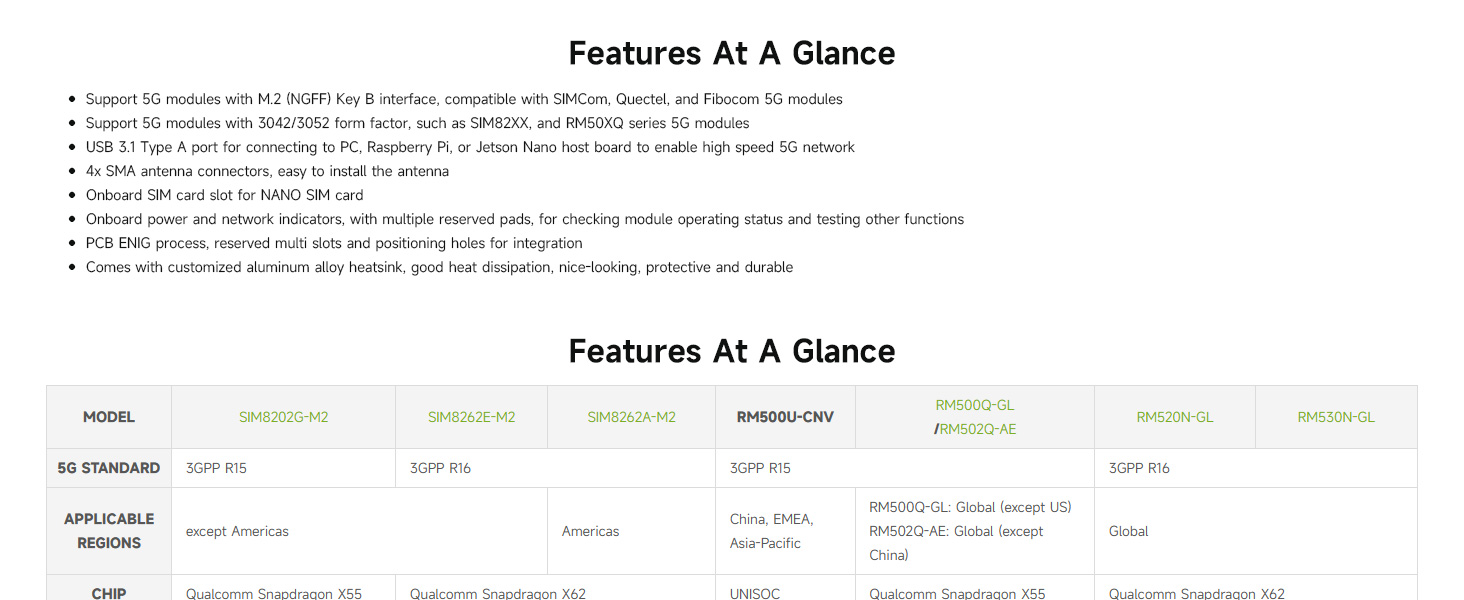
Figure 2: Key features and compatibility overview.
3. Поставување и инсталација
3.1 Package Contents Verification
Пред да продолжите со инсталацијата, проверете дали сите компоненти се присутни во вашиот пакет:
- Waveshare USB TO M.2 B KEY board
- Aluminum alloy heatsink
- Quad antennas
- USB 3.1 Type A cable (with auxiliary power option)
- SMA to IPEX adapter cables (for antenna connection)
- Screws and thermal pads
Note: A 5G module (e.g., SIMCom, Quectel) is NOT included and must be purchased separately.
3.2 Модул собрание
- Инсталирајте го 5G модулот: Carefully insert your compatible 5G module (3042/3052 form factor) into the M.2 Key B slot on the Waveshare board. Secure it with the provided screws.
- Apply Thermal Pad and Heatsink: Place the thermal pad onto the 5G module. Then, attach the aluminum alloy heatsink over the 5G module and secure it to the Waveshare board using the appropriate screws. Ensure good contact for effective heat dissipation.
- Поврзете антени: Connect the SMA to IPEX adapter cables to the 5G module's antenna ports and the SMA connectors on the Waveshare board. Then, screw the quad antennas onto the SMA connectors.
- Вметнете ја нано SIM картичката: Locate the Nano SIM card slot on the board and insert your activated Nano SIM card.
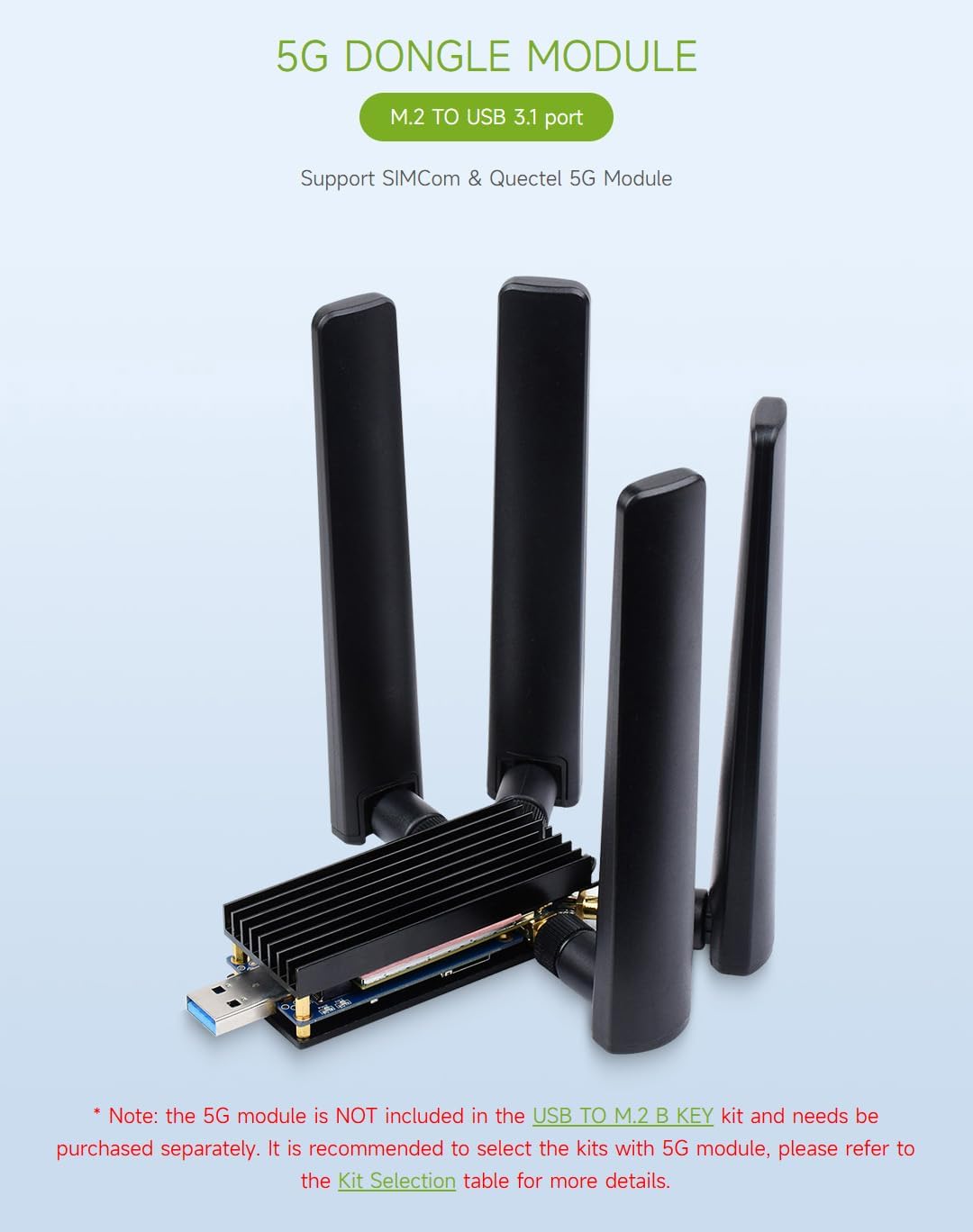
Figure 3: Fully assembled 5G Dongle Module with antennas and heatsink.
3.3 Поврзување со уред домаќин
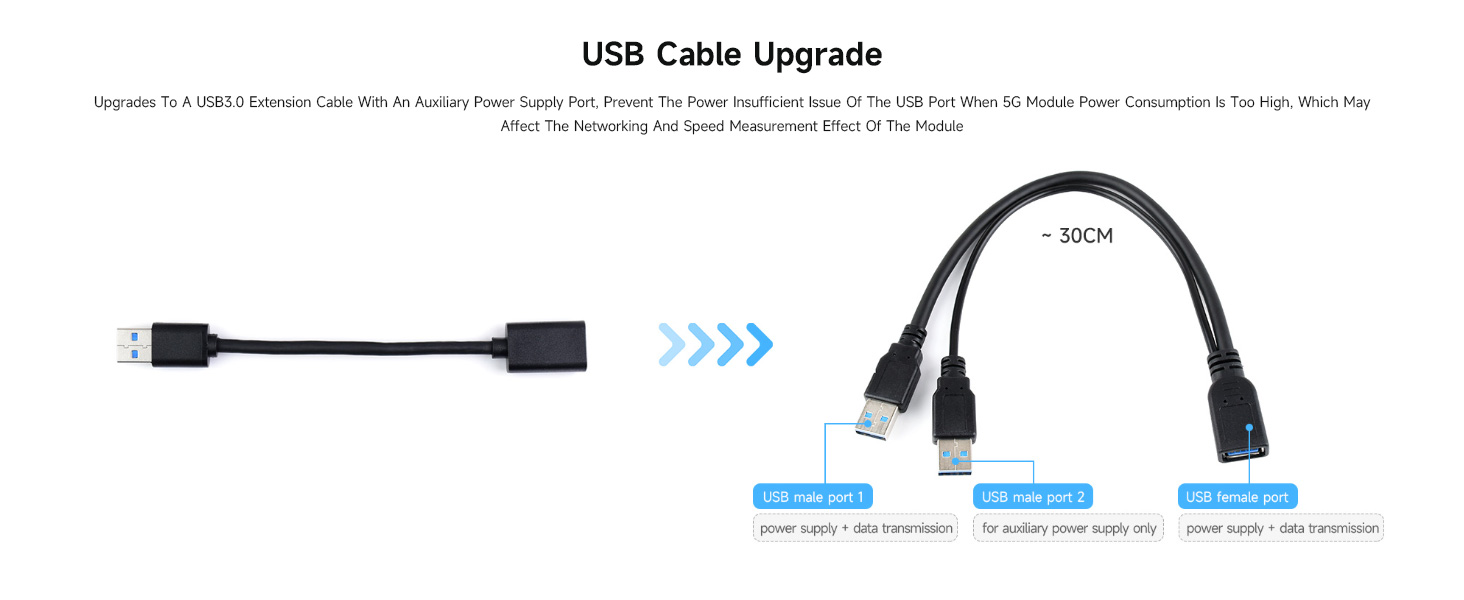
Connect the assembled 5G Dongle Module to your host device (PC, Raspberry Pi, Jetson Nano) using the provided USB 3.1 Type A cable. If your 5G module has high power consumption, use the auxiliary power supply cable by connecting both USB male ports to your host device or a suitable power source.
Слика 4: Поврзување прamples with various host devices.

Figure 5: USB cable with auxiliary power for high-power 5G modules.
4. Упатства за работа
4.1 Системска компатибилност
The Waveshare 5G Dongle Module supports Windows and Linux operating systems. After connecting the module, your system should detect the new hardware.
4.2 Инсталација на драјвери
Depending on your specific 5G module and operating system, you may need to install drivers. Refer to the documentation provided with your 5G module or visit the Waveshare official website for driver downloads and detailed setup guides for your specific module and OS combination.
4.3 мрежно поврзување
Once drivers are installed and the module is recognized, configure your network settings according to your operating system's instructions to establish a 5G network connection. The onboard power and network indicators will provide visual feedback on the module's operational status.

Figure 6: Multi-system support and heatsink function.
5. Одржување
The Waveshare 5G Dongle Module is designed for durability. To ensure its longevity and optimal performance:
- Одржувајте го уредот чист и без прашина. Користете мека, сува крпа за чистење.
- Избегнувајте изложување на модулот на екстремни температури, влажност или директна сончева светлина.
- Ensure the heatsink remains clear of obstructions to allow for proper airflow and heat dissipation.
- Handle the module and its components with care to prevent physical damage to connectors or the PCB.
6 Смена на проблеми
6.1 Module Not Recognized by Host Device
- Проверете ги врските: Ensure the USB cable is securely connected to both the dongle and the host device.
- Помошна моќност: If using a high-power 5G module, ensure the auxiliary power USB cable is also connected to provide sufficient power.
- Инсталација на драјвери: Verify that the correct drivers for your specific 5G module are installed on your operating system. Refer to the 5G module manufacturer's website or Waveshare's support resources.
- Седење во модулот: Ensure the 5G module is correctly seated in the M.2 Key B slot and secured.
6.2 Проблеми со прегревање
- Инсталација на ладилник: Confirm the aluminum alloy heatsink is properly installed with the thermal pad making good contact with the 5G module.
- Проток на воздух: Ensure the heatsink is not obstructed and has adequate airflow.
- Напојување: Insufficient power can sometimes lead to instability and heat. Use the auxiliary power cable if needed.
6.3 Нема мрежен сигнал
- Антенски врски: Verify that all four antennas are securely connected to the SMA connectors and that the IPEX cables are properly attached to the 5G module.
- SIM-картичка: Проверете дали Nano SIM картичката е правилно вметната и активирана со важечки план за податоци.
- 5G Module Compatibility: Confirm that your 5G module is compatible with the network bands available in your region.
- Конфигурација на софтвер: Check your operating system's network settings and the 5G module's software for correct APN settings and network selection.
6.4 Делови што недостасуваат или се оштетени
If you find any parts missing or damaged upon arrival, please contact your vendor or Waveshare support immediately for assistance.
7. Спецификации
| Карактеристика | Детал |
|---|---|
| Број на модел | USB TO M.2 B KEY |
| Хардверски интерфејс | USB 3.1 тип А |
| Компатибилни модули | 5G modules with M.2 (NGFF) Key B interface (3042/3052 form factor), e.g., SIMCom, Quectel SIM82XX, RM50XQ series |
| Антенски конектори | 4x SMA |
| Слот за SIM картичка | Нано СИМ |
| Протокол за врска со податоци | USB |
| Стапка на пренос на податоци | 5 гигабити во секунда |
| Компатибилни уреди | PC, Raspberry Pi, Jetson Nano |
| Материјал на ладилникот | Алуминиумска легура |
| Димензии на пакетот | 7.17 x 5.31 x 1.81 инчи |
| Тежина на ставката | 8.4 унци (0.24 килограми) |
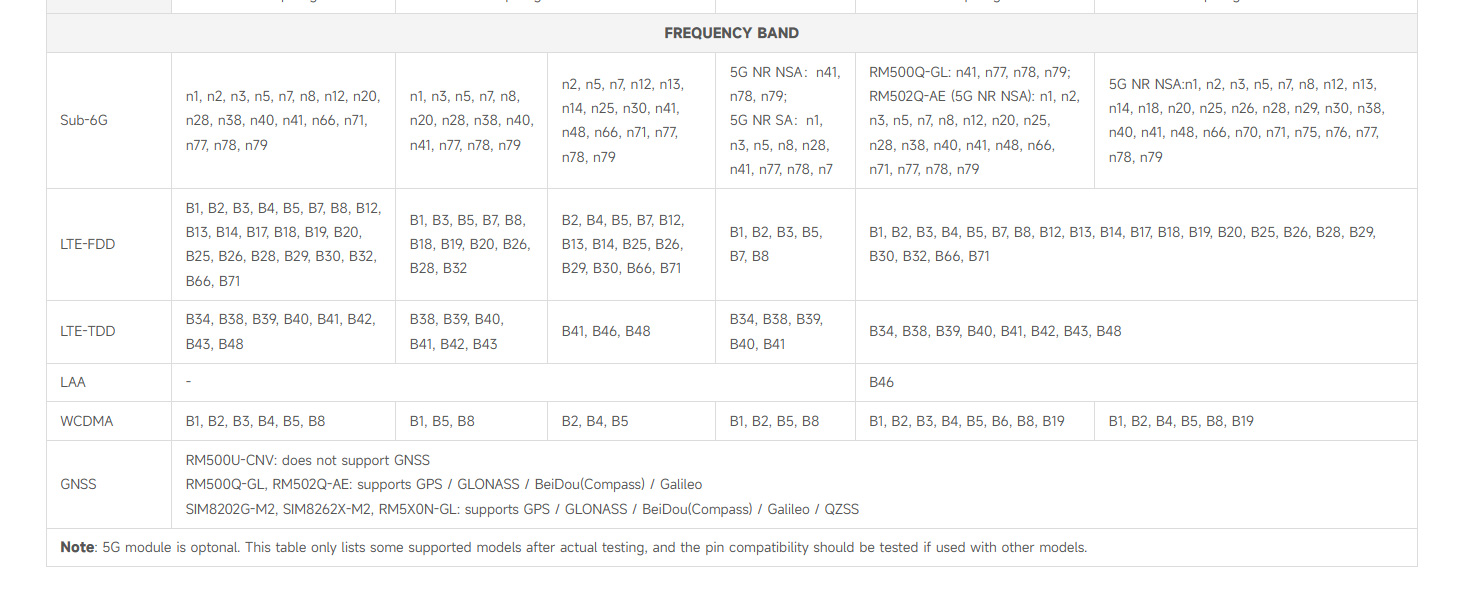
Figure 7: Detailed table of compatible 5G modules and their specifications.

Figure 8: Multiple size compatibility for M.2 modules.
8. Гаранција и поддршка
Specific warranty information for the Waveshare 5G Dongle Module is not provided in this document. For warranty details, technical support, or further assistance, please refer to the official Waveshare webлокација или директно контактирајте ја нивната служба за корисници. Зачувајте ја сметката за купување за гаранциски барања.


