1. Вовед
This manual provides essential information for the safe and correct operation of your Vonyx VMM100 4-Channel DJ Mixer. Please read this manual thoroughly before using the device to ensure optimal performance and to prevent damage. Keep this manual for future reference.
2. Инструкции за безбедност
- Обезбедете ја јачината на напојувањетоtage matches the requirements specified for the device.
- Do not expose the device to rain or moisture to avoid electric shock.
- Избегнувајте да го ставате уредот во близина на извори на топлина или на директна сончева светлина.
- Не го отворајте casing; внатре нема делови што може да ги сервисира корисникот. За секое сервисирање обратете се кај квалификуван персонал.
- Disconnect the power adapter during thunderstorms or when not in use for extended periods.
- Чувајте го уредот подалеку од деца.
3. Карактеристики на производот
- Compact 4-channel analog mixer.
- Bluetooth конекција за безжично аудио стриминг.
- Integrated USB MP3 player with digital display.
- Adjustable delay effect with dedicated volume control.
- Effect send/return on channels 1 and 2.
- High and low tone controls for each channel.
- USB power supply (5V) for mobile use, compatible with power banks.
- Channels 1 and 2 feature +48V phantom power for condenser microphones.
- LED VU meter and peak indicators for signal monitoring.
- Includes USB power adapter and USB cable.
4. Содржина на пакетот
Ве молиме проверете дали сите предмети се присутни при распакувањето:
- Vonyx VMM100 4-Channel DJ Mixer
- USB адаптер за напојување
- USB кабел
- Упатство за употреба (овој документ)
5. Контроли и функции
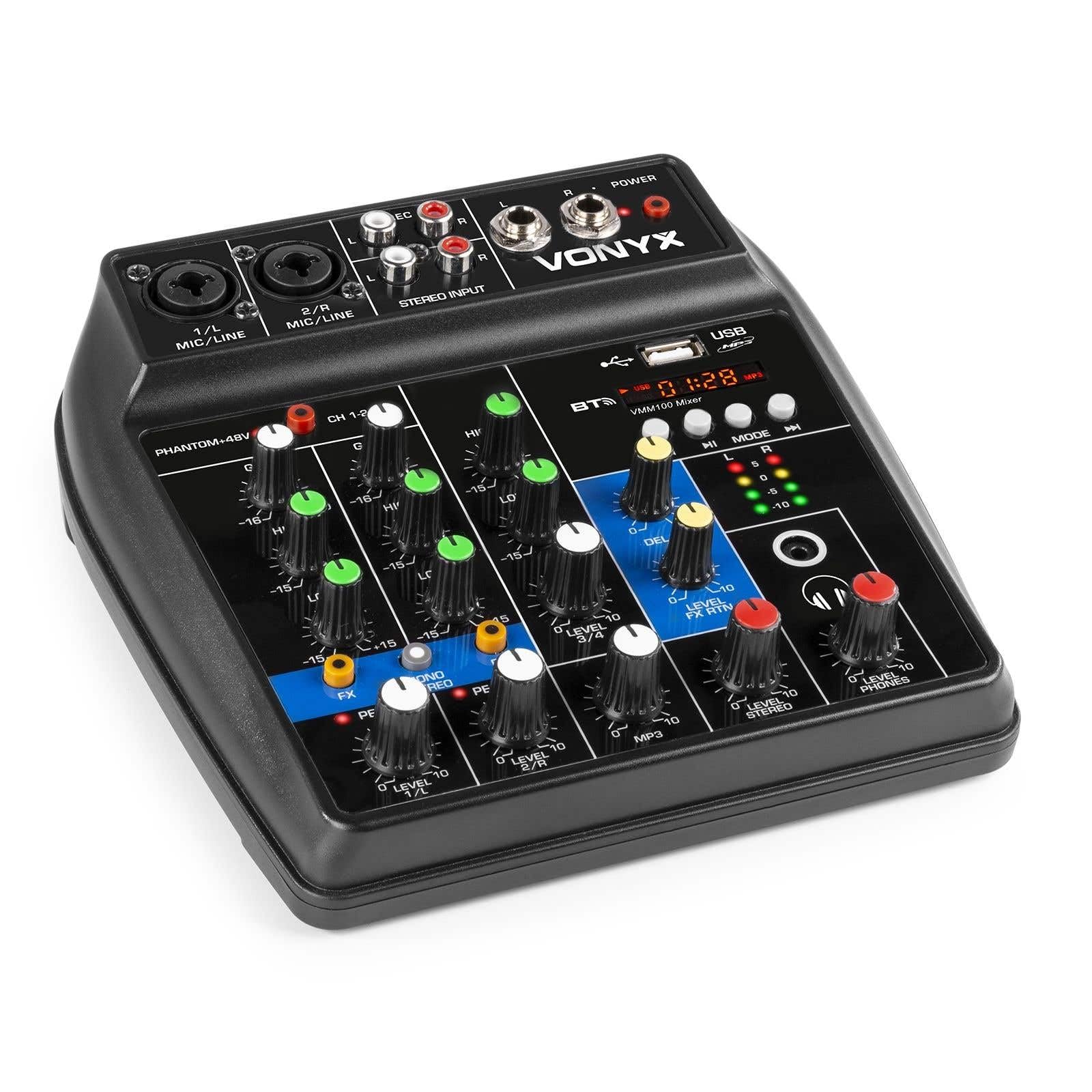
Слика 1: Севкупно view of the Vonyx VMM100 mixer, highlighting the layout of all controls, inputs, and outputs.

Слика 2: Close-up of the mixer's control panel, showing individual channel controls, EQ, gain, and effect knobs.
5.1 Input Channels (1 & 2)
- Combi XLR / 6.3mm Jack: Connect microphones (XLR) or line-level instruments (6.3mm jack).
- Phantom +48V Switch: Activates phantom power for condenser microphones on channels 1 and 2.
- Копче за добивка: Adjusts the input sensitivity for the connected device.
- ВИСОКО копче: Adjusts the high-frequency (treble) level for the channel.
- НИСКО копче: Adjusts the low-frequency (bass) level for the channel.
- FX копче: Controls the amount of delay effect applied to the channel.
- PEAK LED: Illuminates when the input signal is too high, indicating potential clipping. Adjust GAIN to prevent this.
- Копче за НИВО: Го прилагодува вкупното излезно ниво на каналот.
5.2 Stereo Input (Channel 3)
- RCA Inputs (L/R): Connect external stereo audio sources such as CD players or other line-level devices.
- Копче за НИВО: Adjusts the output level of the stereo input.
5.3 MP3/Bluetooth Channel (Channel 4)

Слика 3: USB port with a USB drive, demonstrating media playback capability.

Слика 4: Bluetooth and USB player section, showing the display and control buttons.
- USB порта: Вметнете USB флеш-меморија за репродукција на MP3.
- Прикажи: Shows track information, playback time, and mode.
- Control Buttons (Play/Pause, Skip, Mode): Navigate tracks and switch between USB and Bluetooth modes.
- Bluetooth (BT) Indicator: Свети кога Bluetooth е активен и поврзан.
- Копче за НИВО: Adjusts the output level of the MP3/Bluetooth channel.
5.4 Главен дел
- Копче за одложување: Adjusts the overall intensity of the delay effect.
- LEVEL FX RTN Knob: Controls the return level of the delay effect.
- LEVEL STEREO Knob: Master volume control for the main stereo output.
- LEVEL PHONES Knob: Ја прилагодува јачината на звукот за излезот за слушалки.
- VU Meter (LED): Displays the main output level.
- Main Output (6.3mm Jack L/R): Се поврзува со ampлајфикатори или звучници со напојување.
- Record Output (RCA L/R): Connects to recording devices.
- Излез за слушалки (6.3 мм приклучок): Connects stereo headphones.
- LED напојување: Indicates when the mixer is powered on.
5.5 Влез за напојување

Слика 5: Страна view of the mixer, illustrating the 5V DC USB power input port.
- 5V DC USB Input: Connect the provided USB power adapter or a compatible USB power source (e.g., power bank) to power the mixer.
6. Поставување
6.1 Поврзување за напојување
- Connect the supplied USB cable to the 5V DC USB input on the mixer.
- Поврзете го другиот крај од USB кабелот со испорачаниот USB адаптер за напојување.
- Plug the USB power adapter into a suitable wall outlet. The POWER LED on the mixer will illuminate.
6.2 Поврзување на аудио извори
- Microphones/Line Instruments: Connect microphones via XLR or line-level instruments via 6.3mm jack to channels 1 and 2. If using condenser microphones, activate the +48V phantom power switch.
- Stereo Line Devices: Connect devices like CD players to the RCA inputs of channel 3.
- USB-диск: Вметнете USB флеш драјв што содржи MP3 files into the USB port on channel 4.
6.3 Поврзување на излези
- Главен излез: Connect the 6.3mm jack main outputs (L/R) to your ampосигурувач, звучници со напојување или PA систем.
- Слушалки: Connect your headphones to the 6.3mm headphone jack.
- Уред за снимање: Connect the RCA record outputs (L/R) to an external recording device if desired.
7. Упатства за работа
7.1 Основно мешање
- Ensure all LEVEL and GAIN knobs are set to their minimum positions before powering on.
- Power on the mixer and any connected audio equipment.
- Gradually increase the GAIN knob for each active input channel until the PEAK LED flashes only occasionally during the loudest parts of the signal.
- Adjust the HIGH and LOW EQ knobs for each channel to shape the tone as desired.
- Use the individual LEVEL knobs to balance the volume of each channel.
- Adjust the main STEREO LEVEL knob to control the overall output volume. Monitor the VU meter to avoid clipping.
- Adjust the PHONES LEVEL knob for comfortable headphone monitoring.
7.2 Работа со Bluetooth
- Press the MODE button on the MP3/Bluetooth channel until the display shows "BT" or the Bluetooth indicator flashes.
- On your smartphone, tablet, or PC, search for Bluetooth devices and select "Vonyx VMM100".
- Once paired, the Bluetooth indicator will glow steadily. You can now stream audio wirelessly to the mixer.
- Use the playback controls on the mixer or your device to manage audio.
7.3 USB репродукција на MP3
- Вметнете USB флеш драјв што содржи MP3 files во USB-портата.
- Press the MODE button on the MP3/Bluetooth channel until the display shows track information.
- Use the playback controls (Play/Pause, Skip) to navigate and play tracks.
7.4 Користење на ефекти
- Turn the FX knob on channels 1 and 2 to send a portion of that channel's signal to the internal delay effect.
- Adjust the main DELAY knob to control the overall intensity and characteristics of the delay.
- Use the LEVEL FX RTN knob to control how much of the processed effect signal is mixed back into the main output.
8. Снимање
The VMM100 mixer allows for easy recording of your mix. Connect the RCA record outputs (L/R) to the input of a suitable recording device (e.g., computer audio interface, dedicated recorder). Ensure your recording software or device is configured to receive audio from the connected inputs. The signal sent to the record output is a stereo mix of all active channels, post-fader.
9. Одржување
- Чистење: Use a soft, dry cloth to clean the exterior of the mixer. Do not use abrasive cleaners or solvents.
- Складирање: Чувајте го миксерот на ладно и суво место, подалеку од директна сончева светлина и екстремни температури.
- Ракување: Избегнувајте испуштање или изложување на миксерот на силни удари.
10 Смена на проблеми
| Проблем | Можна причина | Решение |
|---|---|---|
| Нема моќ | Адаптерот за напојување не е поврзан или е неисправен. | Check power connections. Try a different USB port or adapter. |
| Нема излез на звук | Incorrect cable connections; volume knobs too low; incorrect input selection. | Verify all audio cables are securely connected. Increase channel LEVEL and STEREO LEVEL knobs. Ensure correct input mode (e.g., USB/BT). |
| Искривен звук | Input GAIN too high; output level too high. | Reduce GAIN for the affected channel until the PEAK LED stops flashing excessively. Lower STEREO LEVEL. |
| Bluetooth не се спарува | Mixer not in Bluetooth mode; device too far; previously paired device connected. | Ensure mixer is in BT mode. Move device closer. Disconnect from other Bluetooth devices. |
| Репродукцијата преку USB не работи | USB-уредот не е правилно форматиран; не е поддржан file type; mixer not in USB mode. | Ensure USB drive is FAT32 formatted and contains MP3 files. Press MODE to select USB. |
11. Спецификации
- Влезови:
- Channels 1 & 2: Combi XLR / 6.3mm Jack (Line or Microphone)
- Channel 3: RCA (Stereo)
- Channel 4: Bluetooth or USB MP3 Player
- Излези:
- Main: 6.3mm Jack (Stereo)
- Record: RCA (Stereo)
- Headphone: 6.3mm Jack
- Опсег на фреквенција: 20 Hz - 20,000 Hz
- Еквилајзер: 2-band (High, Low) per channel
- Фантом моќ: +48V (Channels 1 & 2)
- Врска Voltage: 5V DC (преку USB)
- Димензии (Д x Ш x В): 18 x 19.5 x 5.8 cm (7.09 x 7.68 x 2.28 инчи)
- Тежина: 0.5 кг (1.1 фунти)
- Материјал: Најлон
12. Гаранција и поддршка
Vonyx products are designed and manufactured to the highest quality standards. In the unlikely event of a problem with your product, please contact your retailer for warranty service. Please retain your proof of purchase. For technical support or further inquiries, refer to the official Vonyx webсајт или контактирајте со нивниот оддел за услуги на клиентите.


