1. Вовед
The Maxcom MM724 is a simple mobile phone designed for ease of use, featuring straightforward software and practical functions. It is particularly suitable for users who prefer a device without complicated menus. Key features include an emergency SOS button, a built-in flashlight, and Bluetooth connectivity for hearing aid compatibility.
2. Содржина на пакетот
Ве молиме означете го полето за следните ставки:
- 1 Maxcom MM724 Mobile Phone
- 1 Desktop Charger
- 1 Matching Cords (for charger)
- 1 Упатство за употреба (овој документ)
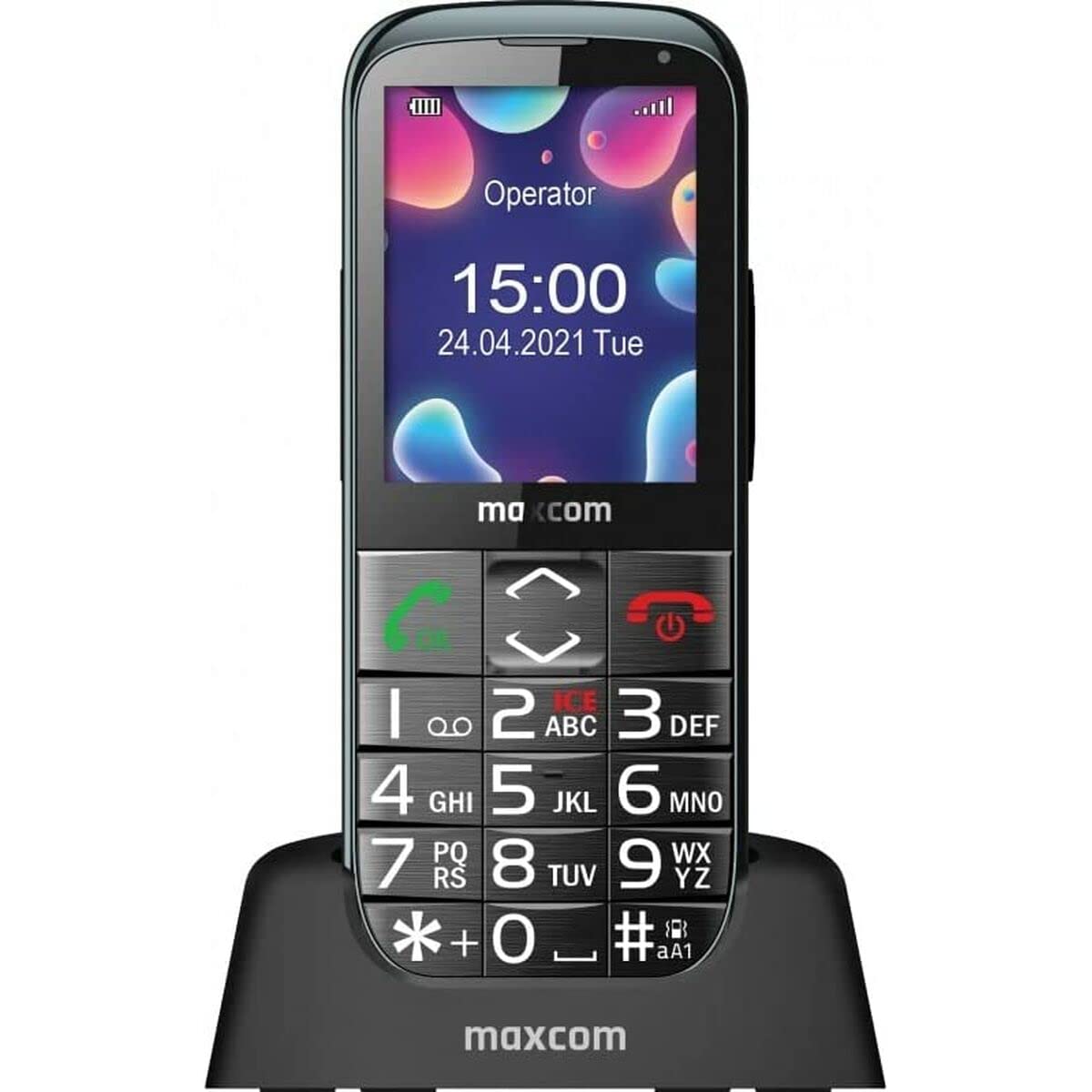
Image: The Maxcom MM724 simple mobile phone, typically black, with a clear display and large buttons.
3. Поставување
3.1. Вметнување на SIM картичката и батеријата
- Внимателно отстранете го задниот капак на телефонот.
- Вметнете ја/ги вашата/ите SIM-картичка/и во назначениот/ите слот/и со златните контакти свртени надолу.
- Вметнете ја батеријата, осигурувајќи се дека контактите се правилно порамнети.
- Вратете го задниот капак додека не кликне безбедно на своето место.
3.2. Полнење на уредот
The Maxcom MM724 uses a convenient desktop charger. To charge your phone:
- Connect the charger cord to a power outlet.
- Place the phone upright into the desktop charging cradle.
- Ensure the charging indicator on the phone or cradle illuminates, indicating that charging has begun.
- For optimal battery life, keep the phone in the cradle when not in use to ensure it is always charged.
4. Упатства за работа
4.1. Вклучување/исклучување
- За вклучување: Притиснете го и задржете го копчето за вклучување/завршување на повик (обично црвено) додека не светне екранот.
- За исклучување: Press and hold the Power/End Call button until the power-off options appear, then confirm.
4.2. Остварување и примање повици
- За да остварите повик: Dial the number using the keypad and press the Call button (usually green).
- За да добиете повик: Press the Call button when the phone rings. The phone is designed to ring very loudly to ensure calls are not missed.
- За да завршите повик: Притиснете го копчето за вклучување/завршување на повик.
4.3. Испраќање и примање пораки
Navigate to the 'Messages' menu to compose new SMS messages or read incoming ones. Use the keypad to type your message.
4.4. Користење на копчето SOS
The SOS button is located on the back of the phone and is designed for emergencies.
- Поставување: Access the phone's settings to pre-define a list of emergency contacts.
- Активирање: In an emergency, press and hold the SOS button. The phone will automatically call the pre-defined contacts in sequence until one answers.
4.5. Activating the Flashlight
The phone features a dedicated button for the flashlight, making it easy to activate when needed. Refer to your phone's specific button layout for its location.
4.6. Bluetooth and Hearing Aid Compatibility
The Maxcom MM724 supports Bluetooth connectivity, allowing it to pair with compatible devices, including certain hearing aids. This enables hands-free calling.
- Спарување: Go to the Bluetooth settings on your phone and enable Bluetooth. Put your hearing aid into pairing mode (consult your hearing aid's manual). Select your hearing aid from the list of available devices on the phone to pair.
- Забелешка: Compatibility with hearing aids depends on the hearing aid's features. Consult your audiologist for specific compatibility information. The phone also features a ring line and additional gain for improved audio performance with or without hearing aids.
5. Одржување
- Чистење: Користете мека, сува крпа за чистење на екранот и куќиштето на телефонот. Избегнувајте употреба на течни средства за чистење или абразивни материјали.
- Нега на батеријата: Keep the battery charged regularly. Avoid extreme temperatures, which can affect battery performance and lifespan.
- Складирање: Чувајте го телефонот на ладно и суво место кога не го користите подолг временски период.
6 Смена на проблеми
- Телефонот не се вклучува: Ensure the battery is correctly inserted and charged. Connect the phone to the charger and try again.
- Нема мрежен сигнал: Check if the SIM card is properly inserted. Move to an area with better network coverage. Contact your service provider if the issue persists.
- Не можам да остварувам/примам повици: Verify that you have sufficient credit or an active plan. Check network signal strength.
- Проблеми со спарување со Bluetooth: Ensure both devices are in pairing mode and within range. Try restarting both the phone and the Bluetooth device.
7. Спецификации
| Бренд | Maxcom |
| Име на моделот | ММ724 |
| Оперативен систем | Андроид |
| Големина на екранот | 3 инчи |
| Технологија за поврзување | Bluetooth |
| Мобилна технологија | 4G |
| Безжична мрежна технологија | GSM |
| Боја | Црното |
| Тежина на ставката | 85 грама |
| Безжичен носач | Отклучен |
8. Гаранција и поддршка
Warranty information for the Maxcom MM724 mobile phone is typically provided with your purchase documentation or can be found on the official Maxcom website. For technical support or service inquiries, please refer to the contact information provided by your retailer or the manufacturer.


