
Вовед
This manual provides comprehensive instructions for the Xtrfy M8 Wireless Gaming Mouse. Designed for professional gamers, the M8 offers an ultra-lightweight design, symmetrical shape, and lag-free 2.4 GHz wireless connectivity.
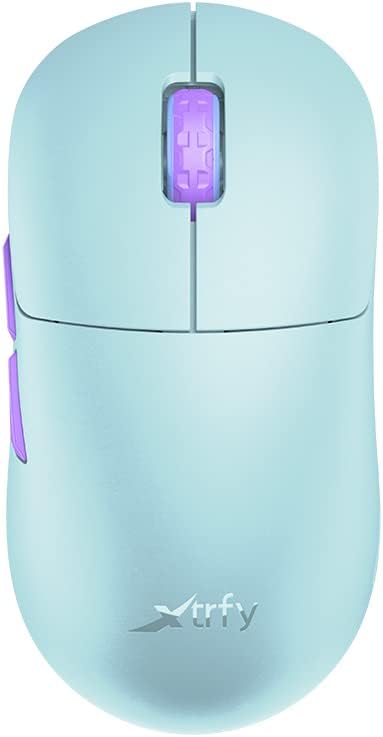
Image: The Xtrfy M8 Wireless Gaming Mouse in Frosty Mint, showcasing неговиот ергономски дизајн.
A key design feature is its ultra-low front, measuring just 4mm, which allows for a unique grip style.

Слика: Крупен план view of the Xtrfy M8 mouse's front, highlighting its low profile од 4мм.
Содржина на пакетот
Проверете дали сите артикли се присутни во вашиот пакет:
- Xtrfy M8 Wireless Gaming Mouse
- USB-C кабел за полнење
- USB безжичен приемник (Dongle)
- USB-A to USB-C Adapter (for receiver extension)
- Упатство за употреба (овој документ)

Image: The USB-C charging cable and the USB wireless receiver (dongle) for the Xtrfy M8 mouse.
Поставување
- Наполнете го глувчето: Before first use, connect the USB-C charging cable to the mouse and a powered USB port. The mouse has an internal Lithium Ion battery.
- Поврзете го USB безжичниот приемник:
- Insert the USB wireless receiver directly into an available USB-A port on your computer.
- For optimal signal strength or if your computer's USB port is not easily accessible, use the provided USB-A to USB-C adapter with the charging cable to extend the receiver closer to the mouse.
- Вклучете го глувчето: Locate the power switch on the underside of the mouse. Slide the switch to the "ON" position.
- Автоматско поврзување: The mouse should automatically connect to the receiver. No additional pairing software is typically required for 2.4 GHz wireless operation.

Image: The underside of the Xtrfy M8 mouse, displaying the power switch, optical sensor, and hardware adjustment buttons.
Упатства за работа
The Xtrfy M8 mouse features standard left and right click buttons, a scroll wheel, and two side buttons. All functions are plug-and-play compatible with most operating systems.
Hardware Adjustments
The Xtrfy M8 allows for on-the-fly adjustment of key performance settings directly from the mouse hardware, without the need for software. These settings are typically located on the underside of the mouse.
- DPI/CPI (Dots Per Inch / Counts Per Inch): Adjusts mouse sensitivity. Use the dedicated button on the mouse bottom to cycle through preset DPI levels. An indicator light may change color to show the current setting.
- Polling Rate (PR): Determines how often the mouse reports its position to the computer. Higher polling rates (e.g., 1000 Hz) provide smoother tracking but consume more battery.
- Lift-off Distance (LOD): Controls how high the mouse can be lifted before tracking stops. A lower LOD prevents unwanted cursor movement when repositioning the mouse.
Refer to the markings near the buttons on the mouse's underside for specific adjustment procedures.

Слика: Страна view of the Xtrfy M8 mouse, highlighting the main click buttons, scroll wheel, and two programmable side buttons.
Полнење и батерија
The Xtrfy M8 Wireless Gaming Mouse is equipped with a rechargeable Lithium Ion battery. To charge the mouse, connect the supplied USB-C cable to the front port of the mouse and the other end to a powered USB port on your computer or a USB wall adapter.
- A small LED indicator on the mouse will typically show charging status (e.g., solid light for charging, off or different color for fully charged).
- The mouse can be used while charging, though the cable connection point may feel unusual during active use.
- Battery life varies based on usage and polling rate settings.
Одржување
Proper maintenance ensures the longevity and performance of your Xtrfy M8 mouse.
- Чистење: Користете мека, сува крпа за да ја избришете површината на глувчето. За тврдокорна нечистотија, малку дampИзмијте ја крпата со вода. Избегнувајте груби хемикалии или абразивни материјали.
- Сензор: Одржувајте го оптичкиот сензор на долната страна од глувчето чист и без прашина или остатоци. Користете памукче или компримиран воздух доколку е потребно.
- Складирање: When not in use for extended periods, store the mouse in a dry, cool place.
- Грижа за кабел: Avoid sharp bends or excessive pulling on the USB-C charging cable to prevent damage.
Решавање проблеми
If you encounter issues with your Xtrfy M8 mouse, refer to the following common solutions:
- Глувчето не реагира:
- Проверете дали глувчето е вклучено.
- Проверете дали USB безжичниот приемник е безбедно приклучен во функционален USB порт.
- Verify the mouse battery is charged. Connect the charging cable and observe the indicator light.
- Обидете се да го вклучите ресиверот во друг USB порт.
- Доцнење или прекини:
- Ensure the receiver is close to the mouse and not obstructed by metal objects.
- Avoid placing the receiver near other wireless devices that may cause interference (e.g., Wi-Fi routers, other wireless peripherals).
- Lower the polling rate setting on the mouse if experiencing frequent disconnections in a crowded wireless environment.
- Неточно следење:
- Исчистете го оптичкиот сензор на долната страна од глувчето.
- Уверете се дека го користите глувчето на соодветна површина (се препорачува подлога за глушец).
- Adjust the DPI/CPI settings to a comfortable level.
- Scroll Wheel Issues (e.g., jumping):
- Ensure the mouse firmware is up to date (check the Xtrfy official website for any available updates).
- If the issue persists, contact Xtrfy customer support.
Спецификации
| Број на модел | M8 |
| Бренд | Xtrfy |
| Технологија за поврзување | Radio Frequency (2.4 GHz), USB (for charging/wired mode) |
| Технологија за откривање на движење | Оптички |
| Посебни карактеристики | Лесен, безжичен |
| Тежина на ставката | 1.94 унци (приближно 55 грама) |
| Батерии | 1 литиум-јонска батерија (вклучена) |
| Димензии на пакетот | 7.32 x 4.06 x 2.44 инчи |
| ASIN | B0BMLF5FMT |
| Датум прв на располагање | 16 ноември 2022 година |
Гаранција и поддршка
The Xtrfy M8 Wireless Gaming Mouse typically comes with a 1-year manufacturer's warranty. For specific warranty details, claims, or technical support, please contact Xtrfy directly through their official webсајт.
Xtrfy Official Webсајт: www.xtrfy.com
Always refer to the manufacturer's official resources for the most current support information and firmware updates.


