1. Вовед
This user manual provides comprehensive instructions for the Montech Sky Two ATX Gaming Mid Tower Computer Case. It covers setup, operation, maintenance, and troubleshooting to ensure optimal performance and longevity of your product. The Montech Sky Two is designed for high airflow and features dual tempered glass panels, pre-installed PWM ARGB fans, and extensive compatibility for modern PC components.
2. Клучни карактеристики
- Seamless Visibility: Integrated front and side panels provide clear views of your interior. A fine mesh, extending to the PSU chamber, is complemented by pre-installed ARGB fans, enhancing the overall aesthetic.
- Revolutionary Airflow: SKY TWO boasts a new design with reversed fan blades for side-panel air intake, rear exhaust, and direct GPU cooling in the PSU chamber.
- Future-Ready Build: SKY TWO supports GPUs up to 400mm, CPU coolers up to 168mm, and 210mm high-wattage PSUs, providing ample space and removing all constraints for your next-gen setup.
- Effortless Cable Management: SKY TWO's innovative design includes a cable channel and three Velcro strips, ensuring easy and tidy cable organization for a clean-looking PC.
- Блескаво светлосно шоу: AX120 and RX120 fans boast 21 lighting effects. Switch between them effortlessly with the LED button or sync with your motherboard for a customized lighting experience.
3. Водич за поставување
Before beginning assembly, ensure you have all necessary components and tools. Carefully unpack the case and inspect for any damage. Refer to your motherboard and component manuals for specific installation steps. The Montech Sky Two case is designed for straightforward installation with features like removable panels and ampпростор за управување со кабли.
3.1 Инсталација на компоненти
- Матична плоча: Install standoffs as required for your motherboard form factor (EATX/ATX/Micro ATX/Mini ITX). Secure the motherboard using screws.
- Кулер на процесорот: Install your CPU cooler, ensuring it does not exceed the maximum height of 168mm.
- Графичка картичка (GPU): Install your GPU. The case supports GPUs up to 400mm in length. Vertical GPU mounting is also supported.
- Напојување (PSU): Install the PSU in the dedicated chamber. The case supports PSUs up to 210mm in length.
- Дискови за складирање: Install SSDs (up to 3) and HDDs (up to 2) in the designated drive bays.
- Fans/Radiators: The case comes with 4 pre-installed ARGB PWM fans. Additional fan and radiator support includes: Top (120/240/280/360mm), Side (120/240mm - compatibility with GPU becomes 180mm with water cooling installed), PSU shroud (120mm*2), Rear (120mm*1).
3.2 Управување со кабли
Utilize the integrated cable channel and three Velcro straps located behind the motherboard tray to route and secure cables. This ensures optimal airflow and a clean internal appearance.
4. Упатства за работа
Once all components are installed and connected, close the side panels. Connect your peripherals (monitor, keyboard, mouse) and power cable. Press the power button on the front I/O panel to start your system. The pre-installed ARGB fans will illuminate upon power-on.
4.1 ARGB контрола на осветлување
The AX120 and RX120 fans feature 21 built-in lighting effects. Use the dedicated LED button on the front I/O panel to cycle through these effects. Alternatively, connect the ARGB lighting to your motherboard's ARGB header (5V 3-pin) to synchronize lighting with your motherboard's software for customized control.
4.2 Предни влезно/излезни порти
The front I/O panel includes USB 2.0 ports (2), USB 3.0 ports (2), and a USB Type-C port for convenient connectivity.
5. Одржување
Regular maintenance helps ensure optimal performance and extends the lifespan of your computer case and components.
- Филтри за прашина: The Montech Sky Two includes mesh dust filters. Periodically remove and clean these filters to prevent dust buildup and maintain optimal airflow.
- Чистење на ентериерот: With the system powered off and unplugged, use compressed air to remove dust from internal components and fans. Avoid touching components directly.
- Надворешно чистење: Wipe the exterior surfaces, including the tempered glass panels, with a soft, damp крпа. Избегнувајте абразивни средства за чистење.
6 Смена на проблеми
Овој дел се однесува на вообичаени проблеми со кои може да се соочите.
| Проблем | Можна причина | Решение |
|---|---|---|
| Системот не се вклучува. | Power cable disconnected, PSU switch off, front panel connectors incorrect. | Check all power connections, ensure PSU switch is ON. Verify front panel header connections to motherboard. |
| Fans are not spinning or ARGB lights are off. | Fan cables disconnected, ARGB controller issue, motherboard ARGB header not configured. | Check fan power and ARGB connections. Ensure ARGB controller is powered. Verify motherboard ARGB software settings. |
| Слаб проток на воздух или високи температури. | Dust buildup on filters/fans, incorrect fan orientation, obstructed vents. | Clean dust filters and fans. Ensure fans are oriented correctly for intake/exhaust. Remove any obstructions. |
7. Спецификации на производот
| Карактеристика | Детал |
|---|---|
| Бренд | Montech |
| Серии | SKY TWO (WHITE) |
| Број на модел | SKY TWO (WHITE) |
| Тип на случај | Mid Tower |
| Боја | Бело |
| Материјал | Калено стакло |
| Тежина на ставката | 17.44 фунти |
| Димензии на производот (ДxШxВ) | 16.93 x 8.46 x 19.29 инчи |
| Компатибилност со матична плоча | ATX, Micro ATX, Mini ITX |
| Компатибилност со графичкиот процесор | До 400 мм |
| Висина на ладилникот на процесорот | До 168 мм |
| Должина на PSU | До 210 мм |
| Диск Бејс | 3 x SSD, 2 x HDD |
| Претходно инсталирани вентилатори | 4 x PWM ARGB вентилатори |
| Предни влезни порти | 2 x USB 2.0, 2 x USB 3.0, 1 x USB Type-C |
| Метод на ладење | Воздух |
| Светла боја | RGB |
8. Медиуми за производи
8.1 Слики од производи

Предна страна view of the Montech Sky Two White PC Case, showcasing the dual tempered glass and pre-installed ARGB fans.

Interior front view of the Montech Sky Two White PC Case, highlighting the fan placement and spacious design.

Страна view of the Montech Sky Two White PC Case, showing the solid side panel with ventilation.
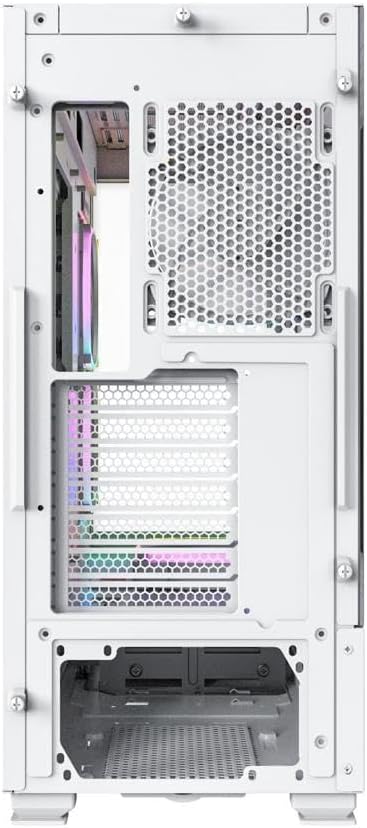
Заден дел view of the Montech Sky Two White PC Case, detailing the I/O and expansion slots.

Внатрешна view of the Montech Sky Two White PC Case, demonstrating effective cable management features.

Diagram illustrating the unique side intake airflow design of the Montech Sky Two White PC Case.
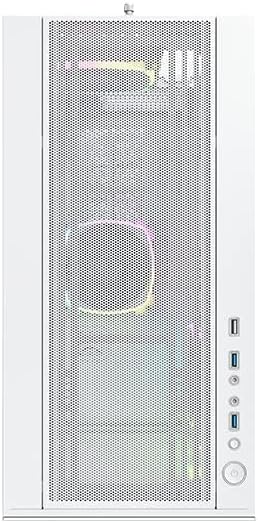
Close-up of the Montech Sky Two White PC Case front panel, showing the mesh design and I/O ports.
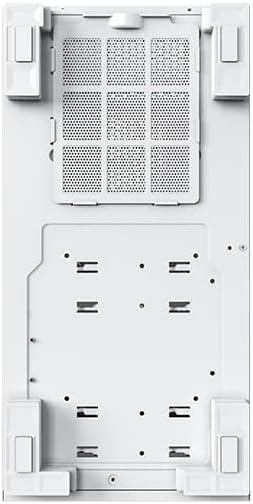
Дното view of the Montech Sky Two White PC Case, showing the removable dust filter and feet.
8.2 Официјални видеа за производи
Официјално видео претставување на производотasing the Montech Sky Two PC case features, including fan support, component compatibility, and unique airflow design. This video highlights the case's internal layout and various specifications.
9. Гаранција и поддршка
Montech products are backed by a manufacturer's warranty. For specific warranty terms and conditions, please refer to the warranty card included with your product or visit the official Montech website. For technical support, troubleshooting assistance, or replacement parts, please contact Montech customer service through their official channels. Keep your proof of purchase for warranty claims.


