1. Вовед
This manual provides essential information for the installation, operation, and maintenance of your Montech Titan Gold 850W ATX 3.0 Power Supply. This high-end power supply is designed for gaming systems, featuring 80 Plus Gold and Cybenetics Gold certifications, fully modular cabling, and readiness for PCIe 5.0 with a new 12VHPWR connector. Please read this manual thoroughly before installation and use to ensure proper functionality and safety.

Figure 1: Montech Titan Gold 850W Power Supply and its retail packaging.
2. Информации за безбедност
Always observe the following safety precautions to prevent injury or damage to your power supply and system components:
- Пред инсталација или ракување, проверете дали напојувањето е исклучено од штекерот за наизменична струја.
- Не го отворајте напојувањето casing. Висок волуменtages are present inside, and there are no user-serviceable parts.
- Инсталирајте го напојувањето во добро проветрено место, подалеку од извори на топлина, директна сончева светлина и влага.
- Користете само модуларните кабли што се испорачуваат со ова напојување. Употребата на некомпатибилни кабли може да предизвика оштетување.
- Пред да го вклучите системот, проверете дали сите конектори се безбедно поставени.
3. Содржина на пакетот
Проверете дали сите артикли се присутни во пакувањето:
- Montech Titan Gold 850W Power Supply Unit
- Модуларен сет кабли (вклучувајќи кабел 12VHPWR)
- Кабел за напојување со наизменична струја
- Завртки за монтирање
- Врвки за кабел/ленти со велкро
- Упатство за употреба (овој документ)

Figure 2: Included modular cables and accessories for the power supply.
4. Поставување и инсталација
Следете ги овие чекори за да го инсталирате напојувањето:
- Подгответе го куќиштето за компјутер: Ensure your PC case is compatible with ATX power supplies.
- Монтирајте го напојувањето: Secure the power supply into the designated PSU bay in your PC case using the provided mounting screws. Ensure the fan is oriented correctly for optimal airflow (typically facing downwards if your case has a bottom vent).
- Поврзете модуларни кабли: Identify the necessary cables for your motherboard, CPU, graphics card(s), and storage devices. Connect these cables to the corresponding ports on the power supply. The fully modular design allows you to connect only the cables you need, reducing clutter.
- Поврзете се со компоненти: Route the connected cables through your case's cable management channels and connect them to your motherboard (24-pin ATX, 8-pin EPS/CPU), graphics card(s) (PCIe, including the 12VHPWR for compatible GPUs), and storage drives (SATA, Molex).
- Безбедни врски: Double-check all connections to ensure they are firm and properly seated.

Слика 3: Готовоview of the modular cable connection ports on the power supply.
5. Упатства за работа
After installation, follow these steps to operate your power supply:
- Поврзете AC напојување: Приклучете го кабелот за наизменична струја во приклучокот за наизменична струја на напојувањето, а потоа во ѕидниот штекер или во заштитата од пренапон.
- Прекинувач: Locate the main power switch on the rear of the power supply and flip it to the 'ON' (I) position.
- Вклучување на системот: Press the power button on your PC case to start your computer.
- Smart Zero Fan Feature: This power supply includes a 'Smart Zero Fan' switch. When enabled (ON), the fan will remain off under low load conditions for silent operation. The fan will automatically activate when the load increases to maintain optimal temperatures. If disabled (OFF), the fan will operate continuously.

Figure 4: Rear panel with main power switch and Smart Zero Fan control.
6. Одржување
За да се обезбеди долготрајност и оптимални перформанси на вашето напојување, се препорачува периодично одржување:
- Чистење прашина: Regularly clean dust from the power supply's fan intake and exhaust vents using compressed air. Ensure the power supply is turned off and unplugged before cleaning.
- Инспекција на кабел: Periodically check all modular cable connections for looseness or damage. Re-seat any loose cables.
- Еколошки услови: Maintain a clean, dry, and cool environment for your PC to prevent excessive heat and dust buildup.

Слика 5: Врв view of the power supply, highlighting the fan grill for cleaning.
7 Смена на проблеми
Доколку наидете на проблеми со напојувањето, погледнете ги следните вообичаени проблеми и решенија:
- Без моќност:
- Осигурајте се дека кабелот за наизменична струја е безбедно вклучен и во напојувањето и во ѕидниот штекер.
- Verify the main power switch on the PSU is in the 'ON' (I) position.
- Check all modular cable connections, especially the 24-pin ATX and 8-pin EPS/CPU cables, for secure seating.
- Тестирајте го штекерот со друг уред за да потврдите дека има струја.
- System Shuts Down Unexpectedly:
- This could indicate an overload or overheating. Ensure your system's power consumption does not exceed the PSU's 850W capacity.
- Check for proper ventilation around the PSU and inside the PC case. Clean any dust buildup.
- Ensure the 'Smart Zero Fan' is functioning correctly or try disabling it to force continuous fan operation.
- Fan Not Spinning (under low load):
- If the 'Smart Zero Fan' feature is enabled, the fan will not spin under low loads. This is normal operation. The fan will activate when the system load increases.
- If the fan never spins even under high load with 'Smart Zero Fan' disabled, contact customer support.
8. Спецификации
Detailed technical specifications for the Montech Titan Gold 850W Power Supply:
| Карактеристика | Спецификација |
|---|---|
| Бренд | Montech |
| Име на моделот | Titan Gold 850W (TIS0124) |
| Ватtage | 850 вати |
| Излезен Ватtage | 750 Watts (Note: Product title states 850W, specifications list 750W. Please verify with manufacturer if discrepancy is critical.) |
| Сертификација на ефикасност | 80 плус злато, кибенетика злато |
| Форма фактор | ATX |
| Дизајн на напојување | Целосно модуларен |
| Тип на конектор | ATX, PCIe 5.0 (12VHPWR) |
| Метод на ладење | Воздух (1 вентилатор) |
| Тежина на ставката | 7.52 фунти |
| Датум прв на располагање | 13 декември 2022 година |
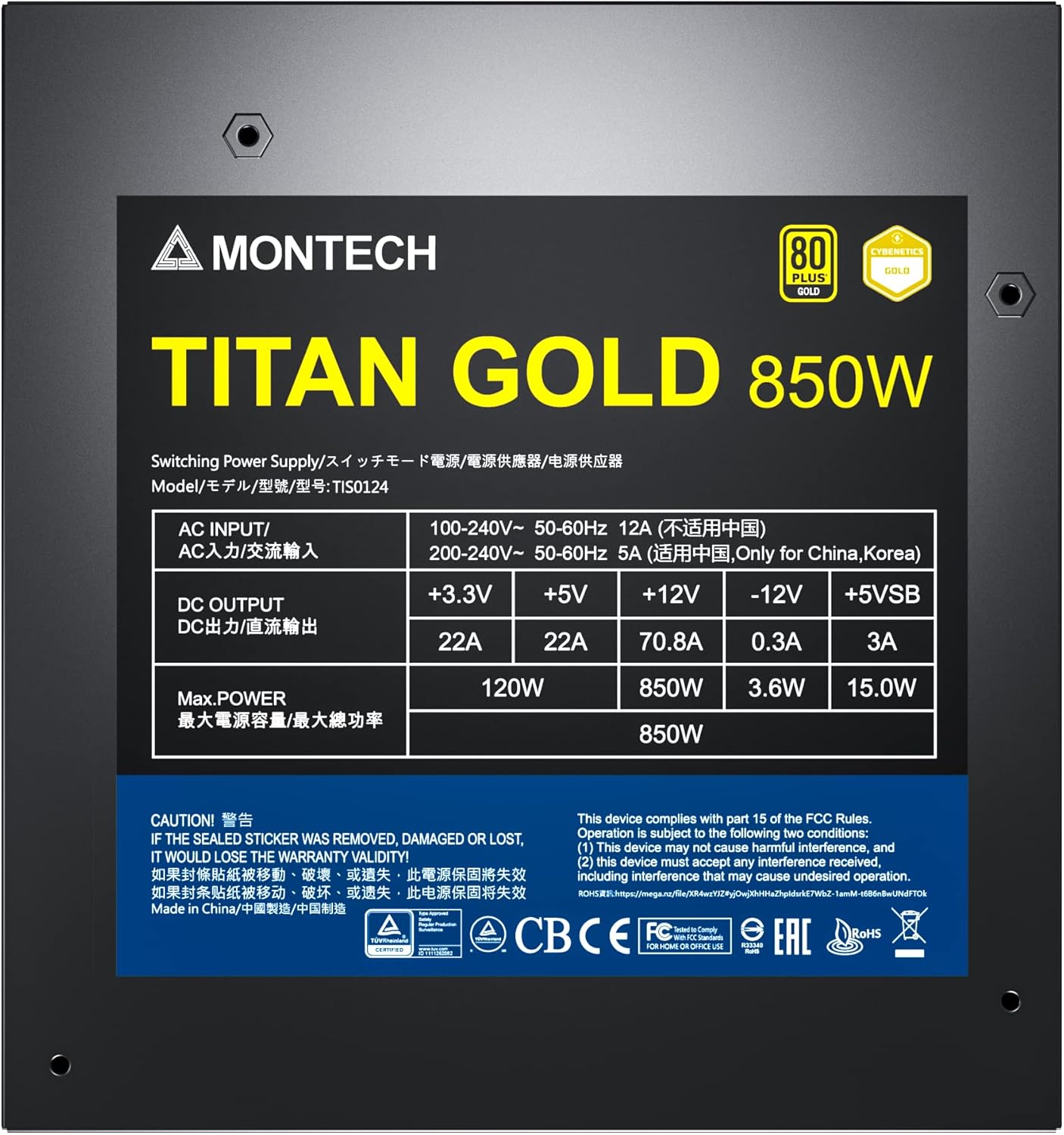
Figure 6: Product label displaying electrical specifications and certifications.
9. Гаранција и поддршка
The Montech Titan Gold 850W Power Supply comes with a 10 година гаранција, ensuring long-term reliability and peace of mind. For technical support, warranty claims, or further assistance, please visit the official Montech webсајт или контактирајте со нивниот оддел за услуги на клиентите.
Ве молиме зачувајте го доказот за купување за потврда на гаранцијата.