1. Вовед и повеќеview
This manual provides essential instructions for setting up, operating, and maintaining your Brinno TLC300 Time Lapse Camera. The TLC300 is designed for capturing time-lapse videos in various environments, including construction sites, outdoor projects, and general-purpose applications. It features Full HD 1080P resolution with HDR, a 118° field of view, and an intuitive user interface.

Слика 1: Предна и странична view of the Brinno TLC300 Time Lapse Camera.
Видео 1: Оверview of the Brinno TLC300 Time Lapse Camera's features and capabilities.
2. Што има во кутијата
Upon unboxing your Brinno TLC300, please ensure all the following items are present:
- Brinno Time Lapse Camera TLC300
- АА батерии x 4
- Покривка за објектив
- SD-картичка
- Прирачник за брз водич
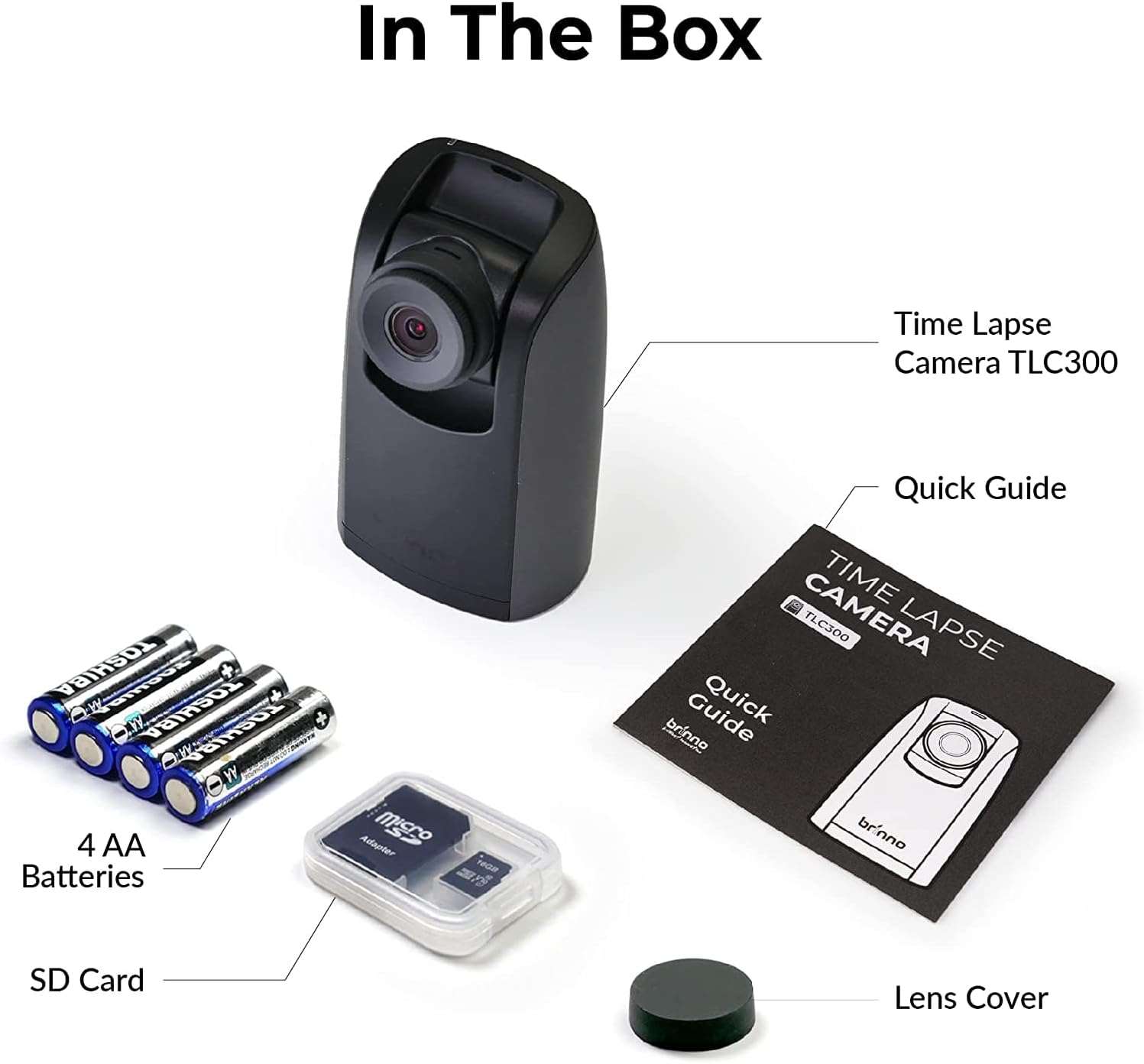
Figure 2: All items included in the Brinno TLC300 package.
3. Поставување
3.1 Инсталација на батерија и SD картичка
- Отворете го капакот на преградата за батерии што се наоѓа на дното од камерата.
- Вметнете 4 AA батерии, обезбедувајќи правилен поларитет (+/-).
- Insert the provided Micro SD card into the SD card slot until it clicks into place. The camera supports up to 128GB.
- Добро затворете го капакот на преградата за батерии.

Figure 3: Proper installation of AA batteries into the camera.
3.2 Почетно вклучување и основни поставки
- Притиснете и задржете го копчето за вклучување за да ја вклучите камерата.
- The 1.44" IPS LCD screen will display the live view.
- Navigate the menu using the directional buttons and the OK button.
- Set the current date and time for accurate time-lapse recording.
- Select your preferred language from the multilingual user interface.

Figure 4: The camera's menu for adjusting settings.
4. Ракување со камерата
4.1 Setting Recording Parameters
The TLC300 offers straightforward operation. You primarily need to set the 'interval' and 'schedule' before starting a recording.
- Интервал: This defines how often the camera captures an image. Adjust this setting based on the duration of your project and the desired speed of the final time-lapse video.
- Распоред: Use the schedule function to specify filming days and times. This ensures the camera only records during active periods, conserving battery life and storage.
- Резолуција: The camera records in Full HD 1080P. Ensure HDR is enabled for optimal image quality, especially for day-to-night transitions.

Figure 5: Visual comparison of HDR and Night Mode performance.
4.2 Starting and Stopping Recording
After configuring your settings, press the OK button to begin recording. The camera will automatically start capturing images according to your set interval and schedule. To stop recording, press the Power button again.
5. Одржување
- Чистење: Use a soft, dry cloth to clean the camera body and lens. Avoid abrasive materials or harsh chemicals.
- Траење на батеријата: The TLC300 offers up to 100 days of battery life with a 5-minute capture interval using 4 AA batteries. Monitor battery levels regularly, especially for long-term projects.
- Складирање: Periodically transfer your time-lapse videos from the SD card to a computer or external storage device to free up space and prevent data loss. The camera supports Micro SD cards up to 128GB.
- Капак на објективот: Always use the provided lens cover when the camera is not in use to protect the lens from dust and scratches.
6 Смена на проблеми
- Камерата не се вклучува: Ensure batteries are correctly inserted and fully charged. Try replacing with new batteries.
- Лош квалитет на сликата: Check lens for smudges or dirt. Ensure HDR is enabled for challenging lighting conditions. Verify the lens cover is removed.
- Снимањето не започнува: Confirm that the interval and schedule settings are correctly configured. Ensure the SD card has sufficient free space.
- Грешка на SD картичката: Reformat the SD card using the camera's menu (this will erase all data). If the issue persists, try a different SD card.
7. Спецификации
| Карактеристика | Спецификација |
|---|---|
| Број на модел | TLC300 |
| Димензии | 2.05 x 2.52 x 4.21 инчи |
| Тежина на ставката | 4.9 унци |
| Извор на енергија | 4 АА батерии |
| Резолуција за снимање видео | 1080p full HD |
| Технологија на фотосензор | CMOS |
| Максимална фокусна должина | 15 милиметри |
| Максимална решетка | 2 f |
| Тип на флеш меморија | Micro SD (до 128 GB) |
| Формат за снимање видео | MP4, MOV, AVI |
| Поддржан аудио формат | MP3, AAC |
| Големина на екранот | 1.44 инчи |
| Технологија за поврзување | Bluetooth |
8. Гаранција и поддршка
Brinno products are designed for durability and performance. For any technical assistance, warranty claims, or product inquiries, please refer to the contact information provided in your Quick Guide Manual or visit the official Brinno support webлокација. Чувајте ја сметката како доказ за купување за гарантни услуги.


