Вовед
The Fanvil W611W is a robust wireless portable phone designed for enhanced communication mobility. Featuring a 2.4-inch color LCD, dual SIP lines, and support for Wi-Fi 6 (2.4GHz & 5GHz) and Bluetooth 5.0, it offers reliable and clear communication. Its IP67 rating ensures durability against water, dust, and drops, making it suitable for various environments.
Клучни карактеристики:
- 2.4" 240 x 320 color screen with intuitive user interface.
- High protection level of IP67, which is waterproof, dustproof, and drop-safe from 1.8-meter height.
- Supports dual-band Wi-Fi 802.11 a/b/g/n/ac/ax (Wi-Fi 6, 2.4GHz & 5GHz).
- Supports IEEE802.11k/v/r roaming for seamless connectivity.
- Supports WPA / WPA2-PSK and 802.1X EAP encryption to ensure communications security.
- 10 hours talk time and 200 hours standby time.
- Type-C USB and 3.5mm 4-pole jack for versatile connectivity.
- Comes with a charging base, belt clip, and power adapter.
Содржина на пакетот
- Fanvil W611W Wireless Portable Phone
- База за полнење
- Клип за појас
- Адаптер за напојување
- Литиум-јонска батерија
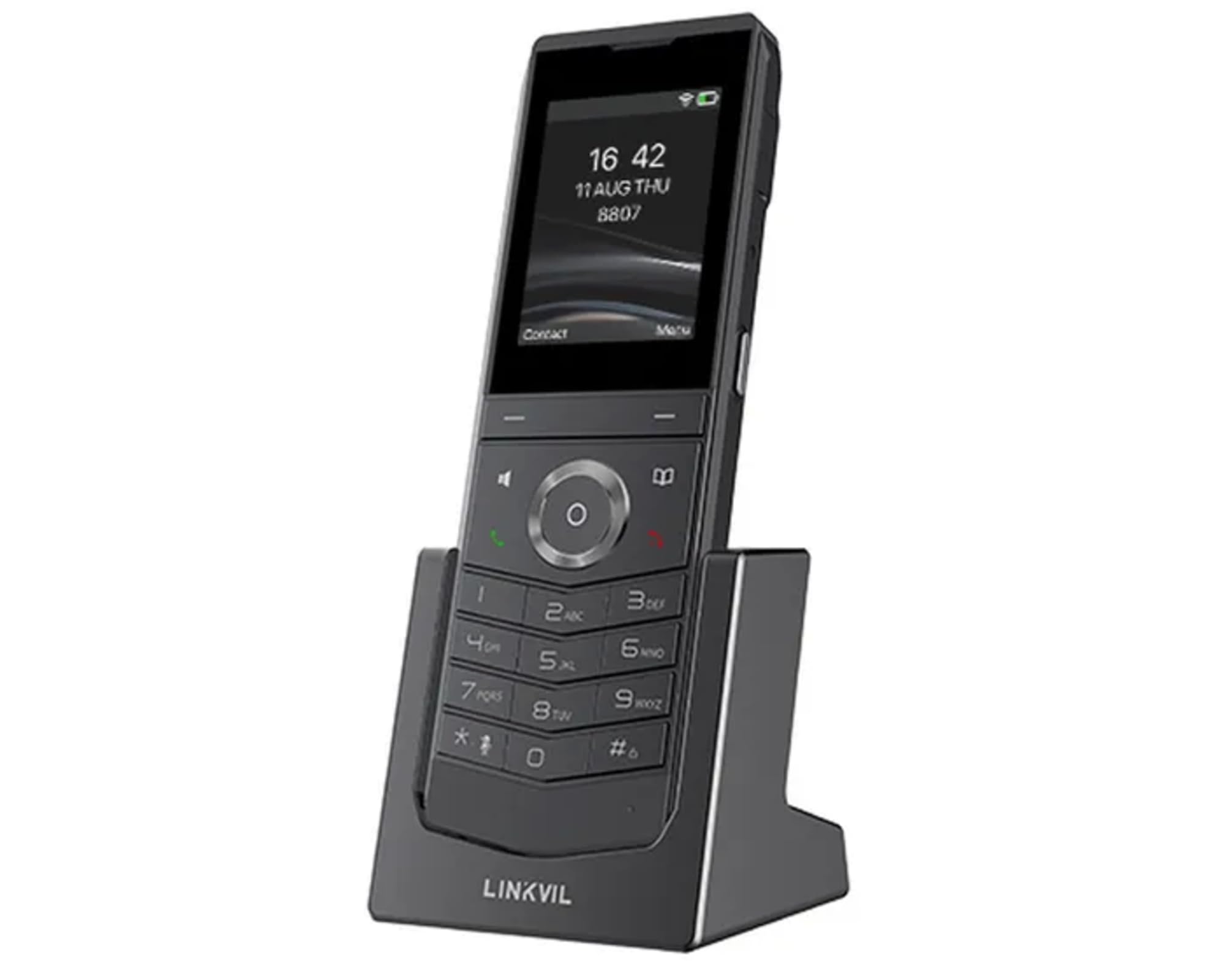
Image: Fanvil W611W Wireless Portable Phone, showcasing the handset and its charging base.
Водич за поставување
- Наполнете ја батеријата: Insert the Lithium Ion battery into the handset. Place the handset on the charging base and connect the power adapter to the charging base and a power outlet. Allow the phone to charge fully before first use (approximately 4 hours).
- Поврзете ја базната станица: Connect the charging base to a power source using the provided power adapter.
- Мрежна конекција: The W611W connects via Wi-Fi. Access the phone's menu to navigate to Wi-Fi settings. Select your desired Wi-Fi network and enter the password if prompted. The phone supports both 2.4GHz and 5GHz bands, including Wi-Fi 6.
- Конфигурација на SIP сметка: Access the phone's settings menu to configure your SIP accounts. You will need your SIP server address, user ID, password, and other relevant details provided by your VoIP service provider. The phone supports up to 2 SIP lines.
- Спарување (доколку е потребно): If your handset is not pre-paired with a base station, follow the instructions in the phone's menu to initiate the pairing process.
Упатства за работа
Остварување повици:
- Бирање: Внесете го телефонскиот број користејќи ја тастатурата и притиснете го копчето Јавете се button (green handset icon).
- Од контакти: Одете до Контакти menu, select the desired contact, and press the Јавете се копче.
- Повторно бирање: Притиснете го Редилирање копчето за да view recent outgoing calls and select a number to redial.
Примање повици:
- Кога телефонот ќе заѕвони, притиснете го копчето Јавете се копче за одговор.
- За да одбиете повик, притиснете на Заврши повик button (red handset icon).
За време на повик:
- Прилагодете ја јачината на звукот: Use the volume buttons on the side of the handset.
- Звучник: Притиснете го Говорник button to activate/deactivate speakerphone mode.
- Исклучи звук: Притиснете го Исклучи звук button to mute/unmute your microphone.
- Држете: Use the menu options to place a call on hold.
- Трансфер: Use the menu options to transfer a call to another extension or number.
Говорна пошта:
- When you have new voicemail messages, an indicator will appear on the screen. Dial your voicemail access number (usually *97 or *98, consult your service provider) to retrieve messages.
Одржување
- Чистење: Користете мека, гamp cloth to clean the phone's surface. Avoid harsh chemicals or abrasive cleaners.
- Нега на батеријата: To prolong battery life, avoid extreme temperatures. If the phone will not be used for an extended period, store it with a partial charge.
- Ажурирања на софтверот: Periodically check for firmware updates through the phone's settings menu or your service provider's instructions to ensure optimal performance and security.
Решавање проблеми
- Нема тон на бирање:
- Ensure the phone is charged and powered on.
- Verify Wi-Fi connection is active and stable.
- Check SIP account registration status in the phone's settings.
- Poor Call Quality/Range:
- Move closer to your Wi-Fi access point.
- Ensure there are no major obstructions (thick walls, metal objects) between the phone and the access point.
- Check for interference from other 2.4GHz or 5GHz devices.
- Батеријата брзо се троши:
- Ensure the phone is charging correctly on the base.
- Намалете ја осветленоста на екранот или исклучете ги непотребните функции за да заштедите енергија.
- Ако батеријата е стара, размислете да ја замените.
- Слушалката не се регистрира:
- Restart the phone and the Wi-Fi access point.
- Re-enter SIP account details carefully.
- Consult your service provider for specific registration steps.
Спецификации
| Карактеристика | Детал |
|---|---|
| Име на моделот | W611W |
| Бренд | Фанвил |
| Големина на екранот | 2.4 инчи |
| Резолуција | 240 x 320 |
| Технологија за поврзување | Bluetooth, WiFi |
| Безжична мрежна технологија | Wi-Fi 802.11 a/b/g/n/ac/ax (Wi-Fi 6, 2.4GHz & 5GHz) |
| SIP линии | 2 |
| Време за разговор | 10 часа |
| Време на мирување | 200 часа |
| Тип на батерија | Литиум Јон |
| Капацитет на батеријата | 1900 милиониamp Часови |
| Ниво на заштита | IP67 (Waterproof, Dustproof, Drop-safe from 1.8m) |
| Димензии на производот | 5.91 x 5.91 x 3.15 инчи |
| Тежина на ставката | 15.8 унци |
Гаранција и поддршка
За информации за гаранцијата и техничка поддршка, ве молиме погледнете го официјалниот Fanvil website or contact your authorized Fanvil dealer. Keep your purchase receipt as proof of purchase for warranty claims.
Дополнителни ресурси
No relevant product videos from the seller were found for the Fanvil W611W in the provided data. Please refer to the official Fanvil website for any available video tutorials or additional support materials.


