1. Во текотview
The waveshare FT232RNL USB to RS232/485/422/TTL Interface Converter is an industrial-grade isolated converter designed for reliable and stable communication across various serial interfaces. It leverages an original FT232RNL chip for superior performance and compatibility. This device is engineered with multiple protection features to ensure safe and durable operation in diverse environments.

Figure 1: waveshare FT232RNL USB to RS232/485/422/TTL Interface Converter
2. Карактеристики
- Original FT232RNL Chip: Ensures fast, stable, and reliable communication with enhanced compatibility.
- Multi-Interface Conversion: Supports USB to RS232, USB to RS485, USB to RS422, and USB to TTL.
- Unibody Power Supply Isolation: Provides stable isolated voltage without requiring external power for the isolated terminal.
- Unibody Digital Isolation: Allows signal isolation, offering high reliability, strong anti-interference, and low power consumption.
- TVS (Transient Voltage Супресор): Ефикасно го потиснува напливот на волуменtage и минлив шилец волtage, providing lightningproof and ESD protection.
- Самообновувачки осигурувач и заштитни диоди: Обезбедува стабилна струја/волуменtage outputs, offering over-current/over-voltage proof and improved shock resistance.
- Automatic Transceiver Circuit: Fully automatic, no-delay transceiver circuit for fast and stable communication without interference.
- TTL Serial 3.3V/5V Voltagе-преведувач: Configurable TTL level via switch.
- LED индикатори: Three LEDs indicate power (PWR) and transceiver status (TXD, RXD).
- Висококвалитетни конектори: Durable USB-B and RS232 connectors for smooth plug/pull.
- Industrial-Grade Metal Case: Supports wall-mount and rail-mount installations, providing a solid and aesthetically pleasinг дизајн.

Figure 2: Internal Design and Protection Features
3. Содржина на пакетот
Пакетот на производи обично ги вклучува следниве артикли:
- waveshare FT232RNL USB to RS232/485/422/TTL Interface Converter
- Кабел USB-A до USB-B
- Шрафцигер
- Монтажни држачи (претходно прикачени или одделни)

Слика 3: Содржина на пакетот
4. Поставување
To set up your waveshare FT232RNL converter, follow these general steps:
- Поврзете се со домаќинот: Use the provided USB-A to USB-B cable to connect the converter's USB-B port to a USB port on your computer (PC, Mac, Linux, Android device).
- Инсталација на драјвери: For most modern operating systems (Windows, Linux, Mac, Android), the necessary drivers for the FT232RNL chip should install automatically upon connection. If not, drivers can be obtained from the FTDI website or waveshare's official support page.
- Select TTL Level (if applicable): If using the TTL interface, adjust the 3.3V/5V voltage translator switch on the converter to match the voltage level of your target device.
- Connect Serial Device: Connect your RS232, RS485, RS422, or TTL serial device to the corresponding screw terminals or DB9 connector on the converter. Ensure correct pin assignments (refer to Section 6: Interface Introduction).
- Потврдете ја врската: The PWR LED on the converter should illuminate when connected to a powered USB port. The TXD and RXD LEDs will flash during data transmission.
Video 1: Demonstrates the connection and various interface conversions of the waveshare USB to RS232/485/422/TTL converter.
5. Работење
Once the converter is set up and connected, it operates as a transparent bridge between your USB host and the connected serial device. The onboard automatic transceiver circuit manages data flow without manual intervention.
LED индикатори:
- PWR (црвена): Indicates power. Lights up when the USB connection is established and voltagе откриена.
- TXD (зелено): Transmit Data Indicator. Lights up when the USB port sends data.
- RXD (Green): Receive Data Indicator. Lights up when the device ports send data back.
To communicate with your serial device, use appropriate serial communication software on your computer. Configure the software with the correct COM port (assigned by your operating system), baud rate, data bits, parity, and stop bits to match your serial device's settings.
6. Вовед во интерфејс
The converter provides multiple interfaces for versatile connectivity:

Слика 4: Готовоview of Converter Interfaces
RS232 Pinout (DB9 Male):
| ПИН | Опис |
|---|---|
| 2 | Receiving data (RXD) |
| 3 | Sending data (TXD) |
| 5 | Земјата GND |
| 1, 4, 6, 7, 8, 9 | N/C (Not Connected) |
RS485/RS422 Pinout (Screw Terminal):
| Screw Terminal (PIN) | Опис |
|---|---|
| PE | 485/422 signal ground |
| TA | RS422 send differential signal positive / RS485 differential signal positive A+ |
| TB | RS422 send differential signal negative / RS485 differential signal negative B- |
| RA | RS422 receive differential signal positive |
| RB | RS422 receive differential signal negative |
TTL (UART) Pinout (Screw Terminal):
| Screw Terminal (PIN) | Опис |
|---|---|
| TXD | TTL transmit data pin, connect to MCU.RXD |
| RXD | TTL receive data pin, connect to MCU.TXD |
| ГНД | Поврзете се на GND |
| VCC | 5V / 3.3V power supply output, configurable via 5V/3.3V level switch |

Figure 5: Detailed Pinouts
7. Спецификации
| Категорија | Спецификација |
|---|---|
| Тип на производ | Industrial grade digital isolated converter |
| Оперативен волtage | 5V (USB) / 3.3V / 5V (TTL) |
| USB конектор | USB-B |
| USB заштита | Осигурувач за самообновување од 200 mA, изолиран излез |
| RS232 конектор | DB9 машки |
| Заштита RS232 | TVS диода, заштита од пренапон и ESD заштита |
| RS232 Transmission Mode | Точка до точка |
| РС232 БАУД стапка | 300bps ~ 921600bps |
| RS485/422 конектор | Терминал за завртки |
| RS485/422 Direction Control | Автоматска контрола на хардвер |
| RS485/422 Protection | 600W lightningproof and surge-suppress, 15KV ESD protection (reserved two 120R balancing resistors, enabled/disabled via jumper) |
| RS485/422 Transmission Mode | Point-to-multipoints (485 mode: up to 32 nodes, repeaters recommended for 16+ nodes; 422 mode: up to 256 nodes, repeaters recommended for 16+ nodes) |
| RS485/422 Baud Rate | 300bps ~ 2Mbps |
| TTL (UART) Connector | Терминал за завртки |
| TTL (UART) Pins | TXD, RXD, GND, 5V/3.3V |
| TTL (UART) Protection | Clamp заштитна диода, над-волtagе/негативно-волtagДоказ, отпорност на удар |
| TTL (UART) Transmission Mode | Точка до точка |
| TTL (UART) Baud Rate | 300bps ~ 2Mbps |
| Работна температура | -40°C ~ 85°C |
| Работна влажност | 5% RH ~ 95% RH |
| Поддржани оперативни системи | Mac, Linux, Android, Windows 11 / 10 / 8.1 / 8 / 7 |
| Димензии на пакетот | 6.14 x 4.33 x 1.26 инчи |
| Тежина на ставката | 1.76 унци |
| Производител | Waveshare |
| Датум прв на располагање | 6 февруари 2023 година |
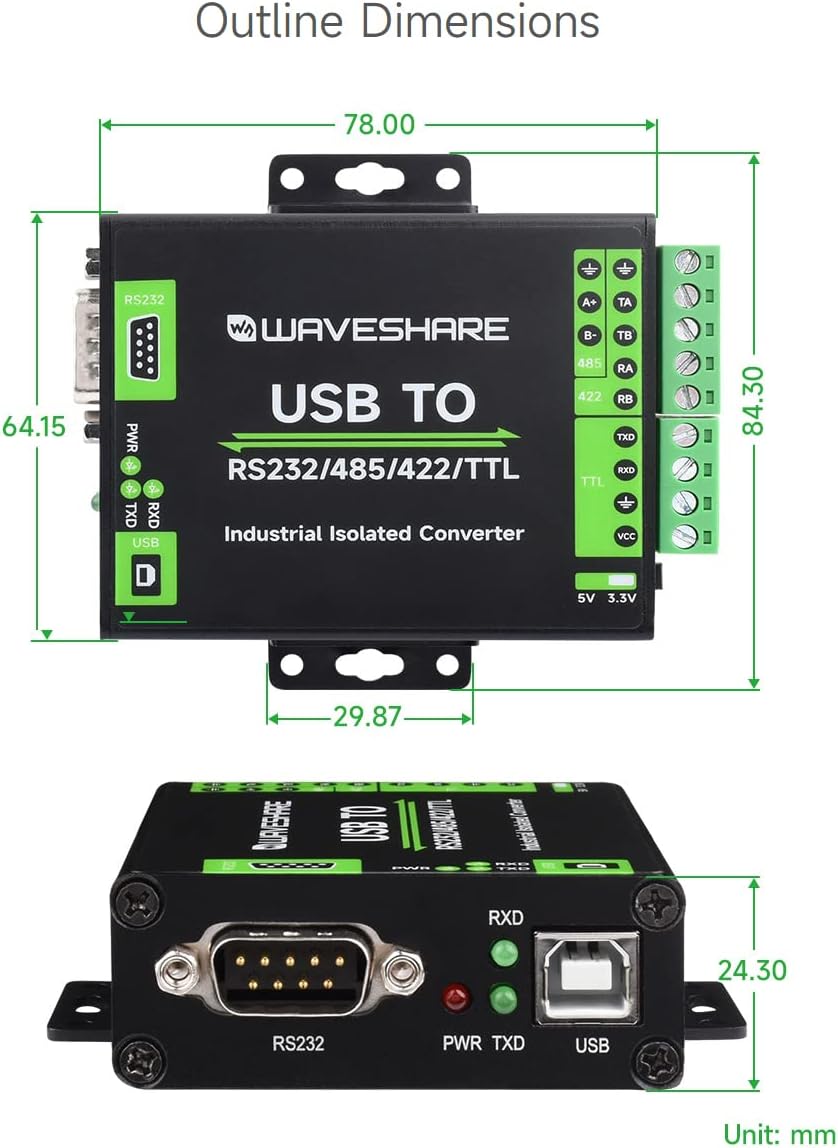
Figure 6: Outline Dimensions (Unit: mm)
8. Одржување
To ensure the longevity and optimal performance of your waveshare FT232RNL converter, follow these maintenance guidelines:
- Чистење: Use a soft, dry cloth to clean the exterior of the device. Avoid using liquid cleaners or solvents, which may damage the casing или внатрешни компоненти.
- Животна средина: Operate and store the converter in a clean, dry environment, away from excessive dust, moisture, and extreme temperatures. Refer to the operating temperature and humidity specifications.
- Ракување: Handle the device with care. Avoid dropping it or subjecting it to strong impacts, which could damage the internal circuitry.
- Врски: Ensure all cable connections are secure and free from strain. Periodically check screw terminals for tightness.
9 Смена на проблеми
If you encounter issues with your waveshare FT232RNL converter, consider the following troubleshooting steps:
- Нема струја (LED диодата за PWR е исклучена):
- Ensure the USB cable is securely connected to both the converter and the host computer.
- Обидете се со друга USB порта на вашиот компјутер.
- Verify that your computer's USB port is providing power.
- No Data Transmission (TXD/RXD LEDs not flashing):
- Check all serial connections (RS232, RS485, RS422, TTL) for correct wiring and secure connections.
- Verify that the serial communication software on your computer is correctly configured (COM port, baud rate, data bits, parity, stop bits).
- Ensure the TTL level switch is set correctly for your TTL device (3.3V or 5V).
- Confirm that the connected serial device is powered on and functioning correctly.
- Проблеми со возачот:
- If the device is not recognized by your operating system, try reinstalling the FTDI drivers. These can typically be found on the FTDI webсајт.
- Check your device manager (Windows) or equivalent system information (Linux/Mac) to see if the device is listed without errors.
- Пречки:
- While the device has strong anti-interference capabilities, ensure it is not placed near strong electromagnetic interference sources.
10. Гаранција и поддршка
For warranty information, technical support, or further assistance with your waveshare FT232RNL USB to RS232/485/422/TTL Interface Converter, please contact waveshare directly through their official webстраницата или продавачот на мало од кој сте го купиле производот.
Официјално упатство за корисникот во PDF формат е исто така достапно за преземање: Упатство за употреба (PDF)


