1. Вовед
This manual provides detailed instructions for the assembly, installation, operation, and maintenance of your AMANSON H07 ATX Mid Tower PC Case. Please read this manual thoroughly before beginning installation to ensure proper setup and safe operation. Keep this manual for future reference.

Figure 1.1: AMANSON H07 ATX Mid Tower PC Case with illuminated internal components.
2. Информации за безбедност
- Секогаш исклучувајте го напојувањето од ѕидниот штекер пред да вршите каква било инсталација или одржување во куќиштето на компјутерот.
- Handle all components with care to prevent damage.
- Носете антистатички ремен за зглоб за да спречите оштетување од електростатско празнење (ESD) на чувствителните електронски компоненти.
- Држете ги малите делови и материјалите за пакување подалеку од дофат на деца.
- Обезбедете соодветна вентилација околу куќиштето на компјутерот за да спречите прегревање.
3. Содржина на пакетот
Проверете дали сите артикли се присутни во пакувањето:
- AMANSON H07 ATX Mid Tower PC Case
- Кутија за додатоци (завртки, држачи, врвки за кабел итн.)
- Упатство за употреба (овој документ)
4. Компонента надview
The AMANSON H07 PC case features a panoramic design with tempered glass panels for full visibility of your internal components. It supports various motherboard sizes and extensive cooling configurations.

Figure 4.1: Top I/O Panel with power button, USB 3.0, USB 2.0, and audio ports.
The top I/O panel includes:
- Копче за напојување
- Копче за ресетирање
- 2x USB 2.0 порти
- 1x USB 3.0 приклучок
- Аудио влезни/излезни приклучоци
5. Поставување и инсталација
5.1. Подготовка на случајот
The AMANSON H07 features tool-less hinged tempered glass side panels for easy access. Gently open the side panel by pulling it from the rear edge. The panels can also be removed by lifting them off their hinges for full access during installation.

Figure 5.1: Hinged tempered glass side panel for easy access.
5.2. Инсталација на матична плоча
The H07 supports E-ATX, ATX, Micro-ATX, and ITX motherboards. Install the necessary standoffs for your motherboard form factor. Carefully align your motherboard with the standoffs and I/O shield, then secure it with screws.
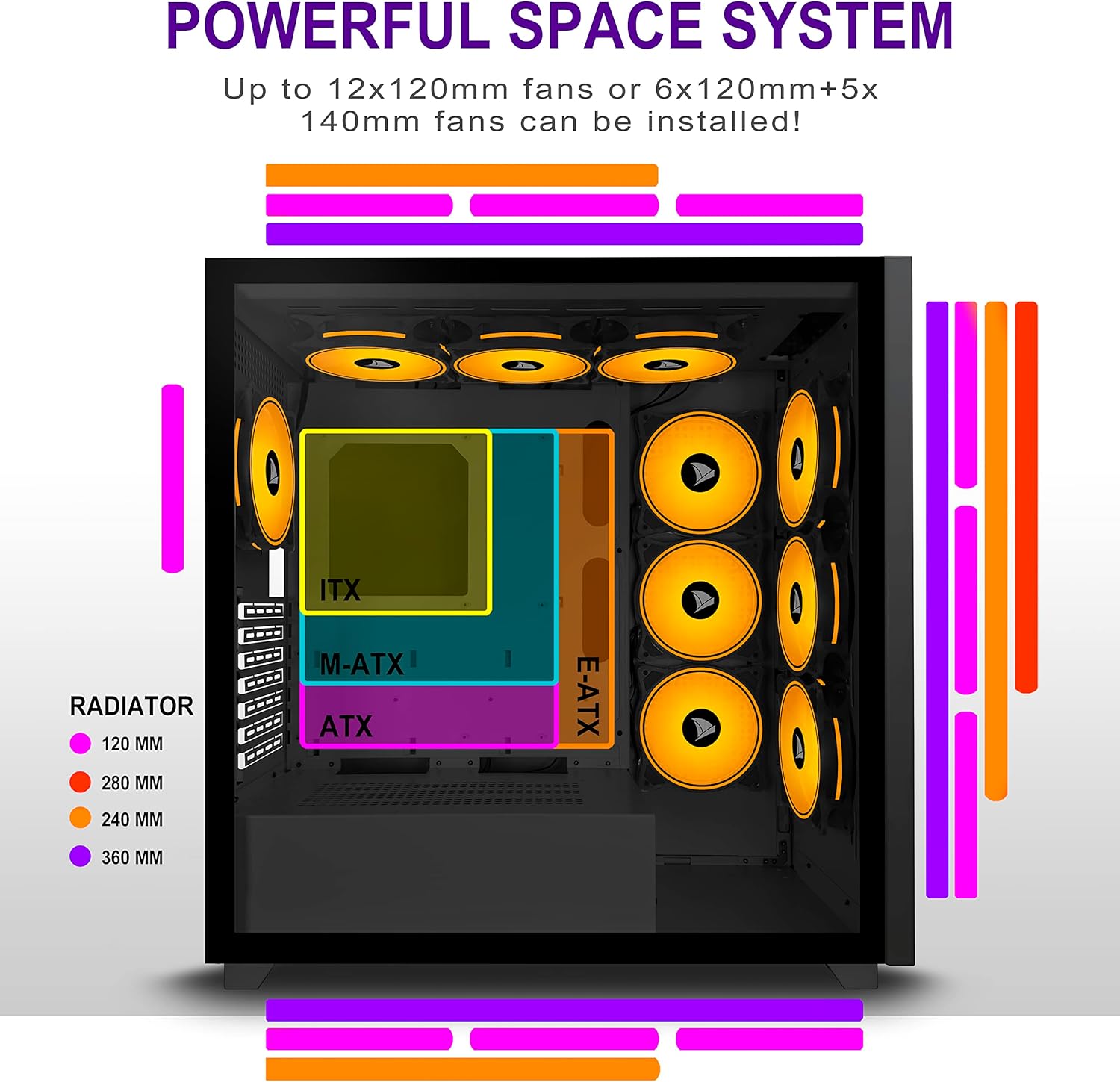
Figure 5.2: Motherboard and cooling component placement options.
5.3. Инсталација на напојување
Install your power supply unit (PSU) into the dedicated compartment at the bottom rear of the case. Secure it with screws from the rear of the case.
5.4. Инсталација на уред за складирање
The case provides multiple mounting points for storage devices. Install your 3.5" HDDs and 2.5" SSDs into the designated trays and mounting locations. Refer to the case diagram for specific locations.

Figure 5.3: Storage drive mounting options for HDDs and SSDs.
5.5. Инсталација на картичка за проширување (GPU)
Remove the necessary PCI-E slot covers from the rear of the case. Insert your graphics card or other expansion cards into the motherboard's PCI-E slots and secure them with screws.
5.6. Управување со кабли
Utilize the cable routing cutouts and tie-down points behind the motherboard tray to manage cables. This improves airflow and maintains a clean aesthetic.
6. Упатства за работа
6.1. Вклучување/исклучување
Press the power button located on the top I/O panel to turn on your PC. To shut down, use the operating system's shutdown function or press and hold the power button for several seconds.
6.2. Using Front I/O Ports
Connect USB devices to the USB 2.0 or USB 3.0 ports. Use the audio jacks for headphones, microphones, or speakers.
7. Одржување
7.1. Чистење
Редовно чистете ја надворешноста на куќиштето со мека, дamp cloth. For internal cleaning, use compressed air to remove dust from fans and components. Ensure the PC is powered off and unplugged before cleaning.
7.2. Филтри за прашина
The AMANSON H07 may include removable dust filters. Clean these filters periodically to maintain optimal airflow and cooling performance.
8 Смена на проблеми
- Компјутерот не се вклучува: Check all power connections, including the PSU to the wall, the PSU to the motherboard, and the front panel power switch cable to the motherboard.
- Проблеми со прегревање: Ensure all fans are properly installed and functioning. Verify that dust filters are clean and not obstructing airflow. Check thermal paste application on CPU cooler.
- USB портите не работат: Confirm that the front panel USB cables are correctly connected to the motherboard headers.
- Audio jacks not working: Verify that the front panel audio cable is correctly connected to the motherboard's audio header.
9. Спецификации
Below are the technical specifications for the AMANSON H07 PC Case:
| Карактеристика | Детал |
|---|---|
| Модел | H07 |
| Тип на случај | Mid Tower |
| Компатибилност со матична плоча | E-ATX, ATX, Micro ATX, ITX |
| Материјал | Калено стакло |
| Димензии на производот (ДxШxВ) | 19.69 x 13.78 x 19.69 инчи (500 x 350 x 500 мм) |
| Тежина на ставката | 24.2 фунти |
| Број на USB 2.0 порти | 2 |
| Број на USB 3.0 порти | 1 |
| Број на слотови за проширување | 8 |
| Метод на ладење | Воздух |
| Тип на монтирање на напојување | Долна монтажа |

Figure 9.1: AMANSON H07 PC Case dimensions (520mm height, 510mm length, 250mm width).
10. Информации за гаранцијата
Please refer to the product packaging or the official AMANSON webстраница за специфични услови за гаранција. Зачувајте го доказот за купување за рекламации за гаранција.
11. Поддршка
For technical assistance or customer support, please visit the official AMANSON website or contact their customer service department. Contact details can typically be found on the product packaging or the brand's webсајт.