Упатство за користење на Poly Edge E220 IP стационарен телефон
Your guide to setting up and using your Poly Edge E220 IP Desk Phone.
1. Вовед
The Poly Edge E220 is a versatile IP desk phone designed for modern office environments, offering advanced communication features. It supports up to 16 lines with 4-line keys and includes integrated Bluetooth for seamless mobile phone and headset pairing. This manual provides detailed instructions for setup, operation, and maintenance of your device.
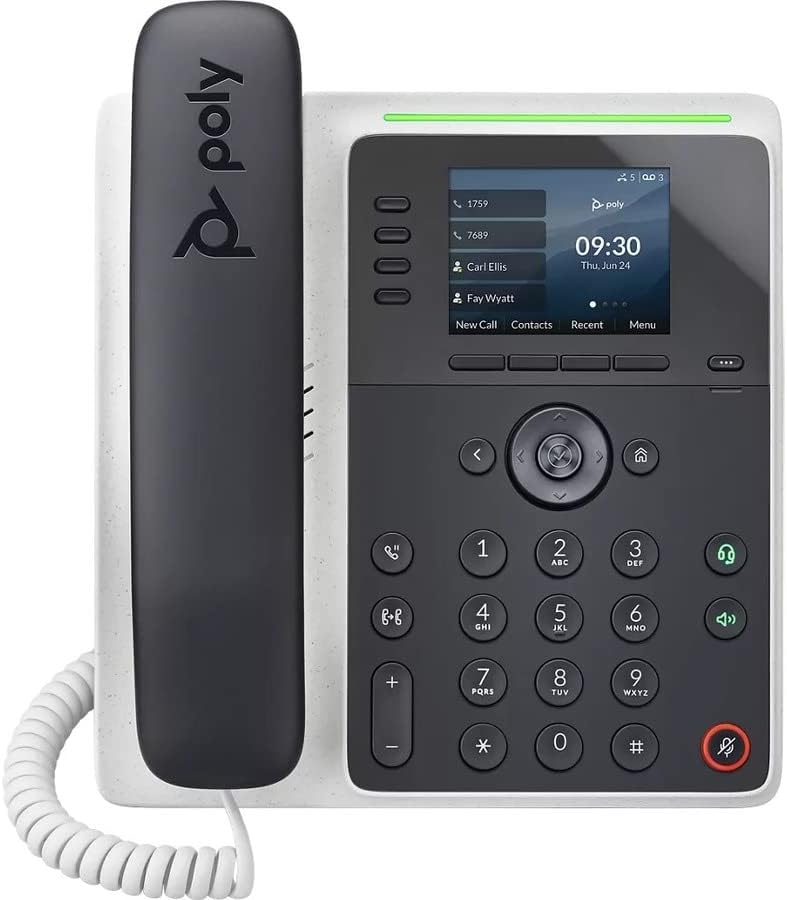
Слика: напред view of the Poly Edge E220 IP Desk Phone, showcasing its display, keypad, and handset.
2. Што има во кутијата
Ве молиме проверете дали сите од следниве компоненти се вклучени во вашиот пакет:
- Poly Edge E220 IP Desk Phone Unit
- Слушалка
- Кабел за намотка на слушалката
- Cat5E Ethernet Cable
- Integrated Wall Mount (pre-attached or separate)
- Основен штанд
Note: A power supply is NOT included with this renewed product and must be acquired separately if Power over Ethernet (PoE) is not available.
3. Карактеристики на производот
- 4-Line Keys: Supports up to 16 lines for flexible call management.
- Интегриран Bluetooth: Allows for seamless pairing with mobile phones and Bluetooth headsets.
- Екран со висока резолуција: Provides clear visibility for call information and menu navigation.
- HD глас: Delivers superior audio quality for clearer conversations.
- Multi-Line Operation: Manage multiple active calls simultaneously.
- Способност за конференциски повик: Supports 3-way conferencing.
4. Поставување и инсталација
4.1 Склопување на телефонот
- Attach the Base Stand: Align the tabs on the base stand with the slots on the back of the phone unit. Slide the stand into place until it clicks securely.
- Connect the Handset: Plug one end of the coil cord into the handset and the other end into the handset port on the side of the phone unit.
4.2 Поврзување на каблите
Locate the ports on the back and side of the phone unit.

Слика: Страна view of the Poly Edge E220 IP Desk Phone, highlighting the various connection ports and the adjustable stand.
- Мрежна конекција: Connect one end of the Cat5E Ethernet cable to the LAN port on the phone and the other end to your network switch or router. If your network provides Power over Ethernet (PoE), the phone will power on automatically.
- Power Connection (if no PoE): Доколку PoE не е достапен, поврзете соодветен адаптер за напојување (не е вклучен) во приклучокот за напојување на телефонот, а потоа во штекер.
- Optional Headset Connection: If using a wired headset, connect it to the dedicated headset port.
4.3 Почетно вклучување
Once connected, the phone will power on and begin its boot sequence. This may take a few moments. The display will show the Poly logo, followed by network configuration and registration status. If prompted, enter your network credentials or contact your IT administrator for setup assistance.
5. Упатства за работа
5.1 Остварување и примање повици
- За да остварите повик: Pick up the handset, press the Speaker button, or press a line key. Dial the number and press the Dial soft key or wait for the call to connect.
- За да одговорите на повик: Pick up the handset, press the Speaker button, or press the flashing line key.
- За да завршите повик: Replace the handset, or press the End Call soft key.

Image: A man engaged in a phone call using the Poly Edge E220 IP Desk Phone in a professional office environment.
5.2 Користење Bluetooth
The Poly Edge E220 allows you to pair your mobile phone or Bluetooth headset for enhanced flexibility.
- Овозможи Bluetooth: Navigate to the phone's menu, select Settings, then Bluetooth, and ensure Bluetooth is enabled.
- Спарување на уред: Put your Bluetooth device (mobile phone or headset) into pairing mode. On the phone, select 'Add New Device' or 'Scan for Devices'. Select your device from the list and follow the on-screen prompts to complete pairing.
- Поврзување: Once paired, your device should automatically connect when in range. You can manually connect/disconnect from the Bluetooth menu.

Image: A woman working at a desk, utilizing the Poly Edge E220 IP Desk Phone alongside her laptop, demonstrating its integration into a modern workspace.
5.3 Напредни функции
- Држете: During a call, press the Hold soft key to place the call on hold. Press it again to resume.
- Трансфер: During a call, press the Transfer soft key, dial the new number, and then press Transfer again to complete.
- Конференција: During an active call, press the Conference soft key, dial the number of the third party, and then press Conference again to join all parties.
- Говорна пошта: Press the Voicemail button to access your voicemail messages.
6. Одржување
To ensure the longevity and optimal performance of your Poly Edge E220 IP Desk Phone, follow these maintenance guidelines:
- Чистење: Користете мека, сува крпа без влакненца за чистење на површината и екранот на телефонот. За тврдокорни дамки, малку избришетеampИзмијте ја крпата со вода. Избегнувајте употреба на јаки хемикалии, абразивни средства за чистење или аеросолни спрејови.
- Животна средина: Чувајте го телефонот на суво место, подалеку од директна сончева светлина, прекумерна топлина и влага.
- Управување со кабли: Ensure all cables are neatly organized and not under strain to prevent damage to ports or cables.
- Ажурирања на софтверот: Periodically check with your IT administrator for available software updates to ensure your phone has the latest features and security enhancements.
7 Смена на проблеми
If you encounter issues with your Poly Edge E220, refer to the table below for common problems and solutions.
| Проблем | Можна причина | Решение |
|---|---|---|
| Телефонот не се вклучува | No power supply or PoE connection | Ensure Ethernet cable is connected to a PoE-enabled port, or connect a compatible power adapter. |
| Нема тон за бирање | Network issue or phone not registered | Check network cable connection. Verify network status on the phone display. Contact IT support if registration fails. |
| Не можам да го слушнам повикувачот / Повикувачот не може да ме чуе мене | Volume too low, faulty handset/headset, or network audio issue | Adjust volume. Test with speakerphone. Check handset/headset connection. Restart phone. |
| Уредот со Bluetooth не се спарува | Уредот не е во режим на спарување или надвор од опсегот | Ensure Bluetooth device is in pairing mode and within range. Restart both devices. |
If the problem persists after attempting these solutions, please contact your IT department or the product support team for further assistance.
8. Спецификации
Key technical specifications for the Poly Edge E220 IP Desk Phone:
| Карактеристика | Детал |
|---|---|
| Димензии на производот | 12.1 x 10.3 x 3.4 инчи |
| Тежина на ставката | 2.55 фунти |
| Тип на телефон | Кабелски IP телефон |
| Извор на енергија | Corded Electric (Power Supply NOT Included) / Power over Ethernet (PoE) |
| Тип на бирач | Единечна тастатура |
| Тип на одговорен систем | Digital (requires service provider support) |
| Можност за конференциски повик | 3-насочен |
| Повеќелиниска операција | Yes, supports up to 16 lines with 4-line keys |
| Bluetooth | Integrated for mobile phone and headset pairing |
9. Гаранција и поддршка
As a renewed product, the Poly Edge E220 IP Desk Phone typically comes with a limited warranty provided by the refurbisher or seller. Please refer to your purchase documentation for specific warranty terms and conditions. For technical support, troubleshooting beyond this manual, or warranty claims, please contact the seller or your IT administrator.


