1. Вовед
This manual provides comprehensive instructions for the safe and effective use of the Flashpoint R2 XPro II 2.4GHz TTL Wireless Flash Trigger for Sony Cameras. This device is designed to provide reliable wireless control over compatible flash units, offering advanced features such as TTL, Manual, and Multi-flash modes, High-Speed Sync (HSS), and a robust 2.4GHz radio system.
Ве молиме внимателно прочитајте го ова упатство пред да го користите уредот за да се осигурате дека работи правилно и да спречите оштетување.
2. Безбедносни мерки на претпазливост
- Do not disassemble or modify the device. Unauthorized modifications can lead to malfunction or electric shock.
- Чувајте го уредот сув. Не го изложувајте на дожд, влага или висока влажност.
- Avoid strong impacts or vibrations. Dropping the device may cause internal damage.
- Да се чува подалеку од дофат на деца.
- Користете само одредени батерии. Неточните типови батерии може да предизвикаат протекување или експлозија.
- Do not operate in environments with flammable gases or liquids.
- Turn off the device when not in use or during cleaning.
3. Компоненти и контроли на производот
The Flashpoint R2 XPro II features an intuitive layout for easy operation. Familiarize yourself with the various parts and controls:
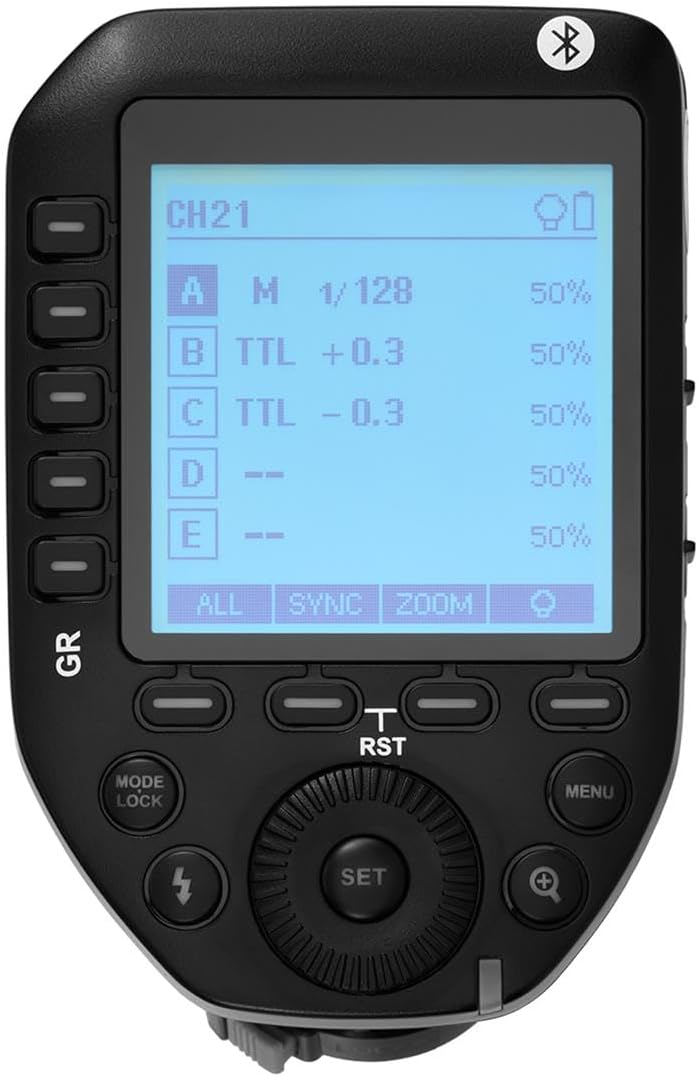
Слика 3.1: Врв view of the Flashpoint R2 XPro II, highlighting the large dot matrix LCD display and various control buttons including Group (GR), Mode/Lock, Set, Menu, and Zoom.

Слика 3.2: Аголна view of the Flashpoint R2 XPro II, illustrating the hot shoe mount for camera attachment and the power ON/OFF switch located on the side.
Клучни контроли:
- LCD дисплеј: Large dot matrix display with adjustable backlight for clear visibility of settings.
- Group (GR) Buttons: Control individual flash groups (A, B, C, D, E).
- Mode/Lock Button: Switches between flash modes (TTL, Manual, Multi) and locks settings.
- Копче за поставување: Confirms selections and enters sub-menus.
- Копче за мени: Accesses system settings and advanced options.
- Копче за зумирање: Adjusts flash zoom settings for specific groups.
- Бирајте: Се движи низ менијата и ги прилагодува вредностите.
- Прекинувач: Го вклучува/исклучува уредот.
- Монтирање за топла обувка: Connects the trigger securely to your camera's hot shoe.
4. Поставување и инсталација
4.1 Инсталација на батерија
The R2 XPro II uses two AA batteries (not included). Ensure correct polarity when inserting.

Figure 4.1: The battery compartment of the Flashpoint R2 XPro II, with the cover removed, illustrating the correct orientation for inserting AA batteries.
- Пронајдете го капакот на преградата за батерии на дното од уредот.
- Отворете го капакот.
- Insert two AA batteries, matching the positive (+) and negative (-) indicators inside the compartment.
- Добро затворете го капакот на преградата за батерии.
4.2 Монтирање на камерата
Attach the trigger to your Sony camera's hot shoe for seamless integration.

Слика 4.2: Долна view of the Flashpoint R2 XPro II, displaying the hot shoe mount and the instant flip locking mechanism designed for secure camera connection.
- Ensure the trigger is turned OFF.
- Slide the hot shoe mount of the R2 XPro II into your camera's hot shoe.
- Secure the trigger by engaging the locking mechanism (typically a lever or dial) on the hot shoe mount.
- Turn on the trigger and your camera.
5. Упатства за работа
The R2 XPro II offers various modes and settings for precise flash control.
5.1 Вклучување/исклучување
Use the ON/OFF switch located on the side of the unit to power the trigger.
5.2 Basic Screen Navigation
The large LCD display shows current settings for channels, groups, and flash modes. Use the dial to navigate and adjust values, and the SET button to confirm.
5.3 Flash Modes (TTL / M / Multi)
Притиснете го Режим/Заклучување копче за циркулирање низ достапните режими на блиц:
- TTL (Низ објективот): Automatic exposure control. The trigger communicates with the camera to determine optimal flash output.
- М (Рачно): Allows manual adjustment of flash power output (e.g., 1/1 to 1/128).
- Мулти (стробоскопски): Пушта серија брзи блицови за креативни ефекти.
The R2 XPro II also features TCM (TTL Converted to Manual) fusion, which allows you to capture an exposure in TTL mode and then convert that exposure value to a manual setting for consistent repeat shots.
5.4 Channel and Group Management
The trigger supports 32 channels and multiple groups (A, B, C, D, E) for managing complex lighting setups.
- Користете го GR (Group) buttons to select and adjust individual flash groups.
- Access the menu to change the wireless channel to avoid interference.
5.5 Синхронизација со голема брзина (HSS)
The R2 XPro II supports High-Speed Sync up to 1/8000s, enabling you to use flash with fast shutter speeds, ideal for overpowering ambient light or freezing fast motion.
5.6 Smartphone APP Control (Bluetooth)
The built-in Bluetooth allows for smartphone app control of flash functions. Download the compatible Flashpoint R2 app to manage settings remotely.

Figure 5.1: Illustration of the R2 Wireless System, demonstrating the Flashpoint R2 XPro II's ability to work with a complete family of Flashpoint speedlights, monolights, and strobe lights, and transmit atop any Sony DSLR, MSLR, or M Series body.
6. Одржување и грижа
- Чистење: Use a soft, dry cloth to clean the exterior of the unit. Do not use solvents or abrasive cleaners.
- Складирање: Кога не го користите подолг период, извадете ги батериите за да спречите истекување. Чувајте го уредот на ладно и суво место, подалеку од директна сончева светлина и екстремни температури.
- Ажурирања на фирмверот: Периодично проверувајте ги упатствата на производителот website for available firmware updates to ensure optimal performance and compatibility. The unit is Mac and PC firmware updatable.
7 Смена на проблеми
If you encounter issues with your Flashpoint R2 XPro II, refer to the following common problems and solutions:
| Проблем | Можна причина | Решение |
|---|---|---|
| Уредот не се вклучува. | Батериите се празни или неправилно вметнати. | Заменете ги батериите или проверете ја точната поларност. |
| Flash unit does not fire. | Incorrect channel/group settings; flash unit not compatible; trigger not securely mounted. | Verify channel and group settings on both trigger and flash; ensure flash is compatible with R2 system; re-mount trigger securely. |
| Inconsistent flash firing. | Interference from other wireless devices; low battery. | Change to a different wireless channel; replace batteries. |
| TTL exposure is inaccurate. | Environmental factors; flash unit limitations. | Adjust flash exposure compensation on the trigger or camera; consider switching to Manual mode. |
8. Спецификации
| Карактеристика | Детал |
|---|---|
| Модел | R2 XPro II |
| Безжичен систем | Flashpoint R2 / Godox X - 2.4GHz Radio System |
| Компатибилност | Sony Cameras (TTL support) |
| Опсег на пренос | 300-400 стапки (приближно 90-120 метри) |
| Канали | 32 |
| Групи | 5 (A, B, C, D, E) |
| Режими на блиц | TTL, Рачно, Мулти |
| Синхронизација со голема брзина (HSS) | До 1/8000 сек |
| Приказ | Large Dot Matrix LCD with Adjustable Backlight |
| Поврзување | Built-in Bluetooth for Smartphone APP Control |
| Ажурирање на фирмверот | Mac and PC Updatable via USB-C port |
| Извор на енергија | 2 x AA батерии |
| Димензии на производот | 5.15 x 4 x 2.8 инчи |
| Тежина на ставката | 8.8 унци |
9. Информации за гаранцијата
Flashpoint products are designed and manufactured to the highest quality standards. For specific warranty terms and conditions, please refer to the warranty card included with your product or visit the official Flashpoint webлокација. Чувајте ја сметката како доказ за купување за гаранциски побарувања.
10. Поддршка за корисници
For technical assistance, troubleshooting, or service inquiries, please contact Flashpoint customer support. You can find contact information on the official Flashpoint webна лице место или преку вашиот продавач.
Онлајн ресурси: Flashpoint Official Store on Amazon


