1. Вовед
Thank you for choosing the HIKMICRO HEIMDAL H4D Digital Night Vision Monocular. This device is designed for observation in low light and complete darkness, featuring a high-resolution sensor and AMOLED display for clear imaging.
Клучни карактеристики:
- 1.39" AMOLED display with 454 x 454 resolution
- High-resolution 2560 x 1440 sensor
- Integrated 850 nm infrared illuminator with smart IR function
- Day/Night/Auto/Defog modes
- Електронска стабилизација на слика (EIS)
- Опсег на детекција до 200 метри
- Replaceable and rechargeable battery with over 4 hours of use
- Compact and portable design, waterproof and dustproof (IP67)
- Integrated 32 GB EMMC for storing recorded videos and photos
- Wireless connection via HIKMICRO Sight app, local album function
Содржина на пакетот:
- HIKMICRO HEIMDAL H4D Digital Night Vision Monocular
- Батерија
- Крпа за прашина
- Заштитна кеса
- Ремен за зглоб
- USB-C кабел
- Брз водич
2. Производот завршиview
Familiarize yourself with the components and controls of your HIKMICRO HEIMDAL H4D monocular.
Распоред на уредот
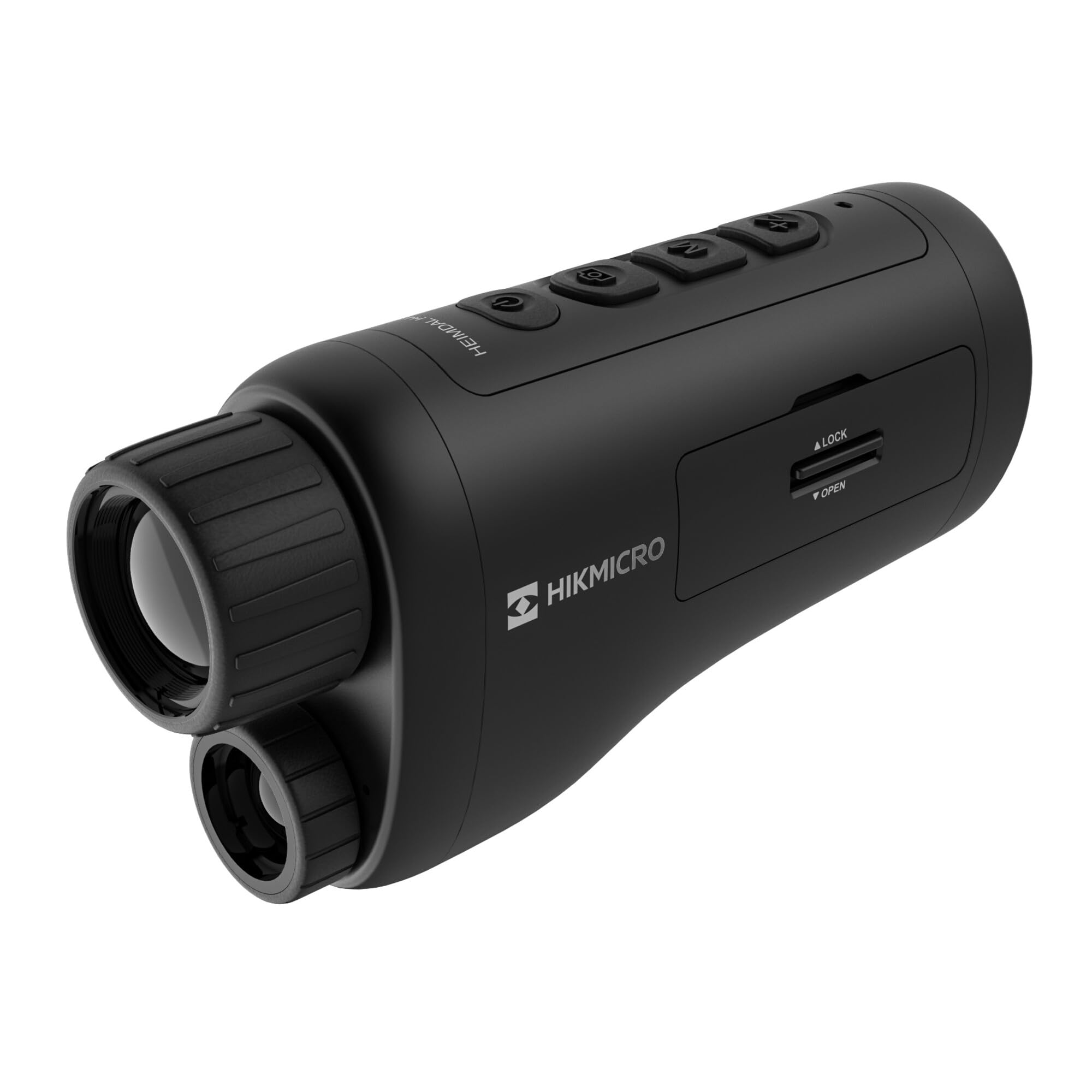
Аголен view of the HIKMICRO HEIMDAL H4D monocular, showing its compact, ergonomic design and the main lens.
Контроли и копчиња

Врвот view of the monocular showing the power button, photo/video record button, mode button, and zoom/IR adjustment buttons.
Lenses and Focus

Предна страна view displaying the objective lens and the integrated infrared illuminator.
Оддел за батерии

Страна view showing the battery compartment with 'LOCK' and 'OPEN' indicators.
3. Поставување
Инсталација на батерија
- Locate the battery compartment on the side of the device.
- Slide the lock mechanism to the 'OPEN' position.
- Вметнете ја батеријата што може да се полни, внимавајќи на точниот поларитет.
- Close the compartment and slide the lock mechanism to the 'LOCK' position.
Полнење на батеријата
Connect the device to a power source using the provided USB-C cable. The charging indicator will show the charging status.
Почетно вклучување
Press and hold the power button (usually marked with Ⓘ) until the HIKMICRO logo appears on the display.
4. Упатства за работа
Вклучување/исклучување
- Вклучување: Притиснете и задржете го копчето за вклучување приближно 3 секунди.
- Исклучено: Притиснете го и држете го копчето за вклучување приближно 3 секунди додека уредот не се исклучи.
Прилагодување на фокусот
Rotate the focus ring on the objective lens to achieve a clear image of your target.
Избор на режим
Press the 'M' (Mode) button to cycle through observation modes: Day, Night, Auto, and Defog.
Zoom and IR Adjustment
Use the '+' and '-' buttons to adjust the digital zoom level. These buttons also control the intensity of the infrared illuminator in night mode.
Photo and Video Recording
- Фотографирајте: Press the photo/video button (usually marked with 📷) once to capture an image.
- Снимајте видео: Press and hold the photo/video button to start recording. Press again to stop.
Connecting to HIKMICRO Sight App
Download the HIKMICRO Sight app from your device's app store. Follow the in-app instructions to connect your monocular for live view, remote control, and media management.
5. Одржување
Чистење
- Use the provided dust cloth or a soft, lint-free cloth to clean the lenses.
- For stubborn dirt, use a lens cleaning solution specifically designed for optics.
- Избришете го телото на уредот со мека, дamp крпа. Не користете абразивни средства за чистење или растворувачи.
Складирање
- Store the monocular in its protective bag in a cool, dry place when not in use.
- Отстранете ја батеријата ако уредот нема да се користи подолг период.
Нега на батерии
- Редовно полнете ја батеријата, дури и ако не ја користите често, за да го одржите нејзиниот век на траење.
- Избегнувајте екстремни температури за време на полнењето и складирањето.
6 Смена на проблеми
Заеднички прашања и решенија
| Проблем | Можна причина | Решение |
|---|---|---|
| Уредот не се вклучува. | Батеријата е празна или неправилно инсталирана. | Наполнете ја батеријата. Осигурајте се дека батеријата е вметната со правилен поларитет. |
| Сликата е заматена. | Focus is not adjusted. | Rotate the focus ring on the objective lens until the image is clear. |
| Лош квалитет на сликата во темница. | IR illuminator is off or set to low intensity. | Activate the IR illuminator or increase its intensity using the '+' button. Ensure you are in Night mode. |
| Cannot connect to HIKMICRO Sight app. | Bluetooth/Wi-Fi is off on device or phone, or app is not updated. | Ensure Bluetooth/Wi-Fi is enabled on both devices. Restart the app and monocular. Check for app updates. |
| Уредот се замрзнува или не реагира. | Привремен софтверски дефект. | Извршете меко ресетирање со држење на копчето за вклучување додека уредот не се рестартира. Ако проблемот продолжи, контактирајте ја поддршката. |
7. Спецификации
| Карактеристика | Детал |
|---|---|
| Резолуција на сензорот | 2560 x 1440 |
| Тип на дисплеј | AMOLED |
| Резолуција на екранот | 454 x 454 |
| Големина на приказ | 1.39 инчи (3.5 см) |
| Инфрацрвен илуминатор | Integrated 850 nm |
| Опсег на откривање | До 200 метри |
| Складирање | 32 GB EMMC (internal) |
| Траење на батеријата | More than 4 hours (replaceable, rechargeable) |
| Водоотпорен рејтинг | IP67 |
| Димензии | 153 мм x 50 мм x 80 мм (6.02" x 1.97" x 3.15") |
| Тежина | 375 грама (0.83 фунти) |
| Материјал | Пластика |
| Компатибилни уреди | Rifle, Compound Bow |
| Тип на монтирање | Монтирање Picatinny |
| Sport Use | Campинг, планинарење |
| Боја | Бело |
8. Гаранција и поддршка
HIKMICRO products are covered by a limited warranty. For detailed warranty information, please refer to the official HIKMICRO webсајт или контактирајте со вашиот локален продавач.
For technical support, troubleshooting assistance, or service inquiries, please visit the official HIKMICRO support page or contact their customer service department.
Службен Webсајт: www.hikmicrotech.com