1. Вовед
This manual provides comprehensive instructions for the installation, operation, and maintenance of the Planet GPN-100 GPON SFU ONT (Optical Network Terminal). The GPN-100 is designed to deliver high-speed fiber optic connectivity, offering efficient GPON solutions for FTTx and multi-service networks. Please read this manual thoroughly before using the device to ensure proper setup and optimal performance.
2. Содржина на пакетот
Verify that all items listed below are present in your package. If any item is missing or damaged, please contact your vendor.
- 1 x Planet GPN-100 GPON SFU Optical Network Terminal with 1 Gb Ethernet Port
- 1 x Power Adapter (specifics may vary by region)
- 1 x Водич за брза инсталација
3. Производот завршиview
The Planet GPN-100 is a compact and efficient GPON SFU ONT. It features one GPON port for fiber optic connection and one Gigabit Ethernet RJ45 interface for local network connectivity. Its plug-and-play design simplifies installation and maintenance.
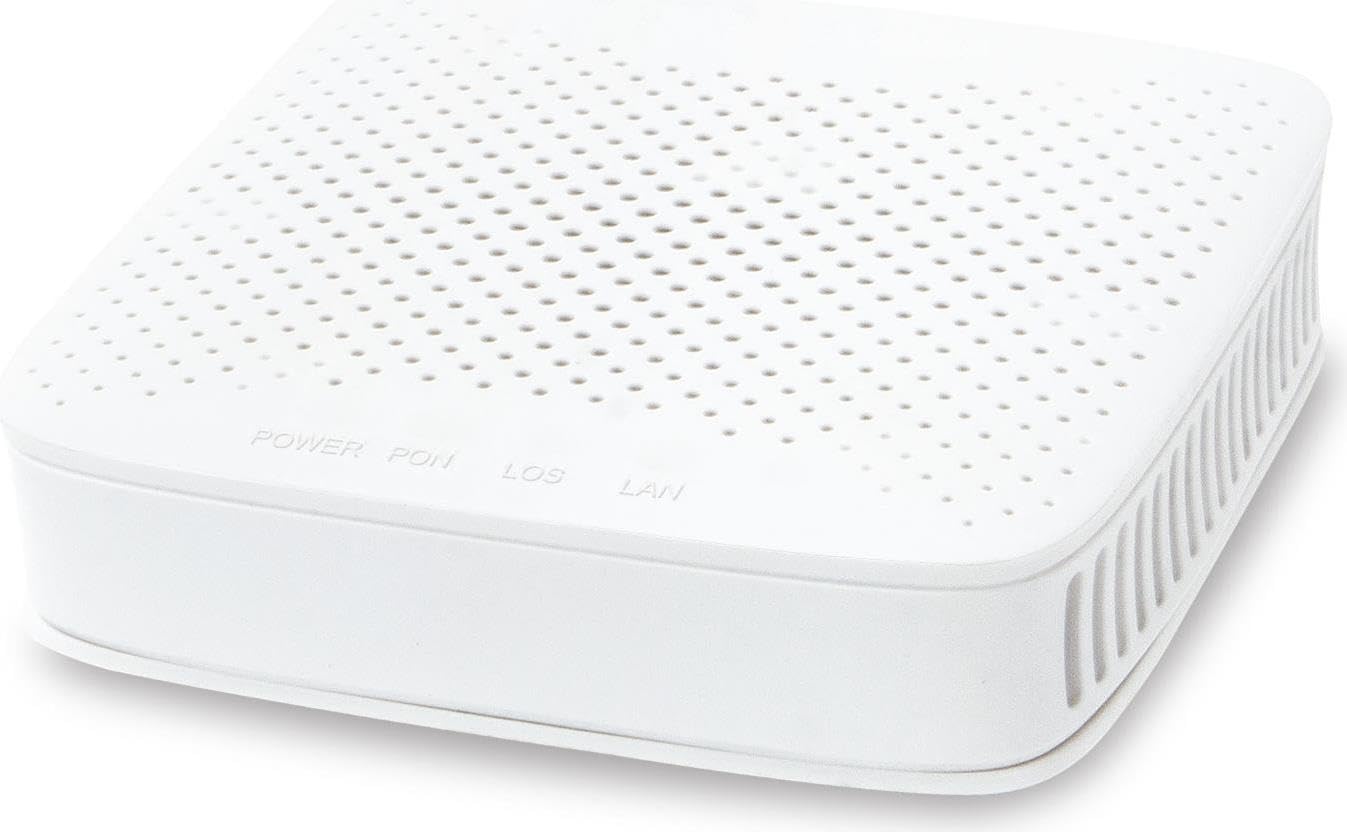
Слика 1: Предна страна view of the Planet GPN-100 GPON SFU ONT. This image shows the compact white casing of the device, typically featuring indicator lights and port labels.
Клучни карактеристики:
- Supports PON downstream rates of 2.5 Gbps and upstream rates of 1.25 Gbps.
- Equipped with one Gigabit Ethernet RJ45 port.
- Advanced DBA (Dynamic Bandwidth Allocation) for rate limit and accurate bandwidth control.
- Green networking technology for low power consumption.
- Cost-effective passive optical network solution.
LED индикатори:
The device features several LED indicators to show its operational status. Refer to the quick installation guide for a detailed description of each LED's function (e.g., Power, PON, LOS, LAN).
4. Поставување
Follow these steps to set up your Planet GPN-100 GPON SFU ONT:
- Поставување: Choose a stable, flat surface for the device, away from direct sunlight, heat sources, and moisture. Ensure adequate ventilation.
- Поврзете го оптичкиот кабел: Carefully connect the fiber optic cable from your GPON network to the GPON port on the GPN-100. Ensure the connector is clean and properly seated. (Caution: Do not look directly into the fiber optic port when the device is powered on, as it may emit invisible laser radiation.)
- Поврзете го етернет кабелот: Connect one end of an Ethernet cable to the Gigabit Ethernet RJ45 port on the GPN-100 and the other end to your computer, router, or network switch.
- Поврзете адаптер за напојување: Plug the power adapter into the DC power input port on the GPN-100, then plug the other end into a standard electrical outlet.
- Вклучување: The device will automatically power on. Observe the LED indicators. The Power LED should illuminate, and the PON LED should eventually turn solid, indicating a successful connection to the OLT.
5. Упатства за работа
Once the GPN-100 is successfully set up and connected to the GPON network, it operates automatically. It acts as a bridge between the fiber optic network and your local Ethernet devices.
- Мрежно поврзување: Your connected devices (computer, router) should automatically obtain an IP address from your network provider's DHCP server via the GPN-100.
- Мониторинг на статус: Monitor the LED indicators on the front panel to check the device's status. A solid PON LED indicates a stable GPON connection, and a blinking LAN LED indicates data activity.
- Циклус на напојување: If you experience network issues, a simple power cycle (unplugging the power adapter, waiting 10 seconds, and plugging it back in) can often resolve temporary problems.
6. Одржување
To ensure the longevity and optimal performance of your GPN-100, follow these maintenance guidelines:
- Чистење: Користете мека, сува крпа за чистење на надворешноста на уредот. Не користете течни или аеросолни средства за чистење.
- Вентилација: Ensure that the ventilation openings are not blocked. Do not place the device in an enclosed space without airflow.
- Управување со кабли: Keep cables neatly organized and avoid bending fiber optic cables sharply, as this can damage them.
- Ажурирања на фирмверот: Firmware updates are typically managed by your service provider. Do not attempt to update firmware yourself unless instructed by your provider.
7 Смена на проблеми
If you encounter issues with your GPN-100, refer to the following common problems and solutions:
| Проблем | Можна причина | Решение |
|---|---|---|
| Нема ЛЕД за напојување | Адаптерот за напојување не е поврзан или е неисправен. | Check power connections. Ensure the power outlet is functional. Try a different outlet. |
| LOS LED is ON (Red) | Loss of optical signal. Fiber optic cable disconnected or damaged. | Check the fiber optic cable connection. Ensure it is securely plugged into the GPON port. Do not attempt to repair damaged fiber optic cables; contact your service provider. |
| PON LED is OFF or Blinking | No connection to OLT or OLT registration issue. | Ensure the fiber optic cable is properly connected. Wait a few minutes for the device to register with the OLT. If the issue persists, contact your service provider. |
| No Internet/Network Access | LAN cable issue, IP address conflict, or service provider issue. | Check the Ethernet cable connection. Power cycle the GPN-100 and your connected router/computer. Verify your service provider's network status. |
If the problem persists after attempting these solutions, please contact your internet service provider or Planet technical support for further assistance.
8. Спецификации
| Карактеристика | Детал |
|---|---|
| Број на модел | GPN-100 |
| GPON интерфејс | 1 x SC/APC GPON Port |
| Етернет интерфејс | 1 x Gigabit Ethernet (10/100/1000BASE-T) RJ45 Port |
| PON Downstream Rate | 2.5 Gbps |
| PON Upstream Rate | 1.25 Gbps |
| Димензии (Д x Ш x В) | 3.15 x 2.95 x 0.94 инчи (80 x 75 x 24 мм) |
| Тежина | 5.6 унци (158.76 g) |
| Напојување | External DC Power Adapter (e.g., 12V/0.5A) |
| Работна температура | 0°C до 40°C (32°F до 104°F) |
| Температура на складирање | -40°C до 70°C (-40°F до 158°F) |
| Влажност | 10% до 90% некондензирачки |
| Производител | Planet Technology Corporation |
| Датум прв на располагање | 2 август 2023 година |
9. Гаранција и поддршка
Информации за гаранцијата: This product comes with a standard manufacturer's warranty. Please refer to the warranty card included in your package or visit the official Planet webстраница за детални услови за гаранција. Чувајте ја сметката како доказ за купување за гаранциски барања.
Техничка поддршка: For technical assistance, product inquiries, or troubleshooting beyond the scope of this manual, please contact your internet service provider or Planet technical support. You can typically find support contact information on the Planet official webстраницата или во документацијата за вашиот производ.
Онлајн ресурси: Посетете го Технологија на планетата webсајт for the latest product information, drivers, and FAQs.


