1. Вовед
This manual provides essential instructions for the proper installation, operation, and maintenance of your Interphone Cellularline U-Com 6R Motorcycle Bluetooth Intercom. Please read this manual thoroughly before using the device to ensure optimal performance and safety.
The U-Com 6R is designed to enhance your riding experience with reliable Bluetooth 5.2 communication, allowing connection with up to two riders over a distance of 1 kilometer. It offers compatibility with various OEM and GPS systems and features a long-lasting, replaceable battery.
2. Информации за безбедност
Always prioritize safety while riding. Operating the intercom should not distract you from road conditions or traffic. Ensure the device is securely mounted and all cables are properly routed to avoid interference with helmet functionality or rider movement.
- Не обидувајте се да го расклопите или менувате уредот.
- Чувајте го уредот подалеку од екстремни температури и директна сончева светлина.
- Осигурајте се дека капакот на приклучокот за полнење е безбедно затворен кога не се полни за да се одржи водоотпорноста.
- Adjust volume to a safe level that allows you to hear ambient traffic sounds.
3. Содржина на пакетот
Проверете дали сите артикли наведени подолу се вклучени во вашиот пакет:
- U-Com 6R Main Unit
- Helmet Mounting Bracket (Clip and Adhesive options)
- Сет за звучници
- Бум микрофон
- Iredичен микрофон
- USB-C кабел за полнење
- Велкро влошки за звучници и микрофони
- Сунѓери за микрофон
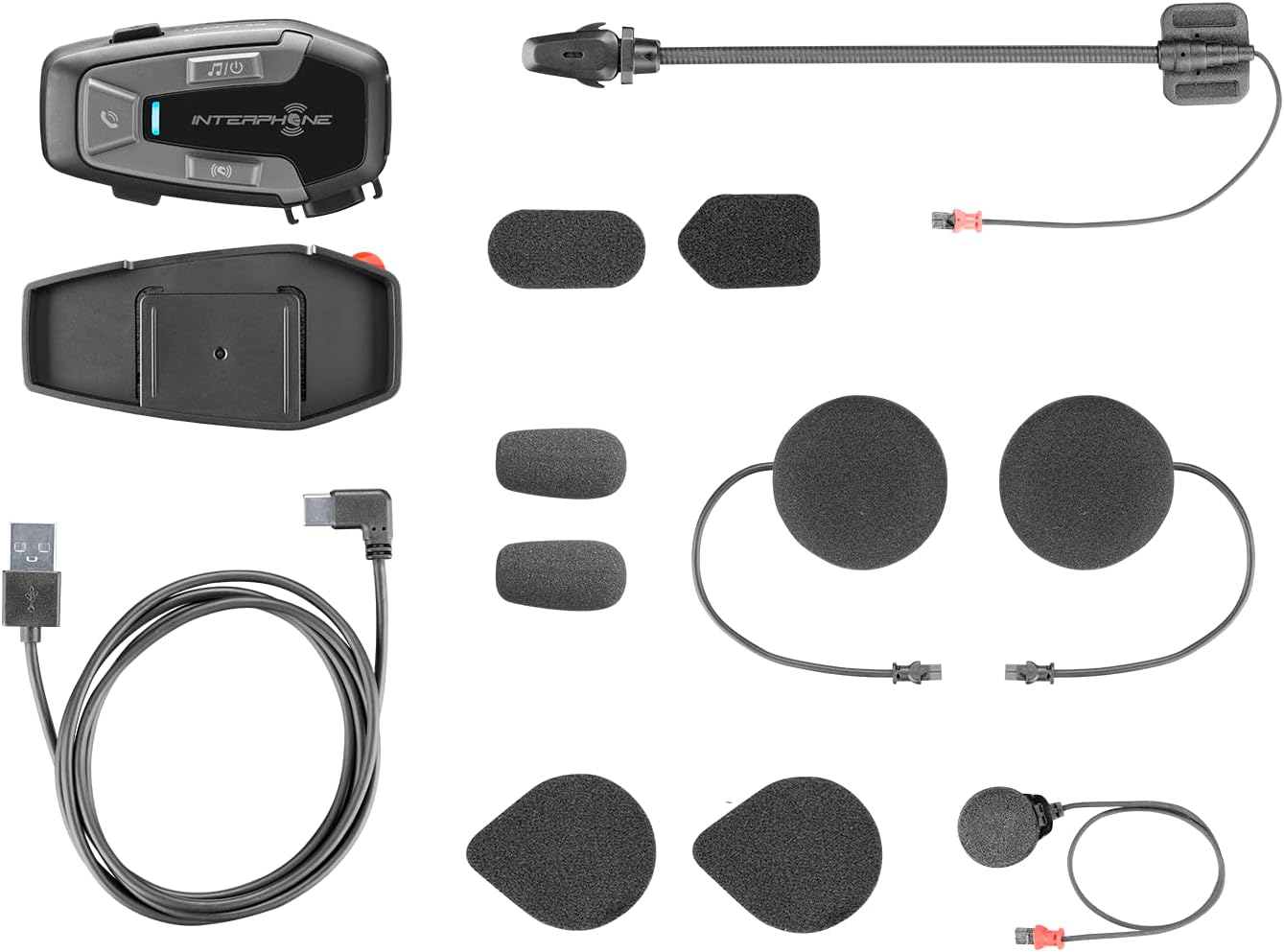
Слика 3.1: All components included in the Interphone U-Com 6R package. This image displays the main intercom unit, mounting accessories, speakers, two types of microphones (boom and wired), and the USB-C charging cable.
4. Уредот завршиview
4.1. Контроли на главната единица

Слика 4.1: Предна страна view of the Interphone U-Com 6R main unit. This image highlights the primary control buttons for music, call management, and intercom functions, along with the LED indicator.
- Музичко копче: Контролира репродукција на музика (репродукција/пауза, прескокнување песни).
- Копче за повик: Manages phone calls (answer/end, voice assistant).
- Копче за домофон: Иницира и управува со интерфонски разговори.
- LED индикатор: Displays device status (pairing, charging, power).
4.2. Порти и конектори

Слика 4.2: Страна view of the Interphone U-Com 6R unit. This image clearly shows the USB-C charging port and the speaker/microphone connector.
- USB-C порта: Се користи за полнење на уредот.
- Speaker/Microphone Connector: Connects the speaker and microphone assembly to the main unit.
5. Инсталација
5.1. Монтирање на главната единица
The U-Com 6R can be mounted to your helmet using either the clip mount or the adhesive mount.
- Монтирање на клип: Slide the clip between the helmet shell and the inner padding on the left side. Ensure it is securely fastened.
- Леплива монтажа: Clean the desired mounting area on the left side of your helmet. Peel off the protective film from the 3M adhesive on the bracket and firmly press it onto the helmet for at least 30 seconds. Allow 24 hours for the adhesive to fully cure before use.
Слика 5.1: Adhesive mounting bracket for the Interphone U-Com 6R. This image shows the bracket with the 3M adhesive backing, ready for attachment to a helmet.
5.2. Инсталирање на звучници и микрофон
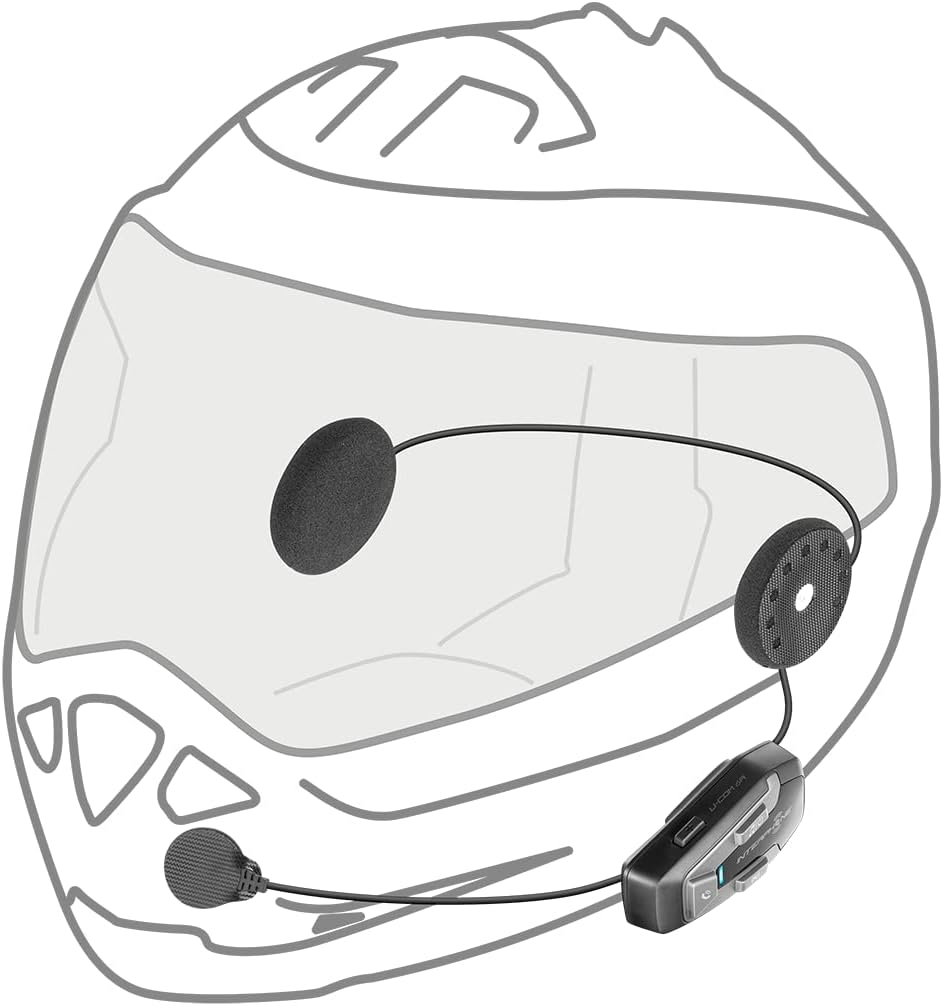
Position the speakers inside the helmet's ear pockets. The microphone should be placed in front of your mouth, ensuring clear voice pickup.
- Attach the speakers to the helmet's interior using the provided Velcro pads. Ensure the speaker with the shorter wire is for the left ear and the longer wire for the right.
- Изберете го соодветниот микрофон за вашиот тип на кацига:
- Бум микрофон: Ideal for open-face or modular helmets. Attach it to the inside of the helmet near your mouth.
- Жичен микрофон: Suitable for full-face helmets. Attach it to the inside of the chin bar, close to your mouth.
- Connect the speaker and microphone assembly to the main U-Com 6R unit.
- Tuck all wires neatly under the helmet padding to prevent discomfort or entanglement.

Слика 5.2: Installation of speakers and wired microphone inside a full-face helmet. This diagram illustrates the placement of the flat speakers in the ear recesses and the wired microphone near the chin bar.

Слика 5.3: Installation of speakers and boom microphone inside an open-face helmet. This diagram shows the placement of speakers and the flexible boom microphone extending towards the rider's mouth.
6. Поставување и основно работење
6.1. Полнење на уредот
Before first use, fully charge the U-Com 6R. Connect the supplied USB-C cable to the charging port on the unit and to a USB power source. The LED indicator will show charging status and turn off when fully charged. A full charge provides approximately 15 hours of talk time.
6.2. Вклучување/исклучување
- Вклучување: Press and hold the Music button for 3 seconds. The LED will flash blue.
- Исклучено: Press and hold the Music button for 5 seconds. The LED will turn red and then off.
6.3. Bluetooth спарување со мобилен телефон
- With the U-Com 6R powered off, press and hold the Call button for 5 seconds until the LED flashes red and blue alternately, indicating pairing mode.
- On your mobile phone, enable Bluetooth and search for new devices.
- Select "Interphone U-Com 6R" from the list of available devices.
- Once paired, the LED on the U-Com 6R will flash blue periodically.
6.4. Intercom Pairing (Up to 2 Riders)
The U-Com 6R supports communication with one other rider. For Mesh 2.0 technology with multiple riders, refer to the advanced features section or the full online manual.
- Ensure both U-Com 6R units are powered on and not connected to other devices.
- On both units, press and hold the Intercom button for 5 seconds until the LED flashes red and blue alternately.
- The units will automatically search and pair with each other. Once connected, the LEDs will flash blue.
- To initiate an intercom conversation, briefly press the Intercom button on either unit.
7. Операција
7.1. Телефонски повици
- Одговори на повикот: Накратко притиснете го копчето Повик.
- Крај на повикот: Накратко притиснете го копчето Повик.
- Одбијте го повикот: Притиснете и задржете го копчето Повик 2 секунди.
- Гласовен асистент: Briefly press the Call button twice to activate your phone's voice assistant (Siri, Google Assistant).
7.2. Репродукција на музика
- Пушти/Пауза: Briefly press the Music button.
- Следна песна: Press the Music button twice.
- Претходна песна: Press the Music button three times.
7.3. Прилагодување на јачината на звукот
The U-Com 6R features dedicated buttons for volume control, typically integrated with the main control panel. Refer to the device overview (Figure 4.1) for button locations.
- Зголемете ја јачината на звукот: Press the 'Volume Up' button.
- Намалување на јачината на звукот: Press the 'Volume Down' button.
7.4. GPS and OEM System Compatibility
The U-Com 6R is designed with Bluetooth 5.2 to ensure broad compatibility with various GPS navigation devices and original equipment manufacturer (OEM) systems found on motorcycles. Pair these devices as you would a mobile phone, following their respective pairing instructions.
8. Одржување
- Чистење: Користете мека, гamp cloth to clean the unit. Do not use abrasive cleaners or solvents.
- Отпорност на вода: The U-Com 6R is waterproof. However, ensure the USB-C port cover is fully sealed to maintain its water-resistant properties.
- Нега на батеријата: For optimal battery life, avoid fully discharging the battery frequently. Charge the device regularly, especially if it will be stored for extended periods. The integrated battery is replaceable, extending the product's lifespan.
- Складирање: Чувајте го уредот на ладно и суво место кога не го користите.
9 Смена на проблеми
| Проблем | Можна причина | Решение |
|---|---|---|
| Уредот не се вклучува. | Слаба батерија. | Наполнете го уредот целосно. |
| Не може да се спари со телефон/интерфон. | Device not in pairing mode; distance too far; interference. | Ensure device is in pairing mode (flashing red/blue). Move closer to the other device. Turn off other Bluetooth devices. |
| Нема аудио или аудио квалитетот е слаб. | Volume too low; speakers incorrectly positioned; loose connection. | Increase volume. Check speaker placement and connections. Ensure microphone is correctly positioned. |
| Интерфонската врска често се прекинува. | Out of range; environmental interference. | Stay within 1 km range. Avoid areas with strong radio interference. |
9.1. Фабрички ресетирање
If issues persist, a factory reset may resolve them. Consult the full online manual or contact customer support for specific instructions on performing a factory reset for the U-Com 6R.
10. Спецификации
| Карактеристика | Детал |
|---|---|
| Број на модел | INTERPHOUCOM6R |
| Bluetooth верзија | 5.2 |
| Опсег на домофон | Up to 1 Kilometer (between 2 riders) |
| Време за разговор | Приближно 15 часа |
| Тип на батерија | Lithium Polymer (included, replaceable) |
| Поврзување | Bluetooth, Mesh 2.0 (compatible with Sena) |
| Отпорност на вода | Да |
| Тежина | 0.36 килограми (12.7 унци) |
| Димензии | 9.09 x 5.83 x 2.64 инчи (пакет) |
| Компатибилност | GPS and OEM systems, most other brands on the market |
11. Гаранција и поддршка
Interphone products are manufactured to high-quality standards. For warranty information, please refer to the warranty card included with your product or visit the official Interphone website. For technical support or further assistance, please contact Interphone customer service through their official channels.
Можете да најдете повеќе информации и ресурси за поддршка со посета на Интерфон продавница на Амазон.


