1. Вовед
This user manual provides essential information for the safe and efficient operation of your HYCHIKA 3.6V Cordless Electric Rechargeable Screwdriver Drill Set. Please read this manual thoroughly before first use and keep it for future reference.
The HYCHIKA 3.6V Cordless Electric Screwdriver is designed for various screwing and light drilling tasks around the home. It features a maximum torque of 6 N-m, a 6.35 mm quick-change chuck, and a versatile design that allows for both pistol and straight grip configurations.
2. Инструкции за безбедност
Секогаш почитувајте ги основните безбедносни мерки на претпазливост при употреба на електрични алати за да го намалите ризикот од пожар, електричен удар и телесни повреди.
- Безбедност на работната површина: Одржувајте го вашето работно место чисто и добро осветлено. Нередните или темните места предизвикуваат несреќи. Не ракувајте со електрични алати во експлозивни атмосфери, како на пример во присуство на запаливи течности, гасови или прашина.
- Електрична безбедност: Избегнувајте контакт на телото со заземјени површини како што се цевки, радијатори, шпорети и фрижидери. Не изложувајте ги електричните алати на дожд или влажни услови.
- Лична безбедност: Always wear eye protection. Use safety glasses, goggles, or a face shield. Wear hearing protection when operating noisy tools. Dress properly; avoid loose clothing or jewelry.
- Употреба и нега на алатката: Не го притискајте електричниот алат. Користете го соодветниот електричен алат за вашата намена. Исклучете го приклучокот од изворот на напојување и/или извадете го батерискиот пакет пред да правите какви било прилагодувања, да менувате додатоци или да складирате електричен алат.
- Употреба и грижа за батеријата: Полнете само со полначот наведен од производителот. Не користете батерии со други електрични алатки. Кога батеријата не е во употреба, држете ја подалеку од други метални предмети.
3. Содржина на пакетот
Проверете дали сите артикли наведени подолу се вклучени во вашиот пакет. Доколку некои артикли недостасуваат или се оштетени, ве молиме контактирајте ја службата за корисници.
- 1 x HYCHIKA 3.6V Cordless Screwdriver
- 19 x битови од шрафцигер
- 1 x Продолжна лента
- 1 x Адаптер за полнење
- 1 x Упатство за употреба

Figure 3.1: Contents of the HYCHIKA 3.6V Cordless Screwdriver package, including the screwdriver, various bits, and charging adapter.
4. Карактеристики и компоненти на производот
Familiarize yourself with the different parts of your cordless screwdriver.

Figure 4.1: Key components of the screwdriver, including the magnetic chuck, PUSH button, front LED light, On/Off switch, LED charger indicator, 3.5mm charger port, and forward & reverse button.
- Magnetic Chuck: 1/4 inch (6.35mm) quick-change chuck for easy bit installation and removal.
- Предно LED светло: Illuminates the work area for improved visibility in dark environments.
- Прекинувач за вклучување/исклучување: Activates and deactivates the screwdriver.
- Forward & Reverse Button: Controls the rotation direction for screwing and unscrewing.
- LED Charger Indicator: Provides status of battery charging.
- 3.5mm Charger Port: Connection point for the charging adapter.
- Притискање на копчето: Used to adjust the grip configuration from pistol to straight.
5. Поставување
5.1 Полнење на батеријата
The screwdriver is powered by a 3.6V 2000 mAh Lithium-Ion battery. Before first use, fully charge the battery.
- Connect the charging adapter to the 3.5mm charger port on the screwdriver.
- Plug the charging adapter into a standard electrical outlet.
- The LED charger indicator will illuminate during charging. Once fully charged, the indicator may change color or turn off depending on the model.
- Исклучете го полначот откако ќе заврши полнењето.

Figure 5.1: The screwdriver connected to its charging adapter, indicating a full charge.
The screwdriver is designed to maintain full power output even when the battery is low, ensuring consistent performance until the battery is depleted.
5.2 Инсталирање на врвови за шрафцигери
The screwdriver features a 1/4 inch (6.35mm) magnetic quick-change chuck for easy bit installation.
- Изберете го соодветниот дел за шрафцигер за вашата задача.
- Insert the bit into the magnetic chuck until it is securely seated. The magnetic chuck will hold the bit firmly in place.
- To remove a bit, simply pull it out of the chuck. Bits with grooves are designed for easier removal.

Figure 5.2: Visual guide for inserting a bit into the magnetic chuck and removing it.
6. Упатства за работа
6.1 Adjusting Grip Configuration
The screwdriver can be used in two grip configurations: pistol grip or straight grip, for enhanced versatility and comfort.
- To change the grip, press and hold the "PUSH" button located at the top of the screwdriver.
- While holding the button, rotate the handle ninety degrees to switch between pistol and straight configurations.
- Release the "PUSH" button once the desired configuration is achieved. The handle will lock into place.
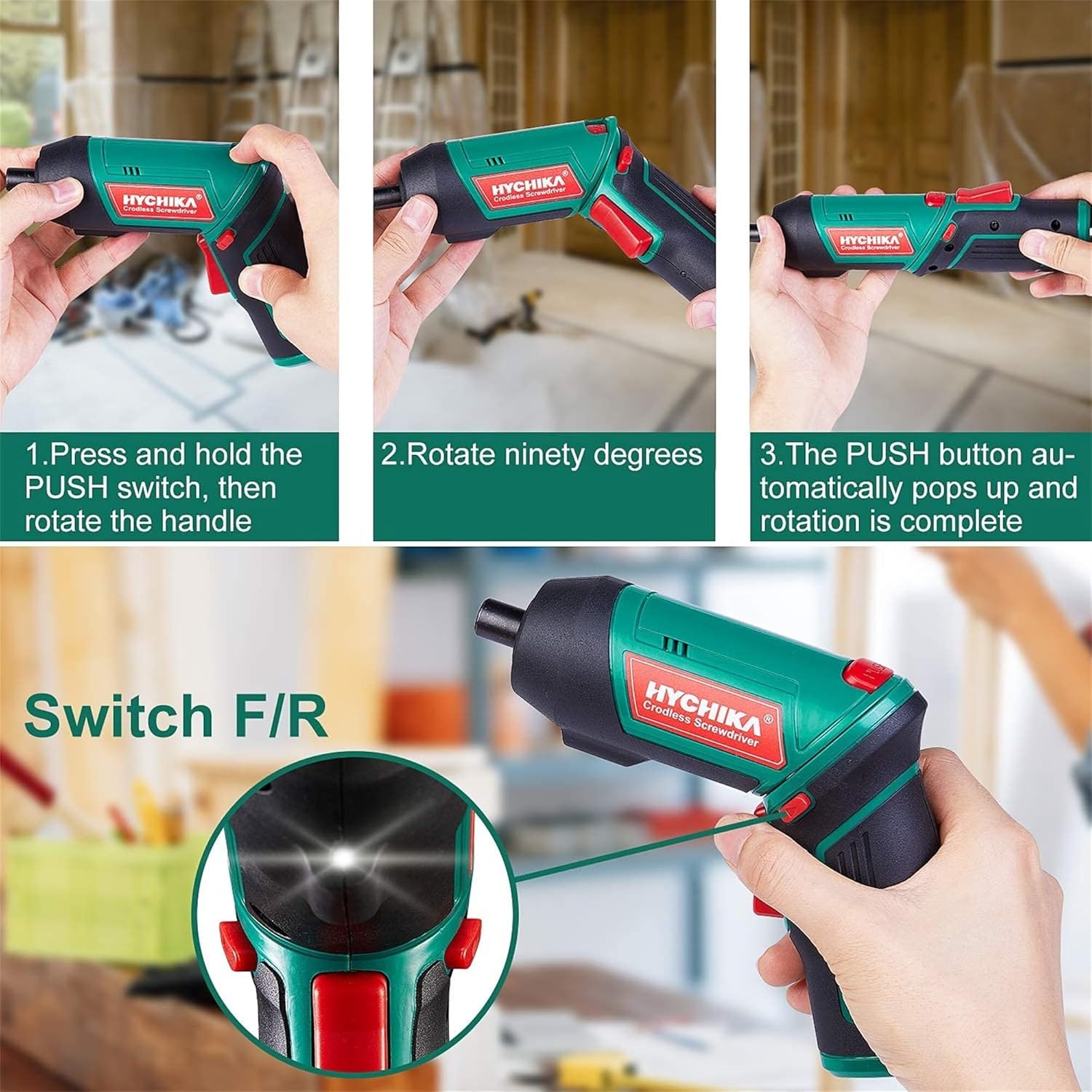
Figure 6.1: Demonstrates the process of transforming the screwdriver's grip by pressing the PUSH button and rotating the handle.
6.2 Forward and Reverse Operation
The forward/reverse button controls the direction of rotation for screwing and unscrewing.
- To drive screws (forward rotation), push the forward/reverse button to the left (when viewод задниот дел на алатот).
- To remove screws (reverse rotation), push the forward/reverse button to the right.
- When the button is in the center position, the tool is locked, preventing accidental activation.
6.3 Користење на LED работното светло
The built-in LED light automatically illuminates when the screwdriver is in operation, providing visibility in dimly lit areas.

Figure 6.2: The integrated LED light provides clear illumination for working in dark environments.
7. Одржување
Regular maintenance ensures the longevity and optimal performance of your screwdriver.
- Чистење: Одржувајте ги отворите за вентилација чисти и без прашина. Користете мека,amp крпа за чистење на алатката casing. Не користете груби хемикалии или абразивни средства за чистење.
- Грижа за битовите: Clean screwdriver bits after use. Store them in the provided case to prevent loss and damage.
- Складирање на батеријата: If storing the tool for an extended period, ensure the battery is partially charged (around 50%) and store it in a cool, dry place. Recharge the battery every 3-6 months to maintain its health.
- Генерална инспекција: Periodically check for any loose screws, damaged cords, or worn parts. Do not use the tool if any damage is observed.
8 Смена на проблеми
This section addresses common issues you might encounter with your screwdriver.
| Проблем | Можна причина | Решение |
|---|---|---|
| Шрафцигерот не се вклучува. | Батеријата е испразнета. Forward/Reverse switch is in the center (locked) position. | Полнете ја батеријата целосно. Притиснете го прекинувачот напред/назад налево или надесно. |
| Screwdriver loses power quickly. | Батеријата не е целосно наполнета. Battery life degraded. | Пред употреба, проверете дали батеријата е целосно наполнета. If battery life is significantly reduced, contact customer support for replacement options. |
| Bits are not held securely in the chuck. | Bit is not fully inserted. Chuck is dirty or damaged. | Push the bit firmly into the chuck until it clicks into place. Clean the chuck area. If damage is visible, contact customer support. |
Доколку проблемот продолжи и по обидот за овие решенија, контактирајте ја службата за корисничка поддршка.
9. Спецификации
| Карактеристика | Спецификација |
|---|---|
| Бренд | Overstock (HYCHIKA) |
| Број на модел | c131a012-0da9-4306-aeab-b1d9ff5cd4b7 |
| Voltage | 3.6 волти |
| Извор на енергија | Напојува со батерија |
| Брзина | 180 вртежи во минута |
| Точка Вртежен момент | 6 Newton Meters (6 N-m) |
| Тип на батерија | Литиум Јон |
| Капацитет на батеријата | 2000 mAh |
| Големина на Чак | 1/4 инчи (6.35 мм) |
| Материјал | Пластика, гума |
| Боја | Зелена |
| UPC | 616859793583 |
10. Гаранција и поддршка
Overstock offers lifetime after-sales service for this product. For any questions, concerns, or technical assistance, please contact our customer support team.
Please have your model number (c131a012-0da9-4306-aeab-b1d9ff5cd4b7) and purchase information ready when contacting support.


