1. Вовед
This manual provides comprehensive instructions for the Vrabocry LM091 RGBCCT 4 Zone Touch RF Remote Control. This remote is designed to control RGBCCT LED strips and bulbs, offering intuitive control over color, brightness, and color temperature. Please read this manual thoroughly before use to ensure proper operation and to maximize the product's lifespan.
2. Производот завршиview
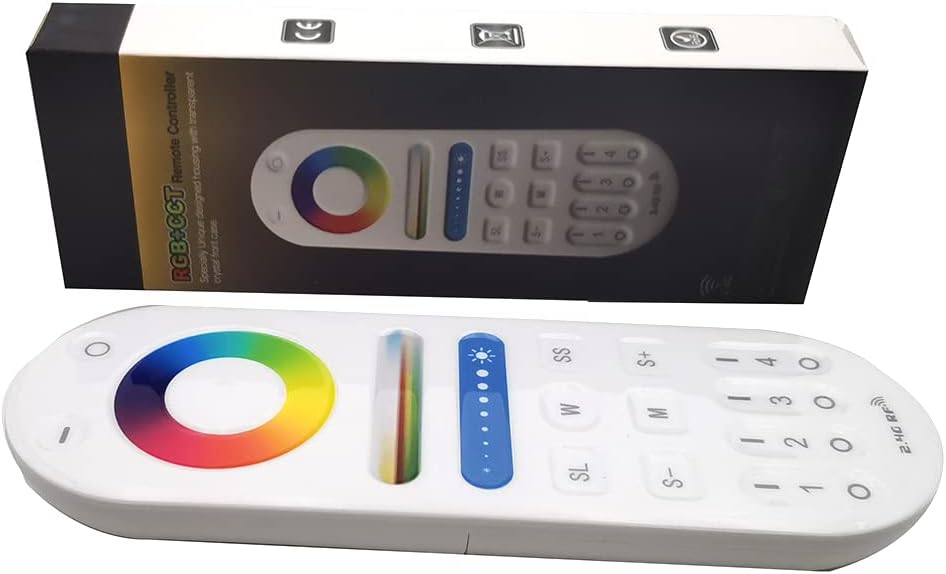
Image 1: The Vrabocry LM091 RGBCCT remote control shown alongside its product packaging.
2.1 Клучни карактеристики
- RGBCCT Control: Capable of controlling RGBCCT 6-pin (V+, R, G, B, WW, CW) LED strips and bulbs.
- 4-зонска контрола: Manage up to four distinct lighting zones independently or simultaneously.
- Touch Color Ring: Intuitive color selection via a sensitive touch color ring.
- Прилагодување на осветленоста и температурата на бојата: Fine-tune lighting intensity and white light temperature (warm white to cool white).
- 2.4GHz RF Transmission: Reliable wireless control with a range of up to 98 feet (30 meters).
- Компатибилност: Works with various Mi-Boxer/Mi-Light RGBCCT series controllers such as WL5, LS2, FUT045, FUT039, and others.
- Ергономски дизајн: Удобно за држење и ракување.
2.2 Распоред на далечински управувач

Слика 2: напред view of the LM091 remote control, showing the touch color ring, brightness slider, and various control buttons.
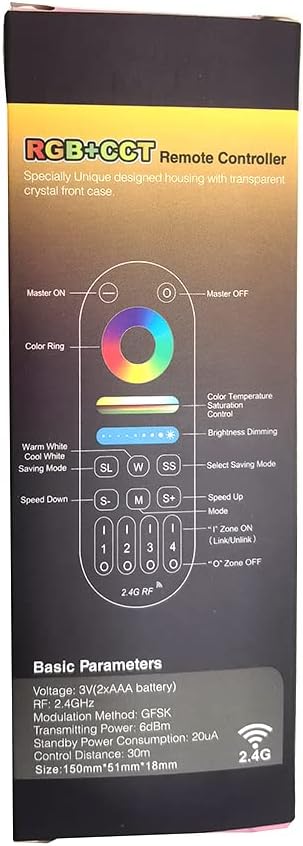
Image 3: A detailed diagram illustrating the functions of each button on the LM091 remote control, as depicted on its packaging.
3. Поставување
3.1 Инсталација на батерија
- Лоцирајте го капакот на преградата за батерии на задниот дел од далечинскиот управувач.
- Отворете го капакот.
- Вметнете две AAA батерии, внимавајќи на точниот поларитет (+ и -).
- Заменете го капакот на преградата за батерии.

Image 4: The back of the LM091 remote control with the battery compartment open, showing where to insert AAA batteries.
3.2 Спарување на далечинскиот управувач
To control your LED lights, the remote control must be paired with a compatible RGBCCT controller (e.g., Mi-Boxer/Mi-Light series). The pairing process typically involves the following steps:
- Ensure your LED controller is powered off.
- Power on the LED controller. Within 3 seconds of powering on, press the desired zone number button (1, 2, 3, or 4) on the LM091 remote control three times.
- The connected LED lights should flash three times to indicate successful pairing.
- If pairing fails, power off the controller and repeat the process.
Непар: To unpair, power on the LED controller. Within 3 seconds, press the desired zone number button five times. The lights should flash six times to confirm unpairing.
4. Упатства за работа
The LM091 remote control allows for precise adjustment of your RGBCCT LED lighting. Refer to Image 3 for button identification.
- Главно ВКЛУЧЕНО/ИСКЛУЧЕНО: Press the 'Master ON' button (top right) to turn all paired lights on. Press the 'Master OFF' button (top left) to turn all paired lights off.
- Избор на зона: Press buttons '1', '2', '3', or '4' to select a specific lighting zone. Once a zone is selected, all subsequent commands will apply only to that zone. To control all zones simultaneously, press the 'Master ON' button.
- Прстен во боја: Touch the color ring to select any static color.
- Контрола на температурата на бојата: Use the 'W' (Warm White) and 'SS' (Cool White) buttons to adjust the color temperature of the white light. This function requires a CCT (Dual White) 3-wire LED strip (V+, WW, CW) or an RGBCCT strip.
- Затемнување на осветленоста: Use the brightness slider to increase or decrease the light intensity. The 'S+' and 'S-' buttons can also be used for fine-tuning brightness.
- Избор на режим (M): Press the 'M' button to cycle through various dynamic lighting modes.
- Speed Adjustment (S+/S-): When a dynamic mode is active, use the 'S+' and 'S-' buttons to increase or decrease the speed of the mode.
- Saving Mode (SL): The 'SL' button may be used to save or recall custom lighting settings, depending on the connected controller's capabilities.
5. Одржување
- Чистење: Избришете го далечинскиот управувач со мека, сува крпа. Не користете абразивни средства за чистење или растворувачи.
- Замена на батерија: Replace batteries when the remote's response becomes sluggish or inconsistent. Always use new AAA batteries and dispose of old batteries responsibly.
- Складирање: Чувајте го далечинскиот управувач на суво место, подалеку од директна сончева светлина и екстремни температури.
6 Смена на проблеми
| Проблем | Можна причина | Решение |
|---|---|---|
| Далечинскиот управувач не реагира | Low or dead batteries. Remote is out of range. Not paired correctly. | Replace batteries. Move closer to the LED controller. Re-pair the remote control with the LED controller (refer to Section 3.2). |
| Lights not changing color/brightness | Incorrect zone selected. Controller not compatible with RGBCCT. | Ensure the correct zone is selected or press 'Master ON'. Verify that your LED controller and strip are RGBCCT compatible. |
| Color temperature adjustment not working | LED strip is not CCT or RGBCCT. | This function requires a CCT (Dual White) 3-wire LED strip (V+, WW, CW) or an RGBCCT strip. Ensure your strip supports this feature. |
7. Спецификации
- Модел: LM091
- Voltage: 3V (2 x AAA Batteries)
- Фреквенција на пренос: 2.4 GHz
- Метод на модулација: ГФСК
- Пренослива моќност: 6dBm
- Потрошувачка на енергија во мирување: 20 uA
- Контролно растојание: До 98 стапки (30 метри)
- Работна температура: -20°C до 60°C (-4°F до 140°F)
- Максимален број на поддржани уреди: 1 (per remote, but one controller can be controlled by four remotes)
- Број на копчиња: 4 (zone buttons) + other control buttons
- Тип на контролор: Remote control, Touch
8. Гаранција и поддршка
For warranty information and technical support, please refer to the documentation provided with your purchase or contact Vrabocry customer service through the retailer where the product was purchased. Keep your proof of purchase for any warranty claims.