1. Инструкции за безбедност
Please read all safety instructions carefully before operating the HANMATEK HM605T Programmable DC Power Supply. Failure to follow these instructions may result in electric shock, fire, or damage to the device.
- Заземјување: Ensure the power supply is properly grounded to prevent electric shock.
- Извор на енергија: Connect the device only to the specified input voltagд (110V)
- Вентилација: Do not block the ventilation openings. Ensure adequate airflow around the unit to prevent overheating. The automatic temperature control cooling fan activates when the operating temperature exceeds 45°C.
- Животна средина: Avoid operating the power supply in wet, damp, or dusty environments. Keep away from flammable materials.
- Врски: Always ensure all connections are secure before turning on the output. Verify positive and negative poles.
- Внатрешни компоненти: Не го отворајте casing or attempt to repair the unit yourself. Refer servicing to qualified personnel.
- Карактеристики на заштита: The device is equipped with Overvoltage Protection (OVP), Overcurrent Protection (OCP), Overpower Protection (OPP), Overheat Protection (OTP), and Short-Circuit Protection. Understand how these features operate.
2. Производот завршиview
The HANMATEK HM605T is a high-precision programmable DC power supply designed for various electronic applications. It features a 4-digit display for voltage, current, power, and time, along with advanced protection mechanisms and PC software control.
Клучни карактеристики:
- Програмабилен излез: Supports Modbus programming instruction set and programmable sequence output via USB interface.
- High Accuracy Display: 4-digit display for output current, voltage, power, and time. Voltage resolution: 10mV; Current resolution: 1mA.
- Сеопфатна заштита: Includes Overvoltage Protection (OVP), Overcurrent Protection (OCP), Overpower Protection (OPP), Overheat Protection (OTP), and Short-Circuit Protection.
- Мултифункционалност: Features a front 5V 1.5A dual USB charging interface, one-key output ON/OFF switch, 6 groups of quick parameter storage (M1-M6), and automatic switching between voltage stabilization and current stabilization modes.
- Пријателски за корисниците: One-key keyboard lock prevents accidental operation.
Идентификација на компоненти:
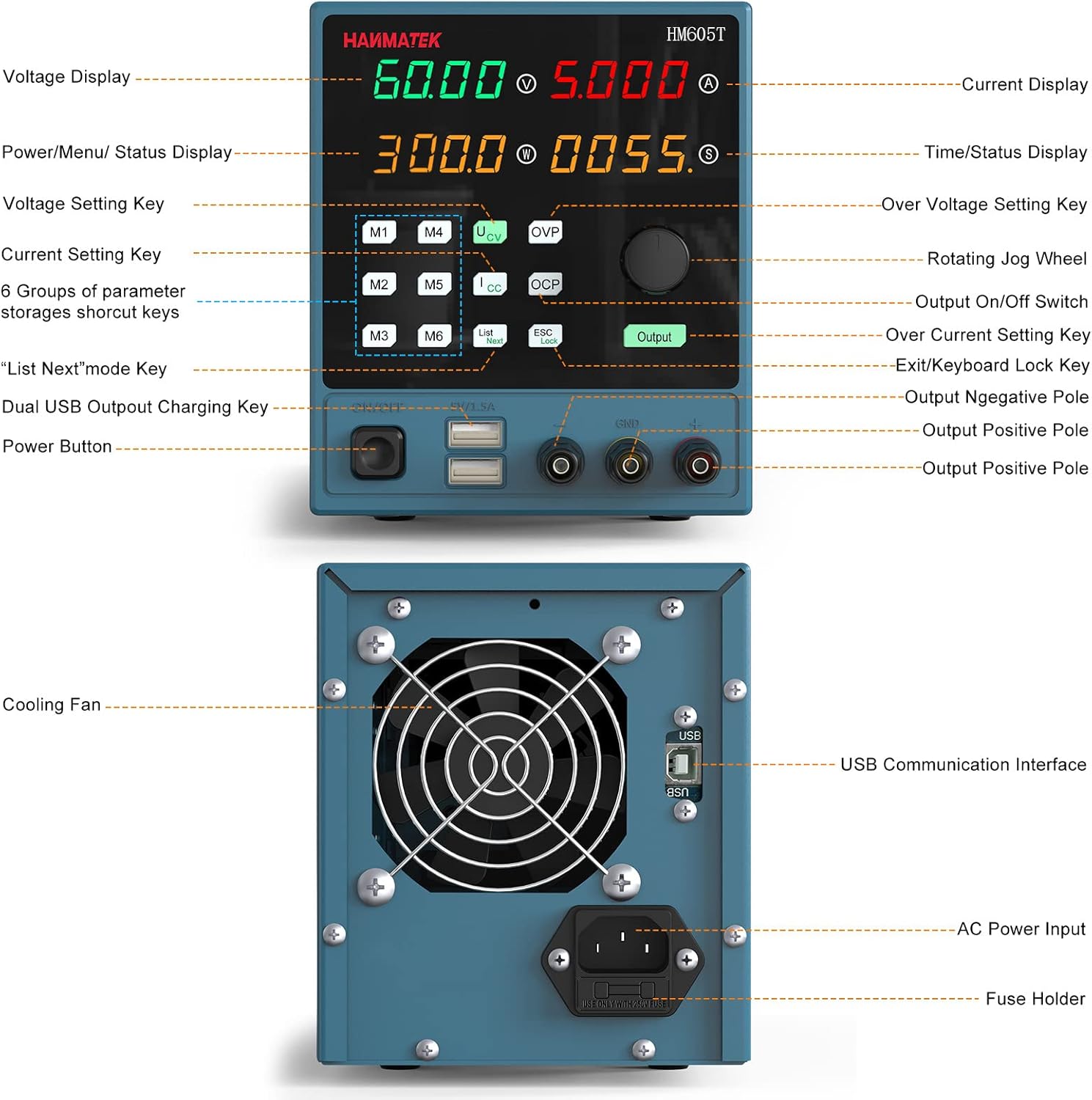
Figure 2.1: Front and Rear Panel Layout. This image illustrates the various controls and ports on the front and back of the HM605T power supply, including the display, control buttons, output terminals, USB ports, cooling fan, and AC power input.

Figure 2.2: Multiple Protection Features. An internal view highlighting the robust circuitry designed for overvoltage, overcurrent, overpower, overtemperature, and short-circuit protection.
3. Поставување
Follow these steps for initial setup of your HANMATEK HM605T power supply:
- Отпакување: Carefully remove all components from the packaging. Verify that all items listed in the 'Packing' section (1 * Programmable DC power supply; 1 * CD; 1 * Power cord; 1 * Clip cord; 1 * USB cable; 1 * Manual) are present.
- Поврзување за напојување: Connect the provided power cord to the AC power input on the rear panel of the power supply and then to a suitable 110V AC outlet.
- Почетно вклучување: Turn on the main power switch located on the rear panel. The display on the front panel should illuminate.
- Излезни терминали: Familiarize yourself with the output terminals (positive, negative, and ground) on the front panel. Ensure correct polarity when connecting your load.
4. Упатства за работа
This section details the operation of the HM605T power supply, including setting parameters and using its various functions.
4.1 Основно работење
- Turning On/Off Output: Притиснете го Излез button on the front panel to enable or disable the power output.
- Поставување Voltage:
- Притиснете го V копче за да го изберете томtagрежим на поставување.
- Rotate the large rotary knob to adjust the voltage value. The 4-digit display allows for precise adjustments.
- Поставување на струја:
- Притиснете го I button to select the current setting mode.
- Rotate the large rotary knob to adjust the current limit.
- Режими на прикажување: Притиснете го Приказ button to switch between numerical and waveform display modes, allowing for real-time monitoring of output parameters.
4.2 Напредни функции
- Memory Function (M1-M6): The power supply allows for storing and recalling up to 6 sets of frequently used voltage and current parameters. Press the Меморија button to access the memory presets. Use the rotary knob to navigate and select a preset, then press the knob to load it.
- Заклучување на тастатурата: За да спречите случајни промени на поставките, притиснете го копчето ESC/Lock button to lock the keyboard. Press it again to unlock.
- Контрола на компјутерски софтвер: The HM605T features a standard USB interface on the rear panel for connection to a computer. Install the provided PC software (from the included CD or manufacturer's website) to utilize Modbus programming instruction set and programmable sequence output. This allows for remote control and data logging.
- Front USB Charging Ports: The dual 5V 1.5A USB ports on the front panel can be used for charging compatible devices or powering low-current electronics.
4.3 Инструктивно видео
Video 4.1: HANMATEK DC Power Supply Overview. This video provides a general demonstration of a HANMATEK adjustable DC power supply, showcasing its features and basic operation, including voltage and current adjustment, and output control.
5. Одржување
Правилното одржување обезбедува долготрајност и сигурно работење на вашето напојување.
- Чистење: Редовно чистете ја надворешноста на уредот со мека, сува крпа. Не користете абразивни средства за чистење или растворувачи.
- Вентилација: Keep the cooling fan and vents free from dust and obstructions. The fan operates automatically to maintain optimal temperature.
- Складирање: Кога не го користите подолго време, чувајте го напојувањето на ладно и суво место, подалеку од директна сончева светлина и екстремни температури.
6 Смена на проблеми
This section addresses common issues you might encounter with the HM605T power supply.
- Без моќност:
- Проверете дали кабелот за напојување е безбедно поврзан и со уредот и со штекерот за наизменична струја.
- Ensure the main power switch on the rear panel is in the 'ON' position.
- Verify the fuse in the AC input socket. Replace if blown (refer to specifications for correct fuse type).
- Нема излез:
- Притиснете го Излез button to ensure the output is enabled.
- Check for active protection (OVP, OCP, OPP). If any protection is triggered, the output will be disabled. Address the cause of the protection event (e.g., reduce voltage/current settings, check load).
- Ensure the load is correctly connected to the output terminals with proper polarity.
- Неточни читања:
- Verify that the measurement leads are properly connected and not damaged.
- Ensure the device is operating within its specified temperature range.
- PC Software Connection Issues:
- Ensure the USB cable is securely connected to both the power supply and the computer.
- Verify that the correct drivers and software are installed on your PC. Refer to the included CD or manufacturer's webстраница за најновите верзии.
7. Спецификации
| Спецификација | Вредност |
|---|---|
| Бренд | ХАНМАТЕК |
| Модел | HM605T |
| Влез волуменtage | 110V |
| Излез Voltage | 0V-60V |
| Излезна струја | 0А-5А |
| Излезен Ватtage | 300 W |
| Voltagд Резолуција | 10 mV |
| Тековна резолуција | 1 mA |
| Приказ | 4-Digit (Voltage, Current, Power, Time) |
| Front USB Output | Voltage: 5V; Current: ≤1.5A |
| Карактеристики на заштита | OVP, OCP, OPP, OTP, Short Circuit |
| Метод на ладење | Automatic Temperature Control Fan |
| Број на модел на ставка | HM605T |
| Димензии на пакетот | 36 x 21.3 x 17.4 cm; 2.58 кг |
8. Гаранција и поддршка
For warranty information and technical support, please refer to the documentation included with your product or contact HANMATEK customer service. The product package includes a manual and a CD with software and drivers. Ensure you keep your purchase receipt for warranty claims.


