Вовед
Thank you for choosing the Datamax S30B Wireless 1D/2D Barcode Scanner. This manual provides detailed instructions on how to set up, operate, and maintain your device, ensuring optimal performance and longevity. The S30B is a versatile scanner designed for various applications, including retail, logistics, libraries, offices, and manufacturing systems, offering multiple connection options and robust scanning capabilities for both 1D and 2D barcodes.
Содржина на пакетот
Пред да започнете, проверете дали сите елементи се присутни во пакетот:
- Datamax S30B Barcode Scanner
- USB кабел за полнење/податоци
- Безжичен USB адаптер од 2.4 GHz
- Упатство за употреба (овој документ)

Image: Contents of the Datamax S30B package, showing the scanner, USB cable, 2.4GHz wireless dongle, and the user manual.
Поставување
1. Полнење на скенерот
The S30B scanner is equipped with a rechargeable battery. Before first use, it is recommended to fully charge the device. Connect the provided USB cable to the scanner's charging port and plug the other end into a USB power source (e.g., computer USB port, USB wall adapter). The charging indicator light will show the charging status.
2. Методи за поврзување
The Datamax S30B offers three versatile connection options:
2.1. Поврзување со Bluetooth
The scanner supports Bluetooth HID and SPP modes, compatible with Windows, Mac OS, Android, and other Bluetooth-enabled systems. To connect via Bluetooth:
- Проверете дали скенерот е вклучен.
- Scan the "Bluetooth HID Mode" barcode from the instruction manual (or the "One-Click Pairing" barcode if available).
- On your device (computer, tablet, smartphone), enable Bluetooth and search for "BT Scanner HID_971A" (or similar).
- Select the scanner to pair. A beep from the scanner and a steady blue light indicate successful pairing.
Video: Demonstrates the Bluetooth pairing process for the Datamax S30B barcode scanner, showing how to scan the pairing barcode and connect to a mobile device.

Image: Visual representation of the scanner connecting via Bluetooth to Android, iOS, iPad, laptop, and desktop computers.
2.2. Безжична конекција од 2.4 GHz
For a stable wireless connection, use the provided 2.4GHz USB dongle:
- Plug the 2.4GHz USB dongle into an available USB port on your computer.
- The scanner will automatically pair with the dongle. No driver installation is required.
- A successful connection is indicated by a specific sound or light on the scanner.

Image: The Datamax S30B scanner demonstrating its wireless capability and USB charging feature. Visit barcoder.jp за повеќе информации.
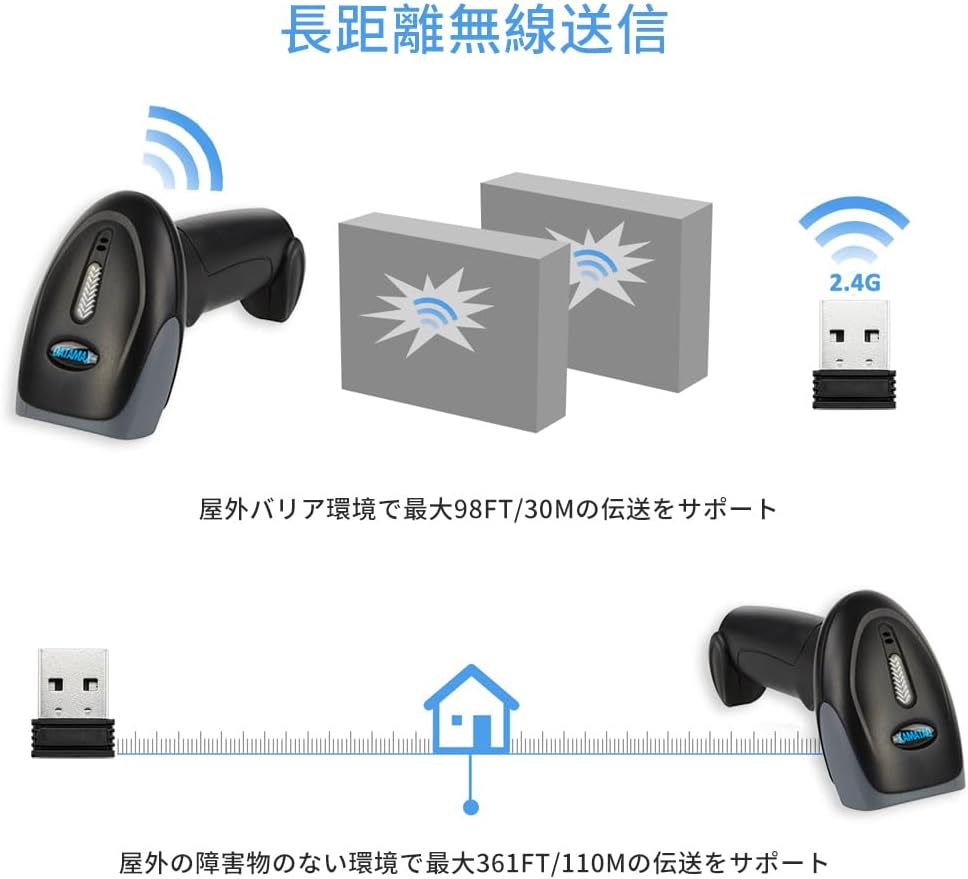
Image: This diagram shows the effective wireless range of the scanner, capable of transmitting up to 30 meters (98 feet) with obstacles and up to 110 meters (361 feet) in open environments.
2.3. Жична USB конекција
For direct and reliable data transfer, connect the scanner via USB cable:
- Connect one end of the USB cable to the scanner's port.
- Вклучете го другиот крај во USB-порт на вашиот компјутер.
- The scanner will function as a plug-and-play device, requiring no additional drivers.

Image: The Datamax S30B barcode scanner, showcasing its primary components including the scanner unit, 2.4GHz wireless USB dongle, and the USB cable for wired connection and charging.
Работење со скенер
1. Режими на скенирање
The S30B offers two primary scanning modes:
- Manual Scan Mode: Press the scan button to trigger each scan. This mode is ideal for precise, controlled scanning.
- Automatic Scan Mode: The scanner automatically detects and scans barcodes when they are presented within its reading range, without needing to press the button. This mode is efficient for high-volume scanning.
You can switch between these modes by scanning specific configuration barcodes found in the full instruction manual.

Image: Illustrates the difference between manual scanning (requiring a button press) and automatic scanning (auto-trigger, high-speed motion reading). Configuration barcodes for these modes are typically found in the detailed manual.
2. Поддржани типови баркодови
The S30B is equipped with advanced CMOS technology, allowing it to read a wide range of 1D and 2D barcodes from both paper and digital screens:
- 2Д баркодови: QR код, матрица на податоци, PDF417, итн.
- 1Д баркодови: EAN, UPC, Code 39, Code 93, Code 128, UCC/EAN 128, Codabar, Interleaved 2 of 5, ITF-6, ITF-14, ISBN, ISSN, MSI-Plessey, GS1 Databar, Code 11, Industrial 25, Matrix 2 of 5, etc.

Image: The scanner's powerful decoding function is shown, capable of reading standard 1D barcodes, incomplete barcodes, folded barcodes, and 2D QR codes from various surfaces.
3. Data Upload Modes
Скенерот поддржува два режима на прикачување податоци:
- Instant Mode: Barcodes are uploaded to the computer immediately after scanning.
- Режим на складирање офлајн: The scanner can store up to 80,000 13-digit barcodes (or 16Mbit of internal storage) when out of range or disconnected. Data can be uploaded later by scanning a specific "Upload Data" barcode.

Image: Depicts the two upload modes: Instant Mode, where barcodes are immediately uploaded to the computer, and Offline Storage Mode, which allows for large-capacity offline storage of up to 80,000 13-digit barcodes in 16Mbit internal memory.
Одржување
Proper maintenance ensures the longevity and performance of your scanner:
- Чистење: Користете мека, сува крпа за чистење на надворешноста на скенерот. За прозорецот за скенирање, користете крпа за чистење на леќи за да избегнете гребнатини. Не користете абразивни средства за чистење или растворувачи.
- Нега на батеријата: Избегнувајте често целосно празнење на батеријата. За долгорочно складирање, наполнете ја батеријата до околу 50% и чувајте ја на ладно и суво место.
- Складирање: Store the scanner in a clean, dry environment, away from extreme temperatures, direct sunlight, and corrosive materials.
- Трајност: The S30B features a shock-resistant silicone design, protecting it from drops and vibrations, with a drop resistance of up to 1.5 meters.

Image: Demonstrates the scanner's strong drop prevention performance, highlighting its IP42 rating and 1.5-meter drop resistance, along with a 10 million button press durability.
Решавање проблеми
If you encounter issues with your Datamax S30B scanner, please refer to the following common problems and solutions:
| Проблем | Можна причина / решение |
|---|---|
| Скенерот не се вклучува. | Battery is low or depleted. Connect the scanner to a power source using the USB cable and charge it. |
| Не може да се поврзе преку Bluetooth. |
|
| Cannot connect via 2.4GHz wireless. |
|
| Скенерот не чита баркодови. |
|
| Скенираните податоци се неточни или нецелосни. |
|
Спецификации
| Карактеристика | Детал |
|---|---|
| Модел | S30B |
| Стапка на скенирање | 300 fps |
| Технологија за поврзување | Bluetooth, безжичен 2.4 GHz, USB кабел |
| Извор на енергија | Напојува со батерија |
| Тип на батерија | 1 литиум полимерна батерија (вклучена) |
| Димензии на пакетот | 20.7 x 10.5 x 7.2 см; 300 г (приближно 8.15 x 4.13 x 2.83 инчи; 0.66 фунти) |
| Отпорност на пад | 1.5 м (приближно 4.9 стапки) |
| Офлајн складирање | Up to 80,000 13-digit barcodes (16Mbit) |

Image: Detailed product dimensions of the S30B scanner: 2.6 inches (6.7 cm) width, 3.5 inches (9 cm) depth, and 6.4 inches (16.5 cm) height.
Гаранција и поддршка
Datamax is committed to providing high-quality products and customer satisfaction. For any warranty claims, technical support, or inquiries regarding your S30B barcode scanner, please refer to the contact information provided with your purchase or visit the official Datamax webлокација. Чувајте ја сметката како доказ за купување за целите на гаранцијата.
За дополнителни ресурси и информации за производот, можете да ја посетите Datamax Brand Store on Amazon.


