1. Вовед
This manual provides detailed instructions for the installation, operation, and maintenance of your YuanLey 8 Port 2.5G Unmanaged Desktop Ethernet Switch with 10G SFP. Please read this manual thoroughly before using the device to ensure proper functionality and to prevent damage.
2. Содржина на пакетот
Потврдете дека вашиот пакет ги содржи следниве ставки:
- 1 x YuanLey 8 Port 2.5G Ethernet Switch
- 1 x кабел за напојување
- 1 x Упатство за употреба
3. Карактеристики на производот
- 9 Port Configuration: Includes 8 x 2.5 Gigabit Ethernet ports and 1 x 10G SFP+ Port.
- Перформанси со голема брзина: Delivers 2.5 times faster network performance than traditional Gigabit switches, with a switching capacity of up to 60Gbps.
- Plug and Play: Unmanaged design requires no configuration for immediate use.
- Durable and Quiet: Features a metal case with 6KV lightning protection and a fanless design for silent operation.
- Широка работна температура: Функционира сигурно на температури кои се движат од -10°C до 50°C.
- Разновидно поставување: Supports both wall mount and desktop placement.
4. Производот завршиview

Figure 4.1: YuanLey 8 Port 2.5G Unmanaged Desktop Ethernet Switch

Слика 4.2: Преден панел надview with Ports and Indicators
The switch features 8 RJ45 ports supporting 10/100/1000Mbps/2.5G adaptive speeds and 1 SFP+ port for 1G/2.5G/10G fiber connections. LED indicators provide status for power and link activity.
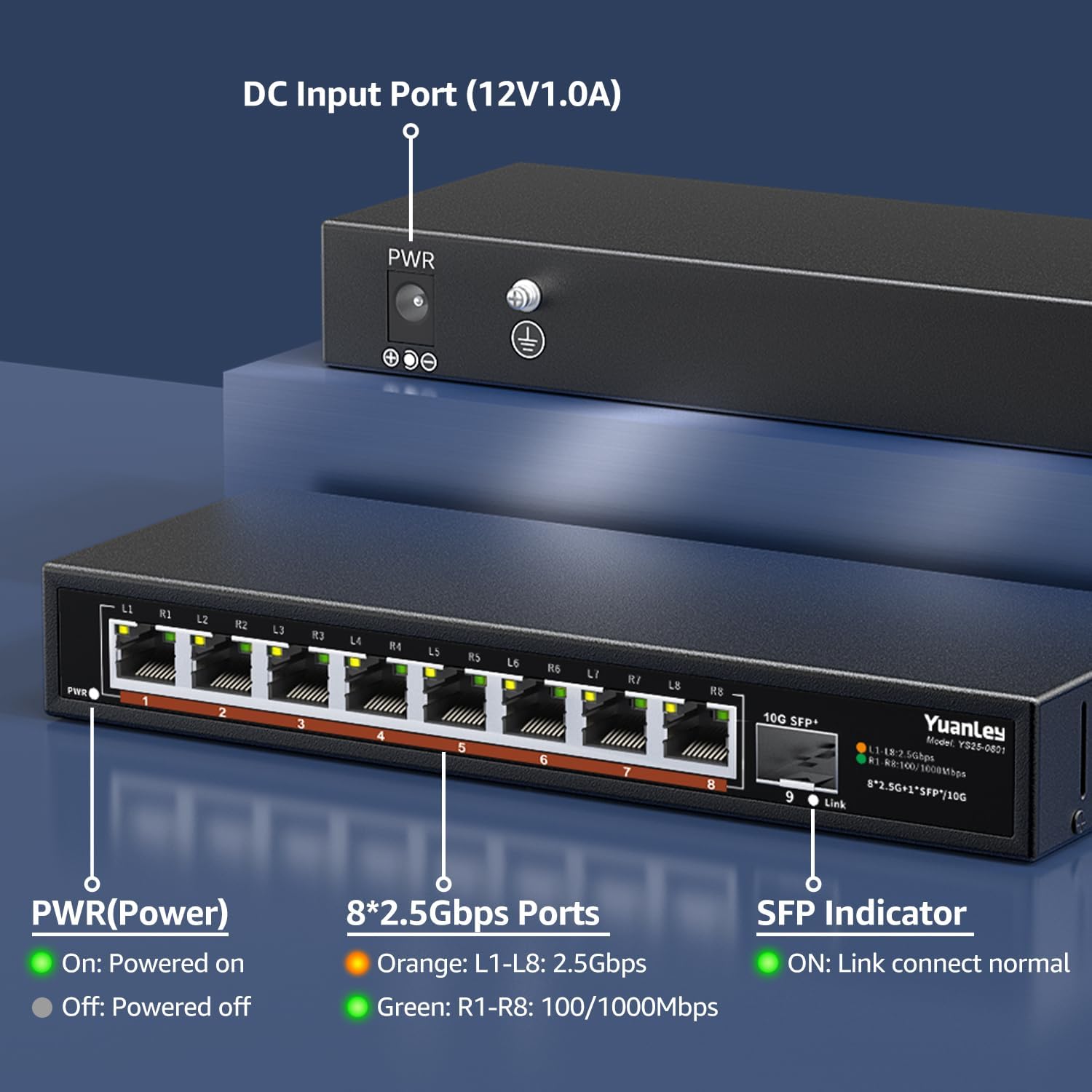
Слика 4.3: Заден панел надview со влез за напојување

Слика 4.4: Детално View of Ports and Indicators
The rear panel includes the DC 12V/1.0A power input port and a grounding screw for electrical safety. The front panel LEDs indicate power status, 2.5Gbps link speed (orange), and 100/1000Mbps link speed (green) for RJ45 ports, and link status for the SFP+ port.
5. Поставување
Follow these steps to set up your YuanLey Ethernet Switch:
- Поврзете напојување: Plug the provided power adapter into the DC 12V/1.0A input port on the rear of the switch, then plug the adapter into a power outlet. The PWR LED on the front panel will illuminate green.
- Поврзување на етернет уреди: Connect your network devices (e.g., computers, NAS, WiFi 6 APs, gaming PCs) to the 2.5G Base-T ports (1-8) using standard Ethernet cables (Cat5e or higher recommended for 2.5G speeds). The corresponding port LEDs will light up to indicate a successful connection and speed.
- Connect SFP+ Module (Optional): If using the 10G SFP+ port, insert a compatible 1G/2.5G/10G SFP/SFP+ module (not included) into the SFP+ slot. Then, connect a fiber optic cable or DAC cable to the module. The SFP indicator LED will light up when a link is established.

Figure 5.1: Typical Network Setup with the YuanLey Switch
Поставување видео водич
Video 5.1: An official YuanLey video demonstrating the setup and features of the 8 Port 2.5Gbps Switch.
6. Ракување со прекинувачот
The YuanLey 2.5G Unmanaged Ethernet Switch is designed for simple plug-and-play operation. Once powered on and connected to your network devices, it will automatically detect the link speed and establish connections without any further configuration.
- LED индикатори: Observe the PWR, L1-L8, and SFP+ Link LEDs to monitor the switch's status and network activity.
- Автоматски MDI/MDIX: The switch supports Auto MDI/MDIX, eliminating the need for crossover cables.
- Adaptive Speed: RJ45 ports automatically adapt to 10/100/1000Mbps or 2.5Gbps.
7. Одржување
To ensure optimal performance and longevity of your switch, consider the following maintenance guidelines:
- Поставување: Поставете го прекинувачот во добро проветрено место, подалеку од директна сончева светлина, извори на топлина и прекумерна влага. Дизајнот без вентилатор се потпира на природна конвекција за ладење.
- Чистење: Периодично чистете ја надворешноста на прекинувачот со мека, сува крпа. Избегнувајте употреба на течни или аеросолни средства за чистење.
- Управување со кабли: Осигурајте се дека мрежните кабли се уредно организирани и не се претерано свиткани или оптоварени.
- Напојување: Use only the original power adapter provided with the switch.

Figure 7.1: Fanless Design and Environmental Considerations
8 Смена на проблеми
Доколку наидете на проблеми со вашиот прекинувач, погледнете ги следните вообичаени проблеми и решенија:
- Без моќност:
- Осигурајте се дека адаптерот за напојување е безбедно поврзан со прекинувачот и со функционален штекер.
- Check if the PWR LED is illuminated. If not, try a different power outlet.
- Нема врска/активност на портата:
- Проверете дали Ethernet кабелот е безбедно поврзан и со портата на прекинувачот и со мрежниот уред.
- Пробајте друг Ethernet кабел.
- Осигурајте се дека поврзаниот уред е вклучен и работи правилно.
- Check the LED indicator for the specific port. If it's off, there might be no link.
- Бавна брзина на мрежата:
- Ensure all devices in the network path (NICs, cables, routers) support 2.5G speeds to achieve maximum performance.
- Use Cat5e or higher-rated Ethernet cables for 2.5G connections.
- Check the color of the port LED: Orange indicates 2.5Gbps, Green indicates 100/1000Mbps.
- SFP+ Port Issues:
- Ensure the SFP/SFP+ module is correctly inserted and compatible with the switch.
- Verify the fiber optic or DAC cable is properly connected and undamaged.
- Check the SFP indicator LED for link status.
9. Спецификации
| Карактеристика | Спецификација |
|---|---|
| Број на модел | 9 Port | 8x2500Mbps+1x10G SFP |
| Димензии на производот | 7.76"Д x 2.87"Ш x 1.14"В (19.7 см x 7.3 см x 2.9 см) |
| Тежина на ставката | 1.36 фунти (0.62 килограми) |
| Број на пристаништа | 8 x 2.5G Base-T, 1 x 10G SFP+ |
| Стапка на пренос на податоци | 60 гигабити во секунда (капацитет за префрлување) |
| Voltage | 230 Volts (AC) input to adapter, 12V DC output |
| Материјал на случајот | Метал |
| Работна температура | -10°C до 50°C |
| Заштита од гром | 6 KV |
| UPC | 790885573743 |
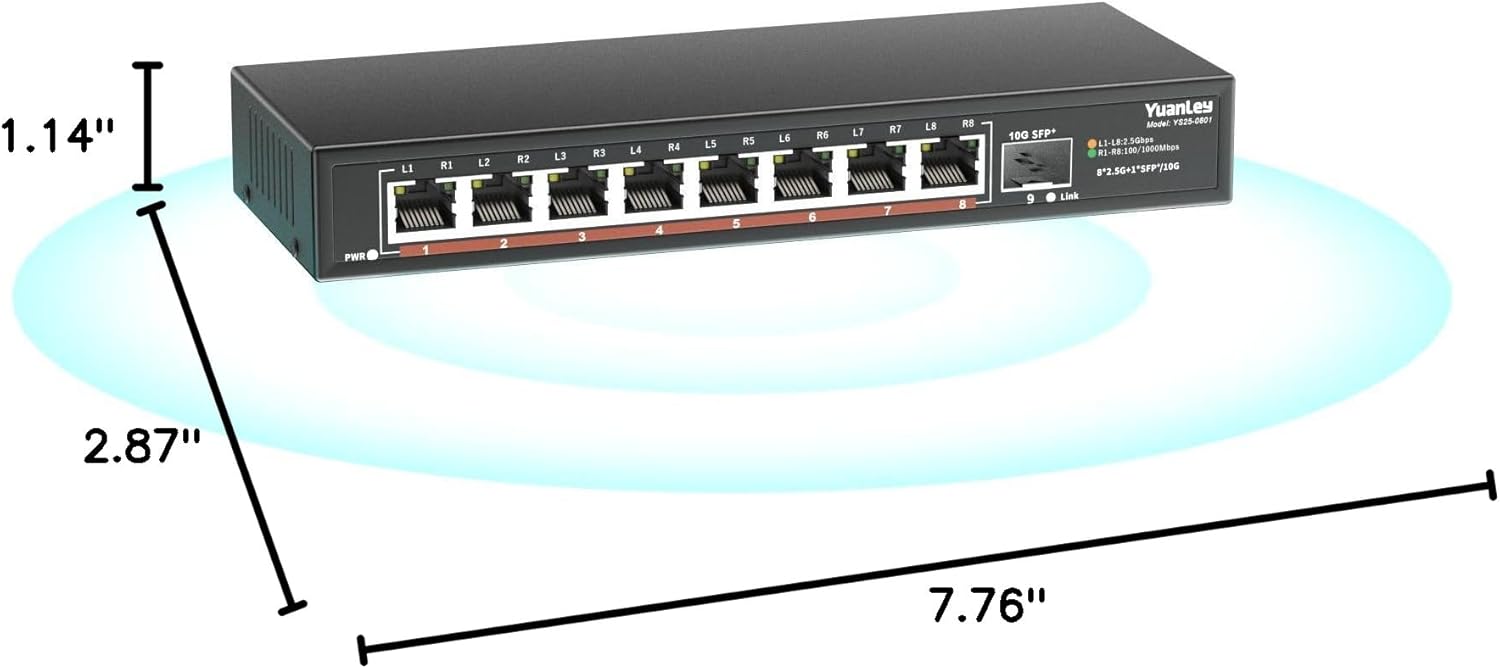
Слика 9.1: Димензии на производот
10. Гаранција и поддршка
YuanLey products are designed for reliability and performance. For warranty information and technical support, please refer to the official YuanLey webлокација или директно контактирајте ја нивната служба за корисници. Зачувајте ја сметката за купување за гаранциски барања.
За дополнителна помош, можете да ја посетите YuanLey Store on Amazon.


