Вовед
Thank you for choosing the Epson EB-L210SF projector. This manual provides essential information for the safe and efficient use of your projector. Please read it thoroughly before operating the device and keep it for future reference.
The Epson EB-L210SF is a 3LCD Full-HD projector designed for clear and vibrant image projection. It features a laser light source for long-lasting performance.
Важни безбедносни информации
- Ласерска безбедност: Не гледајте директно во леќата на проекторот кога изворот на ласерска светлина е активен. Избегнувајте директно изложување на очите на ласерскиот зрак.
- Вентилација: Ensure adequate ventilation around the projector. Do not block ventilation openings. Overheating can cause damage.
- Извор на енергија: Use only the power supply specified for this projector.
- Ракување: Ракувајте со проекторот внимателно. Избегнувајте да го испуштате или да го изложувате на силни удари.
- Чистење: Исклучете го кабелот за напојување пред чистење. Користете мека, сува крпа. Не користете течни или аеросолни средства за чистење.
Поставување
1. Распакување и поставување
Carefully remove the projector and all accessories from the packaging. Place the projector on a stable, level surface. Ensure there is sufficient space around the projector for proper ventilation.

Слика 1: Предна и странична view of the Epson EB-L210SF projector, showing the lens and ventilation grilles.
2. Поврзување на енергија
- Connect the supplied power cord to the projector's AC inlet.
- Приклучете го другиот крај на кабелот за напојување во заземјен електричен штекер.
3. Поврзување на влезни извори
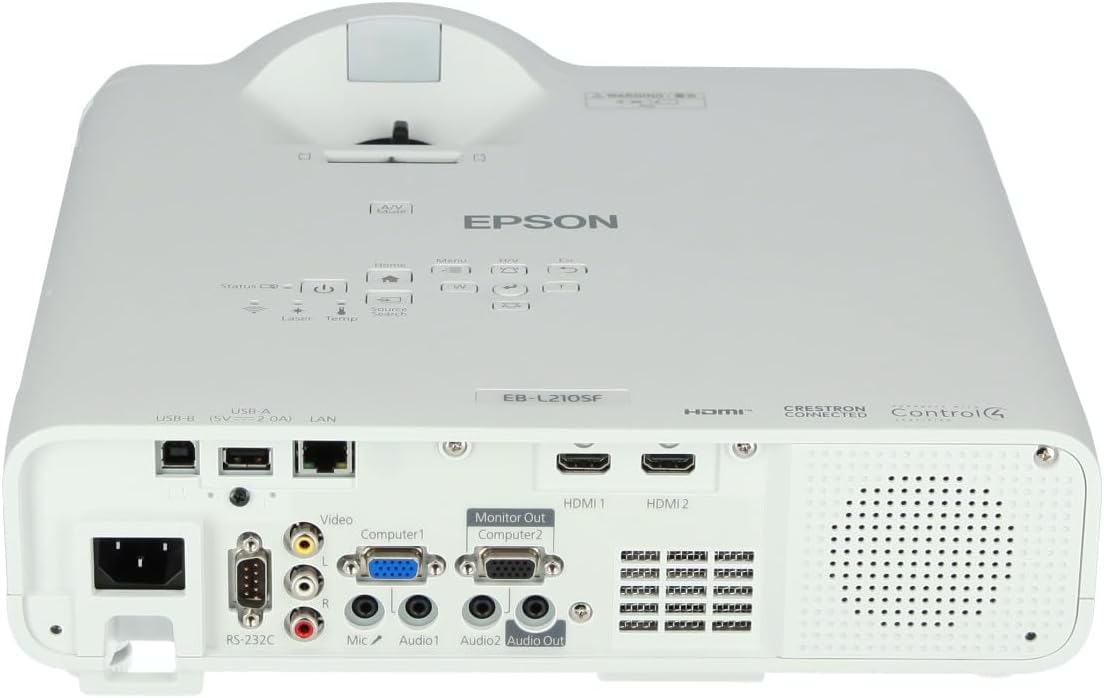
The projector supports various input sources. Connect your device (computer, Blu-ray player, etc.) to the appropriate port on the projector's rear panel.

Figure 2: Rear panel of the projector, displaying various input and output ports including HDMI, Computer (VGA), Video, USB, and Audio connections.
- HDMI: Connect an HDMI cable from your device to one of the HDMI ports (HDMI 1 or HDMI 2).
- Компјутер (VGA): Connect a VGA cable from your computer to the Computer 1 or Computer 2 port. For audio, connect a separate audio cable to Audio 1 or Audio 2.
- Видео: Connect composite video and audio cables to the Video and Audio (R/L) ports.
- USB: Use the USB-A port for connecting USB storage devices or the USB-B port for display over USB.
- LAN: Поврзете етернет кабел за мрежна контрола и следење.
4. Првично вклучување и прилагодување на сликата
- Press the power button on the projector or remote control to turn on the device. The power indicator will illuminate.
- Прилагодете го фокус прстен околу објективот додека сликата не стане остра и јасна.
- Користете го zoom lever (if available) to adjust the image size.
- Ако сликата изгледа трапезоидно, користете го корекција на клучот feature (manual or automatic) to square the image. Refer to the Operating section for details on menu navigation.
Ракување со проекторот
1. Контролен панел е надview
The control panel on top of the projector allows access to various functions and settings.
Слика 3: Врв view of the projector, highlighting the control panel with buttons for power, menu, source selection, and navigation.
- Копче за вклучување: Го вклучува или исклучува проекторот.
- Source Search: Циклично ги прелистува достапните влезни извори.
- Копче за мени: Го отвора менито за приказ на екранот (OSD).
- Navigation Buttons (Arrow keys): Се користи за навигација низ опциите на менито.
- Копче за внесување: Ги потврдува изборите во менито.
- Esc Button: Излегува од тековното мени или се враќа на претходниот екран.
- Копче за почеток: Accesses the home screen or quick settings.
- А/В исклучување: Temporarily mutes audio and blanks the screen.
2. Selecting an Input Source
Притиснете го Извор Барај button on the control panel or remote control to cycle through the connected input sources (e.g., HDMI 1, HDMI 2, Computer 1, Video). The projector will automatically detect and display the active source.
3. Adjusting Image and Audio Settings
Притиснете го Мени button to access the projector's on-screen display (OSD) menu. Use the navigation buttons to browse categories such as:
- Слика: Adjust brightness, contrast, color, tint, sharpness, and color temperature.
- Сигнал: Configure input signal settings, aspect ratio, and overscan.
- Поставки: General projector settings like language, display options, and power management.
- Аудио: Adjust volume, mute, and audio input selection.
Изберете опција и притиснете Внесете to modify its value. Press Esc за да излезете од менито.
Одржување
1. Чистење на проекторот
- Надворешност: Wipe the projector's exterior with a soft, dry, lint-free cloth. For stubborn dirt, dampen the cloth slightly with water, then wipe dry.
- Објектив: Gently wipe the lens with a lens cleaning cloth or lens paper. Avoid using abrasive materials or excessive force.
- Филтер за воздух: Regularly check and clean the air filter to prevent dust buildup, which can affect performance and cause overheating. Refer to the projector's on-screen menu for filter maintenance reminders.
2. Ласерски извор на светлина
The Epson EB-L210SF uses a laser light source, which offers a long operational life and does not require lamp replacement. No user maintenance is typically required for the laser light source itself.
Решавање проблеми
Доколку наидете на проблеми со вашиот проектор, погледнете ги следните вообичаени проблеми и решенија:
| Проблем | Можна причина / решение |
|---|---|
| Не е проектирана слика |
|
| Сликата е заматена или не е во фокус |
|
| Image is distorted (trapezoidal) |
|
| Нема звук |
|
| Projector is not wireless | The Epson EB-L210SF is not inherently a wireless projector. Wireless functionality typically requires an optional external wireless adapter, which is sold separately. Please consult Epson's official website or your retailer for compatible wireless adapters. |
| Overheating warning (Temp indicator) |
|
Спецификации
| Карактеристика | Детал |
|---|---|
| Број на модел | V11HA75080 |
| Резолуција на екранот | 1920 x 1080 (Full HD) |
| Технологија за поврзување | HDMI, VGA, USB, LAN |
| Димензии на производот | 11.81 x 11.81 x 11.81 инчи |
| Тежина на ставката | 10.14 фунти |
| Извор на светлина | Ласерски |
| Производител | Епсон |
| Препорачана употреба | Мониторинг |
| Специјална карактеристика | Лесни |
| Потребни се батерии | 1 AAAA (for remote control, not included with projector unit) |
| Датум прв на располагање | 14 ноември 2023 година |
Гаранција и поддршка
За детални информации за гаранцијата, ве молиме погледнете ја гарантната картичка што е вклучена во вашиот производ или посетете ја официјалната страница на Epson. webлокација. Условите за гаранција може да се разликуваат во зависност од регионот.
За техничка поддршка, регистрација на производ или за преземање на најновите драјвери и софтвер, посетете ја официјалната страница за поддршка на Epson. website or contact Epson customer service in your region. Contact information can typically be found on the Epson webсајт.