1. Вовед
Welcome to the user manual for your Hoppstar Expert Digital Camera. This manual provides essential information on how to set up, operate, and maintain your camera, ensuring a fun and creative experience for young photographers. Please read this manual carefully before using the camera and keep it for future reference.
The Hoppstar Expert is designed specifically for children, offering a user-friendly interface, durable construction with interchangeable silicone covers, and a range of exciting features including a selfie camera, video recording, picture frames, photo filters, and face detection.
2. Информации за безбедност
- This product is intended for children aged 3 years and older. Adult supervision is recommended during use.
- Не го изложувајте фотоапаратот на вода или прекумерна влага.
- Avoid dropping the camera or subjecting it to strong impacts, even with the protective silicone cover.
- Keep small parts, such as memory cards, out of reach of very young children to prevent choking hazards.
- Use only the charging cable provided or a compatible USB charger.
- Do not attempt to disassemble or repair the camera yourself. Contact customer support if issues arise.
3. Содржина на пакетот
Ве молиме означете го полето за следните ставки:
- Hoppstar Expert Digital Camera
- Упатство за употреба
- USB кабел за полнење
- Јаже/ремен
- Адаптер USB-C на USB-A
- USB-C to Micro-USB Adapter
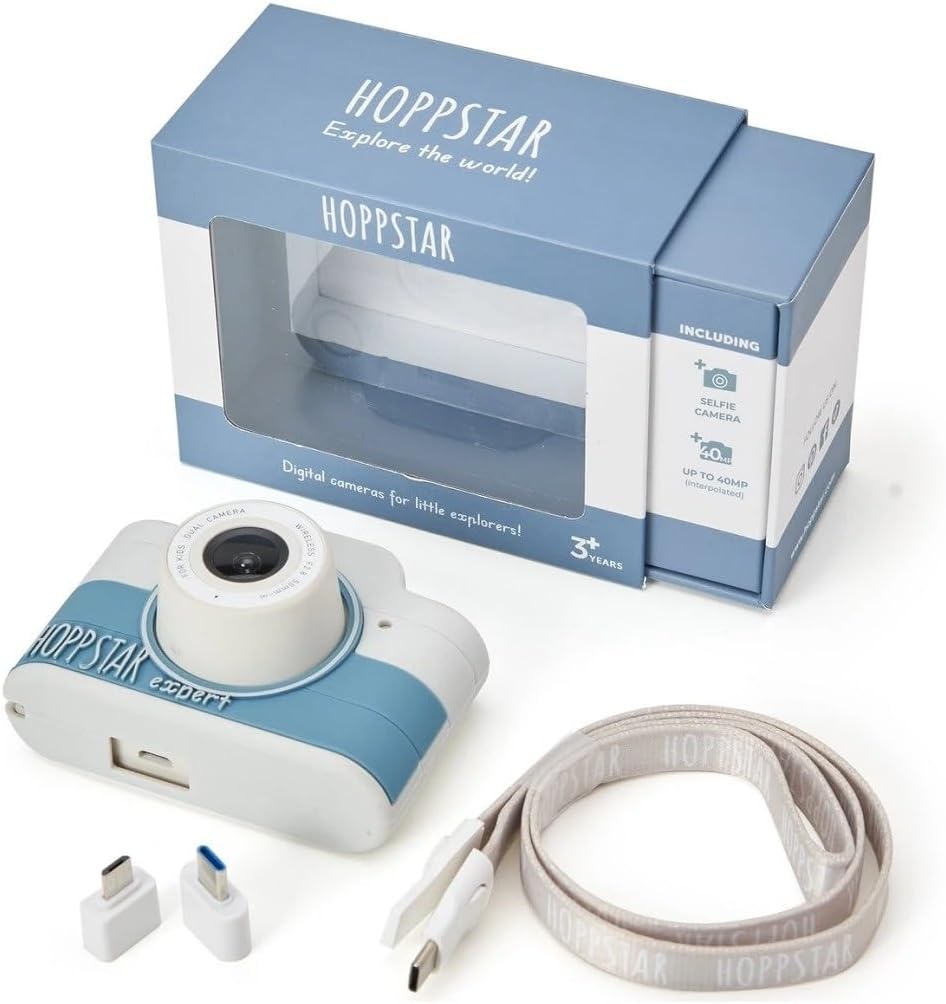
Image: Hoppstar Expert camera shown with its retail packaging, USB charging cable, lanyard, and two USB adapters.
4. Производот завршиview
Предна страна View

Image: The front of the Hoppstar Expert camera, featuring the main lens, flash, and the 'Hoppstar Expert' branding on the blue and white body.
- Главен објектив: For taking standard photos and videos.
- Flash/Light: Обезбедува осветлување во услови на слаба осветленост.
- Микрофон: Снима аудио за време на снимање видео.
Заден дел View

Image: The back of the Hoppstar Expert camera, displaying the LCD screen and the control buttons on either side.
- LCD екран: Displays menus, live view, и репродукција.
- Селфи камера: Located above the screen for self-portraits.
- Контролни копчиња: Navigation, OK, Menu, and other function buttons.
5. Поставување
5.1 Полнење на камерата
Before first use, fully charge the camera's internal battery. Connect the provided USB charging cable to the camera's USB port and to a USB power source (e.g., computer, wall adapter). The charging indicator light will show the charging status and turn off when fully charged.
5.2 Вметнување мемориска картичка
The Hoppstar Expert comes with 16 GB of internal storage. If you wish to expand storage, locate the memory card slot (usually on the side or bottom) and insert a compatible microSD card (not included) until it clicks into place. Ensure the camera is powered off before inserting or removing the card.
5.3 Вклучување/исклучување
Press and hold the Power button (usually located on the top or side) for a few seconds to turn the camera on or off.
6. Упатства за работа
6.1 Основни контроли
- Добро копче: Ги потврдува изборите во менијата, фотографира или започнува/запира снимање видео.
- Копчиња за навигација: Used to move through menu options (Up, Down, Left, Right).
- Копче за мени: Accesses the camera's settings and feature options.
- Копче за режим: Префрлува помеѓу режими за фотографирање, видео и репродукција.
6.2 Фотографирање
In photo mode, frame your shot using the LCD screen. Press the OK button to capture a photo. The camera supports both front and selfie cameras. To switch between cameras, navigate to the camera settings in the menu or use a dedicated button if available.
6.3 Снимање видеа
Switch to video mode. Press the OK button once to start recording and press it again to stop. Videos are saved to the internal memory or inserted memory card.
6.4 Using Creative Features
The Hoppstar Expert includes several creative features:
- Picture Frames: Apply fun borders to your photos. Access this feature through the camera's menu.
- Photo Filters: Change the look and feel of your photos with various color and effect filters.
- Откривање лице: The camera can automatically detect faces in the frame, assisting with focus.
Explore these options within the camera's menu settings to enhance your photos and videos.
7. Одржување
- Чистење: Користете мека, сува крпа за чистење на телото и екранот на фотоапаратот. За објективот, користете специјализирана крпа за чистење објективи. Не користете течни средства за чистење.
- Силиконски капак: The interchangeable silicone cover can be removed and cleaned with mild soap and water if necessary. Ensure it is completely dry before reattaching.
- Нега на батеријата: За да го продолжите животниот век на батеријата, избегнувајте често целосно празнење на батеријата. Полнете го фотоапаратот редовно, дури и ако не го користите подолг период.
- Складирање: Чувајте го фотоапаратот на ладно и суво место, подалеку од директна сончева светлина и екстремни температури.
8 Смена на проблеми
Камерата не се вклучува
- Проверете дали батеријата е наполнета. Поврзете ја камерата со извор на енергија и обидете се повторно.
- Притиснете и задржете го копчето за вклучување подолго време (5-10 секунди).
Лош квалитет на слика/видео
- Осигурајте се дека објективот е чист и без дамки или прашина.
- Check lighting conditions. Optimal results are achieved in well-lit environments.
- Ensure the camera is held steady during capture.
Camera Freezes/Unresponsive
- Try resetting the camera by pressing the reset button (if available, often a small pinhole) or by holding the Power button until it turns off and then restarting.
Cannot Save Photos/Videos
- Check if the internal memory or inserted memory card is full. Delete unnecessary files или вметнете нова картичка.
- Ensure the memory card is properly inserted and not corrupted.
If you encounter issues not listed here or if troubleshooting steps do not resolve the problem, please contact Hoppstar customer support.
9. Спецификации
| Карактеристика | Спецификација |
|---|---|
| Име на брендот | Hoppstar |
| Име на моделот | Hoppstar Expert Yale |
| Број на модел | 76893 |
| Боја | Јеил |
| Димензии на пакетот | 14.3 x 8.7 x 5.1 cm |
| Континуирана брзина на снимање | 30 fps |
| Вградени компоненти | Camera + Instruction Manual |
| Година на модел | 2023 |
| Боја на филмот | Боја |
| Тип на контрола на експозицијата | Автоматски |
| Тип на бленда | Електронски |
10. Гаранција и поддршка
The Hoppstar Expert Digital Camera comes with a standard manufacturer's warranty. Please refer to the warranty information provided with your purchase or visit the official Hoppstar webстраница за детали во врска со условите за гаранција.
For technical support, product inquiries, or warranty claims, please contact Hoppstar customer service through their official webстраницата или информациите за контакт наведени во вашата документација за купување.


