1. Важни безбедносни инструкции
Ве молиме внимателно прочитајте ги сите упатства пред да го користите овој апарат. Зачувајте го ова упатство за во иднина.
- Овој уред е наменет само за употреба во домаќинството.
- Не потопувајте го апаратот во вода или други течности.
- Keep the appliance away from water sources, especially when charging.
- Do not use the appliance if the cord or plug is damaged. Contact customer support for repair.
- Always ensure the appliance is switched off before cleaning or performing maintenance.
- Да се чува подалеку од дофат на деца. Овој апарат не е играчка.
- Избегнувајте контакт со подвижни делови.
- Do not use the trimmer on irritated skin or open wounds.
- Користете го само адаптерот за полнење што е испорачан со апаратот.
2. Производот завршиview
The HTC AT-206A is a rechargeable hair trimmer designed for precise grooming tasks such as edging, outlining, dry shaving, and light shaping around areas like the neck, ears, and sideburns.

Image 2.1: HTC AT-206A Trimmer and its retail packaging, showing the device and included accessories.
Компоненти:
- Trimmer Unit (HTC AT-206A)
- Кабел за полнење
- Четка за чистење
- Шише со масло за подмачкување
- Прицврстување на чешел
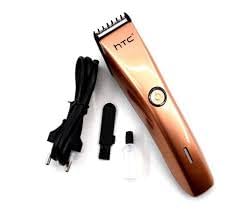
Image 2.2: The HTC AT-206A trimmer displayed with its charging cable, cleaning brush, oil bottle, and comb attachment.
3. Поставување и полнење
3.1 Почетно полнење
- Before first use, fully charge the trimmer for approximately 8-10 hours.
- Проверете дали тримерот е исклучен.
- Поврзете го кабелот за полнење со приклучокот за полнење на тримерот.
- Вклучете го адаптерот во соодветен електричен штекер.
- The charging indicator light (if present) will illuminate to show charging is in progress.
- Once fully charged, disconnect the charger from the outlet and the trimmer.
3.2 Attaching the Comb Attachment
- Проверете дали тримерот е исклучен.
- Align the comb attachment with the trimmer blade.
- Gently push the comb attachment onto the blade until it clicks into place.
- To remove, gently pull the comb attachment away from the blade.
4. Упатства за работа
4.1 Основно работење
- Проверете дали тримерот е наполнет.
- Press the power button to turn the trimmer on.
- Притиснете го копчето за вклучување повторно за да го исклучите тримерот.
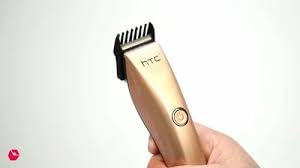
Image 4.1: The HTC AT-206A trimmer held in hand, demonstrating its ergonomic design for ease of use.
4.2 Техники на потстрижување
- За најдобри резултати, користете го тримерот на чиста, сува коса.
- Hold the trimmer at a slight angle against the skin.
- Движете го тримерот полека и стабилно во насока спротивна од растот на влакната.
- Use the comb attachment for longer hair lengths (0.5mm-13mm).
- For edging and outlining, use the trimmer without the comb attachment for a closer trim.
- Stretch the skin taut with your free hand to ensure a smooth surface for trimming.
5. Одржување и чистење
Редовното чистење и одржување ќе обезбедат оптимални перформанси и ќе го продолжат животниот век на вашиот тример.
5.1 Чистење на сечилата
- Ensure the trimmer is switched off and disconnected from the charger.
- Use the provided cleaning brush to remove any loose hairs from the blades.
- For a more thorough clean, you may carefully detach the blade head (refer to specific instructions if provided with your model for blade removal).
- Do not rinse the entire trimmer under water unless explicitly stated as waterproof.
5.2 Подмачкување на сечилата
- After cleaning, apply 1-2 drops of the provided lubricating oil onto the blades.
- Вклучете го тримерот неколку секунди за маслото рамномерно да се распредели.
- Избришете го вишокот масло со мека крпа.
- Oiling the blades regularly (e.g., after every few uses) helps maintain cutting efficiency and prevents rust.
5.3 Складирање
Store the trimmer in a cool, dry place, away from direct sunlight and moisture. Ensure it is fully charged before storing for extended periods.
6 Смена на проблеми
If you encounter any issues with your trimmer, refer to the following common problems and solutions:
- Тримерот не се вклучува:
Ensure the trimmer is fully charged. Check if the charging cable is properly connected and the power outlet is functional. - Poor trimming performance / pulling hair:
The blades may be dull or clogged with hair. Clean and oil the blades as described in the Maintenance section. Ensure the trimmer is adequately charged. - Батеријата не се полни:
Ensure the trimmer is charged for the recommended duration. If the issue persists, the battery may need replacement. Contact customer support. - Прекумерна бучава или вибрации:
The blades might be misaligned or require oiling. Clean and oil the blades. If the problem continues, discontinue use and contact customer support.
7. Спецификации
| Карактеристика | Спецификација |
|---|---|
| Број на модел | AT-206A (SA-144) |
| Извор на енергија | Батерија на полнење |
| Материјал за сечилото | Нерѓосувачки челик (метал) |
| Опсег на должина на сечење | 0.5mm - 13mm (with comb attachment) |
| Димензии (Д x Ш x В) | 18.7 x 4.9 x 11.2 cm |
| Препорачана употреба | Dry Shaving, Edging, Light Shaping, Outlining (Neck, Ears, Sideburns, Face) |
| Боја | Црното |
| Производител | КИНА |
8. Гаранција и поддршка
This product is covered by a standard manufacturer's warranty. Please refer to the product packaging or contact your retailer for specific warranty terms and conditions.
For technical support, troubleshooting assistance, or warranty claims, please contact the retailer or manufacturer directly. Keep your proof of purchase for any warranty-related inquiries.


