Вовед
This manual provides detailed instructions for the setup, operation, maintenance, and troubleshooting of your TECPHILE B102D Bluetooth Wireless Keyboard with Multi-Touch Trackpad. Please read this manual thoroughly before using the product to ensure optimal performance and longevity.

Image: The TECPHILE B102D Bluetooth Wireless Keyboard, showcasinнеговиот компактен дизајн и копчињата со позадинско осветлување.
Содржина на пакетот
Проверете дали сите артикли се присутни во пакувањето:
- 1x TECPHILE B102D Bluetooth Wireless Keyboard
- 1x USB кабел за полнење
- 1x Упатство за употреба (овој документ)
Поставување
1. Полнење на тастатурата
Before initial use, fully charge the keyboard. Connect the provided USB charging cable to the keyboard's USB-C port and the other end to a 5V 1A power adapter (not included) or a computer's USB port. The charging indicator light will illuminate during charging and turn off when fully charged.
Disclaimer: Kindly use the device with a 5V 1A power adapter only. This will improve the lifespan of your gear and its batteries.

Image: Close-up of the keyboard's USB-C charging port, indicating its location for power connection.
2. Pairing with Devices (Multi-Device Connectivity)
The TECPHILE B102D keyboard can connect to up to three devices simultaneously via Bluetooth.
- Активирајте го режимот за спарување: Turn on the keyboard. Press and hold the Fn key along with either Q, W, или E for 3-5 seconds until the Bluetooth indicator light flashes. This indicates the keyboard is in pairing mode for the selected device slot.
- Овозможете Bluetooth на вашиот уред: На вашиот компјутер, таблет или паметен телефон, одете во поставките за Bluetooth и вклучете го Bluetooth.
- Изберете тастатура: Look for "TECPHILE B102D" or a similar name in the list of available Bluetooth devices and select it to connect.
- Потврдете ја врската: Once connected, the Bluetooth indicator light on the keyboard will stop flashing and remain solid for a moment, then turn off.
- Повторете за дополнителни уреди: To pair with a second or third device, repeat steps 1-3, using a different Fn + Q/W/E combination for each new device.

Image: Visual guide demonstrating how to pair the keyboard with multiple devices using Fn+Q/W/E keys.
3. Компатибилност
The TECPHILE B102D keyboard is widely compatible with various operating systems and devices, including:
- Windows (2000 and later)
- macOS
- iOS (iPad, iPhone)
- iPadOS
- Андроид
- ChromeOS

Image: Illustration showing the keyboard's compatibility with various operating systems and device types.
Упатства за работа
1. Основно пишување
The keyboard features a standard QWERTY layout. Simply type as you would on any other keyboard.
2. Тракпад со повеќе допири
The integrated trackpad supports various gestures for navigation and control:
- Допир со еден прст: Лев клик.
- Допирање со два прста: Десен-клик.
- Лизгање со два прста: Скролувајте нагоре/надолу или лево/десно.
- Additional gestures may be supported depending on your operating system.

Image: Diagram illustrating the left and right click functionality of the large trackpad.
3. Контрола на задното осветлување
The keyboard features 7-color backlighting with adjustable brightness.
- Промени боја: Притиснете го RGB key (often combined with the light bulb icon) to cycle through the 7 available colors.
- Прилагодете ја осветленоста: Use the dedicated brightness keys (often combined with the light bulb icon and up/down arrows) to increase or decrease backlight intensity.
- Вклучи/исклучи: Press the backlight key to toggle the backlight on or off.
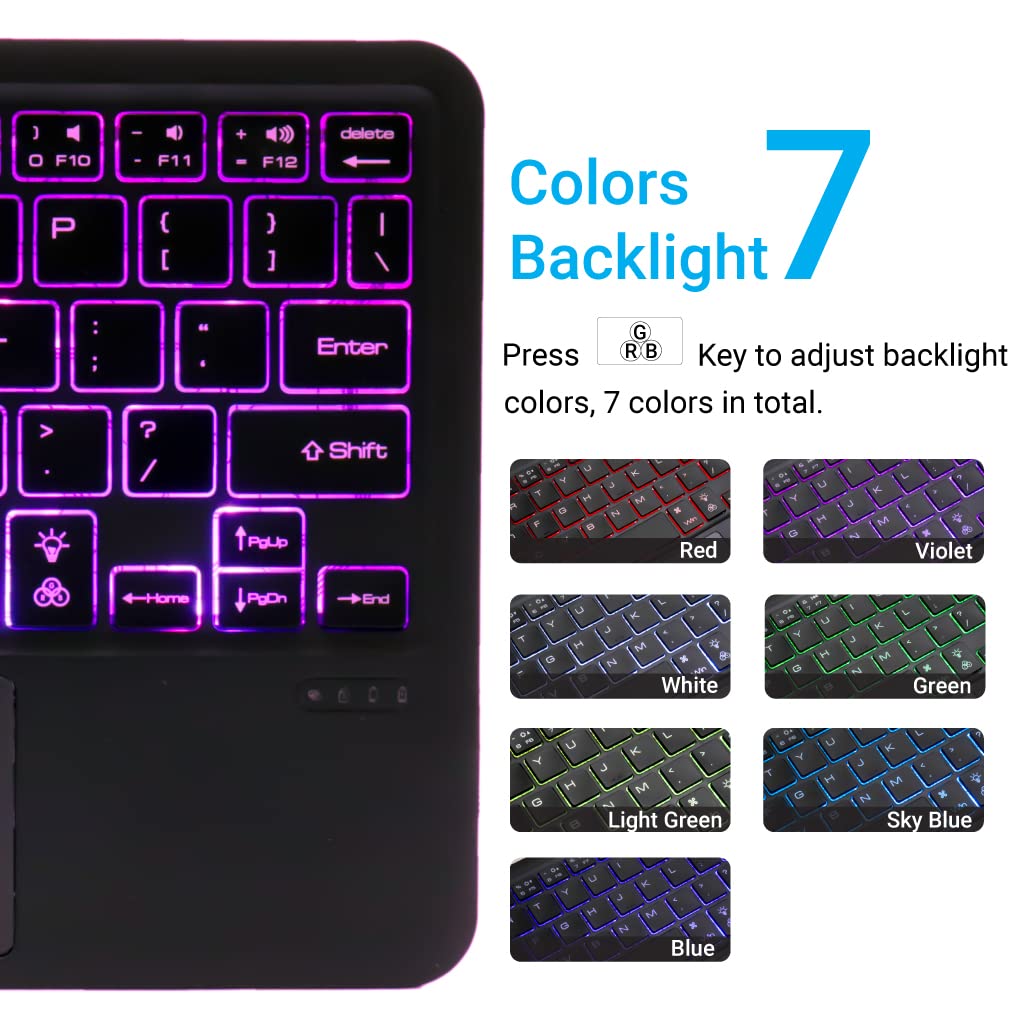
Image: Display of the 7 different backlight colors available on the keyboard.
4. Префрлување помеѓу поврзани уреди
To switch between the three paired devices, simply short press the Fn клуч заедно со соодветниот клуч на уредот (Q, W, или E).
- Притиснете Fn + Q to switch to Device 1.
- Притиснете Fn + W to switch to Device 2.
- Притиснете Fn + E to switch to Device 3.

Image: Visual guide for connecting and seamlessly switching between multiple paired devices.
5. Функциски копчиња
The keyboard includes a full set of function and media keys. These keys often require pressing the Fn key simultaneously with the desired function key to activate their secondary functions (e.g., volume control, media playback).
Одржување
1. Чистење
To clean the keyboard, gently wipe the surface with a soft, damp, lint-free cloth. Avoid using harsh chemicals, abrasive cleaners, or excessive moisture, as these can damage the keyboard's finish or internal components.
2. Нега на батерии
- Always use a 5V 1A power adapter for charging to prevent battery damage and ensure optimal lifespan.
- Избегнувајте често целосно празнење на батеријата.
- Доколку ја складирате тастатурата подолг период, наполнете ја до околу 50% и чувајте ја на ладно и суво место.
3. Складирање
Store the keyboard in a dry environment, away from extreme temperatures, direct sunlight, and humidity. When not in use, it is recommended to turn off the keyboard to conserve battery life.
Решавање проблеми
| Проблем | Можна причина | Решение |
|---|---|---|
| Тастатурата не се вклучува. | Слаба батерија. | Charge the keyboard using the provided USB-C cable and a 5V 1A power adapter. |
| Не може да се поврзе преку Bluetooth. | Keyboard not in pairing mode; Bluetooth off on device; device already connected to 3 keyboards. | Ensure keyboard is in pairing mode (Fn + Q/W/E for 3-5s). Check device's Bluetooth settings. Forget previous connections if necessary. |
| Trackpad not responding. | Software issue; trackpad disabled. | Restart the keyboard and the connected device. Ensure trackpad is not accidentally disabled (check function keys). |
| Задното осветлување не работи. | Backlight turned off; low battery. | Press the backlight key to turn it on. Charge the keyboard. |
| Keys are unresponsive or delayed. | Low battery; interference; distance from device. | Charge the keyboard. Move closer to the connected device. Reduce potential wireless interference. |
Спецификации
- Бренд: ТЕКФИЛ
- Модел: B102D
- Поврзување: Bluetooth
- Распоред на тастатура: QWERTY
- Посебни карактеристики: Multi-Touch Trackpad, 7-Color Backlit, Multi-Device Connectivity (up to 3), USB-C Rechargeable
- Батерија: 1x литиум-јонска батерија (вклучена)
- Димензии на производот: 25 x 1 x 15 cm (Д x Ш x В)
- Тежина на ставката: 300 гр
- Материјал: Пластика
- Компатибилни оперативни системи: Windows, macOS, iOS, iPadOS, Android, ChromeOS

Слика: Дијаграм што го прикажува ултра-тенкиот проfile and dimensions of the keyboard (24.7 cm x 15 cm x 0.5 cm).
Гаранција и поддршка
TECPHILE products are designed for reliability and performance. For warranty information, please refer to the warranty card included with your purchase or visit the official TECPHILE website. For technical support or further assistance, please contact TECPHILE customer service through the contact details provided on the product packaging or the official webсајт.
