1. Вовед
This user manual provides detailed instructions for the installation, operation, and maintenance of your Xprinter XP-D200N Thermal Receipt Printer. The XP-D200N is a high-speed thermal printer designed for reliable and efficient receipt printing in various business environments. Please read this manual thoroughly before using the printer to ensure proper functionality and to prevent damage.
2. Информации за безбедност
To ensure safe operation and prevent damage to the printer or injury to yourself, please observe the following safety precautions:
- Always use the provided power adapter. Using an incorrect adapter may damage the printer and void the warranty.
- Не го изложувајте печатачот на вода, влага или екстремни температури.
- Избегнувајте поставување на печатачот на директна сончева светлина или во близина на извори на топлина.
- Не обидувајте се сами да го расклопите или поправите печатачот. За сите сервиси обратете се на квалификуван персонал.
- Осигурајте се дека печатачот е поставен на стабилна, рамна површина.
- Keep the printer away from dust and debris to maintain optimal performance.
3. Содржина на пакетот
Ве молиме проверете ја содржината на вашиот пакет. Доколку недостасуваат или се оштетени некои предмети, веднаш контактирајте го вашиот продавач.
- Xprinter XP-D200N Thermal Receipt Printer
- Адаптер за напојување
- Кабел за напојување
- USB кабел
- Thermal Paper Roll (starter)
- Упатство за употреба (овој документ)
4. Производот завршиview
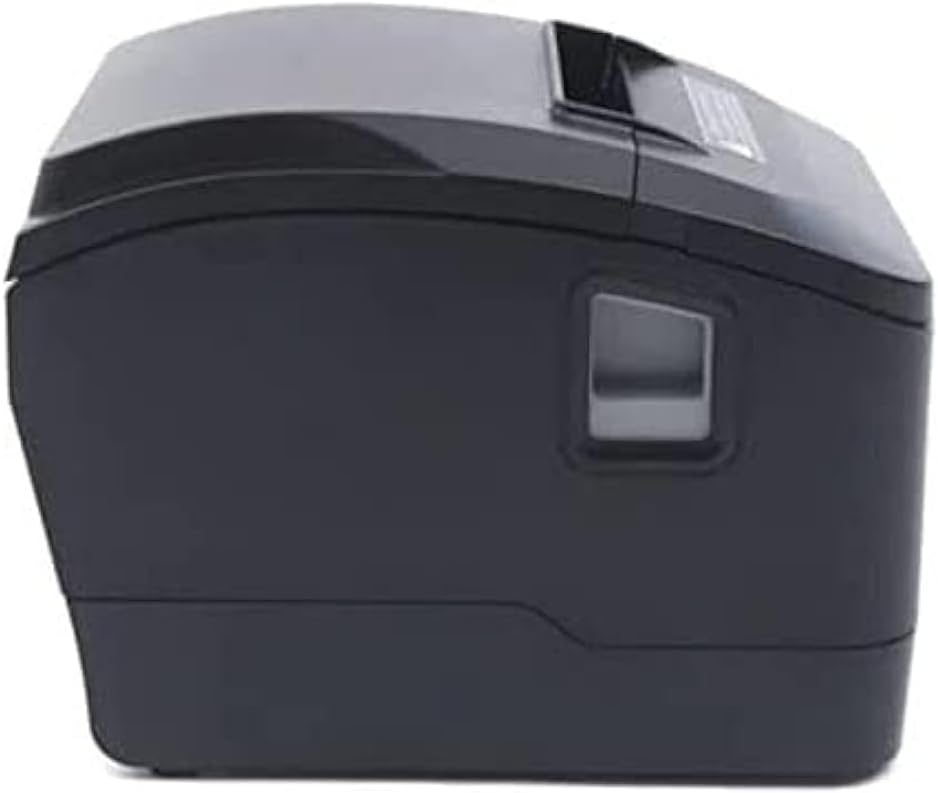
The Xprinter XP-D200N is a compact and efficient thermal receipt printer. Below are images illustrating its key components and design.
Слика 4.1: Предната страна view of the Xprinter XP-D200N Thermal Receipt Printer. This image shows the sleek, black casing and the paper output slot.
Слика 4.2: Страна view of the Xprinter XP-D200N Thermal Receipt Printer. This perspective highlights the compact design and the power switch on the right side.

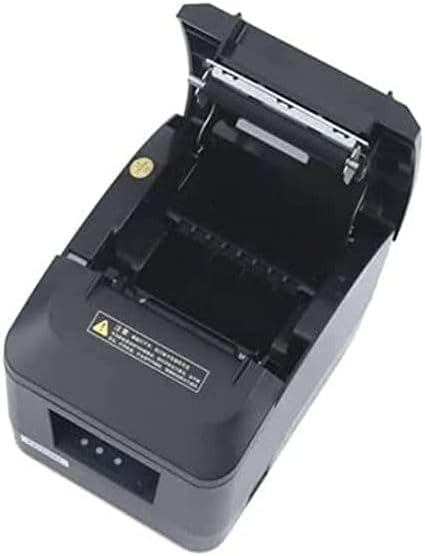
Слика 4.3: Врвот view of the Xprinter XP-D200N Thermal Receipt Printer with the cover open, revealing the thermal paper roll compartment and the print head mechanism. This view is essential for paper loading and maintenance.
5. Поставување
5.1 Поврзување на напојувањето
- Осигурајте се дека прекинувачот за напојување на печатачот е во положба OFF (ИСКЛУЧЕНО).
- Connect the power adapter to the power input port on the back of the printer.
- Plug the power cord into the power adapter, then into a standard electrical outlet.
5.2 Поврзување со компјутер
The XP-D200N supports both USB and LAN connectivity.
USB конекција:
- Connect one end of the USB cable to the USB port on the printer.
- Поврзете го другиот крај на USB-кабелот со достапна USB-порта на вашиот компјутер.
LAN (Ethernet) Connection:
- Connect an Ethernet cable to the LAN port on the printer.
- Поврзете го другиот крај на етернет кабелот со вашиот мрежен рутер или прекинувач.
- Refer to the printer's advanced settings or driver utility for network configuration (e.g., IP address settings).
5.3 Вчитување на термичка хартија
- Open the printer cover by pressing the release button or lifting the cover latch. (Refer to Figure 4.3).
- Insert the thermal paper roll into the compartment with the paper feeding from the bottom and the leading edge extending towards the front of the printer. Ensure the paper is aligned correctly.
- Извлечете мала количина хартија покрај секачот.
- Цврсто затворете го капакот на печатачот додека не кликне на своето место.
5.4 Инсталација на драјвери
After connecting the printer, you will need to install the appropriate drivers on your computer. Drivers are typically provided on a CD included with the printer or can be downloaded from the official Xprinter webстраница. Следете ги упатствата на екранот за време на инсталацијата.
6. Упатства за работа
6.1 Вклучување/исклучување
- To power on: Ensure the power cord is connected, then flip the power switch to the ON position. The indicator light will illuminate.
- To power off: Flip the power switch to the OFF position.
6.2 Основно печатење
Once the printer is connected and drivers are installed, you can print receipts from your point-of-sale (POS) software or other applications. Select the Xprinter XP-D200N as your default printer in your application's print settings.
6.3 Индикатори за статус
The printer features indicator lights (usually on the front panel) that provide information about its status:
- Индикатор за моќност: Solid light indicates the printer is powered on.
- Индикатор за грешка: Flashing or solid light indicates an error (e.g., paper out, cover open, print head overheat). Refer to the troubleshooting section.
- Paper Out Indicator: Illuminates when the paper roll is empty or nearly empty.
7. Одржување
7.1 Чистење на главата за печатење
Regular cleaning of the print head ensures optimal print quality and extends the printer's lifespan.
- Исклучете го печатачот и исклучете го кабелот за напојување.
- Отворете го капакот на печатачот.
- Користете памук лесно dampened with isopropyl alcohol (70% or higher) to gently wipe the thermal print head surface. Avoid touching the print head with bare hands.
- Allow the print head to dry completely before closing the cover and reconnecting power (approximately 2-3 minutes).
7.2 Општо чистење
Избришете ја надворешноста на печатачот со мека, дamp крпа. Не користете абразивни средства за чистење или растворувачи.
7.3 Замена на ролната хартија
When the paper out indicator illuminates or print quality degrades, it's time to replace the paper roll. Follow the steps in Section 5.3 "Loading Thermal Paper".
8 Смена на проблеми
| Проблем | Можна причина | Решение |
|---|---|---|
| Печатачот не се вклучува. | No power, faulty power adapter/cord. | Check power connections. Ensure power switch is ON. Test outlet. |
| Нема печатење. | Paper out, cover open, incorrect driver, incorrect printer selected, cable disconnected. | Load paper, close cover, check USB/LAN connection, verify driver installation, select correct printer in software. |
| Лош квалитет на печатење (бледи, празни линии). | Dirty print head, low quality thermal paper, print head damage. | Clean print head (Section 7.1). Replace thermal paper. If problem persists, contact support. |
| Заглавување на хартија. | Improper paper loading, foreign object. | Turn off printer, open cover, carefully remove jammed paper. Reload paper correctly. |
| Error indicator light is on/flashing. | General error, paper out, cover open. | Check for paper out, ensure cover is closed. Power cycle the printer. If error persists, consult manufacturer's support. |
9. Спецификации
| Бренд: | Xprinter |
| Модел: | XP-D200N |
| Тип на печатач: | Печатач за термички приеми |
| Начин на печатење: | Директно термичко |
| Брзина на печатење: | 220 mm/sec (as per product description) |
| Максимална големина на медиум: | 8 см (80 мм) |
| Поврзување: | USB, LAN (Етернет) |
| Влез на енергија: | 24V – 2.5A |
| Излез од печатач: | Монохроматски |
| Посебни карактеристики: | Sleek, Compact, Lightweight Design, High Print Quality, Durability, Low Noise, Automatic Paper Cutting |
| Димензии на производот: | 18.4 x 14 x 13.5 cm |
| Тежина на ставката: | 1.63 кг |
10. Гаранција и поддршка
The Xprinter XP-D200N Thermal Receipt Printer comes with a standard manufacturer's warranty. For specific warranty terms and conditions, please refer to the warranty card included with your product or visit the official Xprinter website. For technical support, driver downloads, or service inquiries, please contact your local dealer or the Xprinter customer support team through their official channels.
За најнови информации и ресурси за поддршка, посетете ја страницата: www.xprinter.net


