Вовед
Ви благодарам за купувањетоasing the JTEMAN Cell Phone Stand with Wireless Bluetooth Speaker and Alarm Clock. This multi-functional device is designed to enhance your daily routine by combining essential features into one compact and stylish unit. It serves as a high-quality Bluetooth speaker, a reliable alarm clock with a clear display, and a stable, adjustable stand for your mobile devices. Please read this manual carefully to ensure proper use and optimal performance.
Информации за безбедност
- Не го изложувајте уредот на екстремни температури, директна сончева светлина или висока влажност.
- Избегнувајте паѓање или изложување на уредот на силни удари.
- Keep away from water and other liquids. If the device comes into contact with liquid, disconnect it immediately and allow it to dry completely before reuse.
- Не обидувајте се сами да го расклопите, поправите или модифицирате уредот. За сите сервисирања обратете се на квалификуван персонал.
- Користете го само испорачаниот кабел за полнење или сертифициран еквивалент.
- Да се чува подалеку од дофат на деца.
Содржина на пакетот
- JTEMAN Cell Phone Stand with Wireless Bluetooth Speaker and Alarm Clock (Model: JT-L36)
- Кабел за полнење Type-C
- Упатство за употреба
Производот завршиview
Familiarize yourself with the components and controls of your JTEMAN device:
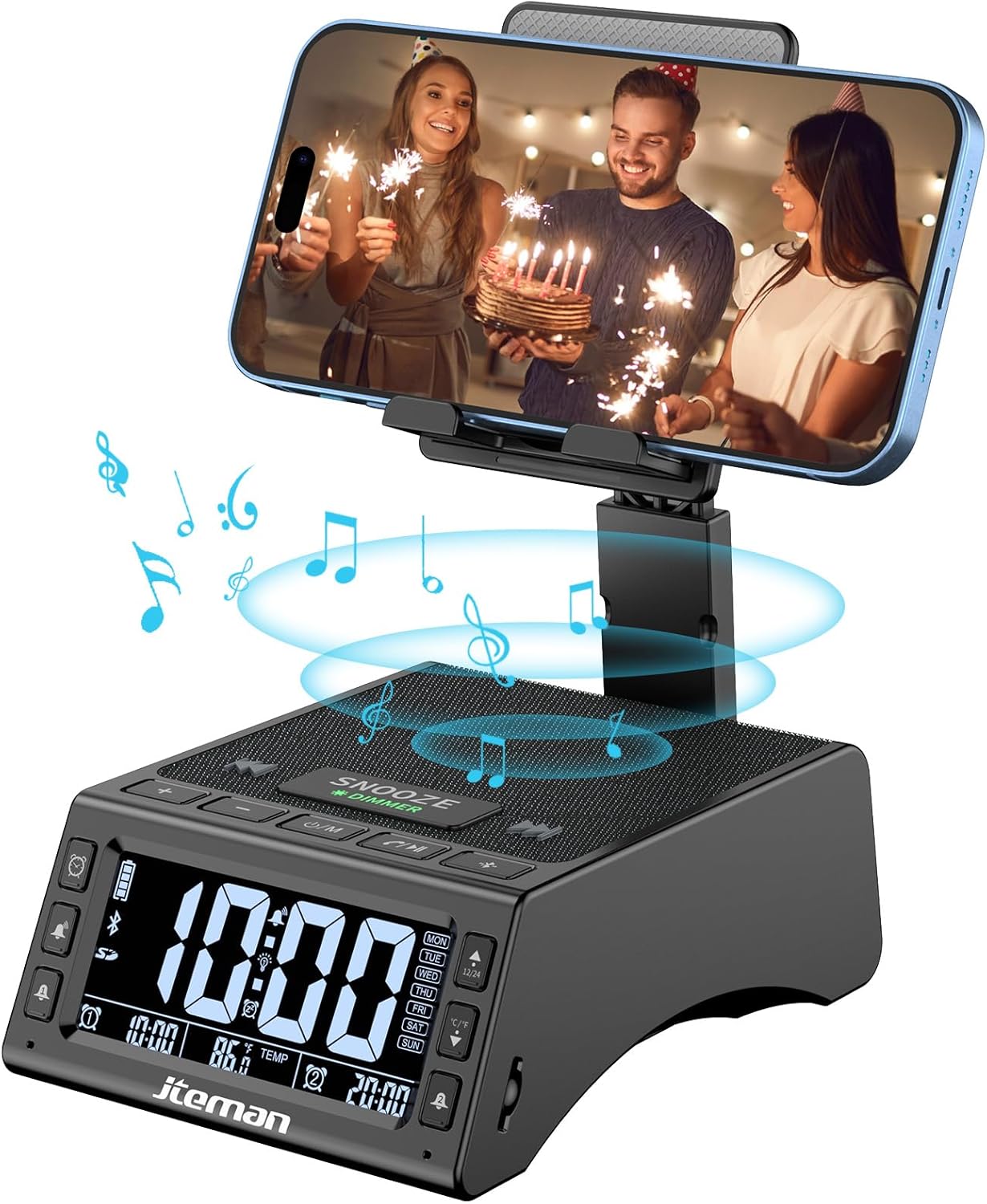
Слика 1: Предна страна view of the JTEMAN device with a smartphone on the adjustable stand, displaying the time and temperature.

Слика 2: Готовоview highlighting the multi-functional aspects including Bluetooth speaker, 12/24H time display, temperature display, foldable phone stand, TF card support, microphone, charging station, dual alarm clocks, and 9 ringtones.
Контроли и пристаништа:
- Екран за прикажување: Shows time, temperature, day of the week, and alarm indicators.
- Копче за одложување/затемнување: Press to snooze an active alarm (5 minutes); long press to adjust display brightness (4 levels).
- Power On/Off/Mode Button: Long press to power on/off; short press to cycle through modes (Bluetooth, TF Card).
- Play/Pause/Answer Button: Controls music playback; answers/ends calls.
- Копче за зголемување на јачината на звукот/следна песна: Increases volume; short press for next track.
- Копче за намалување на јачината на звукот/претходна песна: Decreases volume; short press for previous track.
- Копче за спарување Bluetooth: Го иницира режимот на спарување преку Bluetooth.
- Копчиња за Аларм 1 и Аларм 2: For setting and managing dual alarms.
- Микрофон: За повици без раце.
- Влезна порта од тип C: За полнење на уредот.
- Излезна порта тип-C: За полнење на надворешни уреди.
- Слот за картичка TF: За репродукција на музика директно од TF картичка.
- Adjustable Phone Stand: Foldable and extendable for various viewing angles. Features anti-slip pads and base for stability.
Поставување
1. Почетно полнење
- Connect the provided Type-C charging cable to the Влезна порта од тип C на уредот.
- Connect the other end of the cable to a compatible USB power adapter (not included) and plug it into a wall outlet.
- The display will indicate charging status. Fully charge the device before first use.

Figure 3: The device connected via Type-C for charging itself and an external phone.
2. Поставување време и датум
- Upon powering on, the device should automatically synchronize the current time.
- If manual adjustment is needed, refer to the detailed instructions in the full user manual (included in the package).
- To switch between 12/24 hour format or °F/°C temperature display, use the dedicated buttons or refer to the full manual.

Figure 4: The HD display showing time, temperature, and alarm settings with brightness adjustment levels.
Упатства за работа
1. Using the Phone Stand
- The integrated phone stand can be pulled up from the back of the unit.
- Adjust the height and angle of the stand to your preferred viewing position. The stand is designed to be stable and strong, accommodating devices from 4.0 to 13 inches.
- When not in use, the stand can be folded back into the unit for a compact form factor.

Figure 5: Demonstrates the adjustable height and angle of the phone stand, along with its anti-slip features and foldable design.
2. Функција на Bluetooth звучник
- Вклучување: Long press the Power On/Off/Mode button. The device will enter Bluetooth pairing mode, indicated by a flashing Bluetooth icon on the display.
- Спарување: On your smartphone or other Bluetooth-enabled device, search for “JT-L36” in the Bluetooth settings and select it to pair. A confirmation sound will indicate successful pairing.
- Репродукција на музика: Once paired, you can play audio from your device through the JTEMAN speaker. Use the Play/Pause, Volume Up/Next Track, and Volume Down/Previous Track buttons to control playback.
3. Репродукција на TF картичка
- Insert a TF card (not included) with audio files into the TF Card Slot.
- The device will automatically switch to TF Card mode and begin playing music. If not, short press the Mode button to select TF Card mode.
4. Alarm Clock Features
- Поставување аларми: Use the Alarm 1 and Alarm 2 buttons to set up to two independent alarms. Follow the on-screen prompts to set the time and alarm frequency (e.g., Mon-Fri, Sat-Sun, Mon-Sun).
- Функција за одложување: When an alarm sounds, press the large SNOOZE button on top to activate a 5-minute snooze.
- Прилагодување на осветленоста: Long press the SNOOZE/DIMMER button to cycle through four levels of display brightness, including an off setting for minimal light disturbance.
5. Повикување без раце
- When a call comes in while your phone is connected via Bluetooth, press the Play/Pause/Answer button to answer the call.
- Користете го вградениот микрофон за јасна комуникација.
- Press the Play/Pause/Answer button again to end the call.
6. Полнење на надворешни уреди
- Connect your external device (e.g., smartphone, tablet) to the Излезна порта тип-C on the JTEMAN unit using a compatible charging cable.
- The JTEMAN device will provide power to charge your external device.
Одржување
- Чистете го уредот со мека, сува крпа. Не користете абразивни средства за чистење или растворувачи.
- Осигурајте се дека сите порти се без прашина и остатоци.
- Чувајте го уредот на ладно и суво место кога не го користите подолг временски период.
Решавање проблеми
| Проблем | Можна причина | Решение |
|---|---|---|
| Уредот не се вклучува. | Low battery; power adapter/cable issue. | Charge the device fully. Check power adapter and cable connections. |
| Нема звук од звучникот. | Volume too low; not paired correctly; wrong mode. | Increase volume on both device and connected phone. Re-pair Bluetooth. Ensure correct mode (Bluetooth/TF Card). |
| Спарувањето со Bluetooth не успеа. | Уредот е предалеку; режимот на спарување не е активен; пречки. | Ensure device is in pairing mode and within 10 meters. Turn off other Bluetooth devices. Try restarting both devices. |
| Алармот не се огласува. | Alarm not set; alarm volume too low; alarm disabled. | Verify alarm settings and ensure it's enabled. Increase alarm volume. |
| Phone not charging via output port. | Cable issue; device battery low; incompatible device. | Ensure the JTEMAN device is charged. Try a different charging cable. Confirm your phone is compatible with Type-C charging. |
Спецификации
| Бренд | ЈТЕМАН |
| Број на модел | JT-L36 |
| Димензии на производот | 6.1 x 4.3 x 2.1 инчи |
| Тежина на ставката | 1.26 фунти |
| Боја | Црното |
| Хардверски интерфејс | USB 2.0 |
| Вкупно USB порти | 2 (Type-C Input, Type-C Output) |
| Компатибилност | 4.0-13 inch devices |
Гаранција и поддршка
JTEMAN products are manufactured with high standards of quality. For specific warranty information, please refer to the warranty card included in your product packaging or visit the official JTEMAN website. If you encounter any issues or have questions not covered in this manual, please contact JTEMAN customer support through the contact information provided on the product packaging or webсајт.
Ве молиме чувајте го вашиот доказ за купување за барањата за гаранција.


