1. Вовед
This manual provides detailed instructions for the proper use and maintenance of your Arlec Remote SS3136. This remote control is specifically designed to operate the Arlec Wall Fan AWDC001HA, offering convenient and effortless control over your fan's functions. Please read this manual thoroughly before first use to ensure optimal performance and longevity of your device.
2. Карактеристики на производот
- Лесна контрола: Utilizes Infrared technology for seamless communication with your Arlec Wall Fan AWDC001HA from up to 10 meters away.
- Долготрајна моќност: Requires 3 alkaline batteries for extended use.
- Елегантен дизајн: Finished in a sophisticated black color.
- Разновидна компатибилност: Designed to control Arlec Wall Fans, specifically model AWDC001HA.
- Едноставна операција: Features 3 intuitive buttons for easy fan control.
3. Содржина на пакетот
Проверете дали сите артикли се присутни во пакувањето:
- 1 x Arlec Remote SS3136
- 1 x Wall Mount Holder
- 2 x завртки за монтирање
- 2 x Wallидни приклучоци
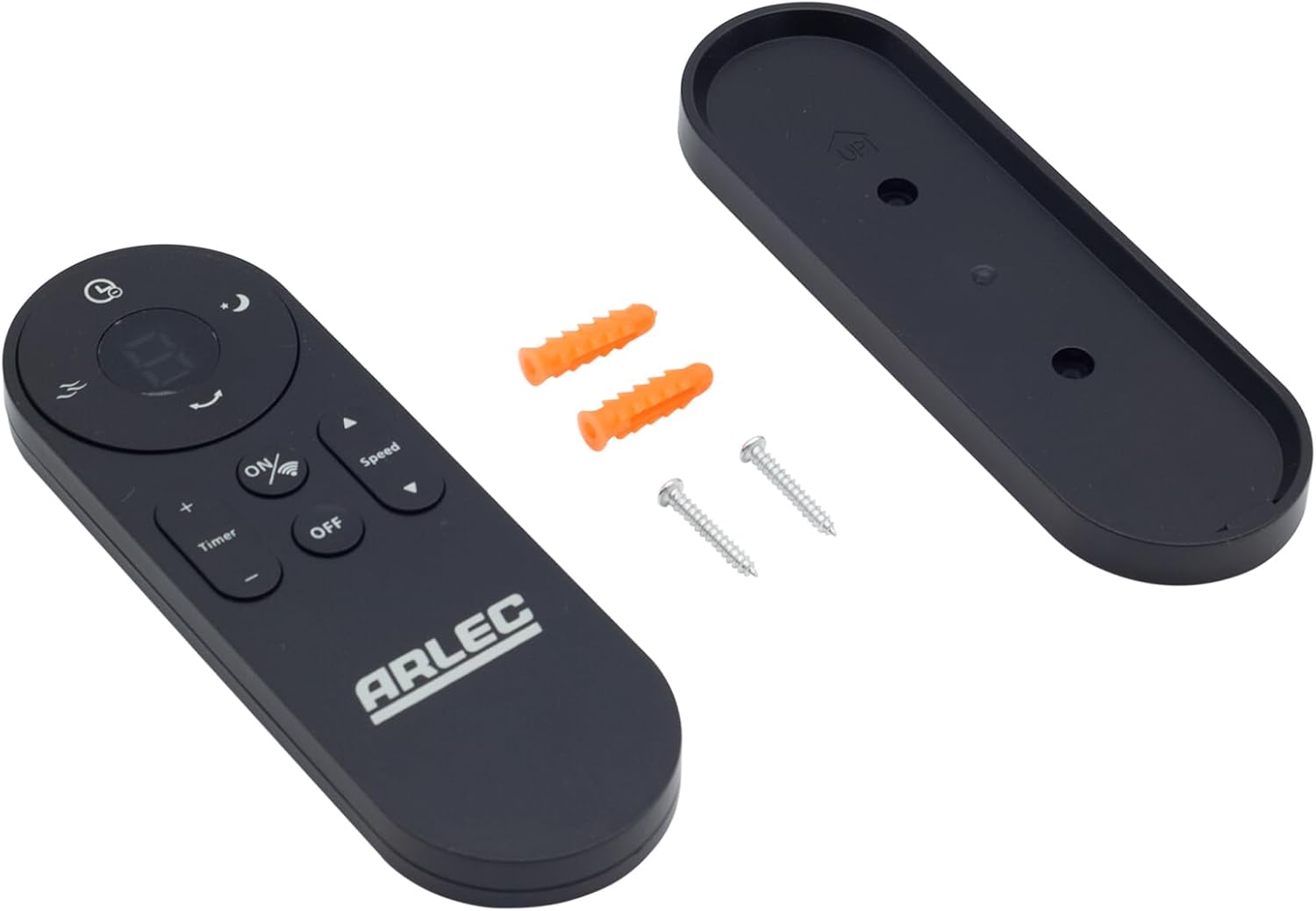
Image: Arlec Remote SS3136 shown with its included wall mount holder, two mounting screws, and two wall plugs, indicating the complete package contents.
4. Поставување
4.1 Инсталација на батерија
- Пронајдете ја преградата за батерии на задниот дел од далечинскиот управувач.
- Отворете го капакот на преградата за батерии.
- Insert 3 Alkaline batteries (not included) into the compartment, ensuring the correct polarity (+ and -) as indicated inside the compartment. The remote requires 3 Volts (DC).
- Добро затворете го капакот на преградата за батерии.
4.2 Инсталација на ѕид (опционално)
- Choose a suitable location on a wall for the remote holder.
- Mark the positions for the two mounting screws using the holder as a template.
- Drill pilot holes at the marked positions. Insert the wall plugs if drilling into drywall or masonry.
- Secure the wall mount holder to the wall using the provided screws.
- Place the remote control into the installed holder for convenient storage.
5. Упатства за работа
The Arlec Remote SS3136 features a simple 3-button layout for controlling your Arlec Wall Fan AWDC001HA. Ensure there is a clear line of sight between the remote and the fan's infrared receiver for optimal performance.

Слика: Крупен план view of the Arlec Remote SS3136, highlighting its three main control buttons: ON/OFF, Speed, and Timer.
- Копче за вклучување/исклучување: Притиснете го ова копче за да го вклучите или исклучите вентилаторот.
- Копче за брзина: Use this button to cycle through the available fan speed settings (e.g., Low, Medium, High).
- Копче за тајмер: Press this button to set or adjust the fan's timer function. Refer to your Arlec Wall Fan AWDC001HA manual for specific timer intervals.
The remote operates using Infrared (IR) technology. Point the remote directly towards the fan's IR receiver. The effective operating range is up to 10 meters (approximately 33 feet).
6. Одржување
- Чистење: Избришете го далечинскиот управувач со мека, сува крпа. Не користете абразивни средства за чистење или растворувачи.
- Замена на батерија: Replace batteries when the remote's performance degrades or it stops responding. Always replace all 3 batteries at the same time with new alkaline batteries.
- Складирање: Доколку далечинскиот управувач нема да се користи подолг период, извадете ги батериите за да спречите истекување. Чувајте на ладно и суво место.
7 Смена на проблеми
| Проблем | Можна причина | Решение |
|---|---|---|
| Remote not responding to fan. |
|
|
| Копчињата се лепливи или не реагираат. | Нечистотија или остатоци под копчињата. | Clean the remote surface with a soft, dry cloth. Avoid liquids. |
8. Спецификации
| Атрибут | Детал |
|---|---|
| Модел | SS3136 |
| Производител | Arlec |
| Компатибилни уреди | Arlec Wall Fan AWDC001HA |
| Технологија за поврзување | Инфрацрвена (IR) |
| Број на копчиња | 3 |
| Тип на контролер | Контрола на копче |
| Тип на батерија | Alkaline (3 required) |
| Voltage | 3 волти (DC) |
| Оперативен опсег | До 10 метри |
9. Гаранција и поддршка
For warranty information and technical support, please refer to the documentation provided with your Arlec Wall Fan AWDC001HA or contact Arlec customer service directly. Keep your purchase receipt as proof of purchase.
За дополнителна помош, посетете ја официјалната страница на производителот webстраницата или контактирајте ја нивната линија за поддршка на корисници.


