1. Вовед
The Moman H2Pro is a wireless helmet communication system designed to enhance your riding experience. It features Bluetooth 5.1 technology for stable connections, a 1000m intercom range for two riders, and high-quality audio with DSP and CVC noise cancellation. The device is built to withstand various weather conditions with an IP65 waterproof rating and offers convenient control through an intuitive knob and buttons.

Image 1.1: Moman H2Pro Motorcycle Helmet Headset, showcasing its design and orange accents.

Слика 1.2: Готовоview of Moman H2Pro functions including Wireless 5.1, Full Duplex Intercom, AI Voice Assistant, Music Share, FM Radio, CVC&DSP Noise Cancellation, IP65 Waterproof, and 900mAh Battery.
2. Содржина на пакетот
Ве молиме проверете дали сите артикли наведени подолу се вклучени во вашиот пакет. Доколку некои артикли недостасуваат или се оштетени, ве молиме контактирајте ја службата за корисници.
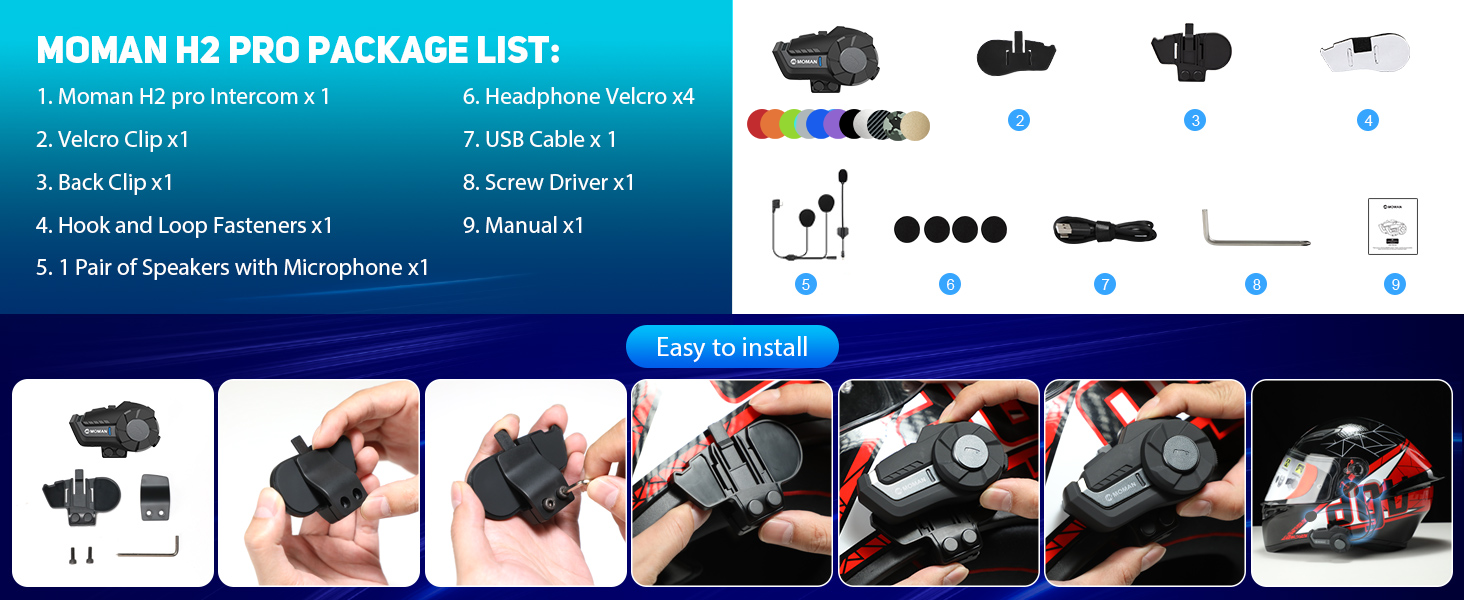
Image 2.1: Visual representation of the Moman H2Pro package contents and installation accessories.
- Moman H2Pro Intercom Unit x 1
- Велкро штипка x 1
- Задна штипка x 1
- Hook and Loop Fasteners x 1
- Pair of Speakers with Microphone x 1
- Слушалки со лепенка x 4
- USB кабел за полнење x 1
- Шрафцигер x 1
- Упатство за употреба x 1
3. Производот завршиview
Familiarize yourself with the main components and controls of your Moman H2Pro headset.

Image 3.1: Diagram illustrating the On/Off Key, Function Key, Knob, Indicator Light, and Charging Interface of the Moman H2Pro.
- Копче за вклучување/исклучување: Used for power on/off, language change, and last call redial.
- Функциски клуч: Controls music playback (play/pause), music sharing, ending/rejecting calls, FM radio activation, and voice assistant.
- Копче: Adjusts volume (up/down), navigates between songs (next/previous), and changes FM channels.
- Индикаторско светло: Provides status feedback (e.g., pairing, charging, power).
- Интерфејс за полнење: USB Type-C порт за полнење на уредот.
4. Поставување и инсталација
The Moman H2Pro can be easily installed onto most helmets using either a back clip or magic tape.

Image 4.1: Step-by-step visual guide for installing the Moman H2Pro onto a motorcycle helmet.
4.1. Choosing an Installation Method
Select the method that best suits your helmet type and personal preference:
- Заден клип: Provides a secure, semi-permanent attachment to the helmet edge. Requires a screwdriver for installation.
- Magic Tape (Adhesive Mount): Offers a strong adhesive bond for helmets where the clip cannot be used or for a cleaner look.
4.2. Поставување на звучникот и микрофонот
- Attach the headphone Velcro pads inside the helmet, ensuring they are positioned over your ears.
- Secure the speakers to the Velcro pads. Ensure the speakers are centered over your ears for optimal audio quality.
- Position the microphone in front of your mouth, inside the helmet, ensuring it is close enough to pick up your voice clearly but not obstructing your vision or comfort. Use the provided hook and loop fasteners to secure the microphone cable.
- Route all cables neatly within the helmet lining to prevent interference and ensure comfort.
5. Упатства за работа
5.1. Вклучување/исклучување
- Вклучување: Притиснете и задржете го Вклучено / исклучено копче додека не светне индикаторската ламбичка.
- Исклучено: Притиснете и задржете го Вклучено / исклучено копче додека не се исклучи показното светло.
5.2. Bluetooth Pairing with Mobile Device
- Ensure the Moman H2Pro is powered off.
- Притиснете и задржете го Вклучено / исклучено копче for approximately 5-7 seconds until the indicator light flashes red and blue alternately, indicating pairing mode.
- На вашиот мобилен уред, овозможете Bluetooth и побарајте достапни уреди.
- Select "Moman H2Pro" from the list. Once connected, the indicator light will flash blue slowly.
5.3. Intercom Communication (2 Riders)
The Moman H2Pro supports full-duplex intercom communication up to 1000 meters between two paired units.

Image 5.1: Illustration of the Moman H2Pro's 1000-meter communication range for two riders.
- Ensure both Moman H2Pro units are powered on and not connected to any other Bluetooth devices.
- On one unit, press and hold the Функциски клуч for approximately 3 seconds until the indicator light flashes red and blue rapidly.
- On the second unit, briefly press the Функциски клуч. The units will search for each other and automatically connect.
- Once connected, the indicator lights on both units will flash blue slowly, and you will hear a confirmation tone.
5.4. Репродукција и споделување на музика

Image 5.2: Depiction of Moman H2Pro features including Music Share, FM Radio, AI Voice Assistant, and Call Answer.
- Пушти/Паузирај музика: Накратко притиснете го Функциски клуч.
- Следна песна: Завртете го Копче во насока на стрелките на часовникот.
- Претходна песна: Завртете го Копче спротивно од стрелките на часовникот.
- Сподели музика: While music is playing, briefly press the Функциски клуч twice to initiate music sharing with a paired intercom unit.
5.5. FM радио
- Активирајте FM радио: Накратко притиснете го Функциски клуч три пати.
- Change FM Channels: Завртете го Копче clockwise or counter-clockwise.
- Deactivate FM Radio: Накратко притиснете го Функциски клуч три пати повторно.
5.6. Гласовен асистент
- Активирајте го гласовниот асистент: Накратко притиснете го Функциски клуч four times. This will activate your phone's AI voice assistant (e.g., Siri, Google Assistant).
5.7. Телефонски повици
- Одговори на повикот: Накратко притиснете го Функциски клуч.
- Заврши/одбиј повик: Притиснете и задржете го Функциски клуч за 2 секунди.
- Повторно бирајте последен број: Накратко притиснете го Вклучено / исклучено копче двапати.
5.8. Прилагодување на јачината на звукот
- Зголемете ја јачината на звукот: Завртете го Копче во насока на стрелките на часовникот.
- Намалување на јачината на звукот: Завртете го Копче спротивно од стрелките на часовникот.
6. Одржување и грижа
Proper maintenance ensures the longevity and optimal performance of your Moman H2Pro headset.
- Чистење: Избришете го уредот со меко, гamp крпа. Не користете груби хемикалии или абразивни средства за чистење.
- Отпорност на вода: The device is IP65 waterproof, meaning it is protected against dust and low-pressure water jets. Avoid submerging the unit in water. Ensure the charging port cover is securely closed when not charging.
- Складирање: Чувајте ги слушалките на ладно и суво место кога не се во употреба. Избегнувајте екстремни температури.
- Батерија: To maintain battery health, charge the device fully before long periods of storage and recharge every few months if not in regular use.

Image 6.1: Visual representation of the Moman H2Pro's IP65 waterproof and dustproof capabilities, suitable for various weather conditions.
7 Смена на проблеми
If you encounter issues with your Moman H2Pro, refer to the following common problems and solutions.
| Проблем | Можна причина | Решение |
|---|---|---|
| Уредот не се вклучува. | Слаба батерија. | Наполнете го уредот користејќи го дадениот USB-кабел. |
| Cannot pair with mobile device. | Device not in pairing mode; Bluetooth off on phone; too many paired devices. | Ensure the H2Pro is in pairing mode (flashing red/blue). Check phone's Bluetooth settings. Clear previous pairings if necessary. |
| Intercom connection unstable or not connecting. | Units too far apart; interference; incorrect pairing procedure. | Ensure units are within 1000m range. Re-attempt intercom pairing procedure. Avoid strong electromagnetic interference. |
| Poor audio quality or noise. | Microphone/speaker placement; environmental noise; low volume. | Adjust speaker position over ears. Ensure microphone is close to mouth. Increase volume. DSP&CVC noise cancellation is active, but extreme noise may still affect clarity. |
| FM Radio not working. | Weak signal; incorrect activation. | Move to an area with better FM signal. Ensure FM radio is activated correctly (three presses of Function Key). |
8. Спецификации
Technical specifications for the Moman H2Pro Motorcycle Helmet Headset.
| Карактеристика | Детал |
|---|---|
| Име на моделот | Moman H2Pro |
| Bluetooth верзија | 5.1 |
| Опсег на домофон | Up to 1000 meters (for 2 riders) |
| Капацитет на батеријата | 900 mAh |
| Работно време | Up to 20 hours (music/call) |
| Време на мирување | До 300 часа |
| Време на полнење | Приближно 2 часа |
| Отпорност на вода | IP65 (Waterproof and Dustfree) |
| Работна температура | -20℃ до 50℃ (-4°F до 122°F) |
| Големина на звучникот | Динамички драјвер од 40 мм |
| Поништување на бучава | DSP & CVC Technology |
| Контролен метод | Physical Knob and Buttons, Voice Assistant |
| Тежина | 340 грама (приближно 12 унци) |

Image 8.1: Details on the Moman H2Pro's 900mAh battery, offering 300 hours standby, 20 hours working/music/call time, and 2 hours charging time via Type-C.
9. Гаранција и поддршка
Moman products are designed for reliability and performance. For warranty information, technical support, or service inquiries, please refer to the official Moman webстраницата или директно контактирајте ја нивната служба за корисници. Чувајте ја сметката за купување како доказ за купување за гаранциски побарувања.
Поддршка преку Интернет: Visit the official Moman webстраница за често поставувани прашања, регистрација на производи и ресурси за поддршка.
Контактирајте со службата за корисници: Refer to the contact information provided on the product packaging or the official Moman webстраница за директна помош.


