Вовед
The Moman H2 Motorcycle Intercom Headset is designed to provide seamless communication and entertainment for motorcycle riders. Featuring advanced Bluetooth technology, noise reduction, and a durable waterproof design, the H2 ensures a clear and reliable connection for up to two riders over a distance of 1000 meters. This manual provides detailed instructions for setting up, operating, maintaining, and troubleshooting your Moman H2 headset.
Производот завршиview и Клучни карактеристики
The Moman H2 headset offers a range of features to enhance your riding experience:
- Двонасочен домофон: Real-time communication for two riders up to 1000 meters (0.6 miles).
- Напредна безжична поврзаност: Equipped with Bluetooth 5.1 for faster transmission, longer distance, more stable connection, and improved efficiency.
- Комуникација без раце: Supports hands-free calls, including answering, hanging up, and rejecting calls.
- Висококвалитетно аудио: Features 40mm Hi-Fi speakers for excellent sound quality for music and calls.
- Двојно намалување на шумот: Incorporates DSP (Digital Signal Processing) and CVC (Clear Voice Capture) noise cancellation technology to minimize engine, wind, and traffic noise, ensuring clear audio even at high speeds.
- Интегрирано FM радио: Allows you to search and select clear FM channels.
- Гласовен асистент со вештачка интелигенција: Access your smartphone's voice assistant for hands-free control.
- Издржлив и отпорен на временски услови: IP65 waterproof and dustproof rating, capable of withstanding harsh weather conditions including dust, rain, storms, and snow. Operates in temperatures from -20°C to 50°C (-4°F to 122°F).
- Долг век на батеријата: Built-in 900mAh battery provides up to 20 hours of continuous operation (music/call) and 300 hours of standby time on a single charge.
- Лесна контрола: Designed with large physical buttons and a rotary knob for easy operation, even while wearing gloves.
- Широка компатибилност: Applicable to most open-face, modular, and full-face helmets.

Слика 1: Готовоview of Moman H2 Pro functions and features.

Figure 2: The Moman H2 supports communication between two riders up to 1000 meters.
Содржина на пакетот
Before you begin, please check the package to ensure all components are present:
- Moman H2 Pro Intercom Unit x 1
- Велкро штипка x 1
- Задна штипка x 1
- Hook and Loop Fasteners x 1
- Pair of Speakers with Microphone x 1
- Слушалки со лепенка x 4
- USB кабел x 1
- Возач за завртки x 1
- Упатство за употреба x 1
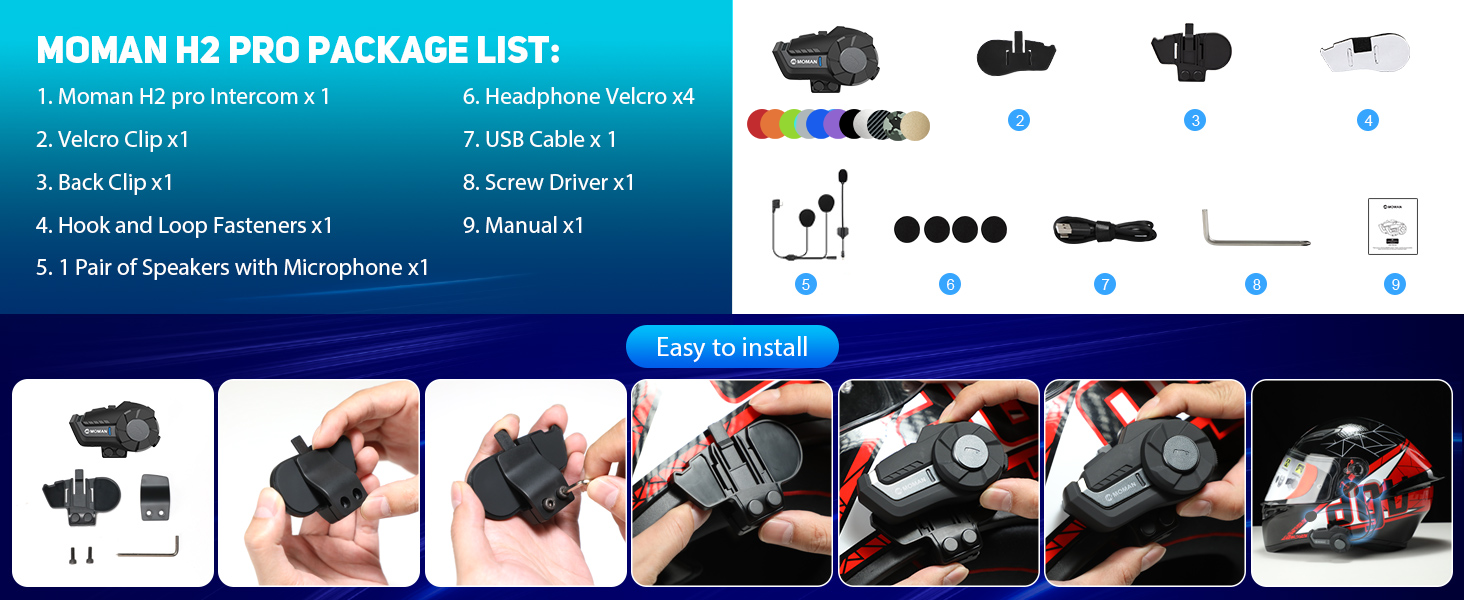
Figure 3: Moman H2 Pro Package List.
Поставување и инсталација
The Moman H2 intercom can be installed on your helmet using either a back clip or Velcro fasteners. Choose the method that best suits your helmet and preference.
Чекори за инсталација:
- Изберете метод на монтирање: Decide whether to use the back clip for a secure, semi-permanent attachment or the Velcro for easier removal and repositioning.
- Attach Intercom Unit:
- Using Back Clip: Securely attach the back clip to the side of your helmet. Then slide the Moman H2 intercom unit onto the clip until it clicks into place.
- Using Velcro: Apply the adhesive Velcro strip to a flat, clean surface on the side of your helmet. Attach the corresponding Velcro on the intercom unit and press firmly to secure.
- Инсталирајте звучници: Place the 40mm Hi-Fi speakers inside your helmet's ear pockets. Use the provided headphone Velcro pads to secure them in position. Ensure the speakers are aligned with your ears for optimal sound.
- Позиција на микрофонот: Attach the microphone to the inside of your helmet, near your mouth. Ensure it is positioned to pick up your voice clearly without being obstructed by padding or wind.
- Поврзете кабли: Route the speaker and microphone cables neatly within the helmet padding and connect them to the appropriate ports on the Moman H2 intercom unit.
- Почетна наплата: Before first use, fully charge the Moman H2 using the provided USB cable. Connect the USB cable to the charging interface on the unit and a power source. The indicator light will show charging status.
Figure 4: Easy installation guide for the Moman H2.
Упатства за работа
The Moman H2 features intuitive controls for various functions. Familiarize yourself with the buttons and rotary knob for easy operation while riding.
Функции на копчињата:
| Контролен елемент | Акција | Функција |
|---|---|---|
| Вклучено / исклучено копче | Притиснете и задржете | Вклучување/исклучување |
| Краток печат | Change Language (when powered on) | |
| Двоен притисок | Последно повикување повторно | |
| Функциски клуч | Краток печат | Пушти/Паузирај музика |
| Притиснете и задржете | Share Music (initiate music sharing with another H2 unit) | |
| Single Press (during call) | Заврши/Одбиј повик | |
| Двоен притисок | Активирајте FM радио | |
| Троен печат | Активирајте го Гласовниот асистент | |
| Ротари копче | Ротирајте во насока на стрелките на часовникот | Volume Up / Next Song (short rotation) / Change FM Channel (long rotation) |
| Ротирајте спротивно од стрелките на часовникот | Volume Down / Previous Song (short rotation) / Change FM Channel (long rotation) |
Pairing and Intercom Usage:
- Bluetooth Pairing (with Phone):
- Проверете дали H2 е исклучен.
- Press and hold the On/Off Key until the indicator light flashes rapidly, indicating pairing mode.
- On your smartphone, enable Bluetooth and search for "Moman H2".
- Select "Moman H2" to connect. The indicator light will change to a slow flash or solid blue once paired.
- Intercom Pairing (between two H2 units):
- Ensure both H2 units are powered off.
- On both units, press and hold the On/Off Key until they enter pairing mode (rapid flashing light).
- Once both are in pairing mode, they will automatically search and connect to each other. The indicator lights will change once connected.
- To initiate intercom conversation, a short press on the Function Key on either unit might be required (refer to specific manual for exact trigger).
- Репродукција на музика: Once paired with your phone, use the Function Key to play or pause music. Use the Rotary Knob to adjust volume or skip tracks.
- ФМ радио: Double press the Function Key to activate FM radio. Use the Rotary Knob to change stations.
- Гласовен асистент: Triple press the Function Key to activate your phone's voice assistant (e.g., Siri, Google Assistant).

Figure 5: Precise Function and Easy Control layout.
Одржување
Proper maintenance will ensure the longevity and optimal performance of your Moman H2 headset.
- Чистење: Избришете го уредот со меко, гamp крпа. Не користете јаки хемикалии, растворувачи за чистење или силни детергенти.
- Изложеност на вода: While the device is IP65 waterproof, avoid prolonged submersion in water. Ensure the charging port cover is securely closed when not charging to maintain water resistance.
- Складирање: Чувајте ги слушалките на ладно и суво место кога не се во употреба. Избегнувајте екстремни температури.
- Нега на батеријата: To preserve battery life, charge the unit regularly, even if not used frequently. Avoid fully discharging the battery for extended periods.
Решавање проблеми
If you encounter issues with your Moman H2 headset, refer to the following common problems and solutions:
| Проблем | Можна причина | Решение |
|---|---|---|
| Уредот не се вклучува. | Слаба батерија. | Наполнете го уредот целосно користејќи го дадениот USB-кабел. |
| Cannot pair with phone/another unit. | Уредот не е во режим на спарување; Bluetooth е исклучен на телефонот; премногу оддалечени. | Ensure device is in pairing mode (rapid flashing light). Turn Bluetooth on phone. Bring devices closer (within 1 meter for pairing). Try resetting the device. |
| Poor audio quality / Noise. | Microphone/speakers improperly positioned; environmental noise; low signal. | Adjust microphone closer to mouth. Ensure speakers are aligned with ears. Move away from strong electromagnetic interference. DSP&CVC noise reduction should handle most environmental noise. |
| Дометот на интерфонот е помал од очекуваното. | Obstructions (buildings, terrain); heavy radio interference. | Ensure clear line of sight between units. Avoid areas with high radio frequency interference. |
| Копчињата не реагираат. | Device frozen; physical damage. | Try restarting the device. If unresponsive, allow battery to drain completely and then recharge. If issue persists, contact customer support. |
Спецификации
| Карактеристика | Детал |
|---|---|
| Име на моделот | H2 |
| Бренд | Моман |
| Опсег на домофон | Up to 1000 meters (0.6 miles) for 2 riders |
| Bluetooth верзија | 5.1 |
| Капацитет на батеријата | 900 mAh |
| Работно време | Up to 20 hours (music/call) |
| Време на мирување | До 300 часа |
| Време на полнење | Приближно 2 часа |
| Отпорност на вода | IP65 (Водоотпорен и отпорен на прашина) |
| Работна температура | -20°C до 50°C (-4°F до 122°F) |
| Големина на звучникот | 40 mm Hi-Fi Speakers |
| Намалување на бучавата | DSP & CVC Technology |
| Материјал | Термопластичен еластомер (TPE) |
| Тип на контрола | Physical Buttons, Rotary Knob |
Гаранција и поддршка
Moman products are designed for durability and performance. For specific warranty details, please refer to the warranty card included in your product package or visit the official Moman website. For technical support, troubleshooting assistance beyond this manual, or inquiries about replacement parts, please contact Moman customer service through their official channels.
While specific warranty information is not available in this document, Moman is committed to providing premium products, superior quality, and professional service.

Figure 6: Moman's commitment to quality and service.


