Вовед
This manual provides detailed instructions for the setup, operation, and maintenance of your ATTACK SHARK M71 75% TKL Wireless Mechanical Keyboard. Please read this guide thoroughly to ensure proper use and to maximize your keyboard's performance and lifespan.

Image: The ATTACK SHARK M71 keyboard showcasing its 68% layout and key features like aluminum alloy body, three-mode connection, and RGB backlight.
Содржина на пакетот
Проверете дали сите артикли се присутни во пакувањето:
- ATTACK SHARK M71 Wireless Mechanical Keyboard
- Кабел тип-C
- 2.4G безжичен ресивер
- Keycap Puller / Switch Puller (Two-in-one tool)
- Complimentary 61 additional PBT OEM keycaps (different color layout)
- Упатство за употреба

Image: A visual representation of the items included in the ATTACK SHARK M71 keyboard package, including the keyboard, cables, and extra keycaps.
Video: Unboxing the Blueberry version of the M71 keyboard, showing the package contents and a demonstration of its typing sound.
Производот завршиview
The ATTACK SHARK M71 is a 75% TKL wireless mechanical keyboard featuring a full aluminum CNC chassis, multi-mode connectivity, hot-swappable switches, and RGB lighting. Its compact design and robust construction are engineered for both gaming and productivity.
Клучни карактеристики:
- Full Aluminum CNC Body: Constructed from international standard 6063 aluminum alloy for durability and a premium feel.
- Три-режимска поврзаност: Supports Bluetooth 5.0/3.0, 2.4G wireless, and wired USB-C connections.
- Прекинувачи што може да се заменуваат со топла вода: Compatible with 3/5-pin switches, allowing for easy customization without soldering.
- Структура на држачот за дихтунзи: Incorporates anti-static IPEX switch pads, PORON sound-absorbing cotton, and PET acoustic switch pads to enhance typing feel and reduce noise.
- RGB LED осветлување: Features customizable RGB backlighting and a side LED light strip.
- Батерија од 4600 mAh: Овозможува продолжена безжична употреба.
- PBT OEM Keycaps: Durable keycaps with GMK-like characters.
Компоненти:
Familiarize yourself with the main components of your keyboard:
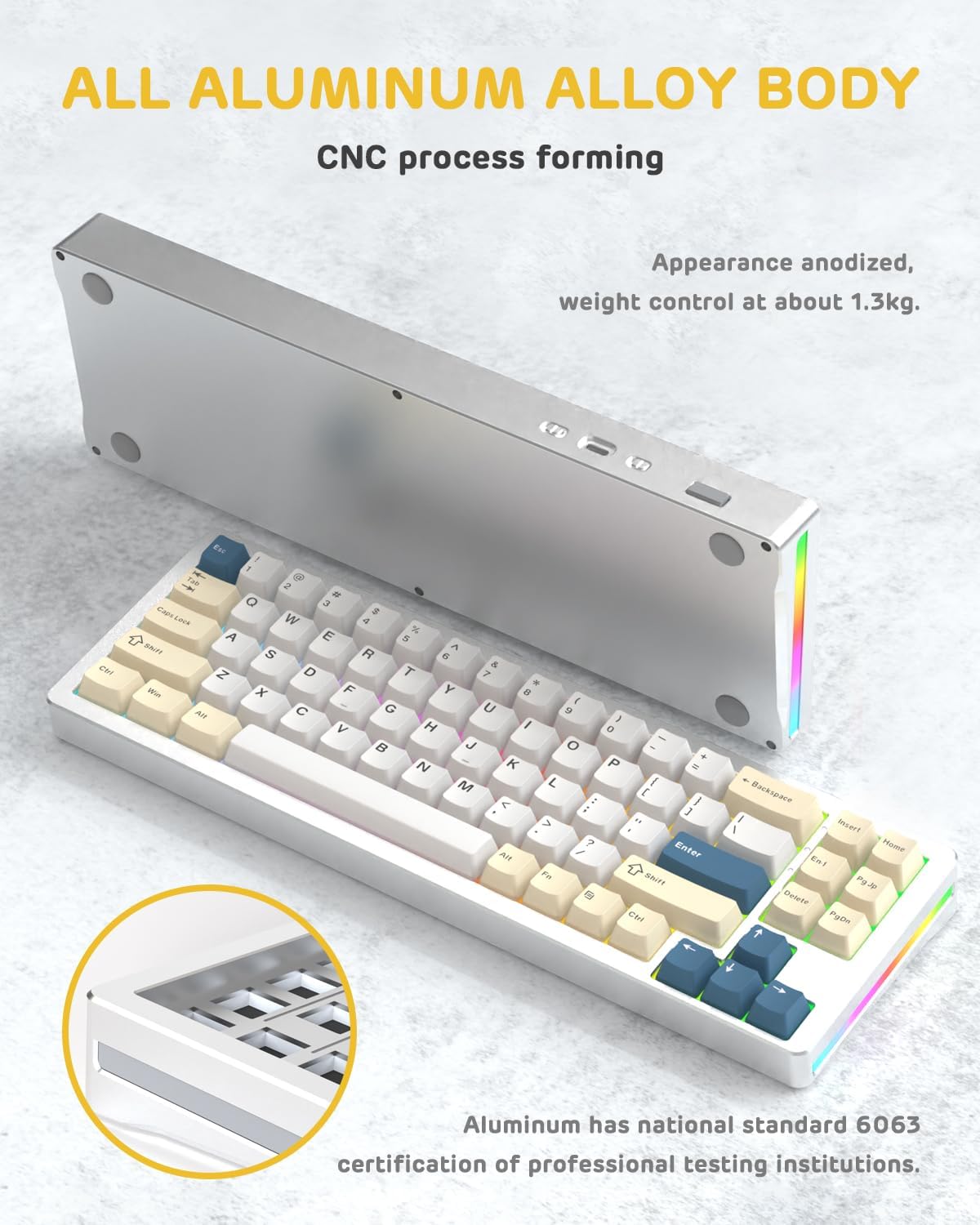
Слика: Страна view of the M71 keyboard highlighting its full aluminum alloy body and CNC process forming.

Слика: Експлодира view illustrating the multi-layered gasket mount structure, including the PBT keycaps, aluminum alloy upper cover, customized switch body, PC positioning board, PORON filled cotton, anti-static IPEX switch underpad, PET singing pad, PCB board, PORON shaft seat cushion, PET sound backing pad, wing light strip, and aluminum alloy base.
Поставување
1. Connectivity Modes:
The M71 keyboard supports three connection modes: Bluetooth, 2.4G wireless, and wired USB-C.
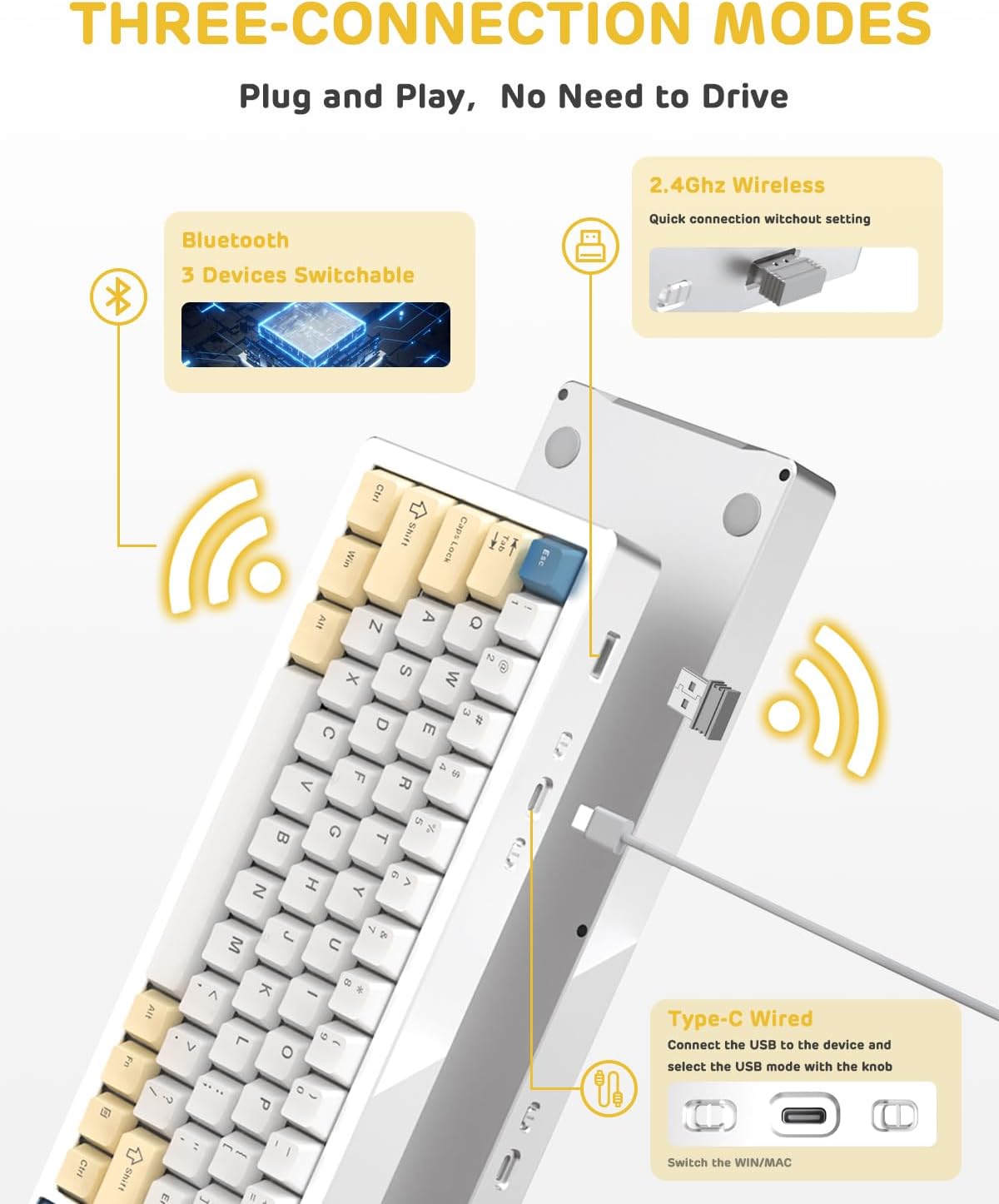
Image: A visual guide to the three connectivity options: Bluetooth for up to 3 devices, 2.4GHz wireless with a receiver, and wired Type-C connection.
Жична врска:
- Connect the provided Type-C cable to the keyboard's USB-C port and to your computer's USB port.
- Ensure the mode switch on the keyboard is set to the wired (USB-C) position.
- Тастатурата автоматски ќе биде препознаена од вашиот систем.
2.4G безжична врска:
- Locate the 2.4G wireless receiver (dongle) in the package.
- Приклучете го 2.4G приемникот во слободен USB порт на вашиот компјутер.
- Set the mode switch on the keyboard to the 2.4G wireless position.
- Тастатурата треба да се поврзе автоматски.
Bluetooth конекција:
- Поставете го прекинувачот за режим на тастатурата во положба Bluetooth.
- На вашиот компјутер или уред, отворете ги поставките за Bluetooth и пребарајте нови уреди.
- The keyboard should appear as "ATTACK SHARK M71" or similar. Select it to pair.
- The keyboard can connect to up to 3 Bluetooth devices. Use Fn + 1/2/3 за префрлање помеѓу спарени уреди.
2. Battery Charging and Status:
The M71 keyboard is equipped with a 4600mAh battery. To charge, connect the keyboard via the USB-C cable to a power source (e.g., computer USB port, USB wall adapter).

Image: A diagram showing how to check the battery level using Fn+ALT(R) and the visual indicators on the keyboard's side LED strip.
- To check the battery level in wireless mode, press Fn + ALT (Right). The side LED strip will indicate the charge level.
- Battery life is approximately 1-2 weeks with lighting enabled and up to 4 weeks with lighting disabled.
Упатства за работа
1. Multimedia Keys:
The keyboard features 12 multimedia keys accessible via the Fn комбинации на клучеви:
- Fn + F1-F12: Access various multimedia functions (e.g., volume control, play/pause, calculator, email).
- Fn + 1/2: Control screen brightness.
2. Контрола на RGB осветлување:
Customize the keyboard's RGB backlight and side LED strip:

Image: The M71 keyboard displaying its RGB backlight and side LED strip, along with a close-up of the PBT keycaps.
- Fn + Ctrl (Right): Switch between different side LED light strip modes.
- Fn + Tab: Toggle white light mode.
- Refer to the full user manual for additional lighting effect controls and customization options via the programmable software.
3. Programmable Software:
The keyboard supports a dedicated driver program for advanced customization. You can download the software from the official ATTACK SHARK website to personalize lighting effects, key assignments, and macros. The keyboard is compatible with Windows 2000/XP/Vista/7/8/10/11, Android, and iOS.
Одржување
1. Чистење:
- Користете мека, сува крпа за да ја избришете површината на тастатурата.
- За подлабоко чистење, отстранете ги капачињата на копчињата користејќи го испорачаниот извлекувач на капачињата на копчињата и користете компримиран воздух за да ги исчистите остатоците помеѓу прекинувачите.
- Избегнувајте употреба на груби хемикалии или абразивни материјали.
2. Hot-Swapping Switches:
The M71 keyboard features hot-swappable sockets, allowing you to change switches without soldering.

Слика: Крупен план view of the hot-swappable White Jade linear switches on the M71 keyboard, demonstrating how they can be easily removed and replaced.
- Исклучете ја тастатурата или исклучете ја од уредот.
- Користете ја алатката за влечење на прекинувачот за внимателно да го фатите прекинувачот и да го повлечете право нагоре.
- Align the pins of the new switch with the holes on the PCB and press down gently until it clicks into place. Ensure pins are not bent.
- The PCB supports both 3-pin and 5-pin switches.
Video: A demonstration of the disassembly process for the M71 keyboard, showing how to remove keycaps and switches, revealing the gasket mount structure.
Решавање проблеми
| Прашање | Можно решение |
|---|---|
| Тастатурата не реагира во безжичен режим. |
|
| Клучевите не се регистрираат или се пишуваат двојно. |
|
| RGB осветлувањето не работи или е неправилно. |
|
| Проблеми со спарување преку Bluetooth. |
|
Спецификации
| Карактеристика | Детал |
|---|---|
| Модел | М71 |
| Распоред | 75% TKL (71 keys) |
| Поврзување | Bluetooth 5.0/3.0, 2.4G Wireless, USB-C Wired |
| Прекинувачи | Hot-swappable (3/5-pin compatible), Pre-lubed Linear White Jade Switch |
| Клучни клучеви | PBT OEM Keycaps |
| Стил на монтирање | Монтирање на дихтунзи |
| Материјал за шасија | Full Aluminum CNC (6063 alloy) |
| Капацитет на батеријата | 4600 mAh |
| Осветлување | RGB Backlight, RGB LED Side Light Strip |
| Компатибилност | Windows 2000/XP/Vista/7/8/10/11, Android, iOS, Mac |
| Димензии на производот | 13.78"Д x 4.53"Ш x 1.22"В |
| Тежина на ставката | 2.86 фунти |
Гаранција и поддршка
For warranty information and technical support, please refer to the official ATTACK SHARK webстраницата или директно контактирајте ја нивната служба за корисници. Чувајте ја сметката за купување како доказ за купување за какви било рекламации за гаранција.
Производител: НАПАДНА АЈКУЛА
Продавач: Ajazz US
Прво достапен датум: 4 август 2023 година


