1. Вовед
Thank you for choosing the ScopeAround M28 Digital Otoscope. This device is designed to provide a clear visual inspection of the ear canal, teeth, mouth, and other small areas. It features a 3.9mm ultra-thin HD camera with LED lights and a 2.8-inch IPS LCD screen for direct viewing. This manual provides essential information for safe and effective use, setup, operation, and maintenance of your otoscope.
2. Важни безбедносни информации
WARNING: Read all safety warnings and instructions before use. Failure to follow warnings and instructions may result in electrical shock, fire, and/or serious injury. Save all warnings and instructions for future reference.
- This device is intended for personal visual inspection and earwax removal. Consult a medical professional for diagnosis or treatment of ear conditions.
- Do not insert the otoscope too deeply into the ear canal. Use the included speculums to prevent excessive insertion and avoid injury.
- Always clean the camera lens and accessories with alcohol prep pads before and after each use to maintain hygiene and prevent cross-contamination.
- Keep the device out of reach of children. Adult supervision is required when used by children.
- Не користете го уредот ако е оштетен или неправилно функционира.
- Избегнувајте изложување на уредот на екстремни температури или директна сончева светлина.
- Ensure the device is fully charged before use for optimal performance.
3. Содржина на пакетот
Проверете дали сите артикли се присутни во вашиот пакет:
- Otoscope Device (Main unit with 2.8" IPS LCD screen)
- Camera Cable with 3.9mm Ultra-Thin HD Camera Lens
- Ear Spoon attachment
- Specula (3 pieces)
- Кабел за полнење USB Type-C
- Магнетен држач
- Пакет за балон Q-tip
- Влошки за подготовка на алкохол
- Упатство за употреба
- Safety Warnings Card

4. Производот завршиview
The ScopeAround M28 Digital Otoscope is a compact and user-friendly device designed for visual inspection. Key features include:
- 3.9mm Ultra-Thin Camera Lens: Allows easy entry into narrow ear canals.
- 720P HD Camera with 6 LED Lights: Provides clear, bright images and videos of the inspection area.
- 2.8" IPS LCD екран: Offers direct, real-time viewing without external apps or devices.
- Дизајн на Plug & Play: Simple operation, no Wi-Fi or app required.
- Магнетен држач: Enables hands-free operation for convenience.
- Батерија на полнење од 1200 mAh: Provides 2-3 hours of continuous use.
- Фиксна фокусна должина: Optimized for sharp images at 0.4 to 0.8 inches.
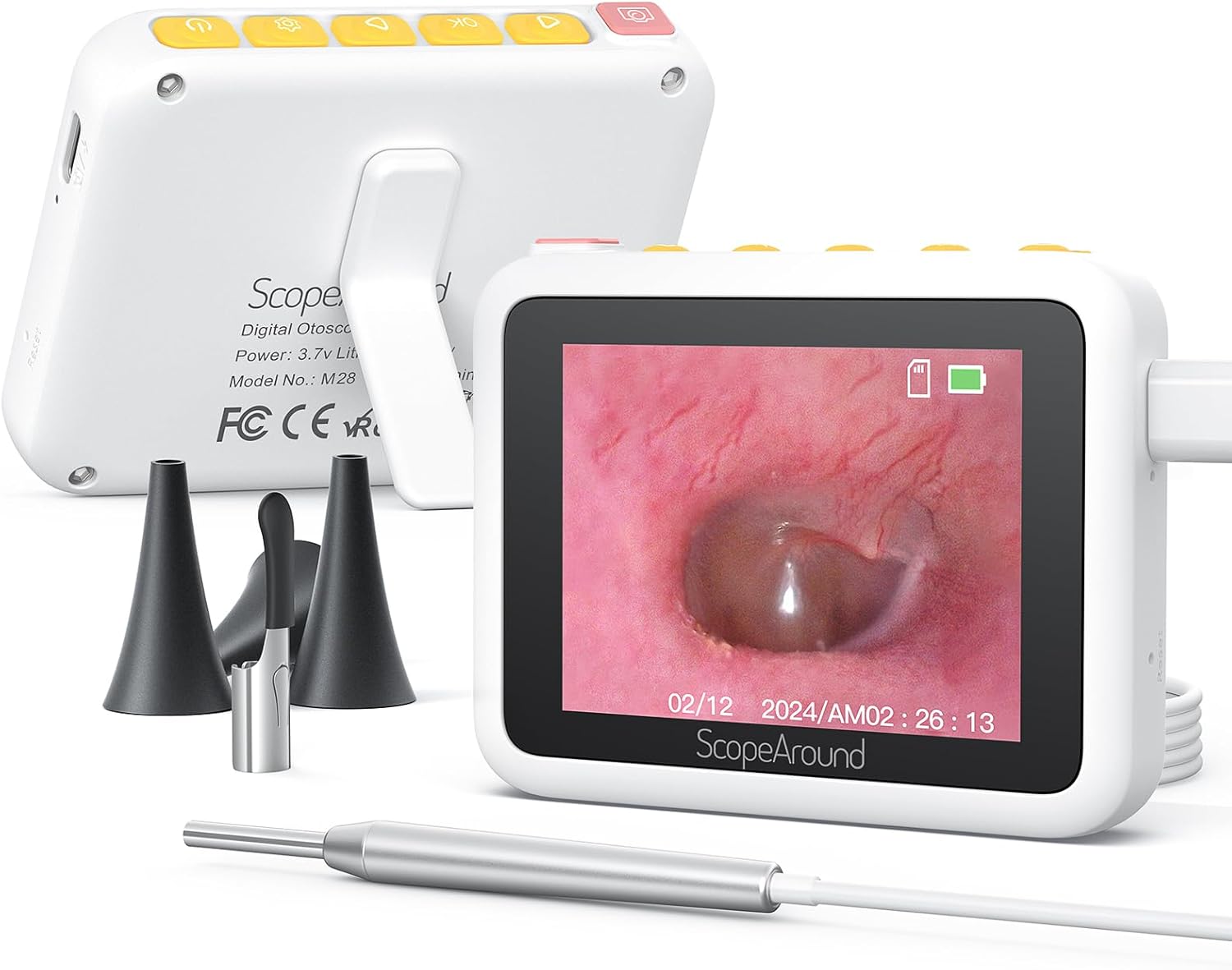


5. Упатства за поставување
Follow these steps to set up your ScopeAround M28 Digital Otoscope:
- Наполнете го уредот: Before first use, fully charge the otoscope device using the provided USB Type-C charging cable. Connect the cable to the charging port on the device and a compatible USB power source. The battery indicator on the screen will show charging status.
- Прикачете ја сондата за камера: Plug the camera probe cable into the designated port on the otoscope device.
- Select and Attach Accessory: Depending on your intended use, attach either an ear spoon or a speculum to the tip of the camera probe. Ensure it is securely fitted.
- Вклучување: Long press the power button (usually located on the top right) to turn on the device. The screen will display the ScopeAround logo and then the live camera feed.
- Attach Magnetic Stand (Optional): За слободни раце viewing, attach the magnetic stand to the back of the main unit. It can be positioned to prop up the screen at a comfortable viewинголен агол.


6. Упатства за работа
Once the device is set up, you can begin your inspection:
- Во живо View: The 2.8" IPS LCD screen will display a real-time view од камерата.
- Фотографирање: Press the Photo/Video button (usually the leftmost button with a camera icon) to capture a still image.
- Снимање видеа: Hold down the Photo/Video button to start recording a video. Press it again to stop recording.
- Функција за зумирање: Use the Left/Zoom buttons to adjust the magnification of the image on the screen (up to 1.5X zoom).
- Ротација на слика: Use the Right/Image Rotate buttons to rotate the image 180 degrees for better viewинг агли.
- Пристап до поставки: Press the Setting button to enter the device menu. Here you can adjust resolution, language, date/time, and other parameters.
- Reviewмедиуми: Navigate to the Playback option in the settings menu to view снимени фотографии и видеа.
- Пренесување Files: Connect the device to a computer using the USB Type-C cable to transfer captured images and videos.


7. Одржување и грижа
Proper maintenance ensures the longevity and hygiene of your otoscope:
- Чистење на објективот: Use the provided alcohol prep pads or Q-tips to gently clean the camera lens before and after each use. Ensure no residue remains.
- Додатоци за чистење: The ear spoon and speculums should also be cleaned with alcohol prep pads after each use.
- Складирање: Чувајте го уредот и неговите додатоци на чисто и суво место, подалеку од директна сончева светлина и екстремни температури.
- Нега на батеријата: Charge the device regularly, even if not in frequent use, to maintain battery health. Avoid fully depleting the battery for extended periods.

8 Смена на проблеми
If you encounter issues with your ScopeAround M28 Digital Otoscope, try the following:
- Без моќност: Уверете се дека уредот е целосно наполнет. Поврзете го со извор на енергија и почекајте неколку минути пред да се обидете повторно да го вклучите.
- Нема слика на екранот: Verify that the camera probe is securely plugged into the device. If the issue persists, try unplugging and re-plugging the camera probe.
- Заматена слика: Ensure the camera lens is clean. The device has a fixed focal length, so adjust the distance between the camera tip and the object for optimal clarity (0.4-0.8 inches).
- Уредот не реагира: Use a thin pin to press the reset button (located near the charging port) to restart the device.
- Не може да се префрли Files: Ensure the device is properly connected to your computer via the USB Type-C cable. Check your computer's file explorer for the device.
9. Спецификации
| Карактеристика | Спецификација |
|---|---|
| Димензии на производот | 3.94 x 3.94 x 3.94 инчи |
| Тежина на ставката | 8.8 унци |
| Дијаметар на објективот на камерата | 3.9 мм |
| Екран за прикажување | 2.8" IPS LCD екран |
| Видео резолуција | 1280 x 720 pixels (720P HD) |
| Капацитет на батеријата | Литиум полимер од 1200 mAh |
| Работно време | 2-3 hours (continuous usage) |
| Складирање | Internal (8GB, not expandable) |
| Поврзување | USB Type-C (for charging and data transfer) |
| Производител | Опсег Околу |
10. Гаранција и поддршка
ScopeAround is committed to customer satisfaction. This product comes with a standard warranty as per the retailer's policy. For any questions, technical support, or warranty claims, please contact our US-based after-sales support team. Contact information can typically be found on our official webвеб-страница или преку вашата платформа за купување.
We are dedicated to providing high-quality technology and support for your health and wellness needs.