1. Вовед
Ви благодарам за купувањетоasing the PPLEE RGB Digital Alarm Clock, Model CR1008R. This clock is designed to provide accurate timekeeping, customizable alarm functions, and convenient charging options. Please read this manual thoroughly before use to ensure proper operation and to maximize your product experience.
2. Информации за безбедност
- Осигурајте се дека адаптерот за напојување е компатибилен со вашето локално напојување (100-240V).
- Не го изложувајте уредот на вода или прекумерна влажност.
- Avoid placing the clock near heat sources or in direct sunlight.
- Користете го само дадениот адаптер за напојување.
- Да се чува подалеку од дофат на деца.
- Insert AAA batteries correctly for backup function (not included).
3. Содржина на пакетот
Проверете дали сите артикли се присутни во вашиот пакет:
- 1 x PPLEE RGB Digital Clock
- 1 x адаптер за напојување
- 1 x кабел за напојување
- 1 x Упатство за употреба (овој документ)

Image: The package includes the RGB digital clock, power adapter, power cord, and user manual.
4. Производот завршиview
Familiarize yourself with the main components of your alarm clock.

Слика: напред view of the PPLEE RGB Digital Alarm Clock displaying time with RGB digits and a smartphone charging via its USB port.
Преден панел: Large LED display for time, AM/PM indicator, DST indicator, Alarm indicator.
Највисок панел: Snooze/Light bar, Hour button, Minute button.
Заден панел:
- DC IN Port: For power adapter connection.
- USB Charging Port: For charging external devices.
- Type-C Charging Port: For charging external devices.
- Alarm ON/OFF Switch.
- Alarm Volume Control (Low/Med/High).
- Dimmer Control (for display brightness).
- Time Format Switch (12H/24H).
- DST (Daylight Saving Time) Switch.
- Set Time Button.
- Set Alarm Button.
- Multi-Color Button (for display and night light).
- Battery Compartment (for 2x AAA backup batteries).

Слика: Заден дел view of the alarm clock highlighting the various control buttons and charging ports, including dimmer, alarm volume, time/alarm set, and time format switches.
5. Поставување
5.1 Поврзување за напојување
- Connect the power cord to the DC IN port on the back of the clock.
- Plug the power adapter into a standard electrical outlet (AC 100-240V).
- The clock display will light up.
5.2 Инсталација на резервна батерија
For battery backup, which saves settings during power outages and can trigger the alarm, install 2 AAA batteries (not included) into the battery compartment on the back of the clock.
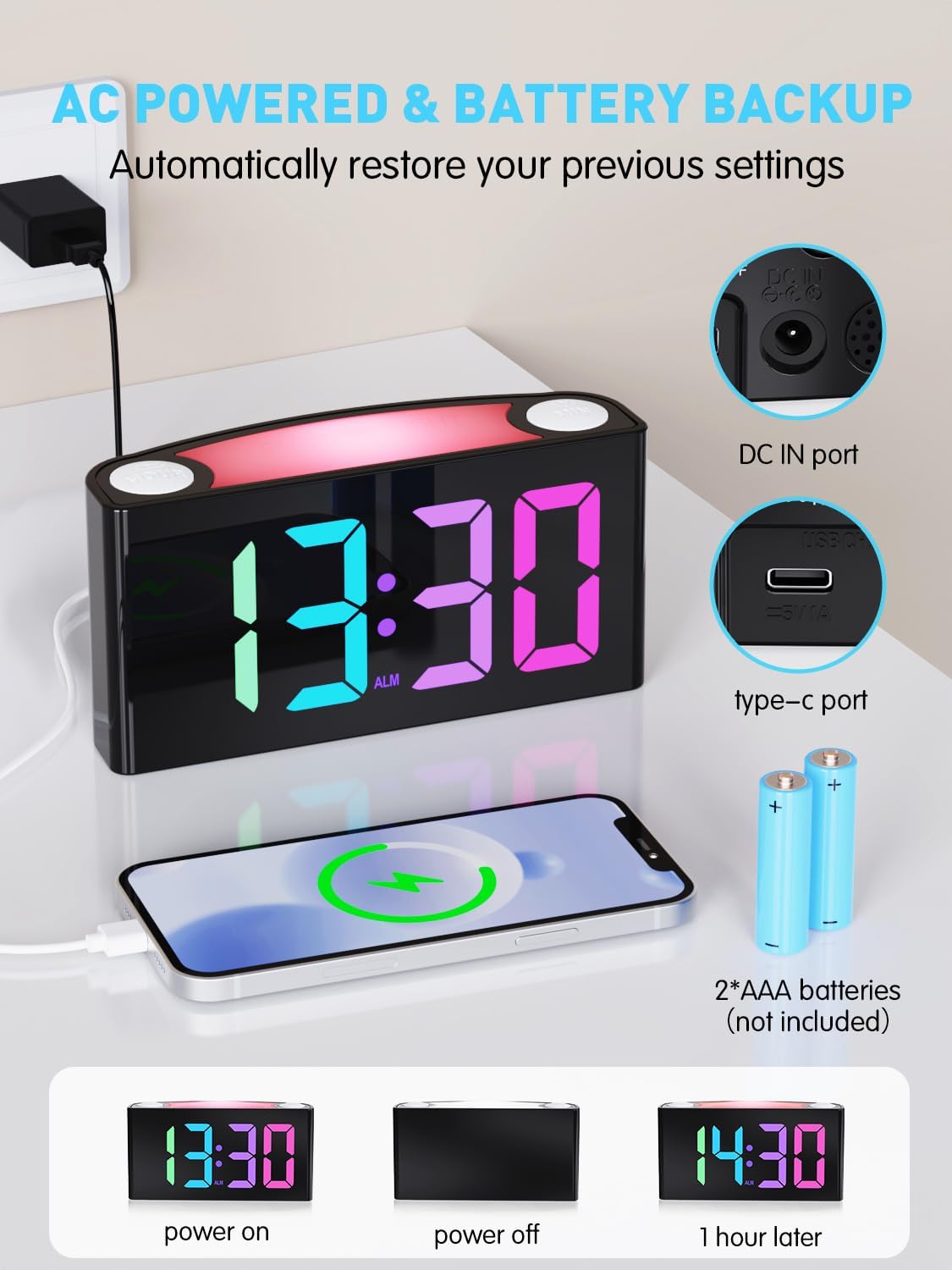
Image: The alarm clock is shown connected to AC power, with an open battery compartment indicating where to insert 2 AAA batteries for backup. The display shows "13:30" (power on), a blank screen (power off), and "14:30" (1 hour later, demonstrating time retention).
Забелешка: The clock's main functions (display, USB charging, alarm) require AC power. Batteries only provide backup for time memory and alarm trigger during power interruptions.
6. Упатства за работа
6.1 Поставување време
- Притиснете го „ПОСТАВЕТЕ ВРЕМЕ“ button on the rear panel. The display will start flashing.
- Притиснете го "ЧАС" button (on top) to adjust the hour.
- Притиснете го „МИН“ button (on top) to adjust the minute.
- Притиснете „ПОСТАВЕТЕ ВРЕМЕ“ again to save, or wait 5 seconds for automatic confirmation.
Video: Demonstrates how to set the time on the PPLEE RGB Digital Alarm Clock, including adjusting hours and minutes and confirming the setting.
6.2 Поставување аларм
- Лизгајте го "АЛАРМ ВКЛУЧЕНО/ИСКЛУЧЕНО" switch to the "ON" position. The alarm indicator will light up.
- Притиснете го "ПОСТАВИ АЛАРМ" button on the rear panel. The alarm time display will start flashing.
- Притиснете го "ЧАС" button (on top) to adjust the alarm hour.
- Притиснете го „МИН“ button (on top) to adjust the alarm minute.
- Притиснете "ПОСТАВИ АЛАРМ" again to save, or wait 5 seconds for automatic confirmation.
За да го исклучите алармот, повлечете го "АЛАРМ ВКЛУЧЕНО/ИСКЛУЧЕНО" switch to the "OFF" position. The alarm indicator will disappear.
6.3 Осветленост на екранот (затемнување)
The clock features a 7-level dimmer for the time display (0%-100% brightness).
- Користете го "ПРИТИСУВАЊЕ" button on the rear panel to cycle through brightness levels.

Image: The alarm clock display shows various brightness levels from 0% to 100%, illustrating the 7-level dimmer function.
6.4 режими на ноќно светло
The clock includes an 8-mode/7-color night light with 3 adjustable brightness settings.
- Притиснете го „ОДЛОЖИ/ПАЛЕТЕ“ bar on top to turn the night light on/off and cycle through colors/modes.
- To adjust night light brightness, press and hold the „ОДЛОЖИ/ПАЛЕТЕ“ бар.

Image: A person sleeping next to the alarm clock, which emits a soft yellow night light from its top bar. Below are icons indicating 3-level adjustable brightness for the night light.
6.5 Јачина на аларм
Adjust the alarm volume to your preference (Low, Medium, High).
- Користете го "ЈАЧИНА НА АЛАРМОТ" switch on the rear panel to select the desired volume level.

Image: A person reaching for the snooze bar on the alarm clock, which displays "8:30". The image also illustrates the 3-level adjustable alarm volume (90db, 103db, 110db).
6.6 Функција за одложување
Кога ќе се огласи алармот, притиснете го големото копче „ОДЛОЖИ/ПАЛЕТЕ“ bar on top to activate snooze for 9 extra minutes of sleep.
The alarm will sound again after 9 minutes. To completely turn off the alarm, use the "АЛАРМ ВКЛУЧЕНО/ИСКЛУЧЕНО" прекинувач.
6.7 12/24 Hour Format and DST
- Користете го "TIME FORMAT" switch on the rear panel to toggle between 12-hour and 24-hour display.
- Користете го „ЛТД“ switch on the rear panel to enable or disable Daylight Saving Time (adjusts time by 1 hour).
6.8 Dual Charging Ports
The clock is equipped with a Type-C output port and a USB output port for charging your devices.

Image: The alarm clock with its display showing "12:00" and two smartphones connected to its USB and Type-C charging ports, indicating active charging.
Simply connect your device's charging cable to the appropriate port on the back of the clock.
7. Одржување
- Чистете го часовникот со мека, сува крпа. Не користете абразивни средства за чистење или растворувачи.
- Ensure the clock is unplugged before cleaning.
- If not in use for an extended period, remove the backup batteries.
8 Смена на проблеми
| Проблем | Решение |
|---|---|
| Приказот на часовникот е празен. | Check if the power adapter is securely plugged into both the clock and the wall outlet. Ensure the outlet has power. |
| Алармот не се огласува. | Verify the "ALARM ON/OFF" switch is in the "ON" position. Check the alarm volume setting. Ensure the alarm time is correctly set. |
| Времето е неточно по исклучувањето на струјатаtage. | Ensure 2 AAA batteries are installed in the battery compartment for backup. If batteries were not present or depleted, reset the time manually. |
| Devices not charging via USB/Type-C. | Confirm the clock is connected to AC power. Check the charging cable and the device being charged. |
| Ноќното светло не работи. | Press the "SNOOZE/LIGHT" bar to cycle through modes and turn on the light. Check if the clock is powered. |
9. Спецификации
| Број на модел | CR1008R |
| Бренд | PPLEE |
| Тип на дисплеј | Digital LED (RGB) |
| Димензии на производот | 6.46"Ш x 3.39"В |
| Извор на енергија | Corded Electric (AC 100-240V) |
| Резервна копија на батеријата | 2 x AAA батерии (не се вклучени) |
| Порти за полнење | 1 x USB, 1 x Type-C |
| Осветленост на приказот | 7-level adjustable dimmer |
| Ноќна светлина | 8 modes / 7 colors, 3-level adjustable brightness |
| Јачина на звук на аларм | 3-level adjustable (Low, Medium, High) |
| Времетраење на одложување | 9 минути |
10. Гаранција и поддршка
For warranty information or technical support, please refer to the contact details provided with your purchase or visit the official PPLEE webсајт. Чувајте ја вашата потврда за купување за барања за гаранција.
Е-пошта: support@pplec.net


