1. Вовед
This manual provides detailed instructions for the installation, operation, and maintenance of your Srihome SH051 4MP QHD 5X Optical Zoom PTZ WiFi IP Camera. Please read this manual thoroughly before using the product to ensure proper functionality and safety. Keep this manual for future reference.

Image 1.1: Srihome SH051 PTZ WiFi IP Camera. This image displays the camera's exterior, highlighting its dome shape, dual antennas, and lens array.
2. Производот завршиview
2.1 Клучни карактеристики
- 4MP QHD резолуција: Captures clear video at 2560*1440p.
- 5X оптички зум: Овозможува детално viewing of distant objects without loss of clarity.
- PTZ функционалност: Панорамирање за 355° и навалување за 70° за сеопфатно покривање на површината.
- Wi-Fi со двоен опсег: Supports 2.4G and 5G Wi-Fi for flexible and stable connectivity.
- Двонасочно аудио: Вграден микрофон и звучник за комуникација во реално време.
- Ноќно гледање во боја: Starlight lens and warm light for full-color video in low-light conditions.
- Детекција и следење на движење: Automatically detects movement and tracks subjects, sending alerts.
- IP65 водоотпорен: Designed for both indoor and outdoor use, resistant to dust and water.
- Локално складирање: Supports MicroSD card up to 128GB for video recording.
2.2 Компоненти на камерата

Image 2.1: Diagram illustrating the components of the Srihome SH051 camera. Key parts include the antenna, white light, zoom lens, infrared light, microphone, power port, LAN port, TF card slot, and reset button.
- Антена: For Wi-Fi signal reception.
- Бела светлина: Provides illumination for color night vision.
- Зумирај објектив: 5X optical zoom capability.
- Инфрацрвена светлина: For traditional black and white night vision.
- Микрофон: Снима аудио за двонасочен разговор и снимање.
- Приклучок за напојување: Се поврзува со адаптерот за напојување.
- LAN порта: За жична мрежна конекција (опционално).
- Слот за картичка TF: Insert MicroSD card for local storage.
- Копче за ресетирање: Се користи за враќање на фабричките поставки.
2.3 Список за пакување

Image 2.2: Contents of the Srihome SH051 package. This includes the camera unit, user manual, mounting screws, and power adapter.
- Srihome SH051 Camera Unit
- Адаптер за напојување
- Завртки за монтирање
- Упатство за употреба
3. Поставување
3.1 Физичка инсталација
- Изберете локација: Select a suitable indoor or outdoor location that provides the desired viewing angle and is within Wi-Fi range. Ensure the power outlet is accessible.
- Монтирајте ја камерата: Use the provided mounting screws to securely attach the camera bracket to a wall or ceiling.
- Поврзете напојување: Plug the power adapter into the camera's power port and then into a power outlet. The camera will power on and initiate its self-test.
- (Опционално) Жична врска: If preferred, connect an Ethernet cable from your router to the camera's LAN port.
3.2 Преземање на апликација и регистрација на сметка
The Srihome app is required to configure and operate your camera.

Image 3.1: Screenshot showing the Srihome app download options via QR codes for Android and iOS, alongside other camera features.
- Преземете ја апликацијата: Пребарај за "Srihome" in your device's app store or scan the QR codes below:
Google Play Store (Андроид)
Apple App Store (iOS) - Регистрирајте сметка: Open the Srihome app and follow the on-screen instructions to register a new account using your email address or phone number.
3.3 Connecting the Camera to Wi-Fi

Image 3.2: Illustration of the camera's 5X optical zoom capability and its support for both 2.4GHz and 5GHz dual-band Wi-Fi connections.
- Додај уред: In the Srihome app, tap the "+" icon to add a new device.
- Select Camera Type: Choose the appropriate camera type (e.g., IP Camera).
- Wi-Fi конфигурација: Follow the app's instructions to connect the camera to your Wi-Fi network. The SH051 supports both 2.4GHz and 5GHz bands for enhanced stability and speed.
- Ставете лозинка: Create a strong password for your camera for security purposes.
4. Операција
4.1 Pan & Tilt Rotation

Image 4.1: Depiction of the camera's pan (350° horizontal) and tilt (90° vertical) rotation, controllable via a mobile phone interface.
Од во живо view interface in the Srihome app, use the on-screen controls to remotely adjust the camera's viewing angle. The camera supports 350° horizontal pan and 90° vertical tilt, allowing you to monitor a wide area.
4.2 5X Optical Zoom

Image 4.2: Visual representation of the 5X optical zoom lens, showing how it magnifies distant objects, and the camera's IP65 waterproof rating.
The SH051 features a 5X optical zoom lens (focal length 2.8mm-12mm). In the live view, use pinch-to-zoom gestures on your mobile device to zoom in or out, allowing you to view details from a distance without compromising image quality.
4.3 Двонасочно аудио

Image 4.3: Scenario demonstrating the two-way audio feature, where a user can speak to a person near the camera through the app.
The camera includes a built-in microphone and speaker. Tap the microphone icon in the app's live view to speak through the camera, and listen to audio from the camera's surroundings. This enables real-time communication with individuals near the camera.
4.4 Режими на ноќно гледање
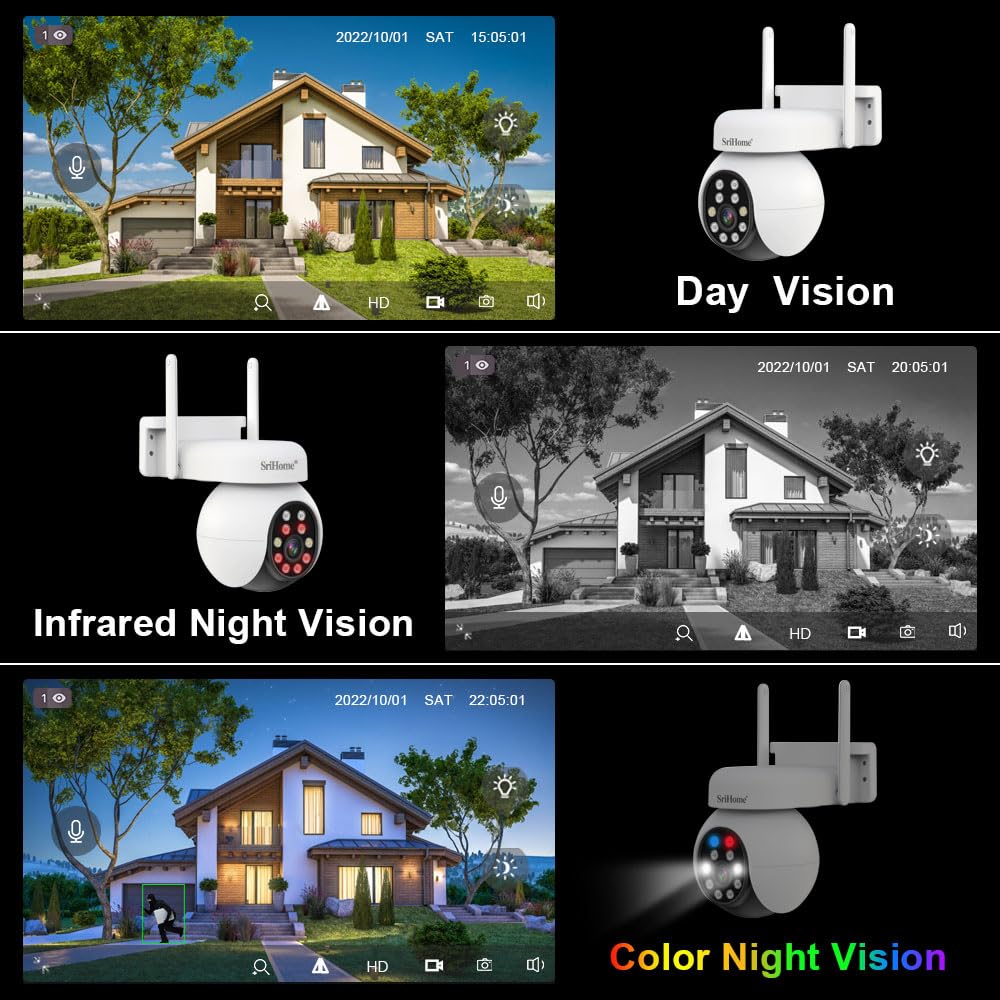
Image 4.4: Comparison of day vision, infrared night vision (black and white), and color night vision, showcasing the camera's versatility in different lighting conditions.
The SH051 offers multiple night vision options:
- Инфрацрвено ноќно гледање: Обезбедува јасно црно-бело видео во целосен мрак со помош на инфрацрвени LED диоди.
- Ноќно гледање во боја: Utilizes the starlight lens and built-in warm lights to deliver full-color video even in very low light conditions.
- Паметно ноќно гледање: The camera can automatically switch between infrared and color night vision based on detected motion or ambient light.
4.5 Детекција на движење и аларми

Image 4.5: Illustration of the camera's active defense feature, showing a light alarm activating upon detecting a person.
The camera can detect motion and send real-time alerts to your mobile device. You can configure motion detection sensitivity and areas within the app. When motion is detected, the camera can also activate an audible alarm and flash its white lights as an active deterrent.
4.6 Складирање на видео
The SH051 supports multiple storage methods for recorded video:
- MicroSD картичка: Insert a MicroSD card (up to 128GB) into the camera's TF card slot for local recording. The camera will record continuously or based on motion detection.
- NVR (мрежен видео рекордер): The camera can be integrated with a compatible NVR system for centralized recording and management.
- Складирање во облак: (Optional, subscription-based) Check the Srihome app for available cloud storage options.
5. Одржување
- Чистење: Regularly wipe the camera lens and exterior with a soft, dry cloth to remove dust and smudges. Do not use harsh chemicals or abrasive materials.
- Ажурирања на фирмверот: Check the Srihome app periodically for firmware updates. Keeping your camera's firmware updated ensures optimal performance, security, and access to new features.
- Циклус на напојување: Доколку камерата има проблеми, обидете се да ја исклучите од изворот на напојување 10 секунди, а потоа повторно да ја вклучите.
- Управување со MicroSD картичка: If using a MicroSD card, ensure it is formatted periodically through the app to maintain recording efficiency. Back up important footage пред форматирање.
6 Смена на проблеми
If you encounter problems with your Srihome SH051 camera, refer to the following common issues and solutions:
| Проблем | Можно решение |
|---|---|
| Камерата не се вклучува | Ensure the power adapter is securely connected to the camera and a working power outlet. Try a different outlet or adapter if available. |
| Не може да се поврзе на Wi-Fi | Verify your Wi-Fi password is correct. Ensure the camera is within range of your router. Try resetting the camera using the reset button and re-attempting the connection process in the app. Confirm your router supports 2.4GHz or 5GHz as required. |
| Лош квалитет на сликата | Check the lens for dirt or smudges and clean it gently. Ensure there is adequate lighting. Verify the camera's resolution settings in the app. A weak Wi-Fi signal can also affect streaming quality. |
| Откривањето на движење не работи | Ensure motion detection is enabled in the app settings. Adjust sensitivity levels and detection zones. Verify the camera has a clear view на областа. |
| No recording to MicroSD card | Ensure a MicroSD card is inserted correctly and is not full. Format the MicroSD card through the app. Check recording settings (e.g., continuous recording, motion-triggered recording). |
| Проблеми со двонасочно аудио | Check the volume settings on your phone and in the app. Ensure the microphone and speaker on the camera are not obstructed. A stable internet connection is crucial for clear audio. |
7. Спецификации
- Име на модел: SH051 4MP 5X Optical Zoom
- Резолуција: 4MP QHD (2560 x 1440p)
- Оптички зум: 5X (Focal length 2.8mm-12mm)
- Опсег на панорамирање/навалување: Пан 355 °, Навалување 70 °
- Поврзување: Wireless (2.4GHz/5GHz Wi-Fi), Wired (LAN Port)
- Посебни карактеристики: 2-Way Audio, Color Night Vision, Motion Detection, PTZ Technology
- Складирање: Поддржува MicroSD картичка до 128 GB
- Внатрешна/надворешна употреба: Затворен, Надворешен
- Оценка за IP: IP65 Водоотпорен и отпорен на прашина
- Извор на енергија: Adapter (Included)
- Димензии на производот: 20 x 10 x 6 cm
- Тежина на ставката: 500 гр
8. Гаранција и поддршка
8.1 Информации за гаранцијата
This Srihome SH051 camera comes with a 1 години гаранција from the date of purchase. Please retain your purchase receipt as proof of warranty. The warranty covers manufacturing defects but does not cover damage caused by misuse, accidents, unauthorized modifications, or improper installation.
8.2 Поддршка за корисници
For technical assistance, troubleshooting, or warranty claims, please contact Megaa Electronics, the authorized distributor:
- WhatsApp: 8328671337
- Е-пошта: support@megaaelectronics.com
- Алтернативна епошта: megaaelectronics@gmail.com


