Вовед
This manual provides detailed instructions for the safe and efficient operation of your boAt Partypal 390 Bluetooth Speaker. Please read this manual thoroughly before using the product and retain it for future reference. The Partypal 390 is a powerful portable speaker designed for various audio needs, featuring 160W boAt Signature Sound, multiple connectivity options, and integrated LED lighting.
Информации за безбедност
- Не го изложувајте звучникот на екстремни температури, директна сончева светлина или висока влажност.
- Избегнувајте паѓање или изложување на звучникот на силни удари.
- Не обидувајте се сами да го расклопите, поправите или модифицирате звучникот. Контактирајте квалификуван сервисер за помош.
- Keep the speaker away from water and other liquids. Although it is waterproof, prolonged submersion or exposure to high-pressure water jets should be avoided.
- Користете го само испорачаниот кабел за полнење или сертифициран еквивалент.
- Обезбедете соодветна вентилација кога работите со звучникот.
- Чистете го звучникот со мека, сува крпа. Не користете абразивни средства за чистење или растворувачи.
Содржина на пакетот
Проверете дали сите артикли наведени подолу се присутни во вашиот пакет:
- boAt Partypal 390 Speaker
- Кабел за полнење
- Упатство за употреба
- Гарантна картичка
Производот завршиview
The boAt Partypal 390 is a versatile Bluetooth speaker featuring powerful audio output and dynamic LED lighting. Below are key visual references and descriptions of its components.
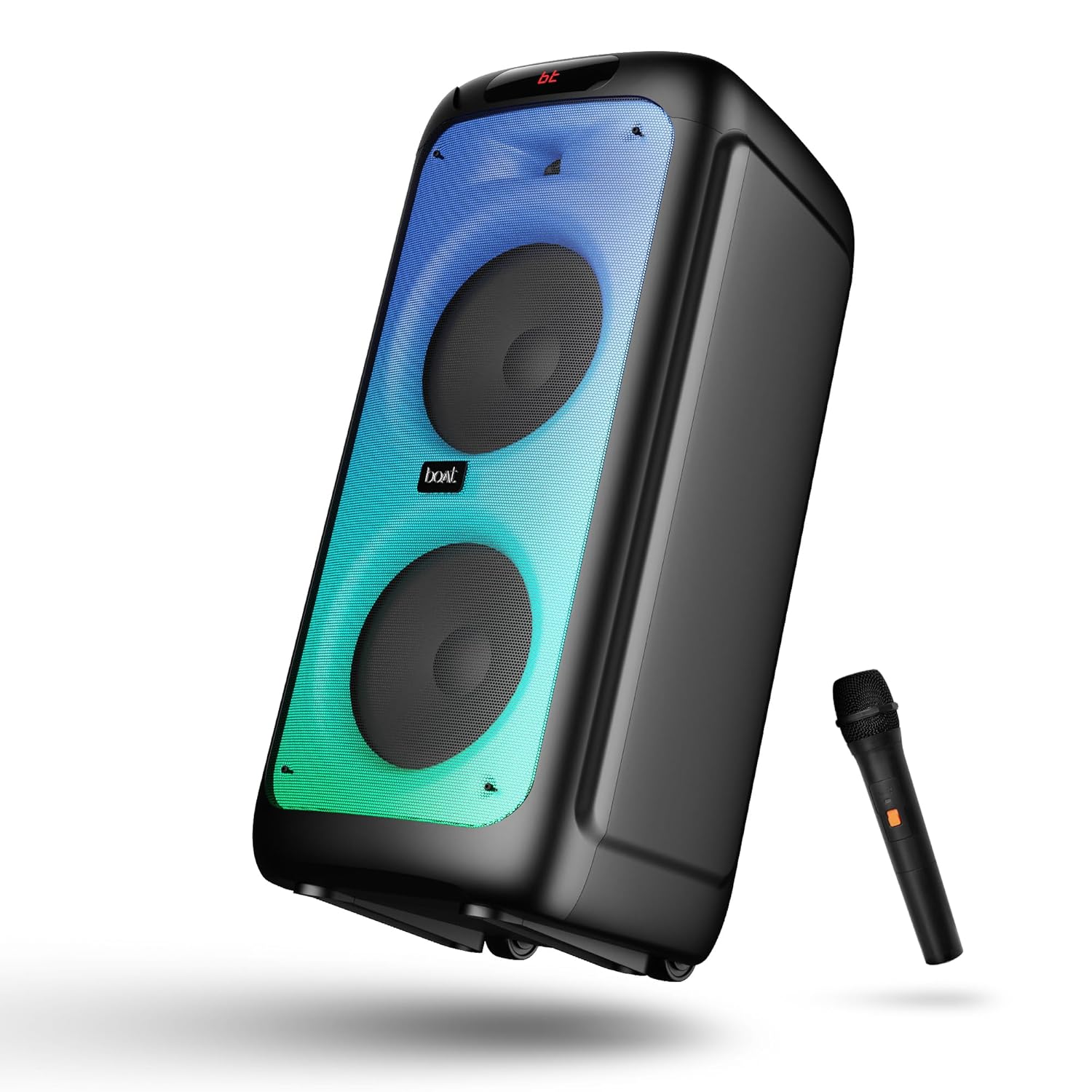
Слика 1: Предна страна view of the boAt Partypal 390 speaker, showcasing its dual speaker design, integrated flame LEDs, and the included wired microphone.

Слика 2: Top panel of the speaker displaying the control buttons and various input ports including USB, AUX, Guitar In, Mic 1, Mic 2, and the USB Type-C charging port. Also shown are dedicated controls for Bass/Treble, LED modes, and volume.
Клучни карактеристики:
- 160W boAt Signature Sound: Обезбедува моќен и јасен звук.
- Flame LEDs: Dynamic lighting effects to enhance the listening experience.
- Повеќекратно поврзување: Bluetooth v5.3, AUX, USB, and TF card support.
- Караоке функционалност: Two microphone input ports for vocal performances.
- Влез за гитара: Dedicated port for connecting a guitar.
- Режими на EQ: Pre-set sound modes (Normal, Party, Pop, Rock, Jazz) for different audio preferences.
- Режим TWS: Allows wireless connection of two Partypal speakers for stereo sound.
- Контроли на бас и високи тонови: Adjustable audio settings for personalized sound.
- Долга репродукција: Траење на батеријата до 6 часа.
Поставување
1. Полнење на звучникот
Before first use, fully charge the speaker. Connect the provided USB Type-C charging cable to the speaker's charging port and the other end to a compatible USB power adapter (not included). The charging indicator will show the charging status. A full charge provides up to 6 hours of playback.

Слика 3: The speaker in an outdoor setting, illustrating its portability and battery life.
2. Вклучување/исклучување
- To power on, press and hold the Power button located on the control panel until the display illuminates.
- За да го исклучите, повторно притиснете и задржете го копчето за вклучување додека екранот не се исклучи.
3. Првично Bluetooth спарување
- Ensure the speaker is powered on and in Bluetooth mode. The display will show "bt" and the Bluetooth indicator will flash, indicating it's ready for pairing.
- На вашиот мобилен уред, овозможете Bluetooth и побарајте достапни уреди.
- Select "boAt Partypal 390" from the list of devices.
- Once paired, the speaker will emit a confirmation sound, and the Bluetooth indicator will stop flashing.
Упатства за работа
1. Избор на режим
Press the "Mode" button on the control panel to cycle through available input modes: Bluetooth, AUX, USB, and TF Card.
2. Режим на Bluetooth
- По успешното спарување, аудио од вашиот поврзан уред ќе се репродуцира преку звучникот.
- Use the volume knob on the speaker or your connected device to adjust the volume.
- Use the Previous/Next buttons to skip tracks.
- Притиснете го копчето Play/Pause за да ја контролирате репродукцијата.
3. AUX режим
- Connect an audio device to the AUX input port using a 3.5mm audio cable.
- Switch the speaker to AUX mode using the "Mode" button.
- Контролирајте ја репродукцијата и јачината на звукот од вашиот поврзан уред.
4. Режим на USB/TF картичка
- Вметнете USB флеш-уред во USB-портата или TF картичка во слотот за TF картичка.
- Звучникот автоматски ќе се префрли во режим на USB или TF картичка и ќе започне со репродукција на аудио files. If not, switch manually using the "Mode" button.
- Use the Previous/Next buttons to navigate tracks and Play/Pause for playback control.
5. Karaoke Function (Microphone Input)
- Connect up to two wired microphones to the "MIC 1" and "MIC 2" input ports.
- Adjust microphone volume using the dedicated MIC VOL knob.
- Adjust microphone echo effect using the ECHO knob.
6. Влез за гитара
- Connect a guitar to the "GUITAR IN" port.
- Adjust guitar volume using the dedicated GUITAR VOL knob.
7. Режими на еквилајзер
The speaker offers several pre-set equalizer modes to optimize audio for different content types. Press the "EQ" button to cycle through:
- Нормално
- Забава
- Поп
- Рок
- Џез

Слика 4: Visual representation of the available EQ modes for sound customization.
8. TWS (Вистински безжичен стерео) режим
To connect two Partypal 390 speakers for a stereo audio experience:
- Уверете се дека двата звучника се вклучени и во Bluetooth режим, но сè уште не се спарени со ниту еден уред.
- On one speaker (this will be the primary speaker), press and hold the TWS button. The speaker will emit a sound indicating it's searching for another speaker.
- Двата звучника автоматски ќе се поврзат еден со друг. Звук за потврда ќе означи успешно TWS спарување.
- Now, pair your mobile device to the primary speaker via Bluetooth as described in the "Initial Bluetooth Pairing" section. Audio will play in stereo through both speakers.

Слика 5: Two Partypal 390 speakers wirelessly connected, demonstrating the TWS feature.
9. LED Контрола
Press the "LED Mode" button to cycle through different flame LED lighting effects or to turn them off.
10. Bass and Treble Controls
Use the dedicated Bass and Treble knobs on the control panel to adjust the low and high frequencies of the audio output according to your preference.
Одржување
- Чистење: Користете мека, сува крпа што не остава влакненца за чистење на надворешноста на звучникот. Не користете течни средства за чистење, аеросоли или растворувачи.
- Складирање: Кога не го користите подолго време, чувајте го звучникот на ладно и суво место, подалеку од директна сончева светлина и екстремни температури.
- Нега на батеријата: За да го продолжите траењето на батеријата, избегнувајте често целосно празнење на звучникот. Полнете го редовно, дури и ако не е во употреба.
Решавање проблеми
| Проблем | Можна причина | Решение |
|---|---|---|
| Звучникот не се вклучува. | Слаба батерија; Копчето за вклучување не е правилно притиснато. | Наполнете го звучникот целосно. Притиснете го и задржете го копчето за вклучување неколку секунди. |
| Нема звук. | Јачината на звукот е прениска; Неточен режим на внесување; Уредот не е поврзан. | Increase speaker and device volume. Ensure correct mode is selected (Bluetooth, AUX, USB, TF). Re-pair Bluetooth device or check cable connections. |
| Спарувањето со Bluetooth не успеа. | Звучникот не е во режим на спарување; Уредот е предалеку; Пречки. | Ensure speaker is in Bluetooth pairing mode (flashing "bt"). Move device closer to speaker. Turn off other Bluetooth devices. Forget "boAt Partypal 390" on your device and try pairing again. |
| Микрофонот не работи. | Microphone not connected properly; MIC VOL too low. | Ensure microphone is securely plugged into MIC 1 or MIC 2 port. Increase the MIC VOL knob. |
| TWS поврзувањето не успева. | Speakers already paired to a device; Speakers too far apart. | Ensure both speakers are not connected to any Bluetooth device. Place speakers within close proximity. Repeat TWS pairing steps. |
Спецификации
Below are the technical specifications for the boAt Partypal 390 speaker:
| Име на моделот | Partypal 390 |
| Тип на звучник | Multimedia, Floor Standing |
| Аудио излезна моќност | 160 вати |
| Технологија за поврзување | Bluetooth v5.3, AUX, USB, TF Card |
| Опсег на Bluetooth | До 10 метри |
| Траење на батеријата | До 6 часа |
| Капацитет на батеријата | 7500 mAh (Lead Acid) |
| Димензии на производот (Д x Ш x В) | 70D x 32W x 32H сантиметри |
| Тежина на ставката | 10.8 кг |
| Ниво на отпорност на вода | Водоотпорен |
| Вклучени компоненти | Speaker, Charging Cable, User Manual, Warranty Card |

Слика 6: Diagram illustrating the physical dimensions of the Partypal 390 speaker.
Гаранција и поддршка
Your boAt Partypal 390 speaker comes with a limited warranty. Please refer to the included Warranty Card for specific terms and conditions, including the warranty period and coverage details. For technical support, service, or warranty claims, please contact boAt customer service through their official webстраницата или контакт информациите наведени на вашата гарантна картичка.
For more information, visit the official boAt store: Продавница за бродови на Амазон