1. Производот завршиview
The Pulido Fingerprint Door Knob offers a modern and secure keyless entry solution for your home or office. This smart door knob provides two primary methods of unlocking: fingerprint recognition and mobile application control. It is designed for ease of use and enhanced security, storing all user data locally on the device.

Image: The Pulido Fingerprint Door Knob highlighting its fingerprint sensor, app management capability, and power interface.
2. Содржина на пакетот
Ве молиме проверете дали сите компоненти се присутни пред да започнете со инсталацијата:
- Fingerprint Door Knob (Interior and Exterior Handles)
- Механизам на бравата
- Ударна плоча
- Завртки за монтирање
- Шаблон за инсталација
- Упатство за употреба
3. Идентификација на компоненти
Familiarize yourself with the different parts of your Pulido Fingerprint Door Knob:
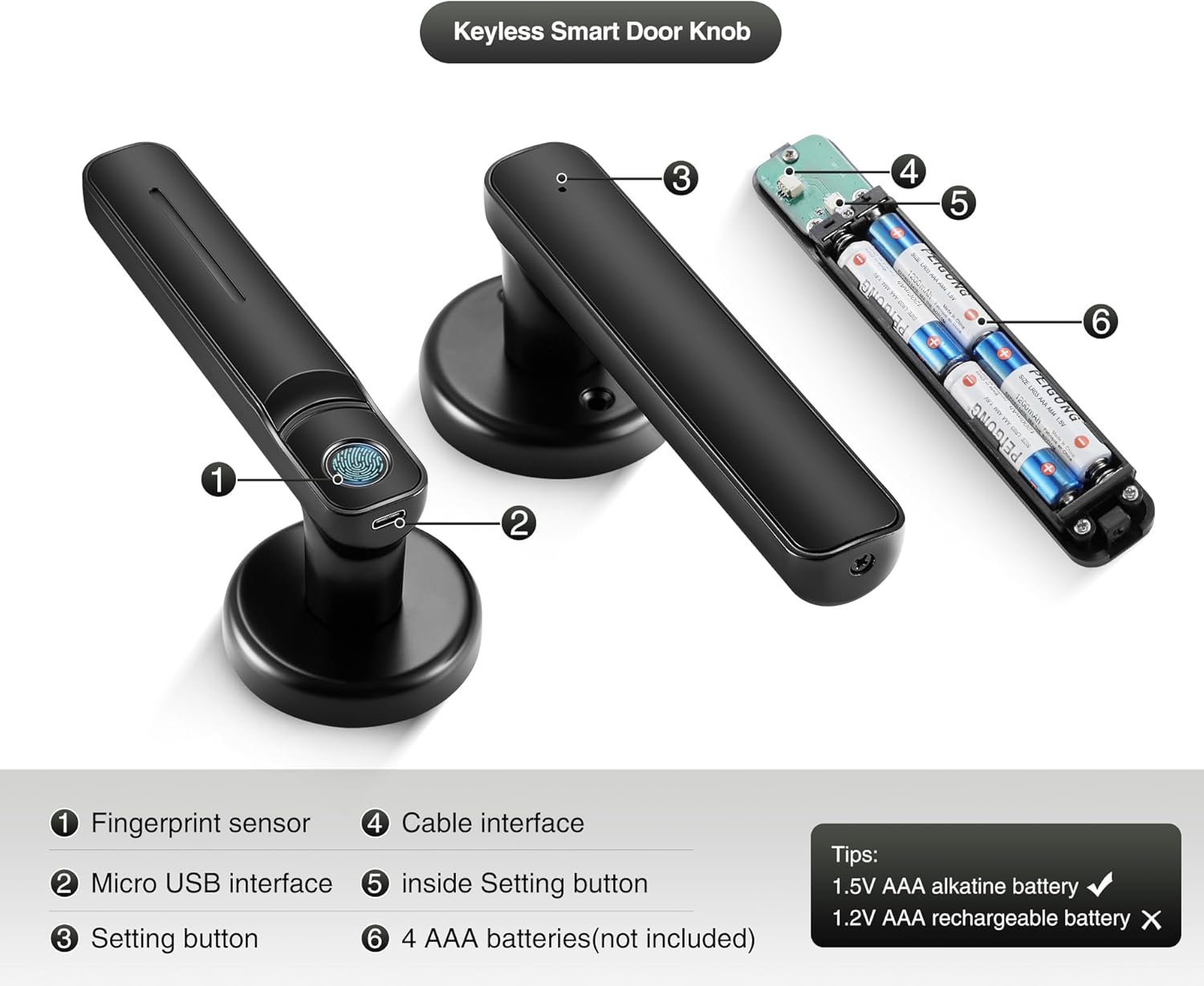
Слика: Детална view of the door knob's internal and external components.
- Сензор за отпечатоци: Used for biometric unlocking.
- Микро USB интерфејс: For emergency power supply.
- Setting Button (Exterior): Used for initial setup and pairing.
- Кабелски интерфејс: Connects the exterior and interior components.
- Inside Setting Button: Used for internal settings and resets.
- AAA Batteries Compartment: Holds 4 AAA batteries (not included).
4. Водич за инсталација
This section provides instructions for installing your new Pulido Fingerprint Door Knob. It is designed to replace standard mechanical door knobs.

Image: Visual representation of replacing a mechanical lock with the smart door knob.
4.1 Подготовка
- Ensure your door thickness is compatible with the lock.
- Remove any existing door hardware.
- Verify the door bore hole and backset dimensions match the installation template.
4.2 Чекори за инсталација
- Инсталирајте го бравата: Insert the latch into the door edge and secure it with screws. Ensure the latch bolt faces the correct direction for your door swing.
- Инсталирајте ја клучната плоча: Mount the strike plate on the door frame, aligning it with the latch bolt.
- Install the Exterior Handle: Feed the cable and spindle through the door bore hole from the exterior side.
- Install the Interior Handle: Connect the cable from the exterior handle to the interior handle. Align the interior handle with the spindle and mounting posts.
- Secure the Handles: Use the provided screws to firmly attach the interior handle to the exterior handle, ensuring the lock is flush with the door surface.
- Вметнете батерии: Open the battery compartment on the interior handle and insert 4 new AAA alkaline batteries.
- Тест операција: After installation, test the mechanical function of the knob to ensure smooth rotation and latch engagement.
5. Првично поставување и конфигурација на апликацијата
To fully utilize your smart door knob, you will need to set it up with the mobile application and register fingerprints.
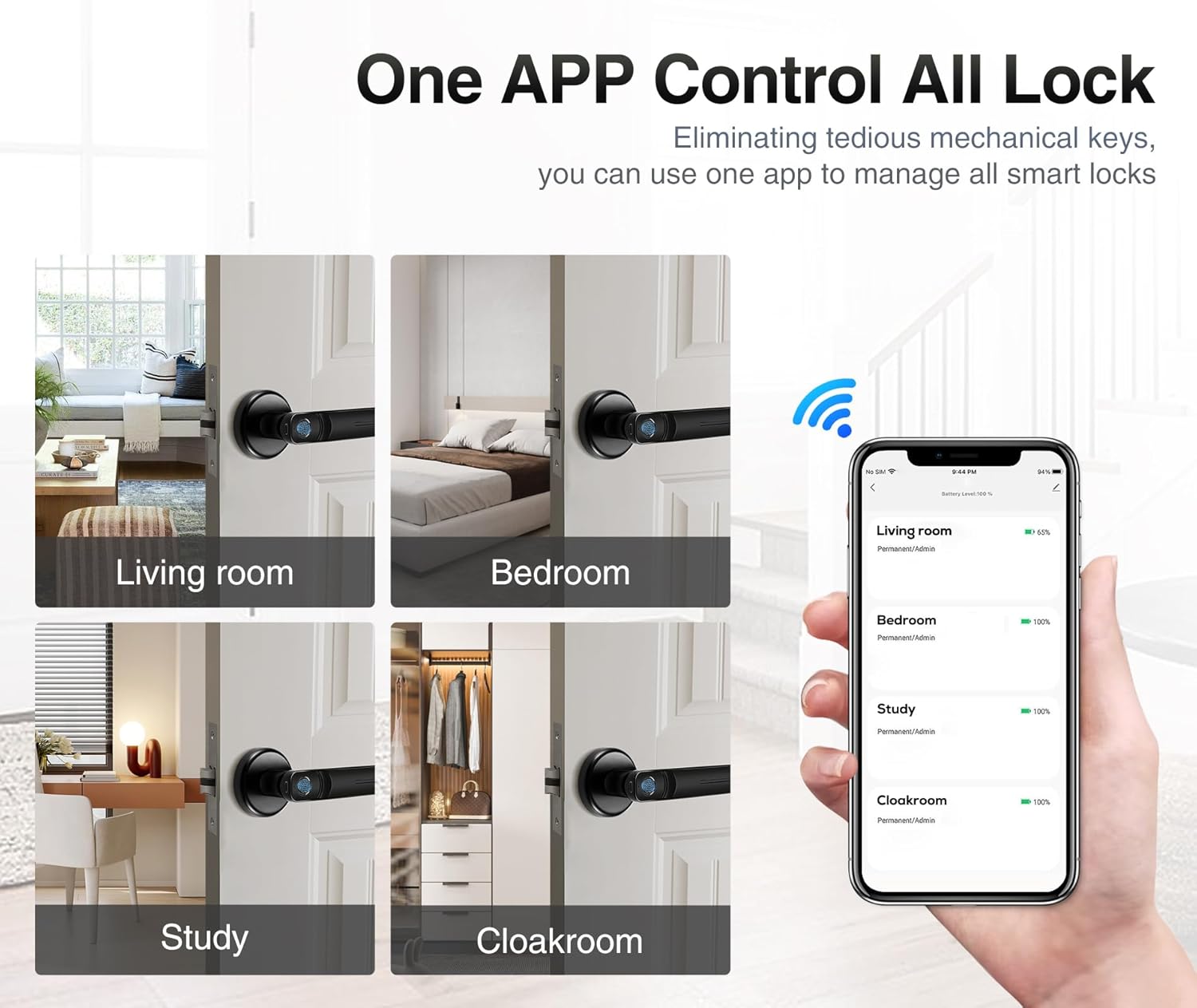
Image: The mobile application interface demonstrating control over multiple locks.
5.1 Преземање и спарување на апликација
- Преземете ја апликацијата: Пребарај за the 'Tuya Smart' or 'Smart Life' app in your smartphone's app store (iOS or Android) and install it.
- Креирај сметка: Отворете ја апликацијата и регистрирајте се за нова сметка или најавете се ако веќе имате.
- Додај уред: In the app, tap '+' to add a new device. Select 'Door Lock' or 'Smart Lock' from the device categories.
- Спарете ја бравата: Follow the in-app instructions to put the door knob into pairing mode (usually by pressing and holding the setting button on the exterior handle until an indicator light flashes). The app will detect and connect to the lock via Bluetooth.
5.2 Регистрација на отпечатоци од прсти
The lock supports up to 100 user fingerprints. Fingerprint information is stored locally on the lock for security.
- Access Fingerprint Management: In the app, navigate to the settings for your connected door lock and find the 'Fingerprint Management' section.
- Додадете отпечаток од прст: Select 'Add Fingerprint' and follow the on-screen prompts.
- Scan Fingerprint: Place your finger on the fingerprint sensor multiple times, adjusting the position slightly with each scan, until the app confirms successful registration.
- Repeat for Additional Users: Repeat the process for any other users who require fingerprint access.
6. Операција
Your Pulido Fingerprint Door Knob offers convenient and secure unlocking methods.
6.1 Отклучување со отпечаток од прст

Image: Demonstrating the quick fingerprint unlock feature.
- Place your registered finger firmly on the fingerprint sensor.
- The lock will unlock within 0.5 seconds if the fingerprint is recognized.
- Rotate the door knob to open the door.
6.2 Unlocking with the App
- Open the 'Tuya Smart' or 'Smart Life' app on your smartphone.
- Select the desired door lock from your device list.
- Tap the 'Unlock' button within the app interface.
- The app also allows you to view unlocking records and manage user access.
6.3 Режим на поминување

Image: The door knob in a hallway, illustrating the Passage Mode feature.
- Passage Mode allows the door to remain unlocked for continuous access without requiring fingerprint or app authentication.
- To activate Passage Mode, open the app, select your door lock, and find the 'Passage Mode' setting.
- Enable Passage Mode as needed. Remember to disable it when you require the door to be locked.
7. Управување со батерии
The Pulido Fingerprint Door Knob is powered by 4 AAA batteries.
7.1 Инсталација/замена на батерија
- Locate the battery compartment on the interior handle (refer to Section 3, Component 6).
- Отворете го капакот на преградата.
- Insert 4 new 1.5V AAA alkaline batteries, ensuring correct polarity. Do not use 1.2V rechargeable batteries.
- Добро затворете го капакот на преградата за батерии.
7.2 Предупредување за слаба батерија
- The lock will provide an audible or visual indicator when battery power is low.
- Replace batteries promptly to ensure continuous operation.
7.3 Итна енергија
- In case of complete battery depletion, the lock can be temporarily powered via the Micro USB interface (refer to Section 3, Component 2) using a standard power bank or USB charger.
- This allows you to unlock the door and replace the batteries.
8 Смена на проблеми
This section addresses common issues you might encounter with your Pulido Fingerprint Door Knob.
8.1 Отпечатокот од прст не е препознаен
- Чист сензор: Ensure the fingerprint sensor is clean and free of dirt or moisture.
- Правилно поставување: Place your finger firmly and completely on the sensor. Try different angles if necessary.
- Повторно регистрирање на отпечаток од прст: If issues persist, delete the existing fingerprint in the app and re-register it, ensuring a thorough scanning process.
- Повеќе обиди: The lock allows multiple attempts. If still unsuccessful, use the app to unlock.
8.2 Проблеми со поврзувањето на апликациите
- Овозможен Bluetooth: Проверете дали Bluetooth е овозможен на вашиот паметен телефон.
- Близина: Be within Bluetooth range of the door knob.
- Рестартирање на апликацијата: Затворете ја и повторно отворете ја апликацијата.
- Повторно спарување на уредот: If the app consistently fails to connect, try removing the device from the app and re-pairing it.
- Проверете ги батериите: Low batteries can affect Bluetooth connectivity.
8.3 Lock Does Not Engage/Disengage
- Проверете ги батериите: Проверете дали батериите не се испразнети. Заменете ги доколку е потребно.
- Проверка на инсталацијата: Verify that the lock was installed correctly and that the spindle and latch mechanism are properly aligned.
- Опструкции: Check for any physical obstructions preventing the latch from extending or retracting fully.
9. Спецификации
| Карактеристика | Спецификација |
|---|---|
| Број на модел | door konb 140 |
| Материјал | Алуминиум, нерѓосувачки челик |
| Димензии на производот | 5.7"Д x 2.5"Ш |
| Тежина на ставката | 1.61 фунти |
| Методи за отклучување | Fingerprint, Mobile App |
| Fingerprint Recognition Rate | До 99% |
| Брзина на отклучување | Во рок од 0.5 секунди |
| Кориснички капацитет | До 100 отпечатоци од прсти |
| Напојување | 4 x 1.5V AAA алкални батерии (не се вклучени) |
| Напојување за итни случаи | Микро USB |
10. Гаранција и поддршка
Pulido is committed to providing reliable products and customer satisfaction.
10.1 Информации за гаранцијата
This product includes a free replacement service for 12 месеци from the date of purchase for non-human caused damage. Please retain your proof of purchase for warranty claims.
10.2 Техничка поддршка
Lifelong technical support is provided for the Pulido Fingerprint Door Knob. If you have any questions, require assistance with installation, setup, or troubleshooting, please contact our customer service team.
За поддршка, ве молиме погледнете ги контакт информациите наведени на пакувањето на производот или на нашата официјална страница. webсајт.


