1. Вовед
Thank you for choosing the Defender Enjoy S200 Portable Bluetooth Speaker. This manual provides essential information for setting up, operating, and maintaining your speaker to ensure optimal performance and longevity. Please read this manual thoroughly before use.
The Defender Enjoy S200 is a versatile portable speaker featuring Bluetooth 5.3 connectivity, True Wireless Stereo (TWS) pairing, an integrated FM radio, and MP3 playback capabilities via USB flash drive or microSD card. It also includes an LED light and supports hands-free calling. Designed for portability, it offers up to 9 hours of playback on a single charge and convenient USB Type-C charging.
2. Производот завршиview
2.1 Клучни карактеристики
- Bluetooth 5.3: За стабилно и ефикасно безжично аудио стриминг.
- Вистински безжичен стерео (TWS): Connect two Enjoy S200 speakers for a stereo sound experience.
- Повеќе режими на репродукција: Bluetooth, FM Radio, USB Flash Drive, MicroSD Card (up to 32GB).
- Вградено LED светло: Provides visual ambiance.
- Повикување без раце: Вграден микрофон за телефонски повици.
- Долг век на батеријата: До 9 часа континуирана репродукција на музика.
- Полнење со USB Type-C: Modern and convenient charging port.
- Преносен дизајн: Compact and lightweight with a carrying strap.
2.2 Содржина на пакетот
- Defender Enjoy S200 Portable Bluetooth Speaker
- Кабел за полнење Type-C
- Водич за брз почеток
- Ремен за носење

Image: The Defender Enjoy S200 Portable Bluetooth Speaker, showcasing its compact design and front grille with an illuminated LED ring.

Image: An infographic highlighting key features such as multi-colored LED lighting, True Wireless Stereo (TWS) pairing, Bluetooth 5.3, MP3 player, FM receiver, and hands-free calling.
3. Поставување
3.1 Полнење на звучникот
- Locate the Type-C charging port on the back of the speaker.
- Connect the provided Type-C charging cable to the speaker and the other end to a USB power adapter (not included) or a computer's USB port.
- LED индикаторот ќе го покаже статусот на полнење. Целосното полнење обично трае приближно 3-4 часа.
- Исклучете го кабелот откако ќе се наполни целосно.
3.2 Вклучување/исклучување
- To power on, slide the ON/OFF switch located on the back of the speaker to the 'ON' position.
- За да го исклучите, поместете го прекинувачот ВКЛУЧЕНО/ИСКЛУЧЕНО во положба „ИСКЛУЧЕНО“.
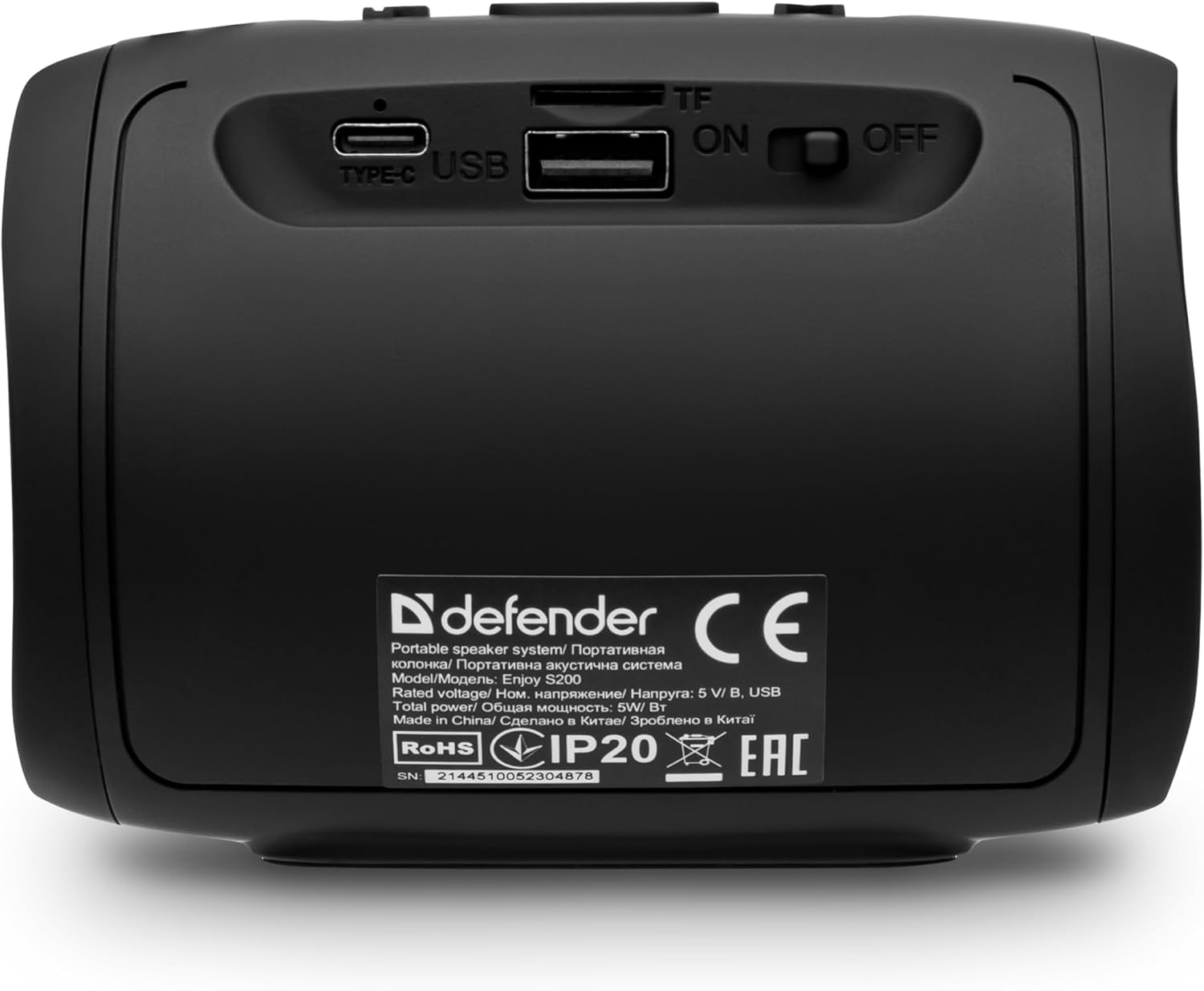
Слика: Заден дел view of the Defender Enjoy S200 speaker, showing the Type-C charging port, USB port, TF (microSD) card slot, and the ON/OFF power switch.
3.3 Спарување преку Bluetooth
- Уверете се дека звучникот е вклучен и во режим на спарување преку Bluetooth (означено со трепкачка LED диода).
- На вашиот уред (паметен телефон, таблет итн.), овозможете Bluetooth и пребарајте достапни уреди.
- Select "Defender Enjoy S200" from the list of devices.
- Откако ќе се спари, звучникот ќе емитува звук за потврда, а LED диодата ќе престане да трепка.
3.4 Спарување на вистински безжичен стерео (TWS)
To pair two Defender Enjoy S200 speakers for stereo sound:
- Проверете дали двата звучника се вклучени и не се поврзани со никаков Bluetooth уред.
- On one speaker (this will be the primary speaker), press and hold the TWS button (often indicated by a double-arrow icon) until you hear a pairing tone.
- The two speakers will automatically search and connect to each other. A confirmation tone will sound once connected.
- Сега, поврзете го вашиот уред со примарниот звучник преку Bluetooth како што е опишано во дел 3.3. Аудиото ќе се репродуцира стерео преку двата звучника.

Image: A visual representation of two Defender Enjoy S200 speakers pairing wirelessly to create a True Wireless Stereo system, alongside icons for Bluetooth 5.3, MP3 player, FM receiver, and hands-free calling.
4. Упатства за работа
4.1 Button Functions (Refer to top panel controls)
- Копче за вклучување: Long press to power on/off. Short press to play/pause in music mode, or answer/end calls.
- Јачина на звук (+): Short press to increase volume. Long press for next track/station.
- Намалување на јачината на звукот (-): Short press to decrease volume. Long press for previous track/station.
- Копче за режим (M): Short press to switch between Bluetooth, FM Radio, USB, and MicroSD modes.
- LED копче за светло: Short press to cycle through LED light modes or turn off the LED.
4.2 Репродукција преку Bluetooth
After successful Bluetooth pairing (Section 3.3), open your music application on your device and begin playback. Use the speaker's volume buttons or your device's volume controls to adjust the audio level.
4.3 FM режим на радио
- Press the 'M' (Mode) button until you hear the FM radio prompt.
- Долго притиснете го копчето Пушти/Пауза за автоматско скенирање и зачувување на достапните FM станици.
- Користете ги копчињата за зголемување на јачината на звукот (+) и намалување на јачината на звукот (-) (долго притискање) за да се движите помеѓу зачуваните станици.
4.4 USB/MicroSD Playback
- Insert a USB flash drive or a microSD card (up to 32GB) containing MP3 audio files во соодветниот порт на задната страна од звучникот.
- Press the 'M' (Mode) button until the speaker automatically switches to USB or MicroSD mode and begins playback.
- Use the speaker's control buttons for play/pause, next track, and previous track.
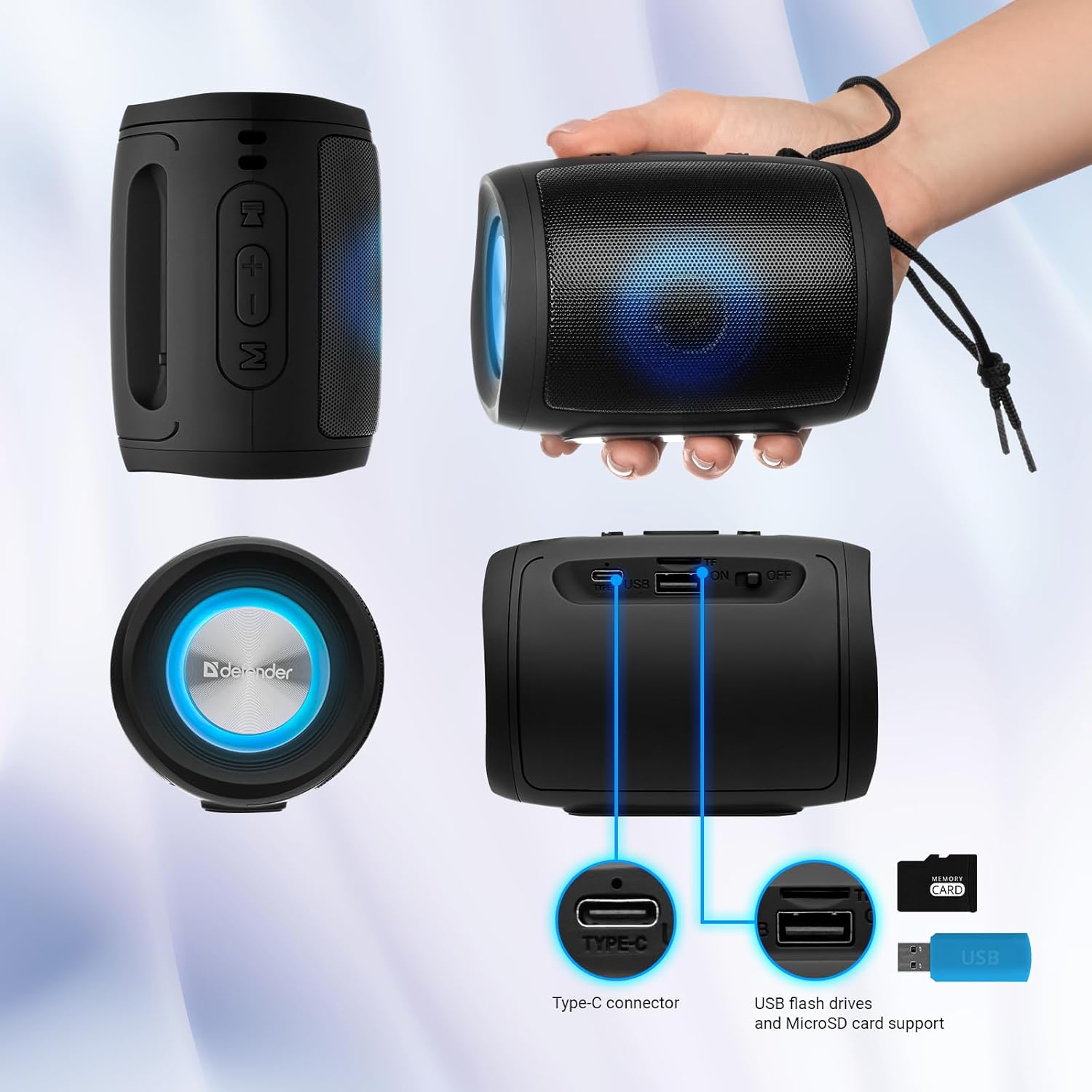
Image: A detailed diagram illustrating the Type-C connector, USB flash drive port, and MicroSD card slot on the Defender Enjoy S200 speaker.
4.5 Повици без раце
When connected to your smartphone via Bluetooth, the speaker's built-in microphone allows for hands-free calls.
- Одговори на повикот: Кратко притиснете го копчето Play/Pause.
- Крај на повикот: Кратко притиснете го копчето Play/Pause.
- Одбијте го повикот: Долго притиснете го копчето Play/Pause.
5. Одржување
- Чистење: Користете мека, сува крпа за чистење на површината на звучникот. Не користете абразивни средства за чистење или растворувачи.
- Складирање: Чувајте го звучникот на ладно и суво место, подалеку од директна сончева светлина и екстремни температури.
- Отпорност на вода: The speaker has an IP20 rating, meaning it is protected against solid objects larger than 12.5mm but has no protection against water. Avoid exposure to rain, splashes, or immersion in water.
- Нега на батеријата: За да го продолжите траењето на батеријата, целосно наполнете го звучникот пред првата употреба и полнете го најмалку еднаш на секои три месеци доколку не го користите редовно.
6 Смена на проблеми
- Без моќност: Ensure the speaker is charged. Connect the Type-C cable and allow it to charge for a few minutes before attempting to power on again.
- Нема звук: Check the volume levels on both the speaker and your connected device. Ensure the speaker is in the correct mode (Bluetooth, FM, USB, MicroSD).
- Проблеми со спарување Bluetooth: Ensure the speaker is in pairing mode. Turn off Bluetooth on your device and turn it back on. Try unpairing and re-pairing the speaker. Move closer to the speaker to ensure you are within the 10-meter range.
- Слаб прием на FM радио: Ensure you are in an area with good signal. The charging cable can sometimes act as an antenna; try connecting it for improved reception.
- USB/MicroSD Not Playing: Обезбедете го аудиото files are in a compatible format (e.g., MP3). Check that the USB drive or microSD card is inserted correctly and is not corrupted.
7. Спецификации
| Име на моделот | Уживајте во S200 |
| Број на модел на ставка | 65200 |
| Бренд | бранител |
| Технологија за поврзување | Bluetooth 5.3, USB |
| Технологија на безжична комуникација | Bluetooth, радиофреквенција |
| Тип на звучник | Мултимедија |
| Големина на звучникот | 2 инчи |
| Излезна моќност | 5 вати |
| Режим за излез на звук | Стерео |
| Извор на енергија | Напојува со батерии (вклучена е 1 литиум-јонска батерија) |
| Посебни карактеристики | Integrated Microphone, USB Port, Portable Bluetooth, LED Light, FM Radio, MicroSD Card Support, TWS |
| Димензии на производот (Д x Ш x В) | 8 x 11 x 8 cm |
| Тежина | 330 грама |
| Максимален опсег | 10 метри |
| Оценка за IP | IP20 |
8. Гаранција и поддршка
8.1 Информации за гаранцијата
Специфичните детали за гаранцијата обично се дадени со вашата документација за купување или на официјалната страница на производителот. website. Please refer to these resources for information regarding warranty coverage and duration.
8.2 Поддршка за корисници
For technical assistance, troubleshooting beyond this manual, or inquiries about your Defender Enjoy S200 speaker, please contact Defender Global customer support. Contact information can usually be found on the product packaging, the manufacturer's webстраницата или вашата сметка за купување.