1. Вовед
This manual provides detailed instructions for the safe and efficient operation of your Telefunken THP-2535 Solar Powered Portable Bluetooth FM Radio. Please read this manual thoroughly before using the device and retain it for future reference.
The Telefunken THP-2535 is a versatile portable radio featuring Bluetooth connectivity, FM radio tuning, USB and TF card playback, and an AUX input. It is designed for portability with a built-in speaker, headphone jack, carrying handle, and a solar panel for convenient battery charging.
2. Информации за безбедност
- Не го изложувајте уредот на екстремни температури, директна сончева светлина подолг период (надвор од полнењето) или висока влажност.
- Избегнувајте паѓање или изложување на уредот на силни удари.
- Не го расклопувајте, не го поправајте или не го модифицирајте уредот сами. За сите сервисирања обратете се на квалификуван персонал.
- Чувајте го уредот подалеку од вода и други течности.
- Обезбедете соодветна вентилација при полнење за да спречите прегревање.
- Use only the specified charging cable and power sources.
- Отстранете ги батериите и електронските компоненти одговорно во согласност со локалните прописи.
- Do not operate the radio at excessively high volumes for extended periods to prevent hearing damage.
3. Содржина на пакетот
Проверете дали сите артикли се присутни во пакетот:
- 1 x Telefunken Solar Powered Portable Bluetooth FM Radio (THP-2535)
- 1 x кабел за полнење (USB)
- 1 x Упатство за употреба (овој документ)
4. Производот завршиview
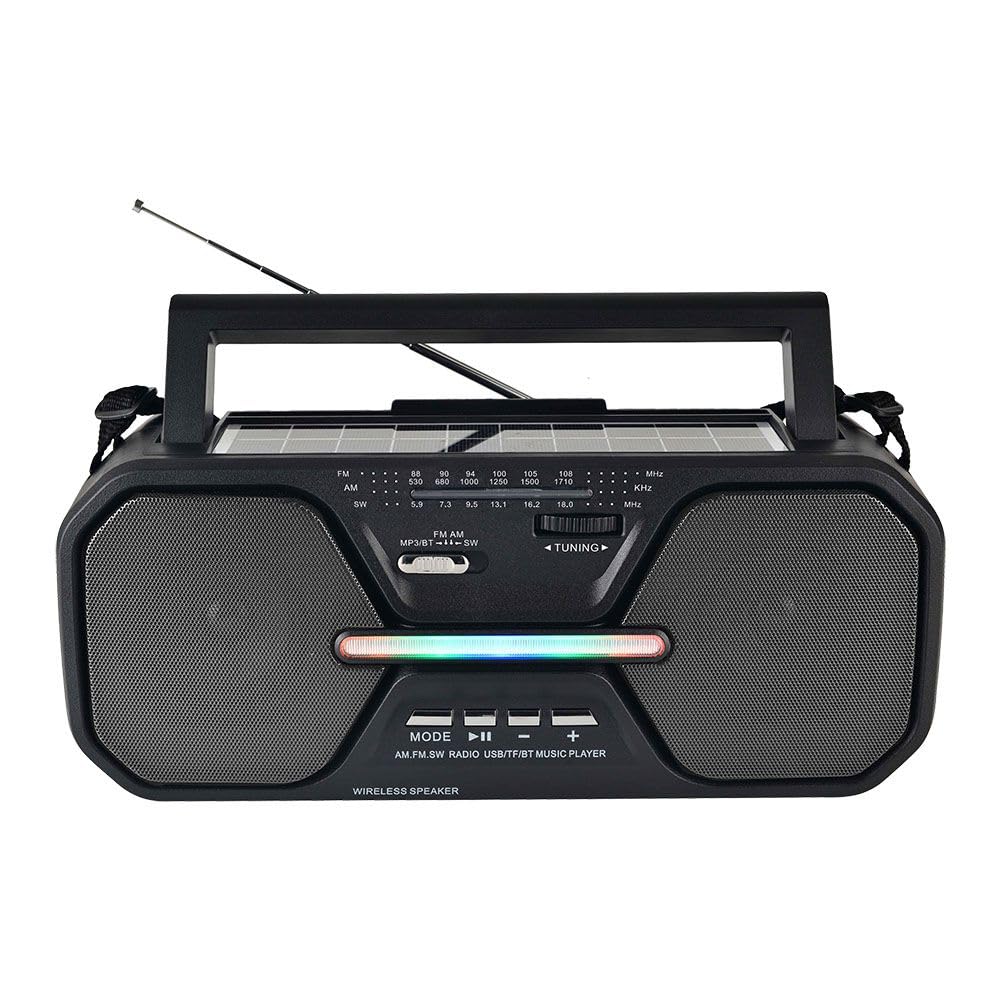
Слика 4.1: Предна страна view of the Telefunken THP-2535 radio, showing speakers, control panel, antenna, and carrying handle.

Слика 4.2: Врв view highlighting the solar panel and control buttons.
Контроли и пристаништа:
- Прекинувач: Го вклучува или исклучува радиото.
- Копче за режим: Switches between Bluetooth, FM, USB, TF, and AUX modes.
- Копче за репродукција/пауза: Controls playback in Bluetooth, USB, and TF modes.
- Previous/Volume Down Button: Skips to the previous track or decreases volume.
- Next/Volume Up Button: Skips to the next track or increases volume.
- Подесување бирање: For manual FM station selection.
- USB порта: For playing music from USB flash drives.
- Слот за картичка TF: For playing music from TF (MicroSD) cards.
- Влез AUX: За поврзување на надворешни аудио уреди преку кабел од 3.5 мм.
- Jackек за слушалки: За приватно слушање.
- Соларен панел: Charges the internal battery when exposed to sunlight.
- Порта за полнење: For charging the internal battery using the provided USB cable.
- Антена: Продолжете за подобар прием на FM радио.
5. Поставување
5.1 Почетно полнење
- Before first use, fully charge the radio's internal battery.
- Connect the provided USB charging cable to the radio's charging port.
- Поврзете го другиот крај од USB кабелот со стандарден USB адаптер за напојување (не е вклучен) или USB порт на компјутерот.
- The charging indicator light will illuminate. Once fully charged, the light may change color or turn off (refer to specific indicator behavior if detailed in product).
- Charging via the solar panel: Place the radio with the solar panel facing direct sunlight. Ensure the panel is clean and unobstructed. Solar charging is slower than USB charging and is best for maintaining charge or extending playtime.
5.2 Вклучување/исклучување
- To power on the radio, slide the Power Switch to the "ON" position.
- To power off the radio, slide the Power Switch to the "OFF" position.
6. Упатства за работа
6.1 Избор на режим
Притиснете го Режим button repeatedly to cycle through the available modes: Bluetooth, FM Radio, USB, TF Card, and AUX Input.
6.2 режим на Bluetooth
- Switch the radio to Bluetooth mode. The radio will indicate it is ready for pairing (e.g., a voice prompt or flashing indicator light).
- На вашиот уред со Bluetooth (паметен телефон, таблет итн.), овозможете Bluetooth и пребарајте достапни уреди.
- Select "THP-2535" (or similar name) from the list of devices.
- Once paired, the radio will confirm the connection. You can now stream audio from your device to the radio.
- Use the Play/Pause, Previous/Volume Down, and Next/Volume Up buttons on the radio to control playback and volume.
6.3 FM режим на радио
- Префрлете го радиото во FM режим.
- Целосно извлечете ја телескопската антена за оптимален прием.
- Завртете го Подесување бирање to scan for FM radio stations (frequency range: 87.5-108 MHz).
- Прилагодете ја јачината на звукот користејќи ги копчињата за зголемување/намалување на јачината на звукот.
6.4 Репродукција преку USB/TF картичка
- Вметнете USB флеш-меморија во USB-портата или TF (MicroSD) картичка во слотот за TF картичка.
- Switch the radio to USB or TF mode. The radio will automatically detect and begin playing audio files (e.g., MP3 format).
- Use the Play/Pause, Previous/Volume Down, and Next/Volume Up buttons to control playback and volume.
6.5 Режим на AUX влез
- Connect one end of a 3.5mm audio cable (not included) to the AUX input port on the radio.
- Connect the other end of the audio cable to the headphone jack or audio output of your external device (e.g., MP3 player, laptop).
- Switch the radio to AUX mode.
- Control playback and volume primarily from your external device. The radio's volume controls will also adjust the output.
6.6 Употреба на слушалки
Insert 3.5mm headphones (not included) into the headphone jack for private listening. The internal speakers will automatically mute.
7. Одржување
- Чистење: Избришете го радиото со мека, сува крпа. Не користете абразивни средства за чистење, восоци или растворувачи.
- Складирање: Кога не го користите подолго време, чувајте го радиото на ладно и суво место.
- Нега на батеријата: To prolong battery life, avoid fully discharging the battery frequently. Recharge the battery regularly, even if the radio is not in active use.
- Соларен панел: Одржувајте го соларниот панел чист и без прашина или остатоци за да обезбедите ефикасно полнење.
8 Смена на проблеми
| Проблем | Можна причина | Решение |
|---|---|---|
| Радиото не се вклучува. | Батеријата е празна. Прекинувачот за напојување е исклучен. | Charge the battery using the USB cable or solar panel. Ensure the power switch is in the "ON" position. |
| Нема звук. | Volume is too low. Mute function active. Incorrect mode selected. Headphones connected. | Increase the volume. Check if headphones are plugged in. Ensure the correct mode (Bluetooth, FM, USB, TF, AUX) is selected. |
| Лош FM прием. | Antenna not extended. Weak signal. Interference. | Fully extend the telescopic antenna. Reposition the radio for better signal. Avoid sources of electronic interference. |
| Bluetooth не се спарува. | Radio not in Bluetooth mode. Device's Bluetooth is off. Radio is already paired with another device. | Ensure the radio is in Bluetooth mode. Turn on Bluetooth on your device. Disconnect from other devices or restart the radio and your device. |
| USB/TF картичката не се репродуцира. | Incorrect mode. Unsupported file формат. Оштетен files. Card/drive not inserted correctly. | Ensure the correct mode is selected. Check if audio files are in a supported format (e.g., MP3). Reinsert the USB drive/TF card. Try another drive/card. |
9. Спецификации
| Број на модел | THP-2535 |
| Бренд | ТЕЛЕФУНКЕН |
| Извор на енергија | Solar Powered, USB Rechargeable (Lithium Ion Battery) |
| Поврзување | Bluetooth, USB, TF Card, AUX Input |
| Технологија на тјунер | FM |
| Поддржани радио бендови | ФМ (87.5-108 MHz) |
| Димензии на производот | 38.7L x 13.3W x 16.5H сантиметри |
| Посебни карактеристики | Portable, Built-in Speaker, Headphone Jack, Carrying Handle |
10. Гаранција и поддршка
10.1 Гаранција на производителот
This Telefunken THP-2535 radio comes with a 1 години гаранција на производителот од датумот на купување. Оваа гаранција ги покрива производствените дефекти и изработката при нормална употреба. Не ги покрива штетите предизвикани од злоупотреба, несреќи, неовластени модификации или нормално абење.
Ве молиме чувајте го вашиот доказ за купување за барањата за гаранција.
10.2 Поддршка за корисници
For technical assistance, warranty claims, or further inquiries, please contact your retailer or the Telefunken customer support service. Refer to the product packaging or the official Telefunken webсајт за детали за контакт.


