Вовед
The Optoma ML1080 is an ultra-portable, standard throw RGB laser projector designed for versatile use. It features Time of Flight (ToF) technology for advanced auto-focus and auto keystone correction, ensuring clear images on various surfaces. The RGB Triple Laser delivers 100% REC.709 and 98% DCI-P3 color accuracy for cinematic visuals. Enjoy seamless gaming with an ultra-low 23ms input lag. This projector supports 1080p HD resolution with 4K input, offers multiple connectivity ports, Bluetooth, and a built-in speaker. It can be powered via the included AC cable or a USB-C 60W PD 3.0 portable battery.
Што има во кутијата
- Адаптер за напојување
- Далечински управувач
- Батерија
- Торба за носење
- Упатство за употреба
Карактеристики на производот
- Ултра-преносен дизајн: Compact and lightweight for use on any surface with Time of Flight (ToF) technology for advanced auto-focus.
- RGB Triple Laser: Delivers cinematic color with 100% REC.709 and 98% DCI-P3 (WCG) color accuracy.
- Ultra-Low Input Lag: 23ms at 1080p60 and 23ms at 4K60 with Enhanced Game Mode and Auto Low Latency Mode (ALLM).
- Подготвено за стриминг: Optional EZC-USB Wireless adapter (not included) allows for streaming apps.
- Висока резолуција: 1080p resolution with 4K input support.
- Повеќе пристаништа: HDMI 2.1 input, two USB Type-C display inputs, USB-A input.
- Интегриран медиа плеер: Play content directly from storage devices.
- Вграден звучник: За аудио излез.
- Разновидни режими на прикажување: 9 different display modes.
- Bluetooth поврзување: For input devices and audio devices.
- Casting & Screen Mirroring: Share content from compatible devices.
- File Менаџер: For easy content access.
- Signage Mode: For commercial applications.
- Премиум торбичка за носење: Included for portability and protection.
Поставување
Првично сместување
Place the projector on a stable, flat surface. Ensure adequate ventilation around the unit. The compact size allows for flexible placement.

Предна страна view of the Optoma ML1080 projector, highlighting its compact design and lens.
Поврзување за напојување
Connect the included power adapter to the "Power In" port on the projector and then to a power outlet. Alternatively, the projector can be powered by a compatible USB-C 60W PD 3.0 portable battery.
Прилагодување на сликата
The ML1080 features Time of Flight (ToF) technology for advanced auto-focus and auto keystone correction. Upon powering on or moving the projector, it will automatically adjust the image for optimal clarity and geometry. For best results, ensure the projection surface is flat and free of obstructions.

Diagram illustrating the throw distance for the Optoma ML1080 projector to achieve a 100-inch image.
Оперативни
Вклучување/исклучување
Press the power button located on the projector or the remote control to turn the unit on or off.
Избор на извор
Use the remote control or the projector's control panel to select the desired input source (e.g., HDMI, USB-C, USB-A).
Режими на прикажување
The projector offers 9 display modes to optimize image quality for different content types (e.g., movie, game, presentation). Refer to the on-screen menu for selection.
Режим на игри
For an enhanced gaming experience, activate the Enhanced Game Mode and Auto Low Latency Mode (ALLM) through the projector settings. This reduces input lag to 23ms at 1080p60 and 4K60.
Official video demonstrating the portability, RGB Triple Laser technology, instant setup with Time-of-Flight, built-in speaker, and multiple input options of the Optoma ML1080 projector.
Поврзување
Достапни пристаништа
- HDMI2.1: Connect to Blu-ray players, gaming consoles, or other HDMI-enabled devices.
- USB Type-C (Image Display): Connect compatible devices for video and audio transmission.
- USB Type-C (Power Input): For powering the projector with a compatible portable battery.
- USB-A: For media playback from USB drives or connecting an optional EZC-USB Wireless adapter for streaming.
- Аудио излез од 3.5 мм: Поврзете надворешни звучници или слушалки.
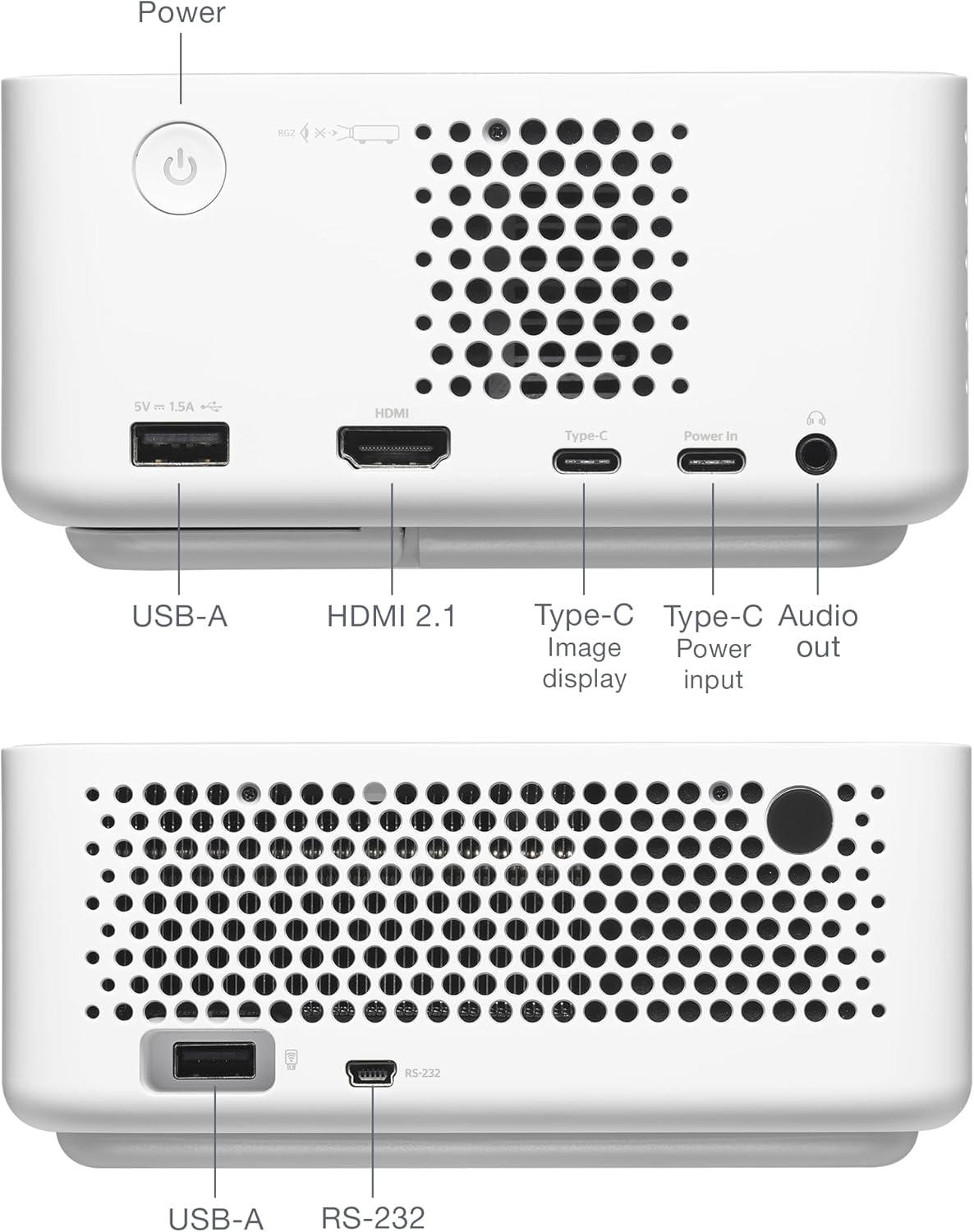
Заден дел view of the Optoma ML1080 projector, showing the various input and output ports including USB-A, HDMI 2.1, USB-C (Image display), USB-C (Power input), and Audio out.
Одржување
Чистење на објективот
Use a soft, lint-free cloth specifically designed for optical lenses. Gently wipe the lens to remove dust or smudges. Avoid abrasive materials or harsh chemicals.
Општо чистење
Избришете ја надворешноста на проекторот со мека, сува крпа. Не користете течни средства за чистење директно на уредот.
Вентилација
Осигурајте се дека отворите за вентилација на проекторот се чисти и непречени за да спречите прегревање.
Решавање проблеми
Нема приказ на слика
- Check power connections and ensure the projector is turned on.
- Проверете дали влезниот извор е правилно избран.
- Осигурајте се дека изворниот уред е вклучен и дека емитува сигнал.
Заматена слика
- Allow the projector to complete its automatic focus adjustment.
- Ensure the projection surface is flat and free of obstructions.
Нема аудио
- Проверете го нивото на јачина на звук на проекторот и изворниот уред.
- Доколку користите надворешни звучници, проверете дали се правилно поврзани и напојувани.
Спецификации
- Димензии на производот: 12.5 x 10 x 4.75 инчи
- Тежина на ставката: 2.2 фунти
- Број на модел на ставка: ML1080
- Батерии: Потребна е 1 литиум метална батерија (вклучена)
- Производител: Optoma Technology Inc
- Препорачана употреба: Gaming, Home Cinema, Road Warrior, SMB and Work From Home
- Посебни карактеристики: 100% REC.709 | 98% DCI-P3, Enhanced Game Mode w/ ALLM, RGB Laser Technology, Time-of-Flight (ToF) Technology, Ultra-Portable
- Технологија за поврзување: 3.5mm Audio, HDMI, USB
- Резолуција на екранот: 1920 x 1080

Diagram illustrating the dimensions and connectivity ports of the Optoma ML1080 projector.
Гаранција и поддршка
For warranty information and technical support, please refer to the official Optoma website or contact Optoma customer service. Keep your purchase receipt for warranty claims. Online resources may include FAQs, driver downloads, and service center locations.


