1. Вовед
This manual provides essential information for the proper setup, operation, and maintenance of your Tele System SMART24 LS2 A11 24-inch Android Smart TV. Please read it thoroughly before using the product to ensure safe and efficient operation.
2. Што има во кутијата
Проверете дали сите компоненти се присутни:
- Tele System SMART24 LS2 A11 Smart TV
- Далечински управувач
- Кабел за напојување
- Водич за брз почеток
- Warranty Paper
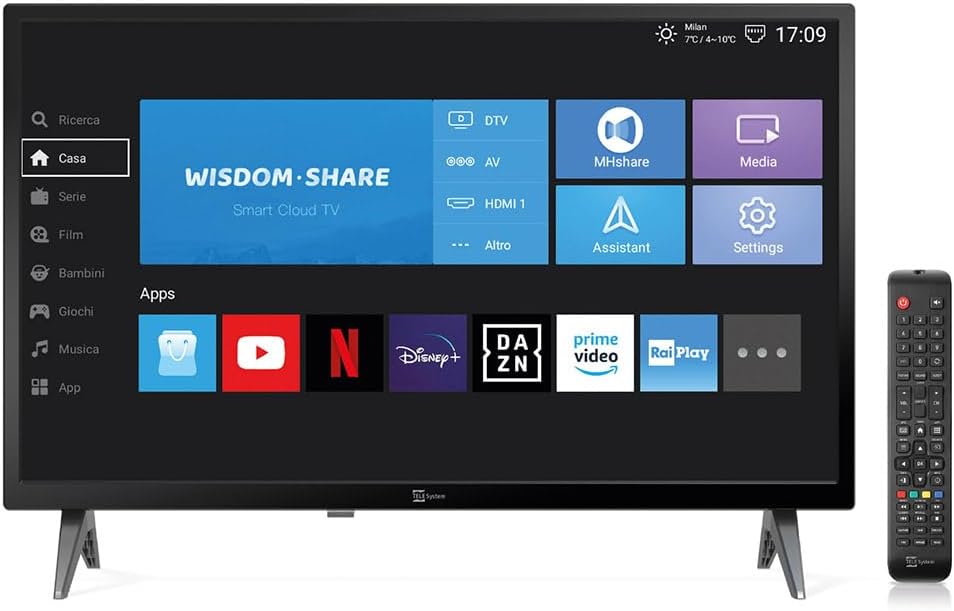
Image: The Tele System SMART24 LS2 A11 Smart TV displaying its home screen, with the included remote control positioned to the right. This illustrates the main components and initial user interface.
3. Поставување
3.1. Распакување и поставување
- Внимателно извадете го телевизорот од пакувањето.
- Place the TV on a stable, flat surface or mount it on a wall using a compatible VESA 100x100 wall mount (sold separately).
- Обезбедете соодветна вентилација околу телевизорот.
3.2. Поврзување на енергија
Connect the power cable to the TV's power input and then to a suitable electrical outlet (100-240V AC). While the product description mentions 12/220V, the specifications indicate 100-240V AC. Ensure the power source matches the TV's requirements.
3.3. Волшебник за почетно поставување
При првото вклучување, телевизорот ќе ве води низ почетниот волшебник за поставување. Ова вклучува:
- Избор на јазик.
- Мрежна конекција (Wi-Fi или Ethernet).
- Channel scanning for DVB-T2 (Digital Terrestrial) and Satellite channels.
- Tivùsat LCN channel numbering setup (if applicable).
4. Упатства за работа
4.1. Далечински управувачview

Image: The standard remote control for the Tele System Smart TV, showing various buttons for power, numbers, volume, channel, navigation, and smart TV functions.
Familiarize yourself with the remote control buttons for power, volume, channel selection, navigation, and smart TV functions.
4.2. Android Smart TV Features
Your TV runs on Android AOSP, providing access to a wide range of applications.
- Пристап до апликацијата: Navigate to the "Apps" section on the home screen to download and use applications like Prime Video, YouTube, Disney Plus, and DAZN.
- Пресликување на екранот: Use the mirroring function to share content from your mobile devices (smartphone, tablet) to the TV screen. This includes photos, videos, and music.
- MHshare App: Download the free MHshare app on your smartphone to use it as an additional remote control for your TV.

Image: The Smart TV displaying a streaming service interface with various movie and series titles, demonstrating the Android app capabilities.

Image: The Smart TV screen displaying "Mirroring" with an arrow pointing from a smartphone icon to the TV, illustrating the screen mirroring function.
4.3. TV Pause (USB)
The TV Pause function allows you to temporarily pause live TV broadcasts. To use this feature:
- Connect an external USB memory stick (not included) to the TV's USB port.
- While watching live TV, press the 'Play/Pause' button on your remote control to pause the program.
- Press 'Play' again to resume.

Image: A TV screen displaying a "TV Pause" overlay with playback controls, indicating the functionality to pause live television.
4.4. Digital Terrestrial (DVB-T2) and Satellite (Tivùsat LCN)
The TV supports DVB-T2 for digital terrestrial broadcasts and satellite reception. It features a CI+ slot for maximum compatibility with TELE System certified Tivùsat CAMs, enhancing viewing quality and experience.
- Пребарување канали: The TV allows for satellite channel search with Tivùsat HD classification.
- CI+ слот: Insert a compatible CI+ module (e.g., Tivùsat CAM) into the CI+ slot for access to encrypted channels.
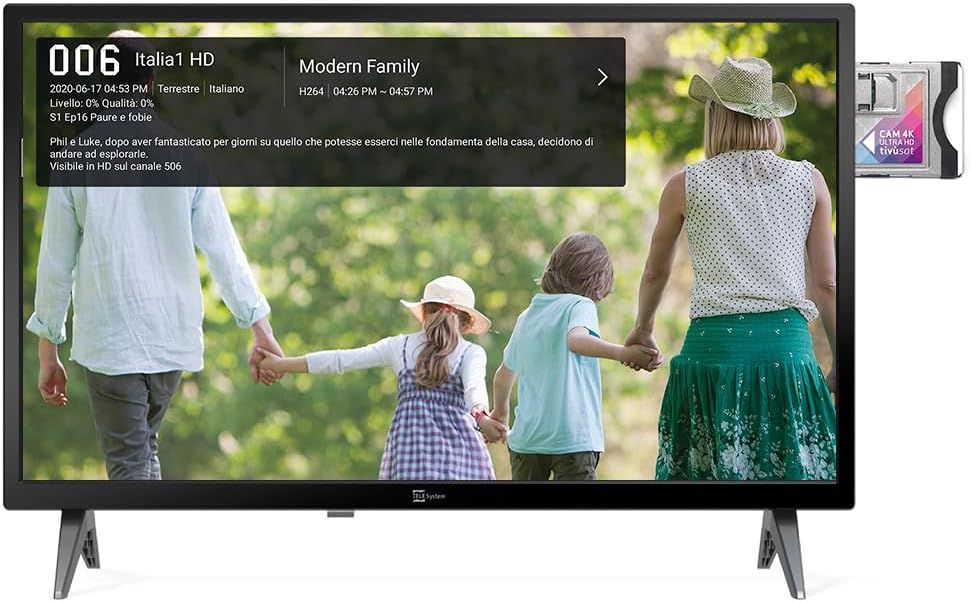
Image: The Smart TV displaying channel information for "Italia 1 HD" and a CI+ module inserted into the side, indicating support for encrypted satellite channels.
4.5. Хотелски режим
The Hotel Mode function is designed for use in hospitality environments. It allows for specific settings to be pre-defined:
- Set maximum audio levels.
- Determine the default channel upon power-on.
- Adjust the initial volume when the unit is turned on.
- Select the default source signal.
5. Одржување
5.1. Чистење
- Секогаш исклучувајте го телевизорот од струја пред чистење.
- Користете мека, сува крпа за да го избришете екранот и куќиштето.
- За тврдокорни траги, лесно дampИзмијте ја крпата со вода или со благ, неабразивен чистач за екран.
- Избегнувајте употреба на груби хемикалии или абразивни материјали.
5.2. Складирање
If storing the TV for an extended period, ensure it is kept in a cool, dry place, protected from dust and extreme temperatures.
6 Смена на проблеми
Доколку наидете на проблеми, погледнете ги следниве вообичаени решенија:
- Без моќност: Проверете дали кабелот за напојување е безбедно поврзан и со телевизорот и со штекерот. Проверете дали штекерот е функционален.
- Нема слика/звук: Verify the correct input source is selected. Check cable connections for external devices. For broadcast channels, perform a channel scan.
- Далечинскиот управувач не работи: Заменете ги батериите. Уверете се дека нема пречки помеѓу далечинскиот управувач и инфрацрвениот сензор на телевизорот.
- Проблеми со мрежната конекција: Check your Wi-Fi router or Ethernet cable. Try restarting the TV and your router.
- Пропусти во софтверот: Perform a factory reset (refer to the TV's settings menu for this option). Note that a factory reset will erase all personal settings and installed apps.
7. Спецификации
Below are the technical specifications for the Tele System SMART24 LS2 A11 Smart TV:
| Карактеристика | Детал |
|---|---|
| Број на модел | TELE System SMART24 LS2 A11 2022 |
| Големина на екранот | 23.6 инчи (60 см) |
| Технологија на прикажување | LED |
| Резолуција | 720p (1366 x 768) |
| Стапка на освежување | 60 Hz |
| Оперативен систем | Android AOSP |
| Поврзување | Етернет, Wi-Fi |
| Сооднос на аспект | 16:9 |
| Димензии (со држач) | 60.4 x 37.5 x 10.5 cm |
| Тежина | 3 кг |
| Оценка за енергетска ефикасност | E |
| Влез на енергија | 100-240V, 50/60Hz (AC) |
| Посебни карактеристики | TV Pause (USB), Digital Terrestrial DVB-T2, Satellite, Tivùsat LCN, Hotel Mode, Screen Mirroring |

Image: A detailed table listing the technical specifications of the SMART24 LS2 A11 TV, including display size, resolution, operating system, and connectivity options.

Image: The EU Energy Label for the Tele System SMART24 LS2 A11, showing an energy efficiency rating of 'E' and power consumption details. For more information, visit eprel.ec.europa.eu/qr/1183185.
8. Гаранција и поддршка
Your Tele System SMART24 LS2 A11 TV comes with a standard manufacturer's warranty. Please refer to the included Warranty Paper for specific terms and conditions.
For technical support, service, or further inquiries, please visit the official Tele System website or contact their customer service department. Contact information can typically be found in the Quick Start Guide or on the manufacturer's webсајт.
Official Tele System Webсајт: www.telesystem-world.com