1. Вовед
The Trevi DAB 7F80 R is a portable digital radio offering DAB, DAB+, and FM reception, along with Bluetooth connectivity. It features a high-readability Dot Matrix display, a programmable alarm clock, and a headphone jack. This manual provides instructions for the proper setup, operation, and maintenance of your device.
2. Информации за безбедност
- Внимателно прочитајте ги сите упатства пред да го користите уредот.
- Не го изложувајте уредот на вода, влага или екстремни температури.
- Use only the specified power source (4 x AAA batteries or a compatible 5V DC adapter, not included).
- Не обидувајте се да го расклопите, поправите или модифицирате уредот. За сите сервисирања обратете се на квалификуван персонал.
- Отстранете ги батериите одговорно во согласност со локалните прописи.
- Чувајте го уредот подалеку од силни магнетни полиња.
3. Содржина на пакетот
Ве молиме проверете дали следните артикли се вклучени во вашиот пакет:
- Trevi DAB 7F80 R Main Unit
- Упатство за употреба (овој документ)
- Гарантен сертификат
4. Производот завршиview
Familiarize yourself with the components and controls of your Trevi DAB 7F80 R radio.
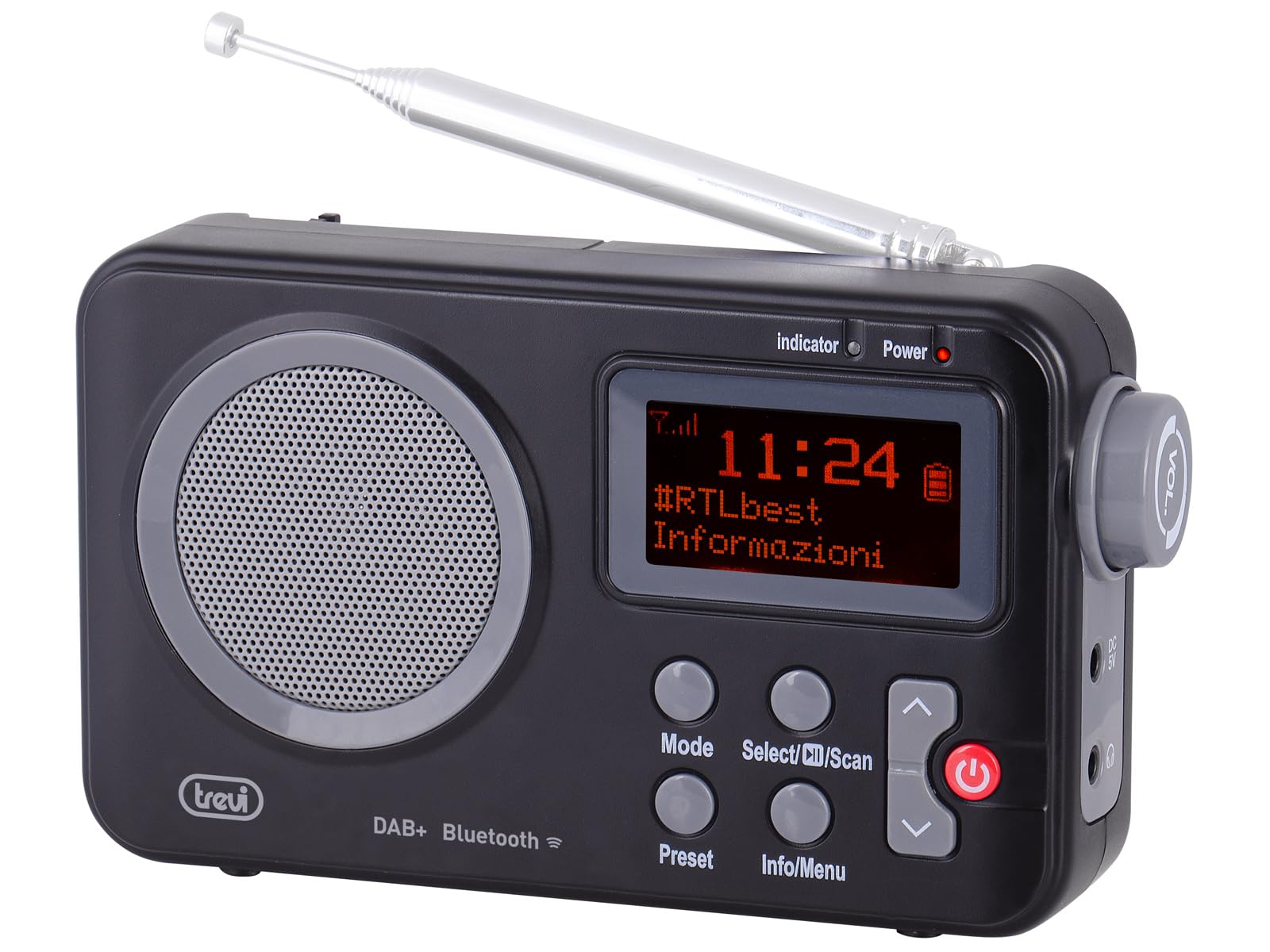
Слика 1: Предна страна view of the Trevi DAB 7F80 R radio. This image displays the Dot Matrix screen, the main speaker grille, and the primary control buttons including Mode, Select/Scan, Preset, Info/Menu, and Power. The extendable telescopic antenna is visible at the top.
Контроли и карактеристики:
- Прикажи: High-readability Dot Matrix screen for station information, time, and menu navigation.
- Говорник: Интегриран звучник за аудио излез.
- Копче за вклучување: Го вклучува/исклучува радиото.
- Копче за режим: Switches between DAB/DAB+, FM, and Bluetooth modes.
- Select/Scan Button: Confirms selections in menus, initiates station scans.
- Копче претходно поставено: Accesses and stores favorite radio stations.
- Копче за информации/мени: Displays station information and accesses system settings.
- Копчиња со стрелки нагоре/надолу: Navigates through menus, adjusts volume, changes stations.
- Jackек за слушалки: 3.5 мм излез за приватно слушање.
- Антена: Телескопска антена што може да се издолжи за подобар радио прием.
5. Поставување
5.1 Напојување на уредот
The Trevi DAB 7F80 R can be powered by batteries or an external AC adapter.
- Инсталација на батерија: Open the battery compartment cover on the back of the unit. Insert 4 x AAA batteries (not included), ensuring correct polarity (+/-). Close the cover securely.
- Адаптер за наизменична струја (опционално): For continuous power, connect a compatible 5V DC, 1A AC adapter (not included) to the DC IN port on the side of the radio.
Важно предупредување: Do not use batteries in the device when it is connected to an AC adapter for extended periods. This may lead to battery leakage or damage to the unit. If using the AC adapter, remove the batteries. If using batteries, disconnect the AC adapter.
5.2 Почетно вклучување и скенирање на станици
- Целосно извлечете ја телескопската антена за оптимален прием.
- Притиснете го Моќ копче за вклучување на радиото.
- Upon first use, the radio may prompt you to select a language. Use the Стрелка горе / долу копчиња за навигација и Select/Scan да се потврди.
- The radio will automatically perform a full scan for DAB/DAB+ stations. This process may take a few minutes. Once complete, the first available station will begin playing.
6. Упатства за работа
6.1 Radio Mode (DAB/DAB+, FM)
- Префрлување режими: Притиснете го Режим button repeatedly to cycle between DAB, FM, and Bluetooth modes.
- Скенирање за станици:
- In DAB mode, a full scan is usually performed on first use. To perform a new scan, press and hold Select/Scan.
- Во режимот FM, притиснете Select/Scan за автоматско скенирање за следната достапна станица.
- Избор на станици: Користете го Стрелка горе / долу buttons to browse through available stations.
- Зачувување на поставки: The radio can store up to 20 DAB/DAB+ and 20 FM stations.
- Прилагодете се на саканата станица.
- Притиснете и задржете го Претходно поставено button until 'Preset Store' appears on the display.
- Користете го Стрелка горе / долу копчиња за да изберете претходно поставен број (1-20).
- Притиснете Select/Scan за да потврдите и зачувате станицата.
- Потсетување на мемории за поставување: Притиснете го Претходно поставено button briefly. Use the Стрелка горе / долу buttons to select the desired preset number, then press Select/Scan.
- RDS/DLS Information: In FM or DAB mode, press the Инфо/Мени button repeatedly to cycle through available information such as station name, program type, time, and song title (if broadcast).
6.2 режим на Bluetooth
- Притиснете го Режим button until 'Bluetooth' appears on the display. The radio will enter pairing mode, indicated by a flashing Bluetooth icon.
- На вашиот паметен телефон, таблет или лаптоп, овозможете Bluetooth и пребарајте достапни уреди.
- Select 'Trevi DAB 7F80 R' from the list of devices to pair. Once connected, the Bluetooth icon will stop flashing.
- You can now play audio from your connected device through the radio. Use your device's controls for playback and the radio's volume controls for audio level.
6.3 Функции на часовникот и алармот
The radio features an integrated clock and two programmable alarms.
- Поставување на времето:
- Притиснете и задржете го Инфо/Мени копчето за да влезете во главното мени.
- Користете Стрелка горе / долу buttons to navigate to 'Time/Date' and press Select/Scan.
- Select 'Set Time/Date' and adjust the hour, minute, day, month, and year using the Стрелка горе / долу копчиња и потврдување на секој чекор со Select/Scan.
- Setting Alarms (Alarm 1 / Alarm 2):
- From the main menu, navigate to 'Alarm' and press Select/Scan.
- Select 'Alarm 1 Setup' or 'Alarm 2 Setup'.
- Configure the alarm settings: 'On Time' (hour/minute), 'Duration', 'Source' (Buzzer or last used radio station), 'Volume', and 'Frequency' (Daily, Weekdays, Weekends, Once). Use Стрелка горе / долу buttons to adjust values and Select/Scan за да ја потврдите секоја поставка.
- Ensure the alarm is set to 'On' in the alarm setup menu.
- Deactivating a sounding alarm: Притиснете го Моќ копче за исклучување на алармот.
6.4 Употреба на слушалки
To listen privately, insert standard 3.5mm headphones into the headphone jack located on the side of the radio. The internal speaker will automatically mute.
7. Одржување
- Чистење: Wipe the radio with a soft, dry, lint-free cloth. Do not use abrasive cleaners, waxes, or solvents.
- Замена на батерија: When the low battery indicator appears on the display, replace all four AAA batteries with new ones.
- Складирање: If the radio will not be used for an extended period, remove the batteries to prevent leakage and potential damage. Store the device in a cool, dry place.
8 Смена на проблеми
If you encounter issues with your Trevi DAB 7F80 R, please refer to the following common problems and solutions:
- Радиото не се вклучува:
- Проверете дали батериите се правилно вметнати и дали не се испразнети. Заменете ги доколку е потребно.
- Доколку користите адаптер за наизменична струја, проверете дали е правилно поврзан и дали штекерот е функционален.
- Нема звук или звукот е со слаб квалитет:
- Прилагодете ја јачината на звукот.
- Ensure headphones are not connected if you want sound from the speaker.
- Check radio reception. Extend and adjust the antenna. Try moving the radio to a different location.
- For Bluetooth, ensure the device is paired and audio is playing from the source.
- Clock resets after power loss or battery change:
- This model does not feature a backup battery for the clock. It is normal for the time to reset when power is completely removed (e.g., batteries removed or AC adapter unplugged). You will need to re-set the time manually as described in section 6.3.
- Кратко траење на батеријата:
- Battery life can vary depending on usage and battery quality. Use high-quality alkaline batteries for best performance.
- For prolonged use, consider using a compatible 5V DC AC adapter (not included).
- Difficulty with setup or navigation (e.g., station search, alarm setup):
- The radio uses a limited number of buttons for various functions. Refer to the specific operating instructions in section 6 for detailed, step-by-step guidance. Some functions may require pressing buttons multiple times or holding them down.
- Radio turns off when switching between battery and AC power:
- This is expected behavior. The radio will power cycle when changing its primary power source. Ensure you have saved any settings or presets before switching.
9. Спецификации
| Бренд | Треви |
| Модел | DAB 7F80 R |
| Боја | Црното |
| Технологија за подесување | DAB/DAB+, FM |
| Поддржани радио опсези | DAB, DAB+, FM (3 bands) |
| Bluetooth | Да |
| Приказ | High-readability Dot Matrix |
| Аларми | 2 програмабилни аларми |
| Претходно поставувања | 20 DAB/DAB+, 20 FM |
| Извор на енергија | 4 x AAA batteries (not included) or 5V DC adapter (not included) |
| Компатибилни уреди | Паметен телефон, таблет, лаптоп |
| Димензии на производот (Д x Ш x В) | 14 x 3.5 x 8.5 cm |
| Вклучени компоненти | Main unit, user manual, warranty certificate |
10. Гаранција и поддршка
This product is supplied with a warranty certificate. For detailed information regarding warranty terms and conditions, please refer to the certificate included in your package.
For technical support, troubleshooting beyond this manual, or warranty claims, please contact your retailer or the manufacturer's customer service using the contact information provided with your purchase.


