1. Вовед
Ви благодарам за купувањетоasing the TANLANIN CD-001 Portable Rechargeable CD Player. This device offers multiple audio playback options, including CD, Bluetooth input/output, USB, and AUX. This manual provides detailed instructions for setup, operation, maintenance, and troubleshooting to ensure optimal performance and longevity of your device.

Слика 1.1: The TANLANIN CD-001 Portable CD Player and included remote control.
2. Производот завршиview
2.1 Содржина на пакетот
Ве молиме проверете го пакувањето за следните ставки:
- 1x TANLANIN CD-001 Vintage CD Player
- 1x Упатство за употреба (овој документ)
- 1x далечински управувач
- 1x Кабел за полнење од тип C
- 1x Гарантна картичка
2.2 Device Features and Controls
Запознајте се со различните делови и контроли на вашиот CD плеер.

Слика 2.1: Предни и задни view of the CD player, highlighting controls and ports. Key features include the CD play arm, control buttons (Stop, Next, Previous, Play/Pause, Bluetooth Transmit/Repeat), Volume Knob, Headphone Jack (AUX Out), Power Switch, USB Input Port, AUX Input Port, and Type-C Charging Port.

Слика 2.2: The LED display indicates the current operating mode: Bluetooth Input Mode (bE), USB Mode (USb), CD Mode (Cd), Line/AUX Mode (LINE), and Bluetooth Output Mode (-bE-).
3. Поставување
3.1 Почетно полнење
Before first use, fully charge the CD player. Connect the provided Type-C charging cable to the charging port on the device and the other end to a compatible USB power source (e.g., wall adapter, power bank, computer USB port). The LED indicator will show charging status.
3.2 Вклучување/исклучување
To power on the device, locate the power switch on the rear of the unit and slide it to the 'ON' position. To power off, slide the switch to the 'OFF' position.
4. Упатства за работа
4.1 Репродукција на ЦД
- Отворете го горниот капак на CD плеерот.
- Carefully place a CD (CD, CD-R, CD-RW, MP3, WMA formats supported) onto the spindle, pressing gently until it clicks into place.
- Затворете го горниот капак.
- Swing the play arm over the CD. The device will automatically detect the CD and begin playback.
- Use the control buttons (Play/Pause, Next Song, Previous Song, Stop) on the device or remote control to manage playback. Adjust volume using the Volume Knob.
4.2 Bluetooth Input Mode (Speaker Function)
This mode allows you to use the CD player as a Bluetooth speaker for your mobile phone or tablet.
- Вклучете го CD плејерот.
- The LED display will show 'bE' indicating Bluetooth Input Mode. If not, press the 'Mode' button on the remote or the 'Bluetooth Transmit/Repeat' button on the unit until 'bE' is displayed.
- On your mobile device, enable Bluetooth and search for available devices. Select 'TANLANIN CD-001' to pair.
- Once paired, you can play audio from your mobile device through the CD player's speakers.
4.3 Bluetooth Output Mode (Transmitter Function)
This mode allows the CD player to transmit audio to external Bluetooth headphones or speakers.

Слика 4.1: The CD player can wirelessly connect to Bluetooth headphones or speakers for audio output.
- Ensure your external Bluetooth headphones or speaker are in pairing mode.
- Power on the CD player and select the desired audio source (CD, USB, or AUX).
- Press and hold the 'Bluetooth Transmit/Repeat' button on the unit or the dedicated Bluetooth output button on the remote until '-bE-' appears on the LED display and starts flashing. This indicates Bluetooth Output Mode and pairing search.
- The CD player will automatically search for and connect to nearby Bluetooth audio devices. Once connected, '-bE-' will stop flashing.
- Audio from the selected source will now play through your connected Bluetooth headphones or speaker.
4.4 USB репродукција
Пушти аудио fileдиректно од USB флеш драјв.
- Insert a USB flash drive into the USB Input Port on the rear of the device.
- Press the 'Mode' button on the remote or the 'Bluetooth Transmit/Repeat' button on the unit until 'USb' is displayed.
- The device will automatically begin playing audio files од USB-уредот.
- Use the control buttons (Play/Pause, Next Song, Previous Song, Stop) on the device or remote control to manage playback.
4.5 Влез AUX
Connect external audio devices (e.g., MP3 players, non-Bluetooth phones) using a 3.5mm audio cable.
- Connect one end of a 3.5mm audio cable to the AUX Input Port on the rear of the CD player.
- Поврзете го другиот крај со приклучокот за слушалки или аудио излезот на вашиот надворешен уред.
- Press the 'Mode' button on the remote or the 'Bluetooth Transmit/Repeat' button on the unit until 'LINE' is displayed.
- Play audio from your external device. The sound will be output through the CD player's speakers.
4.6 Функции на далечинскиот управувач
The included remote control provides convenient access to all playback and mode functions. Refer to the remote control diagram for specific button layouts and functions.
5. Полнење
The TANLANIN CD-001 features a built-in 2000mAh rechargeable Lithium Ion battery, providing 5-8 hours of playtime on a full charge. When the battery is low, the device will indicate this on the LED display or through an audible alert.
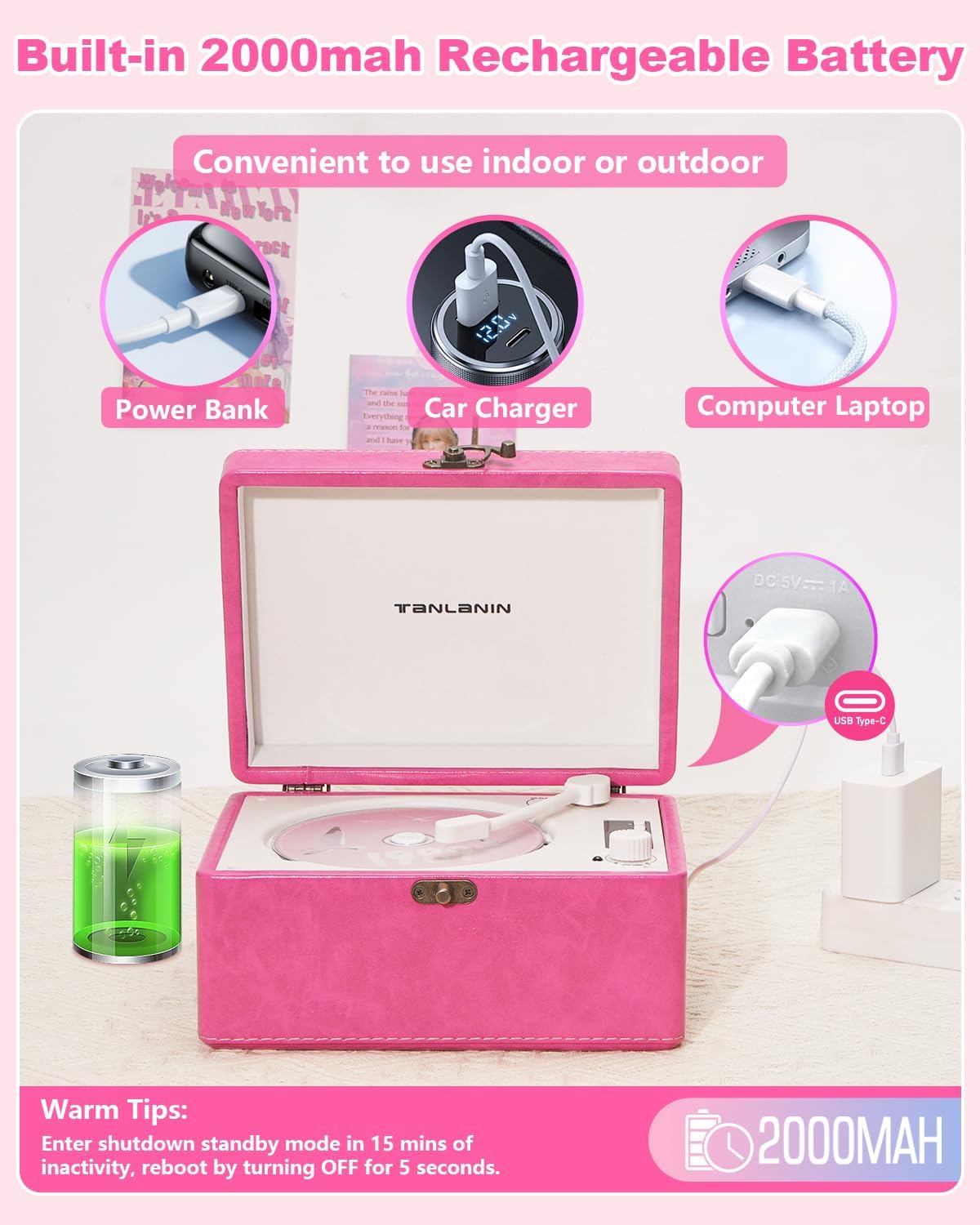
Слика 5.1: The CD player can be charged using various USB power sources, including power banks, car chargers, and computer laptops, via the Type-C port.
За полнење на уредот:
- Connect the provided Type-C charging cable to the Type-C Charging Port on the rear of the CD player.
- Connect the other end of the cable to a 5V/1A USB power adapter (not included), a power bank, or a computer's USB port.
- The charging indicator will illuminate during charging and turn off or change color when fully charged.
Топол совет:
The device will enter shutdown standby mode after 15 minutes of inactivity to conserve battery. To reactivate, turn the power switch OFF for 5 seconds, then turn it back ON.
6. Одржување
6.1 Чистење
- Секогаш исклучувајте го уредот од струја и исклучете го од струја пред чистење.
- Избришете ја надворешноста со мека, сува крпа. Не користете абразивни средства за чистење, восоци или растворувачи.
- За објективот на CD-то, користете специјализиран комплет за чистење на објективи на CD-то. Не го допирајте објективот директно.
6.2 Складирање
- Чувајте го уредот на ладно и суво место, подалеку од директна сончева светлина и екстремни температури.
- Avoid placing heavy objects on top of the player.
- Доколку ја складирате батеријата подолг период, периодично полнете ја за да ја одржите нејзината исправност.
7 Смена на проблеми
| Проблем | Можна причина | Решение |
|---|---|---|
| Уредот не се вклучува. | Батеријата е празна; Прекинувачот за напојување е исклучен. | Наполнете го уредот; Осигурајте се дека прекинувачот за напојување е во положба „ВКЛУЧЕНО“. |
| CD-то не се репродуцира или прескокнува. | CD is dirty, scratched, or inserted incorrectly; Unsupported CD format. | Clean the CD; Reinsert correctly; Ensure CD is a supported format (CD, CD-R, CD-RW, MP3, WMA). |
| Bluetooth device cannot connect (Input Mode). | CD player not in Bluetooth Input Mode; Device too far; Bluetooth not enabled on external device. | Ensure 'bE' is displayed; Move devices closer; Enable Bluetooth on your phone/tablet. |
| No sound from external Bluetooth speaker/headphones (Output Mode). | CD player not in Bluetooth Output Mode; External device not in pairing mode or too far. | Ensure '-bE-' is displayed and flashing during pairing; Put external device in pairing mode; Move devices closer. |
| USB drive not recognized or playing. | CD player not in USB Mode; USB drive not formatted correctly; Unsupported file типови. | Ensure 'USb' is displayed; Use FAT32 formatted USB drives; Ensure audio files are MP3 or WMA. |
| Нема звук од AUX влезот. | CD player not in AUX Mode; Cable not fully inserted; Volume too low on external device. | Ensure 'LINE' is displayed; Check cable connections; Increase volume on external device. |
8. Спецификации
- Димензии на производот: 8.07 x 6.1 x 4.13 инчи
- Тежина на ставката: 3.2 фунти
- Број на модел: ЦД-001
- Батерија: 1 литиум-јонска батерија (вклучена)
- Технологија за поврзување: 3.5mm AUX input & output, Bluetooth input & output, USB
- Поддржани CD формати: CD, CD-R, CD-RW, MP3, WMA
- Посебни карактеристики: Anti-Skip Protection, Battery Level Indicator, Portable, Rechargeable
- Производител: ТАНЛАНИН
9. Гаранција и поддршка
This TANLANIN CD-001 CD Player comes with a 1-годишна гаранција на производотДополнително, Политика за замена во рок од 30 дена is offered for any manufacturing defects.
For technical support, warranty claims, or any questions regarding your product, please contact TANLANIN customer service through the retailer where the product was purchased.