1. Вовед
This manual provides instructions for the iTOMA Model CKS507 Clock Radio. This device combines an alarm clock with a large LED display, FM radio, dual alarms, two USB charging ports, a night light, and both automatic and manual dimmer functions. It also features APP control for enhanced functionality and ease of use.

Figure 1: iTOMA CKS507 Clock Radio overview.
2. Клучни карактеристики
- Ultra Clear 1.4-inch White LED Display: Large numbers for easy readability from any angle, with 4-level manual and auto brightness adjustment.
- Контрола на апликации: Manage alarms, radio, and other settings via the dedicated iTOMA App for iOS and Android.
- Двојни аларми: Set two independent alarms with customizable wake-up modes (radio or buzzer) and 4 alarm week modes (Every day, single day, weekdays, weekends).
- ФМ радио: Digital tuning with memory storage for up to 20 programmable stations (87.5-108MHz). Features a sleep-to-music timer (10-90 minutes).
- Bluetooth поврзување: Стримувајте аудио безжично од вашите уреди со Bluetooth.
- Two USB Charging Ports: Includes one USB Type-A and one USB Type-C port (2.1A 5V) for charging mobile devices.
- Ноќна светлина: Two-level night light for ambient illumination.
- Функција за одложување: 9-minute snooze, up to 6 times.
- Crescendo Wake-up Control: Јачината на алармот постепено се зголемува.
3. Содржина на пакетот
Проверете дали сите артикли се присутни во пакувањето:
- 1 x iTOMA CKS507 Clock Radio
- 1 x адаптер за напојување
- 1 x Упатство за користење (шест јазици)
4. Поставување
4.1 Поврзување за напојување
- Unpack the iTOMA CKS507 Clock Radio and its power adapter.
- Connect the power adapter to the DC input port on the back of the clock radio.
- Plug the power adapter into a standard electrical outlet. The clock will automatically set itself to the correct year, month, date, day, and time upon initial power-up and after any power interruption.
4.2 Поставување на контрола на апликацијата
The iTOMA App provides convenient control over various clock functions.
- Преземете ја апликацијата: Пребарај за "iTOMA" in the App Store (iOS) or Google Play Store (Android) and download the application.
- Power On and Bluetooth Activation: Ensure the clock radio is powered on. Press the BT button on the clock. The Bluetooth indicator on the clock display should flash, indicating it is in pairing mode.
- Поврзете се преку апликацијата:
- Open the iTOMA App on your mobile device.
- Tap "Connect" within the App.
- In the pop-up interface, select "Settings" and then connect to the Bluetooth device named "507".
- Потврда: A successful connection will be indicated by an audible tone from the clock. The App and Bluetooth indicator lights on the clock will remain steadily on.
- Решавање проблеми Поврзување: If the App cannot connect, ensure your mobile device's Bluetooth is enabled and the clock's Bluetooth is active (indicator flashing or steady).

Figure 2: Steps for connecting the iTOMA App.
5. Упатства за работа
5.1 Поставување време и датум
The clock automatically sets the time upon power-up. Manual adjustment is also possible.
- Рачно поставено време: Користете го ВРЕМЕ СЕТ button to adjust the year, date, day of the week, and time. Refer to the detailed instructions in the included multi-language manual for specific button sequences.
- Временска зона: Прилагодете ја временската зона според вашата локација.
- Формат 12/24 часа: Select your preferred time display format.
5.2 Функции за аларм
Радио часовникот има два независни аларми.

Figure 3: Dual alarm clock functionality.
- Поставување аларми: Use the dedicated alarm buttons or the iTOMA App to set Alarm 1 and Alarm 2.
- Режими на будење: Choose to wake up to the FM radio or a buzzer sound.
- Режими на аларм за недела: Select from four options: Every day, single day only, weekdays only, or weekends only.
- Јачина на аларм: Adjust the alarm volume (16 levels). The alarm sound will gradually increase (crescendo wake-up).
- Одложи: Кога ќе се огласи аларм, притиснете го копчето СНОЗА button to temporarily silence it for 9 minutes. This can be repeated up to 6 times.
- Disabling Alarm: To turn off an alarm, use the physical alarm switch on the back of the unit or disable it via the App. Remember to re-enable it for the next day if needed.
5.3 FM радио
Enjoy your favorite radio stations with digital tuning.

Figure 4: FM Radio tuning and presets via App.
- подесување: Use the tuning controls on the unit or the App to find FM stations (87.5-108MHz).
- Претходно поставени мемории: Store up to 20 favorite radio stations for quick access.
- Волумен: Adjust the radio volume from 0-16 levels.
- Антена: Ensure the external cable antenna is properly extended for optimal reception.
- Тајмер за спиење: Set a programmable sleep-to-music timer (10-90 minutes) to fall asleep to your chosen radio station. The radio will automatically turn off after the set duration.
5.4 Bluetooth аудио стриминг
Connect your mobile device to stream music wirelessly.

Figure 5: Bluetooth music streaming.
- Притиснете го BT button on the clock radio to enter Bluetooth pairing mode. The Bluetooth indicator will flash.
- On your mobile device, go to Bluetooth settings and select "507" from the list of available devices to pair.
- Once paired, the Bluetooth indicator on the clock will stop flashing and remain steady. You can now stream audio from your device to the clock radio.
5.5 Затемнување на екранот
Adjust the display brightness for comfort.

Figure 6: Display brightness levels and auto dimmer.
- Manual Dimmer: Користете го ПОТРАГО button to cycle through 4 brightness levels (L-1, L-2, L-3, OFF).
- Автоматско затемнување: The clock features an auto-dimmer function that adjusts the display brightness based on ambient light conditions, reducing brightness for uninterrupted sleep.
5.6 Ноќно светло
Вградената ноќна светилка обезбедува меко осветлување.
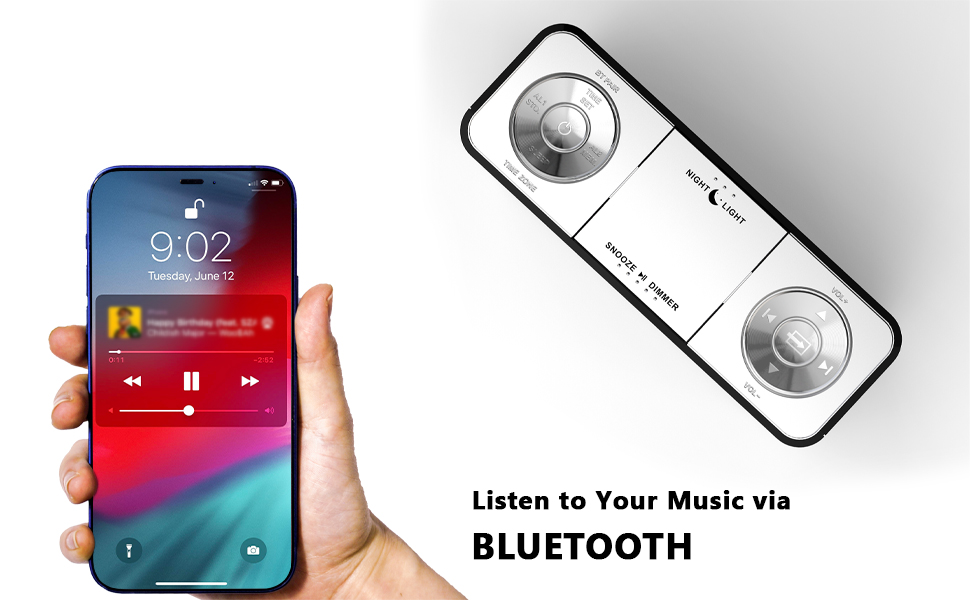
Figure 7: Night light feature.
- Притиснете го НОЌНА СВЕТЛИНА button to activate or adjust the two-level night light.
5.7 USB порти за полнење
Charge your mobile devices conveniently.
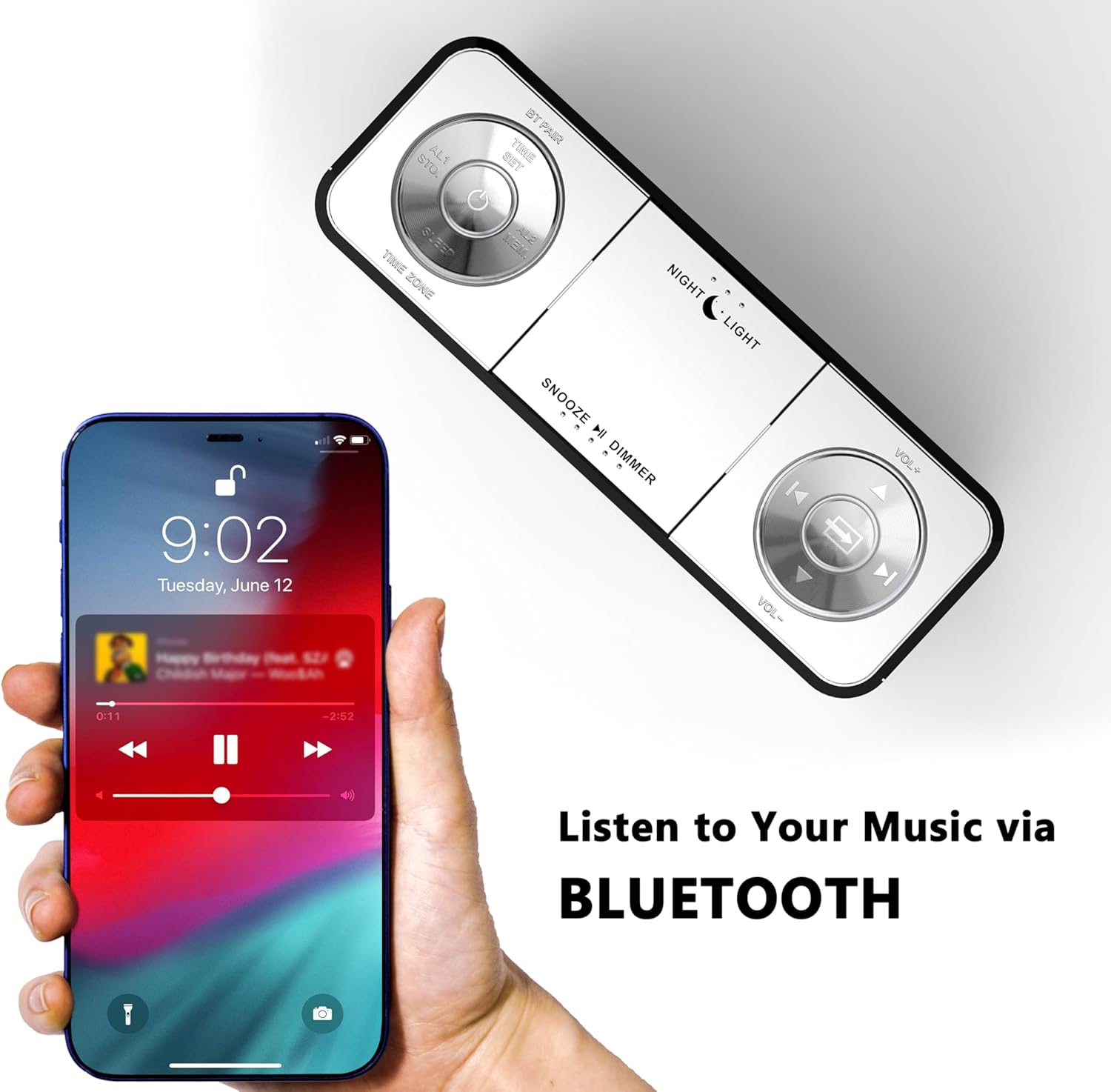
Figure 8: USB charging ports in use.
- The clock radio includes one USB Type-A and one USB Type-C charging port (2.1A 5V total output).
- Connect your mobile phone, tablet, or other USB-powered devices to these ports for charging.
6. Одржување
- Чистење: Избришете го уредот со мека, сува крпа. Не користете абразивни средства за чистење или растворувачи.
- Исклучување на струја: Исклучете го адаптерот за напојување од ѕидниот штекер ако уредот не се користи подолг временски период.
- Поставување: Place the clock radio on a stable, flat surface away from direct sunlight, heat sources, and moisture.
7 Смена на проблеми
| Проблем | Можна причина | Решение |
|---|---|---|
| Clock display is blank or not working. | No power or power interruption. | Осигурајте се дека адаптерот за напојување е безбедно вклучен во часовникот и во функционален електричен штекер. |
| Time/Date is incorrect after power interruption. | No battery backup for settings. | The clock automatically resets time upon power restoration. If manual settings were lost, re-enter them using the TIME SET button or App. |
| Cannot connect to the iTOMA App. | Bluetooth is off on the clock or mobile device; incorrect pairing process. | Ensure Bluetooth is enabled on your mobile device. Press the BT button on the clock to activate pairing mode. Follow App connection steps carefully. |
| Слаб FM радио прием. | Антената не е проширена или сигналот е слаб. | Fully extend the external cable antenna. Try repositioning the antenna or the clock radio for better signal. |
| Алармот не се огласува. | Alarm is not set, turned off, or volume is too low. | Verify alarm settings (time, mode, active days) via the clock or App. Ensure alarm volume is set to an audible level. Check the physical alarm switch on the back. |
| USB полнењето не работи. | Уредот не е компатибилен или кабелот е неисправен. | Ensure your device is compatible with 5V USB charging. Try a different USB cable. Confirm the clock radio is powered on. |
8. Спецификации
| Бренд | iTOMA |
| Број на модел | CKS507 |
| Боја | Бело Лед |
| Тип на дисплеј | Дигитална LED диода |
| Димензии на производот | 6.22"Ш x 3.54"В (158мм x 90мм) |
| Извор на енергија | Електричен со кабел |
| Материјал за рамка | Пластика |
| Тежина на ставката | 1.19 фунти |
| Опсег на фреквенција FM | 87.5-108 MHz |
| USB излез за полнење | 2.1A 5V (Type-A and Type-C ports) |

Слика 9: Димензии на производот.
9. Поддршка за корисници
For further assistance, troubleshooting, or warranty information, please contact iTOMA customer support.
- Производител: iTOMA
- Поддршка преку Интернет: Refer to the official iTOMA webстраницата или информациите за контакт наведени во пакувањето на вашиот производ за најактуелните канали за поддршка.


