1. Вовед
This manual provides detailed instructions for the installation, operation, and maintenance of your DieseRC Smart Wireless Roller Shutter Controller Module. Please read this manual carefully before installation and use to ensure proper function and safety.
2. Производот завршиview
The DieseRC Smart Wireless Roller Shutter Controller Module is designed to upgrade traditional roller shutter switches, allowing for smart control via a mobile application, RF remote control, and voice commands. It integrates Wi-Fi and RF 433Mhz technologies for versatile control options.

Image: DieseRC Smart Wireless Roller Shutter Controller Module, showing the compact design of the receiver and the included RF remote control.
3. Клучни карактеристики
- Повеќе методи за контрола: Supports control via mobile application (Tuya/Smart Life), 433Mhz RF remote control, and traditional manual wall switch.
- Контрола на паметна апликација: Compatible with "Tuya" and "Smart Life" applications for unlimited wireless control via 2.4GHz Wi-Fi network from Android and iOS devices.
- Интеграција за гласовна контрола: Works with Amazon Alexa (Echo/Dot/Spot) and Google Home for convenient voice commands.
- RF Wireless Control: Features a 433Mhz RF remote control with stable performance and high reception sensitivity. Offers a control range of 30-50 meters in open areas, with signal penetration through walls and floors.
- Компактен дизајн: Module dimensions of 45x45x16 mm allow for easy concealment within most electrical boxes or junction boxes.
- Персенtage Control & Timer Function: The mobile application allows for precise percentage control of shutter opening/closing and programmable timer functions.
- Широка апликација: Suitable for controlling various AC motors, including roller blinds, electric curtains, awnings, and garage doors. Compatible with 4-wire AC motors (2 input phase wires, 1 neutral wire, 1 ground wire).
- Издржливи компоненти: Equipped with a high-quality relay designed for over 400,000 operations, supporting a 10A current and a maximum inductive load of approximately 5A.
- Broad Voltagд Компатибилност: Receiver operates on AC 100V~240V.
- High-Quality Remote: The RF remote transmitter is designed for over 500,000 clicks, is removable from its base, and includes a replaceable 27A 12V battery with an approximate 3-year lifespan.
4. Содржина на пакетот
Стандардниот пакет вклучува:
- 1 x DieseRC Smart Wireless Roller Shutter Controller Module (Receiver)
- 1 x RF Remote Control Transmitter
- 1 x Remote Control Base (for wall mounting)
- Mounting Screws / Double-sided Adhesive for remote base
- 1 x 27A 12V Battery (pre-installed in remote)
- Упатство за употреба (овој документ)
5. Спецификации
| Параметар | Вредност |
|---|---|
| Бренд | DieseRC |
| Број на модел | 1 Receiver with 1 Transmitter Kit |
| Димензии на производот | 4.5 x 4.5 x 1.6 cm |
| Тежина на производот | 120 гр |
| Оперативен волtage | AC 100V~240V |
| Оценета струја | 10 Ampерес |
| Max Inductive Load | ~5 Ampерес |
| Електрична енергија | Up to 3520 Watts (depending on voltage) |
| Безжично поврзување | Wi-Fi 2.4GHz, RF 433Mhz |
| RF Control Range | 30-50 meters (open area) |
| Компатибилност со апликации | Tuya Smart, Smart Life |
| Компатибилност со гласовен асистент | Amazon Alexa, Google Home |
| Моторна компатибилност | 4-wire AC motors (2 phase, 1 neutral, 1 ground) |
| Далечинска батерија | 1 x 27A 12V Alkaline (included) |
| Материјал | Пластика |
| Земја на потекло | Кина |
6. Информации за безбедност
Ве молиме почитувајте ги следните безбедносни мерки:
- Installation should only be performed by a qualified electrician or in accordance with local electrical codes.
- Пред да извршите какво било поврзување, осигурајте се дека напојувањето е исклучено на прекинувачот.
- Do not exceed the maximum load ratings of the module (10A, ~5A inductive, 3520W).
- Овој уред е дизајниран само за внатрешна употреба. Избегнувајте изложување на влага или екстремни температури.
- Чувајте го уредот подалеку од дофат на деца.
- Ensure proper grounding for the AC motor as specified.
7. Поставување и инсталација
7.1 Дијаграм за поврзување
The module is compatible with 4-wire AC motors. Ensure your motor has two phase wires (for up/down), one neutral wire, and one ground wire. The module can be installed with or without an existing manual panel switch.

Image: Detailed wiring diagrams showing connections for the controller module with an existing panel switch (left) and without a panel switch (right). The diagrams illustrate connections for AC 100V-240V power, the AC motor, and the module's terminals (L, N, L1, L2, S1, S2, Earth).
Чекори за поврзување со жици:
- Исклучете го напојувањето: Исклучете го главното напојување на прекинувачот пред да започнете со какво било поврзување.
- Идентификувајте ги жиците: Identify the Live (L), Neutral (N), and motor control wires (L1 for one direction, L2 for the other direction) from your existing setup. Also, identify the Ground (E) wire from your AC motor.
- Connect Power to Module: Connect the Live (L) and Neutral (N) wires from your AC power supply to the corresponding 'L' and 'N' terminals on the module.
- Connect Motor to Module: Connect the motor's L1 and L2 wires to the 'L1' and 'L2' terminals on the module. Connect the motor's Neutral (N) wire to the 'N' terminal on the module. Ensure the motor's Ground (E) wire is properly connected to the electrical system's ground.
- Connect Panel Switch (Optional): If using a manual panel switch, connect its output wires to the 'S1' and 'S2' terminals on the module. Connect the Live (L) wire to the 'L' terminal of the panel switch.
- Безбедни врски: Проверете дали сите жичани врски се цврсти и сигурни.
- Вратете ја моќноста: Once all connections are verified, restore power at the circuit breaker.
7.2 APP Pairing (Tuya Smart / Smart Life)
To control the module via your smartphone, you need to pair it with the Tuya Smart or Smart Life application.
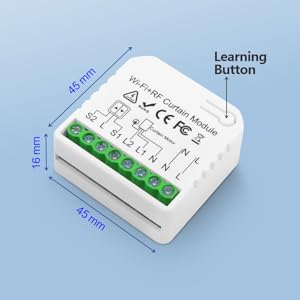
Image: QR code for downloading the Tuya Smart application. Scan this code to download the app.
Alternatively, download from Tuya Smart official webсајт.
- Преземи апликација: Download and install the "Tuya Smart" or "Smart Life" app from your smartphone's app store or by scanning the QR code above.
- Регистрација/Најава: Отворете ја апликацијата и регистрирајте нова сметка или најавете се со постоечка.
- Додај уред: Допрете ја иконата „+“ во горниот десен агол на апликацијата за да додадете нов уред.
- Изберете тип на уред: Choose "Curtain Switch" or "Curtain Module" from the device list.
- Внесете ги деталите за Wi-Fi: Проверете дали вашиот телефон е поврзан со Wi-Fi мрежа од 2.4 GHz. Внесете ја лозинката за Wi-Fi во апликацијата.
- Овозможи режим на спарување: Power on the module. The Wi-Fi indicator light on the module should blink rapidly. If not, press and hold the learning button on the module for 5-10 seconds until it blinks rapidly.
- Потврди трепкање: In the app, confirm that the indicator light is blinking rapidly and proceed.
- Спарување: The app will start searching for the device. Once found, add it to your account.
- Преименувајте го уредот: You can rename the device for easier identification (e.g., "Living Room Blinds").
7.3 RF Remote Control Pairing
The RF remote control is typically pre-paired at the factory. If re-pairing is needed or you have additional remotes, follow these steps:
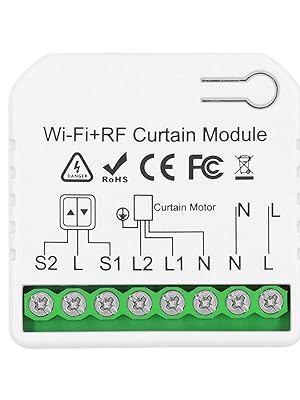
Image: Step-by-step visual guide on how to pair the 433Mhz RF remote control with the receiver module. It shows pressing the learning button on the receiver once, then pressing a button on the remote control.
- Влезете во режим на спарување: Press the learning button on the receiver module 1 пат. Wait for 3 seconds.
- Притиснете го копчето за далечинско управување: Press any button (e.g., "Up" or "Down") on the RF remote control 1 пат. Wait for 3 seconds.
- Потврда: The module will indicate successful pairing (e.g., a beep or light flash).
7.4 Clearing RF Signals
To clear all paired RF remote controls from the module:

Image: Visual guide on how to clear all paired 433Mhz RF remote control signals from the receiver module. It shows pressing the learning button on the receiver 8 times.
- Clear Signals: Press the learning button on the receiver module 8 пати.
- Потврда: The module will indicate that the data has been cleared successfully (e.g., a series of beeps or light flashes). After this, the previously paired transmitters will no longer work.
8. Операција
8.1 APP Control (Tuya Smart / Smart Life)
Once paired, you can control your roller shutter from anywhere using the app.

Image: A smartphone screen showing the Tuya Smart app interface for controlling a roller shutter, with "Open", "Paused", and "Close" options, and a slider for percentagд контрола.
- Отвори/Затвори: Tap the "Open" or "Close" buttons in the app to fully open or close the shutter.
- Пауза: Tap the "Pause" button to stop the shutter at any desired position.
- Персенtagд Контрола: Use the slider in the app to set the shutter to a specific opening percentage (на пр., 50% отворено).
- Функција на тајмер: Set schedules for automatic opening and closing at specific times.
- Создавање сцена: Create smart scenes to automate actions based on conditions (e.g., open at sunrise, close at sunset).
- Контрола на споделување: Share device control with family members through the app.
8.2 RF далечински управувач
Use the provided RF remote control for direct, local control of your roller shutter.

Image: A hand holding the RF remote control, with buttons for up, down, and stop functions. The image also illustrates the 50-meter control distance capability.
- Копче горе: Press to open the roller shutter.
- Долу копче: Press to close the roller shutter.
- Копче за стоп/пауза: Press to stop the roller shutter at its current position.
- The remote control base can be mounted on a wall using the included adhesive or screws for easy access.
8.3 Гласовна контрола (Alexa / Google Home)
Integrate the module with Amazon Alexa or Google Home for hands-free voice control.

Image: An illustration showing Amazon Echo and Google Home devices, with a speech bubble indicating a voice command "Alexa, open the curtains!". This demonstrates the voice control capability of the module.
- Поврзување на сметка: In your Alexa or Google Home app, enable the "Tuya Smart" or "Smart Life" skill/service and link your account.
- Откријте уреди: Побарајте од вашиот гласовен асистент да „Открие уреди“ или рачно да иницира откривање уреди во апликацијата.
- Гласовни команди: Користете команди како што се:
- "Alexa, open [Device Name]"
- "Hey Google, close [Device Name]"
- "Alexa, set [Device Name] to 50%" (for percentagд контрола)
- "Hey Google, stop [Device Name]"
8.4 Рачна контрола со прекинувач
If connected to a traditional manual wall switch, you can continue to operate the roller shutter directly from the wall switch.
- Press the "Up" button on the wall switch to open the shutter.
- Press the "Down" button on the wall switch to close the shutter.
- Press the "Stop" button (if available) or press the opposite direction button briefly to stop the shutter.
9. Одржување
- Чистење: Wipe the module and remote control with a soft, dry cloth. Do not use liquid cleaners or aerosols.
- Замена на батерија: The RF remote control uses a 27A 12V battery. If the remote's range or responsiveness decreases, replace the battery. To replace, carefully open the remote casing, remove the old battery, and insert a new one with correct polarity.
- Ажурирања на фирмверот: Periodically check the Tuya Smart or Smart Life app for available firmware updates for the module. Updates can improve performance and add new features.
10 Смена на проблеми
| Проблем | Можна причина | Решение |
|---|---|---|
| Module not responding to APP. | No Wi-Fi connection, incorrect Wi-Fi password, module not paired, 2.4GHz/5GHz Wi-Fi conflict. |
|
| Module not responding to RF remote. | Remote battery low/dead, remote not paired, out of range. |
|
| Roller shutter does not move or moves incorrectly. | Incorrect wiring, motor issue, module malfunction. |
|
| Гласовната контрола не работи. | Alexa/Google Home account not linked, device not discovered, incorrect commands. |
|
11. Гаранција и поддршка
DieseRC products are manufactured with high-quality standards. For warranty information and technical support, please refer to the seller's policy on the platform where you purchased the product or contact DieseRC customer service directly.
Ве молиме чувајте го вашиот доказ за купување за барањата за гаранција.
For further assistance, you may visit the DieseRC brand store on Amazon: DieseRC Store


