1. Вовед и повеќеview
This manual provides essential instructions for the safe and efficient use of your Maxcom MM135L Basic Mobile Phone. The MM135L is designed for straightforward communication, featuring a user-friendly interface, large keys, and a 1.77-inch screen. It supports 2G networks and includes dual SIM capability, an SOS button for emergencies, and convenient USB-C charging. Please read this manual thoroughly before operating the device.
2. Содржина на пакетот
Проверете дали сите артикли се присутни во пакувањето:
- Maxcom MM135L Mobile Phone
- Battery (Lithium-Ion, 600 mAh)
- USB кабел
- Исфрлач на фиока за SIM
- Упатство за употреба (овој документ)
3. Распоред на уредот
Familiarize yourself with the physical components of your Maxcom MM135L phone.
Слика 3.1: Заден дел view of the Maxcom MM135L phone, showing the blue textured back cover, Maxcom logo, and speaker grille at the top.

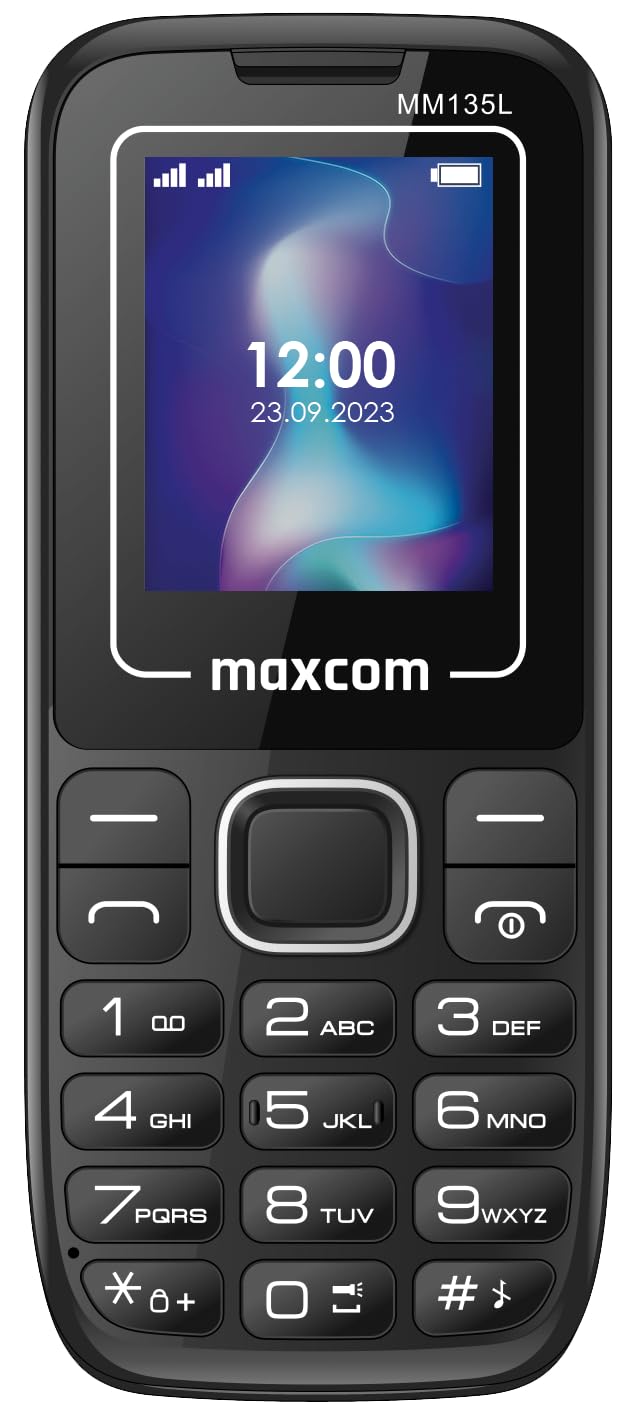
Слика 3.2: Предна страна view of the Maxcom MM135L phone, displaying the screen, large numeric keypad, and call/end buttons.

Figure 3.3: Bottom edge of the phone, featuring the USB-C charging port and a 3.5mm headphone jack.

Figure 3.4: Top edge of the phone, highlighting the integrated flashlight.
Клучни компоненти:
- Екран за прикажување: 1.77-inch LCD for clear text and call information.
- Нумеричка тастатура: Large, tactile buttons for easy dialing and texting.
- Копчиња за повик/завршување: Dedicated buttons for managing calls.
- Копчиња за навигација: За навигација низ менито.
- Копче SOS: Located on the rear for emergency calls (refer to Figure 3.1).
- Фенерче: Integrated at the top of the device (refer to Figure 3.4).
- USB-C порта: For charging the device (refer to Figure 3.3).
- Jackек за слушалки: 3.5mm port for audio accessories (refer to Figure 3.3).
4. Поставување
4.1 Инсталација на батерија
- Внимателно отстранете го задниот капак на телефонот.
- Порамнете ги контактите на батеријата со терминалите во преградата за батеријата.
- Gently press the battery into place.
- Вратете го задниот капак, осигурувајќи се дека безбедно кликнува.
4.2 Инсталација на SIM картичка
The Maxcom MM135L supports dual SIM cards.
- With the phone powered off and the back cover removed, locate the SIM card slots.
- Insert your SIM card(s) into the designated slot(s) with the gold contacts facing down, following the orientation indicated on the phone.
- Ensure the SIM card(s) are fully seated.
- Replace the back cover and battery.
4.3 Полнење на телефонот
The phone uses a USB-C port for charging.
- Connect the USB-C cable to the charging port at the bottom of the phone (refer to Figure 3.3).
- Поврзете го другиот крај од USB кабелот со компатибилен USB адаптер за напојување или USB порт на компјутер.
- Индикаторот за батерија на екранот ќе го покаже статусот на полнење.
- Исклучете го полначот откако батеријата е целосно наполнета.
Забелешка: For optimal battery life, fully charge the phone before first use.
5. Упатства за работа
5.1 Вклучување/исклучување
- За вклучување: Притиснете и задржете го Call/Power копче додека не светне екранот.
- За исклучување: Притиснете и задржете го Крај/моќ button until the power off options appear, then confirm.
5.2 Остварување и примање повици
- За да остварите повик: Внесете го телефонскиот број користејќи ја тастатурата и притиснете го копчето Јавете се копче.
- За да одговорите на повик: Притиснете го Јавете се копче кога телефонот ѕвони.
- За да завршите повик: Притиснете го Крај копче.
5.3 Испраќање и примање пораки
- Одете во менито „Пораки“ користејќи ги навигациските копчиња.
- Select "Create New Message" to compose an SMS.
- Внесете го бројот на примателот и вашата порака, а потоа испратете.
- Примените пораки ќе се појават во „Влезното сандаче“.
5.4 Using the SOS Button
The SOS button is located on the rear of the phone. It is designed for emergency situations.
- Активирање: Press and hold the SOS button for several seconds.
- The phone will automatically sound an alarm and send emergency SMS messages to pre-set contacts.
- It will then automatically call the saved emergency contacts in a loop until a call is answered.
- Ensure emergency contacts are properly configured in the phone settings.
5.5 Функција на фенерче
The built-in flashlight can be activated for convenience.
- Refer to the phone's specific settings or a dedicated side button for flashlight activation. Typically, a long press on a designated key or a side switch controls it.
6. Одржување
- Чистење: Користете мека, сува крпа за чистење на површината на телефонот. Избегнувајте течни средства за чистење.
- Нега на батеријата: Do not expose the battery to extreme temperatures. Avoid fully discharging the battery frequently.
- Складирање: Чувајте го телефонот на ладно и суво место кога не го користите подолг временски период.
- Отпорност на вода: Овој телефон не е водоотпорен. Избегнувајте изложување на течности.
7 Смена на проблеми
| Проблем | Можно решение |
|---|---|
| Телефонот не се вклучува. | Проверете дали батеријата е правилно инсталирана и наполнета. Поврзете го полначот и обидете се повторно. |
| Не може да се остваруваат или примаат повици. | Check if the SIM card is properly inserted and activated. Verify network signal strength. Contact your service provider if issues persist. |
| Батеријата не се полни. | Ensure the USB-C cable and charger are securely connected and functional. Try a different charging cable or adapter. |
| SOS копчето не работи. | Verify that emergency contacts are saved in the phone's settings. Ensure the phone has network coverage. |
| Лош квалитет на повик. | Move to an area with better network reception. Check the speaker and microphone for obstructions. |
8. Спецификации
| Карактеристика | Детал |
|---|---|
| Име на моделот | MM135L |
| Големина на екранот | 1.77 инчи |
| Тип на дисплеј | LCD екран |
| Резолуција | 128 x 160 |
| Мобилна технологија | 2G |
| Поддршка за SIM | Двојна СИМ-картичка |
| Тип на батерија | Литиум-јон |
| Капацитет на батеријата | 600 mAh |
| Порта за полнење | USB-C |
| Димензии (Д x Ш x В) | 7 x 14 x 3.5 cm |
| Тежина | 60 гр |
| Посебни карактеристики | SOS Button, Flashlight, Expandable Memory, Fast Charging Support |
9. Гаранција и поддршка
For warranty information, technical support, or service inquiries, please refer to the warranty card included with your product or contact Maxcom customer service directly. Keep your proof of purchase for warranty claims.


