1. Вовед
This manual provides detailed instructions for the installation, configuration, and operation of your SODOLA 24 Port 2.5G Smart Web Managed Switch. This device is designed to enhance network performance with its multi-gigabit capabilities, offering 24x 2.5G Base-T ports and 2x 10G SFP+ ports for high-speed data transfer and flexible network expansion. Please read this manual thoroughly before using the product to ensure proper setup and functionality.
2. Информации за безбедност
- Осигурајте се дека уредот е инсталиран во добро проветрена просторија за да спречите прегревање.
- Користете го само дадениот адаптер за напојување.
- Do not expose the switch to water or excessive humidity.
- Избегнувајте да ставате тешки предмети на прекинувачот.
- Само за внатрешна употреба.
3. Содржина на пакетот
Проверете дали сите артикли се присутни во вашиот пакет:
- 1 x SODOLA 24 Port 2.5G Smart Web Управуван прекинувач
- 1 x Упатство за употреба
- 1 x кабел за напојување
4. Производот завршиview
The SODOLA 24 Port 2.5G Smart Web Managed Switch is designed for robust network environments, offering a combination of high-speed Ethernet and SFP+ ports.

Слика 4.1: Севкупно view of the SODOLA 24 Port 2.5G Smart Web Управуван прекинувач.
4.1 Преден панел
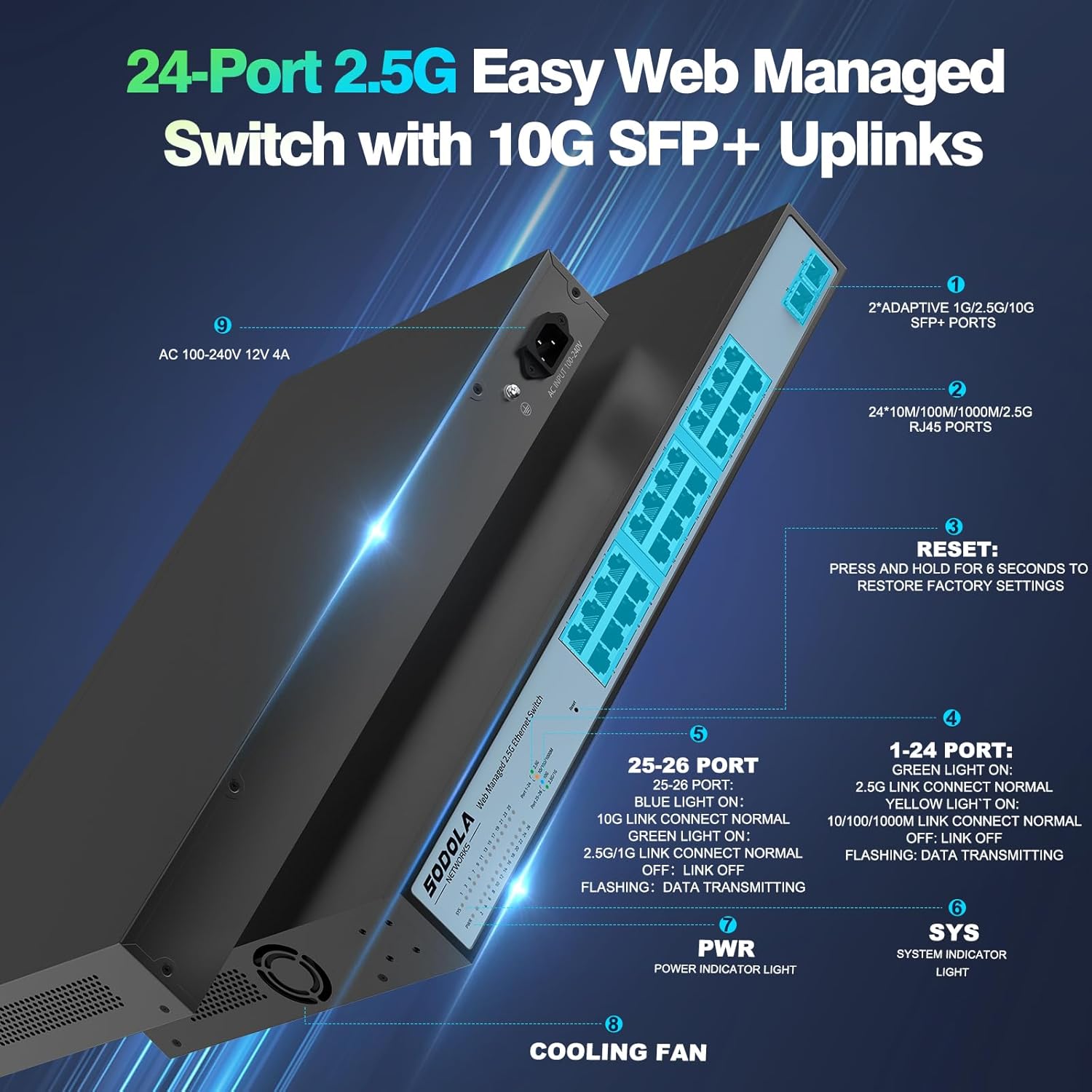
Слика 4.2: Детално view of the switch's front and rear panels, highlighting ports and indicators.
- 24 x 100/1000/2500M RJ45 Ports: These ports support 2.5 Gigabit Ethernet connectivity. Each port has Link/Act LEDs: Green for 2.5G Link/Act, Yellow for 10/100/1000M Link/Act, and flashing for data transmission.
- 2 x 10G SFP+ Ports: These ports provide high-speed 10 Gigabit fiber connectivity for uplinks or connecting to high-bandwidth devices.
- Копче за ресетирање: Притиснете и задржете 6 секунди за да ги вратите фабричките поставки.
- PWR LED: Показно светло за напојување.
- SYS LED: System indicator light.
4.2 Заден панел
- AC 100-240V Power Input: Connect the provided power cord here.
- Вентилатор за ладење: The switch features a bilateral cooling design without a built-in fan for silent operation.
5. Упатства за поставување
5.1 Физичка инсталација
- Монтирање: The switch supports 1U rack mounting. Ensure adequate space for ventilation. It can also be placed on a desktop.
- Поврзете ги уредите: Connect your network devices (computers, servers, NAS, WiFi 6 APs) to the RJ45 ports using Cat5e, Cat6, or Cat6a Ethernet cables.
- Поврзување на Uplink: Use the 10G SFP+ ports for high-speed connections to your router or other core network devices.
- Вклучување: Connect the power cord to the switch and then to a power outlet. The PWR LED should illuminate.
5.2 Почетна Web Управување пристап
За пристап до web интерфејс за управување:
- Конфигурација на IP адреса: Before logging in, ensure your computer's IP address is set within the same IPv4 subnet as the switch's default IP address (e.g., if the switch is 192.168.2.1, set your computer to 192.168.2.X, where X is not 1).
- Отвори Web Прелистувач: Користете компатибилен web browser (e.g., IE 9.0+, Chrome 23.0+, Firefox 20.0+).
- Внесете IP адреса: Type the default IP address of the switch (192.168.2.1) into the browser's address bar and press Enter.
- Најавете се: Внесете ги стандардните ингеренции:
Корисничко име: админ
Лозинка: админ
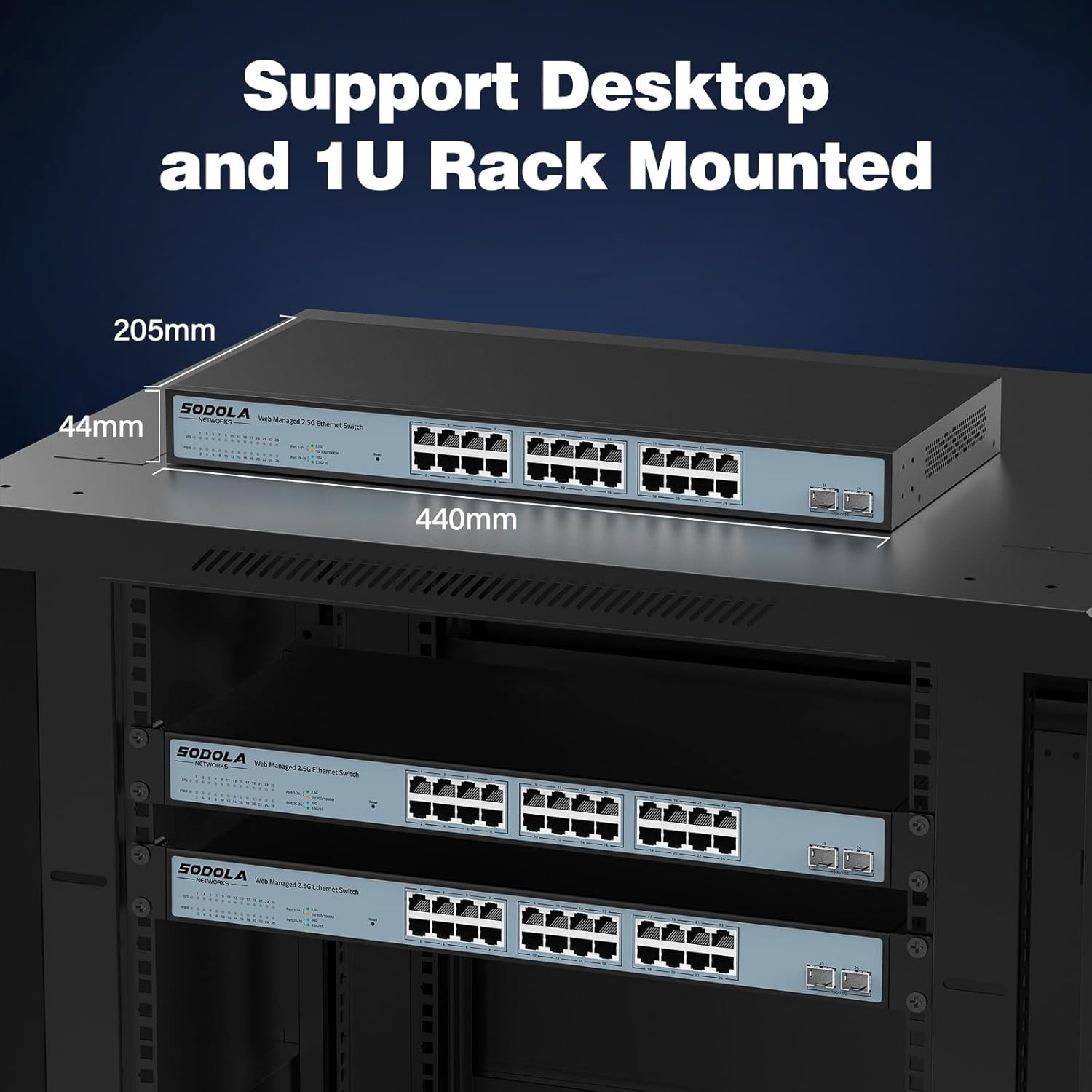
Figure 5.1: Screenshot of the web management interface login page.
6. Operating Instructions (Web Управување)
На web management interface allows for configuration, monitoring, and troubleshooting without requiring command-line interface (CLI) expertise. Key features include:

Figure 6.1: Visual representation of the switch's basic management features.
- Агрегација на линкови (LACP): Комбинирајте повеќе физички врски во една логичка врска за зголемен пропусен опсег и редундантност.
- VLAN (Виртуелна локална мрежа): Segment your network into smaller, isolated broadcast domains for improved security and performance.
- QoS (Квалитет на услуга): Дајте приоритет на мрежниот сообраќај за да се осигурате дека критичните апликации добиваат доволен пропусен опсег.
- Повеќекратно емитување: Efficiently deliver data to multiple recipients simultaneously.
- MAC Address Management: Control access to the network based on MAC addresses.
- RSTP (Rapid Spanning Tree Protocol): Спречете мрежни јамки и обезбедете стабилност на мрежата.
- Џамбо рамки: Support larger Ethernet frames for increased data throughput.
- Откривање јамка: Identify and mitigate network loops.
- ERPS (Ethernet Ring Protection Switching): Provide fast protection and recovery switching in Ethernet ring topologies.
6.1 Зачувување на конфигурацијата
After making any changes in the web интерфејс, одете до Tools > Save to ensure your settings are permanently stored and not lost upon power cycling the device.
7. Одржување
- Чистење: Use a dry, soft cloth to clean the exterior of the switch. Do not use liquid or aerosol cleaners.
- Вентилација: Ensure the ventilation openings on the sides of the switch are not obstructed. The fanless design relies on natural convection for cooling.
- Ажурирања на фирмверот: Периодично проверувајте ги упатствата на производителот webстраница за сите достапни ажурирања на фирмверот за да се обезбедат оптимални перформанси и безбедност.
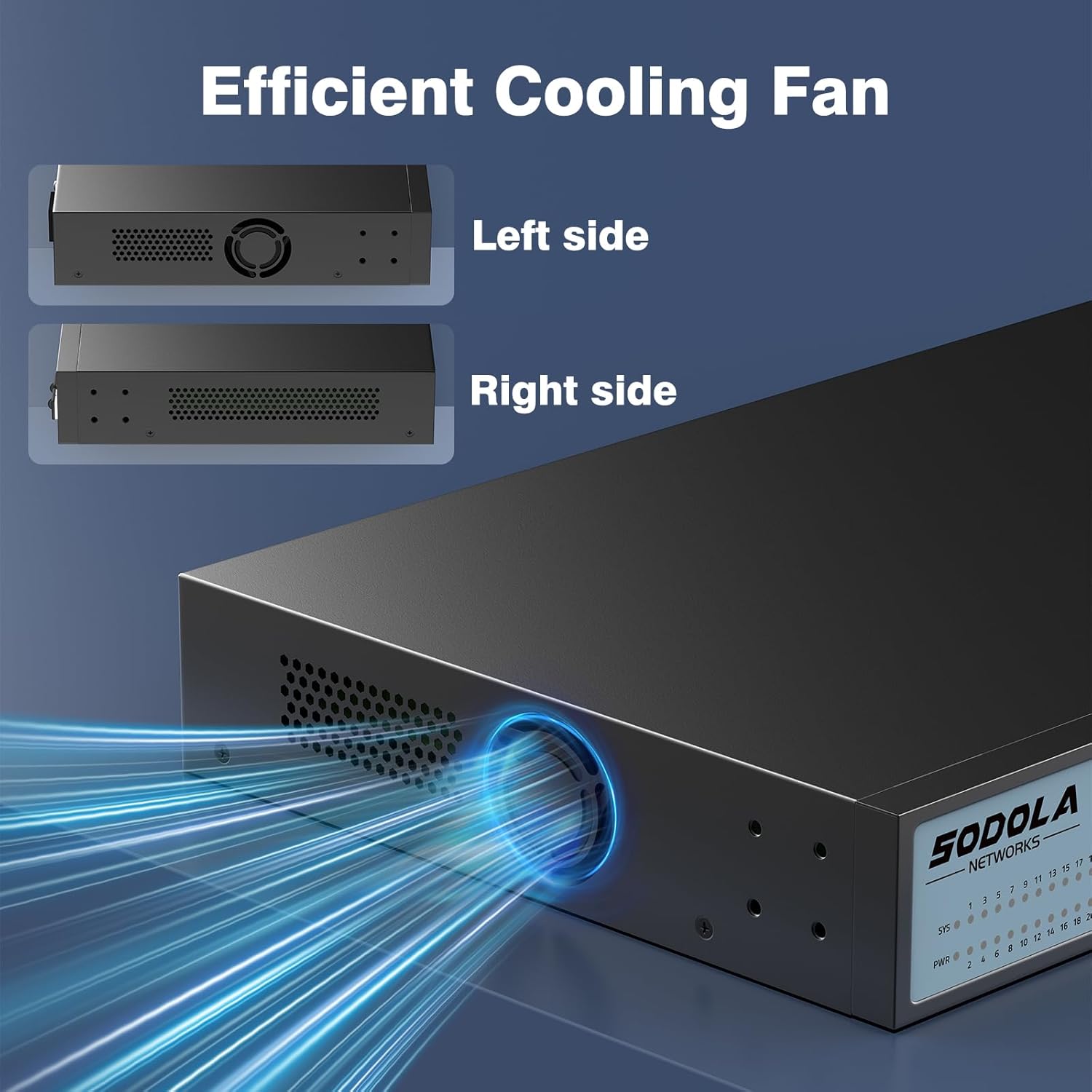
Figure 7.1: Illustration of the switch's efficient fanless cooling design.
8 Смена на проблеми
8.1 Заеднички прашања и решенија
- Без моќност: Check if the power cord is securely connected to both the switch and the power outlet. Verify the power outlet is functional.
- Нема врска/активност на портата: Ensure the Ethernet cable is properly connected to both the switch port and the connected device. Verify the connected device is powered on and functioning correctly. Try a different cable or port.
- Бавна брзина на мрежата: Ensure all connected devices and cables support 2.5G or 10G speeds for optimal performance. Check for network congestion or duplex mismatches in the web интерфејс.
- Не може да се пристапи Web Интерфејс:
- Verify your computer's IP address is in the same subnet as the switch's IP.
- Confirm the switch's IP address (default is 192.168.2.1).
- Обезбедете го web browser is compatible.
- If the management interface becomes unresponsive, a power cycle may resolve the issue.
- Network Instability: Ensure Spanning Tree Protocol (STP) or Rapid Spanning Tree Protocol (RSTP) is enabled to prevent network loops, especially in complex network topologies.
- Configuration Loss: Always remember to save your configuration changes via Tools > Save во web интерфејс.
8.2 Фабричко ресетирање
If you encounter persistent issues or forget your login credentials, you can restore the switch to its factory default settings by pressing and holding the Ресетирање копче за 6 секунди.
9. Спецификации
| Бренд | Sodola |
| Број на модел | 24X2.5G+2X10G SFP+(Managed) |
| Број на пристаништа | 26 (24x 2.5G RJ45, 2x 10G SFP+) |
| Тип на интерфејс | RJ45, SFP+ |
| Стапка на пренос на податоци | 2500 Megabytes Per Second (2.5Gbps per RJ45 port) |
| Капацитет на префрлување | 160 Gbps |
| Стапка на препраќање пакети | 119.04 Mpps |
| Големина на табелата на MAC адреса | 16 илјади |
| Package Cache | 12 Mbit |
| Материјал на случајот | Метал |
| Боја | Црното |
| Димензии на производот | 17.32 x 8.07 x 1.73 инчи |
| Тежина на ставката | 5.89 фунти |
| Компатибилни уреди | Laptop, Server |
10. Гаранција и поддршка
SODOLA provides a replacement for any quality issue within one year of purchase. For technical support or warranty claims, please refer to your purchase documentation or the retailer where the product was acquired. Please note that official SODOLA website, phone number, or email for direct support may not be readily available.


