1. Производот завршиview
This manual provides essential information for the operation and maintenance of your GHUST MR23GA Replacement Magic Voice Remote Control. This remote is designed as a replacement for various LG Smart TV models, offering convenient control without complex setup.

Image 1.1: The GHUST MR23GA Replacement Magic Voice Remote Control.
Клучни карактеристики:
- Директна замена: Functions as a direct replacement for original LG Magic Remote models.
- Не е потребно програмирање: Ready to use out of the box after battery insertion.
- Издржлива конструкција: Made of high-quality ABS material for enhanced durability.
- Компактен дизајн: Small and ergonomic for comfortable grip.
- Voice Search Capability: Supports voice commands for easier navigation (functionality may vary based on TV model and original remote features).
- Наменски копчиња за кратенки: Брз пристап до популарни услуги за стриминг како Netflix и Prime Video.
2. Поставување и инсталација
The MR23GA remote control is designed for immediate use with compatible LG Smart TVs. No complex programming or pairing procedures are required.
2.1. Инсталација на батерија
- Лоцирајте го капакот на преградата за батерии на задниот дел од далечинскиот управувач.
- Лизнете го капакот надолу или притиснете го резето за да го отворите преградата.
- Insert two (2) AAA batteries (not included) into the compartment, ensuring the positive (+) and negative (-) terminals align correctly with the indicators inside.
- Затворете го капакот на преградата за батерии со лизгање назад на своето место додека не кликне безбедно.

Image 2.1: The remote control is designed for ease of use with no setup or programming required after battery installation.
Once batteries are installed, the remote is ready to operate your compatible LG Smart TV.
3. Упатства за работа
This section details the basic functions and operation of your MR23GA remote control.
3.1. Основни функции
- Копче за вклучување (●): Притиснете за да го вклучите или исклучите телевизорот.
- Копчиња со броеви (0-9): Користете го за директно внесување на броеви на канали.
- Јачина на звук нагоре/надолу (+/-): Прилагодете го нивото на јачина на звук на телевизорот.
- Channel Up/Down (▲/▼): Менувајте ТВ канали.
- Копче за исклучување на звук (🔇): Исклучете го или вклучете го звукот на телевизорот.
- Навигациска подлога (горе, долу, лево, десно, во ред): Навигирајте низ менијата и изберете опции.
- Копче за назад (↶): Вратете се на претходниот екран или мени.
- Home Button (🏠): Access the TV's Smart Home dashboard.

Image 3.1: The compact size and ergonomic design make the remote easy to hold and operate.
3.2. Гласовна контрола
Притиснете и задржете го Копче за микрофон to activate voice control. Speak clearly into the remote to issue commands or search for content. Release the button when finished speaking. Note that voice control functionality may depend on your specific LG TV model and its original features.
3.3. Dedicated Shortcut Buttons
Далечинскиот управувач има наменски копчиња за брз пристап до популарни апликации за стриминг:
- Копче Netflix: Директно стартувајте ја апликацијата Netflix.
- Копче за прво видео: Директно стартувајте ја апликацијата Amazon Prime Video.
- Копче за Disney+: Directly launch the Disney+ application.
- LG Channels Button: Directly launch the LG Channels application.
- Sling Button: Directly launch the Sling TV application.
- Копче Алекса: Activate Alexa voice assistant (functionality depends on TV model).

Image 3.2: Dedicated shortcut buttons provide quick access to your favorite applications.
3.4. Компатибилност
This replacement remote control is compatible with a wide range of LG Smart TV models, including but not limited to:
- LG OLED Series: OLED42C3AUA, OLED42C3PUA, OLED48C3PUA, OLED55C3PUA, OLED65C3AUA, OLED77C3PUA, OLED83C3PUA, OLED55G3PUA, OLED65G3PUA, OLED77G3PUA, OLED83G3PUA, OLED55B3PUA, OLED65B3PUA, OLED77B3PUA
- LG QNED Series: 43QNED75URA, 50QNED75URA, 55QNED75URA, 65QNED75URA, 75QNED75URA, 50QNED80URA, 55QNED80URA, 65QNED80URA, 75QNED80URA, 86QNED80URA
- LG UR9000 Series: 43UR9000PUA, 50UR9000PUA, 55UR9000PUA, 65UR9000PUA, 75UR9000PUA
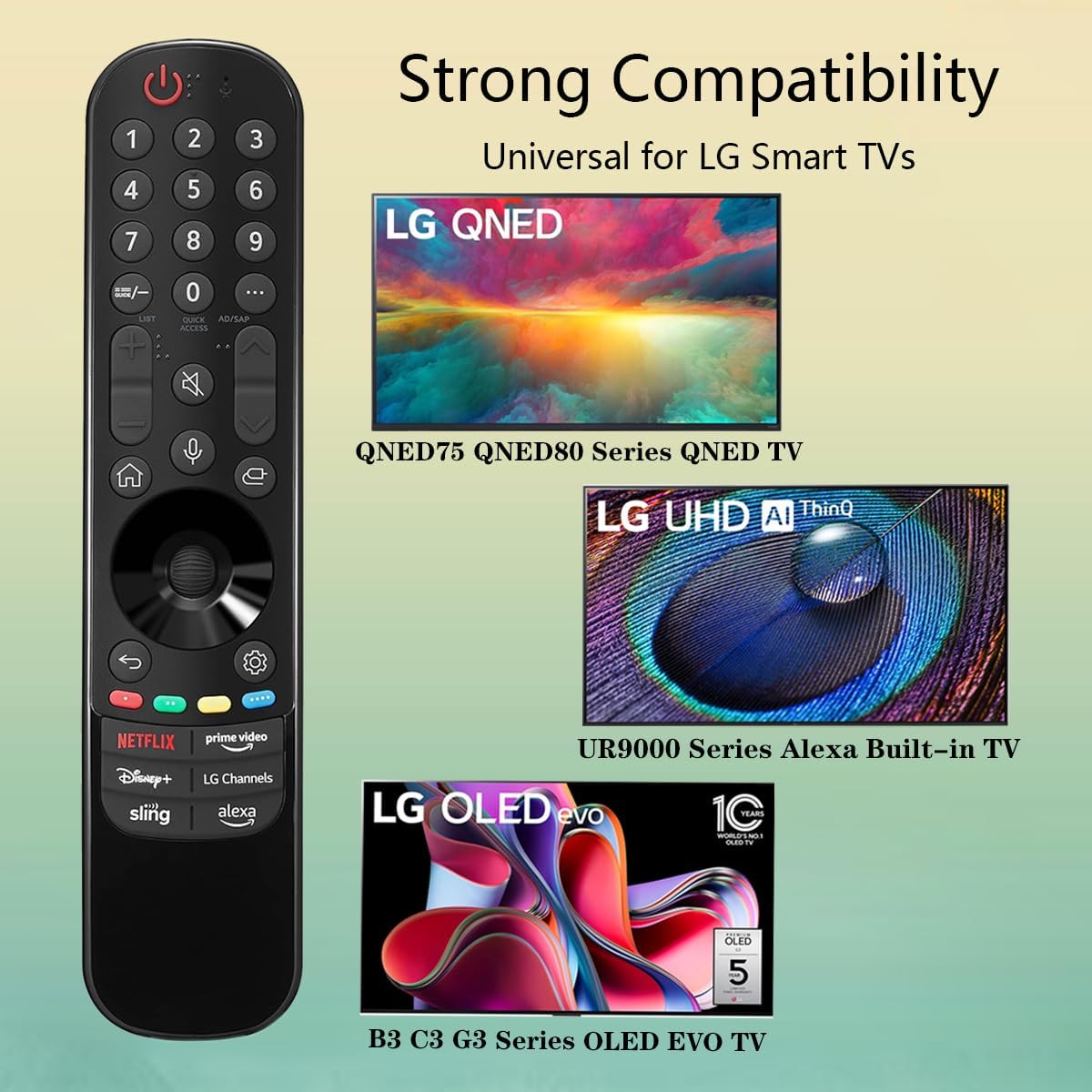
Image 3.3: The remote offers strong compatibility with various LG Smart TV series.
4. Одржување
Proper care and maintenance will extend the lifespan of your remote control.
4.1. Чистење
- Користете мека, сува крпа за да ја избришете површината на далечинскиот управувач.
- За тврдокорна нечистотија, малку дampИзмијте ја крпата со вода или со благ, неабразивен чистач. Не прскајте средство за чистење директно врз далечинскиот управувач.
- Избегнувајте употреба на груби хемикалии, растворувачи или абразивни средства за чистење, бидејќи тие можат да ја оштетат завршната обработка на далечинскиот управувач или внатрешните компоненти.
4.2. Нега на батерии
- Replace batteries when the remote's responsiveness decreases or it stops functioning.
- Секогаш заменувајте ги обете батерии истовремено со нови од ист тип (AAA).
- Доколку далечинскиот управувач нема да се користи подолг период (на пр., еден месец или повеќе), извадете ги батериите за да спречите протекување и потенцијално оштетување на далечинскиот управувач.
- Фрлете ги искористените батерии според локалните прописи.
5 Смена на проблеми
Доколку наидете на проблеми со вашиот далечински управувач, погледнете ги следните вообичаени проблеми и решенија:
| Проблем | Можна причина | Решение |
|---|---|---|
| Далечинскиот управувач не реагира. | Мртви или неправилно вметнати батерии. | Заменете ги батериите со нови AAA батерии, внимавајќи на правилниот поларитет (+/-). |
| Далечинскиот управувач работи повремено. | Low battery power; obstruction between remote and TV; infrared sensor blocked on TV. | Replace batteries. Ensure a clear line of sight to the TV's infrared sensor. Remove any obstructions. |
| Voice control or pointer not working. | This replacement remote may not support all advanced features of the original LG Magic Remote, or your TV model does not fully support these features with a replacement remote. | Verify your TV model's compatibility with replacement remotes for advanced features. Basic functions should still operate. |
| Dedicated app buttons (e.g., Alexa, LG Channels) not working. | Functionality depends on TV model and specific app integration. | Some app buttons may not be universally compatible or require specific TV software versions. Verify if other buttons work. |
Ако проблемот продолжи откако ќе ги испробате овие решенија, контактирајте ја корисничката поддршка.
6. Спецификации
- Број на модел: MR23GA
- Бренд: ДУХ
- Димензии на производот: 7.3 x 1.6 x 1.2 инчи
- Тежина на ставката: 2.29 унци
- Извор на енергија: 2 x AAA батерии (не се вклучени)
- Боја: Црното
- Материјал: Висококвалитетен ABS
- Компатибилни уреди: LG Smart Televisions (specific models listed in Section 3.4)
- Специјална карактеристика: Voice Search (functionality may vary)
7. Гаранција и поддршка
GHUST is committed to providing high-quality products and excellent customer service.
7.1. Служба по продажбата
If you have any questions regarding the quality or functionality of your GHUST MR23GA remote control, please do not hesitate to contact our customer support team. We are dedicated to resolving any issues promptly and ensuring your satisfaction.
For support, please refer to the contact information provided with your purchase or on the official GHUST product page.