1. Вовед
The XIAOMI Redmi Note 13 Pro 5G is a feature-rich smartphone designed for global use, offering advanced camera capabilities, a vibrant display, and robust performance. This manual provides essential information to help you set up, operate, and maintain your device effectively.
Key features include a flagship-level 200MP OIS anti-shake main camera, a 1.5K 120Hz AMOLED display, and support for 5G and 4G LTE global bands. The device is powered by the Snapdragon 7s Gen 2 Mobile Platform, ensuring smooth and efficient operation for various tasks.

Figure 1: Xiaomi Redmi Note 13 Pro 5G in various color options, showcasing its front display.
2. Што има во кутијата
Upon unboxing your XIAOMI Redmi Note 13 Pro 5G, you should find the following items:
- XIAOMI Redmi Note 13 Pro 5G паметен телефон
- Брз полнач за автомобили
- Исфрлач на фиока за SIM
- USB кабел
- Ѕиден адаптер
3. Физичко преоптоварувањеview
The Redmi Note 13 Pro 5G features a sleek design with a comfortable grip. Its dimensions are approximately 3.58 x 7.32 x 2.36 inches, and it weighs about 1.19 pounds (0.54 kilograms).
3.1 Екран
The device is equipped with a 6.67-inch AMOLED display, offering a refresh rate of up to 120Hz and a peak brightness of 1800 nits. The resolution is 2712x1220 pixels (446PPI), providing sharp and vibrant visuals. It features 12-bit color depth, a 5,000,000:1 contrast ratio, and 100% DCI-P3 color gamut. The screen is protected by Corning Gorilla Glass Victus and supports Dolby Vision.
3.2 Модул за камера
The rear camera system includes a triple camera setup:
- Главна камера од 200MP: Features OIS (Optical Image Stabilization), f/1.65 aperture, 1/1.4” sensor size, and 7P lens for high-resolution photos and improved low-light performance.
- 8MP ултраширока камера: With f/2.2 aperture for capturing broader scenes.
- 2MP макро камера: With f/2.4 aperture for detailed close-up shots.
The front camera is designed for selfies and video calls.
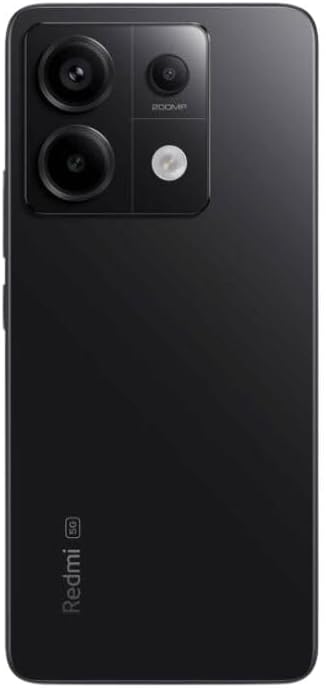
Слика 2: Заден дел view of the Xiaomi Redmi Note 13 Pro 5G, showing the 200MP triple camera setup.
3.3 Ports and Sensors
The device includes a USB-C port for charging and data transfer, and a 3.5mm headphone jack. Integrated sensors include an in-screen fingerprint sensor, AI Face Unlock, ambient light sensor, accelerometer, electronic compass, IR blaster, and gyroscope.
4. Поставување
4.1 Инсталација на SIM картичка
- Пронајдете го држачот за SIM-картичка од страната на вашиот уред.
- Вметнете ја алатката за исфрлање на фиоката на SIM-картичката во малата дупка до фиоката и цврсто притиснете додека фиоката не испадне.
- Place your nano-SIM card(s) into the designated slots on the tray. Ensure the gold contacts are facing down. The device supports Dual SIM (nano SIM + nano SIM or nano SIM + eSIM).
- Внимателно вратете го држачот за SIM картичка во телефонот додека не кликне на своето место.
4.2 Почетно вклучување и волшебник за поставување
- Притиснете и држете го копчето за вклучување (обично од десната страна) додека не се појави логото на Xiaomi.
- Follow the on-screen instructions to select your language, region, and agree to the terms and conditions.
- Поврзете се на Wi-Fi мрежа за да го завршите процесот на поставување и да ги преземете потребните ажурирања.
- Sign in with your Google account and/or Xiaomi account to access services and restore backups.
- Set up your preferred security methods, such as PIN, pattern, password, fingerprint, or AI Face Unlock.
5. Ракување со уредот
5.1 Навигација на екранот
Navigate your device using intuitive touch gestures. Swipe, tap, pinch, and zoom to interact with apps and content. The 120Hz refresh rate ensures a smooth and fluid user experience. Unlock your device quickly and securely using the in-screen fingerprint sensor or AI Face Unlock.
5.2 Употреба на камерата
Open the Camera app to capture photos and videos. Utilize the 200MP main camera for highly detailed images, the ultra-wide lens for expansive landscapes, and the macro lens for close-up photography. The camera supports 4K video recording at 30fps, 1080p at 30/60fps, and 720p at 30fps. Slow motion video is available at 1080p (120fps) and 720p (120/240fps).
5.3 Перформанси
The Redmi Note 13 Pro 5G is powered by the Snapdragon 7s Gen 2 Mobile Platform, built on 4nm process technology with an octa-core CPU up to 2.4GHz and Adreno GPU. This configuration, combined with 8GB of RAM and 256GB of internal storage, provides strong performance for multitasking, gaming, and demanding applications.
5.4 Аудио
Enjoy immersive audio with dual speakers and Dolby Atmos support. The device also retains a 3.5mm headphone jack for wired audio connections.
6. Одржување
6.1 Ажурирања на софтверот
Редовно проверувајте и инсталирајте ажурирања на софтверот за да се осигурате дека вашиот уред ги има најновите функции, безбедносни закрпи и подобрувања на перформансите. Одете на Поставки > За телефонот > Верзија на MIUI за да проверите дали има ажурирања.
6.2 Грижа за батерии
The 5000 mAh battery provides extended usage. To prolong battery life, avoid extreme temperatures, use the provided 67W fast charger, and manage background app usage. Avoid fully discharging the battery frequently.
6.3 Чистење
Use a soft, lint-free cloth to clean your device. Avoid harsh chemicals or abrasive materials that could damage the screen or finish. Do not expose the device to excessive moisture.
6.4 Управување со складирање
Со 256 GB внатрешна меморија, имате ample space for apps and media. Regularly review вашиот files and uninstall unused applications to optimize performance and free up space.
7 Смена на проблеми
Доколку наидете на проблеми со вашиот уред, обидете се со следниве основни чекори за решавање проблеми:
- Уредот не реагира: Притиснете го и држете го копчето за вклучување околу 10-15 секунди за да го рестартирате.
- Проблеми со мрежната поврзаност: Check if your SIM card is properly inserted. Toggle Airplane Mode on and off. Restart your device. Verify Wi-Fi settings and router connection.
- Паѓање/замрзнување на апликацијата: Close the app and reopen it. Clear the app's cache and data (Settings > Apps > Manage apps > [App Name] > Clear data). Update the app to its latest version.
- Испуштање на батеријата: Check battery usage in Settings to identify power-hungry apps. Reduce screen brightness, disable unnecessary features like GPS or Bluetooth when not in use.
- Бавни перформанси: Clear cache, uninstall unused apps, and ensure sufficient free storage space.
- Ресетирање на фабриката: Како последно средство, ако проблемите продолжат, можете да извршите ресетирање на фабричките поставки. Предупредување: Ова ќе ги избрише сите податоци на вашиот уред. Направете резервна копија на важните податоци пред да продолжите. Одете на Поставки > За телефонот > Фабрички ресетирање.
8. Спецификации
| Карактеристика | Спецификација |
|---|---|
| Име на моделот | Redmi Note 13 Pro 5G |
| Број на модел на ставка | 2312DRA50G |
| Бренд | XIAOMI |
| Оперативен систем | Андроид 13.0 |
| Модел на процесорот | Snapdragon 7s Gen 2 Mobile Platform |
| Брзина на процесорот | До 2.4 GHz |
| Големина на инсталирана RAM меморија | 8 GB |
| Капацитет за складирање на меморија | 256 GB |
| Големина на приказ на стоечки екран | 6.67 инчи AMOLED |
| Резолуција | 2712x1220 (446PPI) |
| Стапка на освежување | До 120 Hz |
| Врвна осветленост | 1800 нити |
| Главна камера | 200MP оптичка стабилизација |
| Ултраширока камера | 8 MP |
| Макро камера | 2 MP |
| Оценка за моќност на батеријата | 5000 милиониamp Часови |
| Полнење | Брзо полнење од 67 W |
| Аудио Џек | 3.5 мм |
| Безжичен носач | Unlocked (USA Market: T-Mobile, Mint, Tello or any under T-Mobile network) |
| Димензии на производот | 3.58 x 7.32 x 2.36 инчи |
| Тежина на ставката | 1.19 фунти (0.54 килограми) |
9. Гаранција и поддршка
Your XIAOMI Redmi Note 13 Pro 5G is covered by a manufacturer's warranty. For detailed information regarding warranty terms, conditions, and duration, please refer to the warranty card included in your product packaging or visit the official XIAOMI support webсајт.
For technical support, service requests, or further assistance, please visit the official XIAOMI webстраницата или контактирајте ја нивната служба за корисници. Чувајте го доказот за купување при рака за какви било рекламации за гаранција.


